
1. Introduction and Overview
The ULANZI Go Quick II is a versatile accessory designed for action cameras, functioning as both an extendable selfie stick and a stable tripod. It features a quick-release system for efficient camera attachment and offers multiple height adjustments for various shooting requirements. Constructed from durable ABS and aluminum, this device is lightweight and suitable for a range of outdoor activities.

Image 1.1: The ULANZI Go Quick II tripod shown in its extended selfie stick mode, compact mode, and tripod mode with an action camera attached. A close-up inset illustrates the quick release mechanism.
2. Product Features
- Go Quick II System: Features a magnetic quick-release mount for fast and secure attachment of action cameras, complemented by a secondary reinforced locking pin.
- Extendable Design: Offers 7 height adjustments, extending from 11.53 inches (29.3 cm) to 57 inches (147 cm) for diverse shooting perspectives.
- Integrated Tripod: The handle transforms into three stable tripod legs, providing strong support for stationary shots, even on uneven surfaces.
- Durable Construction: Made from ABS and aluminum, ensuring a lightweight yet robust structure.
- Wide Compatibility: Includes an action camera quick release adapter, suitable for various action camera models.
- Invisible Selfie Stick Function: Designed to remain out of frame when used with compatible action cameras, ensuring a clean shot.

Image 2.1: Overview of the ULANZI Go-Quick II Series magnetic suction quick release mounts, highlighting the system's components.
3. Setup Instructions
3.1 Attaching Your Action Camera
- Locate the Go Quick II adapter on the top of the selfie stick/tripod.
- Align your action camera's mounting bracket with the adapter.
- Press the camera firmly onto the magnetic mount until it clicks into place.
- Ensure the secondary reinforced locking pin is engaged for added security.

Image 3.1: Detailed view of the quick release mechanism, showing how to attach an action camera securely.
3.2 Deploying the Tripod Legs
- Hold the handle of the device.
- Rotate the red knob at the base of the handle counter-clockwise to unlock the tripod legs.
- Gently pull the legs outwards until they are fully extended and stable.
- Rotate the red knob clockwise to lock the tripod legs in position.
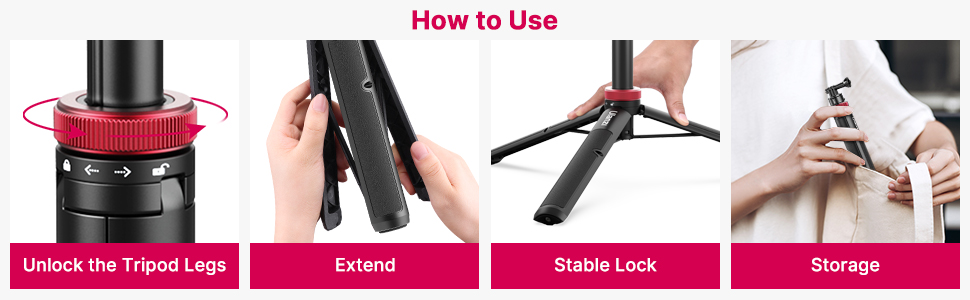
Image 3.2: Step-by-step guide on how to unlock, extend, lock, and store the tripod legs for stable support.
3.3 Extending the Selfie Stick
- Ensure the tripod legs are either folded or locked in tripod mode.
- Grasp the top section of the stick and pull upwards to extend the telescopic segments.
- Adjust to your desired height. The stick will lock into place at each of the 7 stages.
4. Operating Instructions
4.1 Switching Between Modes
The ULANZI Go Quick II seamlessly transitions between selfie stick and tripod modes:
- Selfie Stick Mode: Keep the tripod legs folded and locked into the handle. Extend the telescopic pole to your desired length.
- Tripod Mode: Deploy and lock the tripod legs as described in Section 3.2. Adjust the telescopic pole to your preferred height for stable ground placement.

Image 4.1: Demonstrates the ULANZI Go Quick II being used as both an extended selfie stick and a stable tripod.
4.2 Adjusting Height
The device offers 7 distinct height adjustments. To change the height, simply pull or push the telescopic sections. Each section will click into place, indicating a secure height setting. The maximum extension is 57 inches (147 cm).

Image 4.2: Visual representation of the 7 different height adjustments available, ranging from 12.2 inches to 57.87 inches.
4.3 Invisible Selfie Stick Function
When used with certain action cameras that feature 360-degree stitching capabilities, the slim design of the ULANZI Go Quick II allows it to be digitally removed from the final video footage, creating an illusion of a floating camera. For optimal results, ensure your camera's settings are configured for this feature.

Image 4.3: Illustrates the 'invisible' effect of the selfie stick when used with compatible action cameras and software.
5. Maintenance
To ensure the longevity and optimal performance of your ULANZI Go Quick II, follow these maintenance guidelines:
- Cleaning: Wipe the device with a soft, damp cloth to remove dust and dirt. Avoid using harsh chemicals or abrasive materials.
- Drying: If the device gets wet, dry it thoroughly before storage to prevent corrosion, especially on metal parts.
- Storage: Store the tripod in a cool, dry place, away from direct sunlight and extreme temperatures. Ensure it is fully collapsed before storing.
- Joints and Mechanisms: Periodically check all moving parts, such as the telescopic sections and tripod leg hinges, for smooth operation. Do not force any mechanisms.
6. Troubleshooting
- Camera Not Attaching Securely: Ensure the quick release adapter is clean and free of debris. Verify that the camera's mounting bracket is correctly aligned and fully engaged with the magnetic mount and locking pin.
- Tripod Legs Not Stable: Confirm that the red knob at the base is rotated clockwise to the locked position after deploying the legs. Ensure the tripod is placed on a flat, stable surface.
- Telescopic Pole Difficult to Extend/Retract: Check for any obstructions or dirt in the telescopic sections. Clean the pole if necessary. Do not apply excessive force.
- Mounting Screw Too Tight: If the camera's mounting screw becomes overly tight, use appropriate tools (e.g., a small wrench or pliers, with caution to avoid damage) to loosen it. Avoid overtightening during initial setup.
7. Specifications

Image 7.1: Key product parameters for the ULANZI Go Quick II, detailing dimensions and weight.
| Feature | Detail |
|---|---|
| Model Name | Ulanzi Go Quick II |
| Item Model Number | 3113-AE |
| Material | Acrylonitrile Butadiene Styrene (ABS), Aluminum |
| Product Dimensions (Collapsed) | 10 x 2 x 2.7 inches (29.3 cm / 11.53 inches) |
| Item Weight | 11.7 ounces (0.73 Pounds / 332g) |
| Maximum Height | 57 inches (147 cm) |
| Weight Limit | 2.2 Pounds |
| Compatible Devices | Action Cameras |
| Special Feature | Lightweight, Extendable, Tripod Function |
8. Warranty and Support
ULANZI Select offers a 12-month risk-free service for this product. If you encounter any issues or are not satisfied with the quality, please contact the manufacturer directly for assistance. Support is available even if the return window has closed. The manufacturer aims to resolve any product-related problems within 24 hours.
For further support or inquiries, please refer to the contact information provided with your product packaging or visit the official ULANZI Select website.


