
1. Introduction
This manual provides essential instructions for the safe and efficient operation of your Zendure SuperBase Pro 1500 Portable Power Station and Zendure 200W Solar Panels. Please read this manual thoroughly before use and retain it for future reference.

Image 1.1: The Zendure SuperBase Pro 1500 Portable Power Station shown with several 200W solar panels, illustrating the complete power generation and storage system.
2. Safety Instructions
Always observe the following safety precautions to prevent injury or damage to the product:
- Do not disassemble, repair, or modify the unit.
- Keep the product away from fire, water, and extreme temperatures.
- Ensure proper ventilation during use to prevent overheating.
- Use only approved accessories and charging cables.
- Avoid dropping or subjecting the unit to strong impacts.
- Keep out of reach of children and pets.
- The solar panels are IP67 rated for dust and water resistance, but avoid prolonged submersion.
3. Package Contents
Verify that all items are present in your package:
- Zendure SuperBase Pro 1500 Portable Power Station
- Zendure 200W Solar Panel (Quantity as purchased, e.g., 3 units)
- AC Charging Cable
- Car Charging Cable
- MC4 to XT60 Cable (for solar panel connection)
- User Manual
4. Product Overview
4.1 SuperBase Pro 1500 Portable Power Station
The SuperBase Pro 1500 features a 1440Wh capacity and provides up to 2000W (4000W peak) AC output. It is designed for portability with an aviation-grade aluminum telescopic handle and industrial-grade wheels.

Image 4.1: Key portable features of the SuperBase Pro 1500, including its robust handles and wheels for easy transport.
4.2 6.1" Intelligent Display
The integrated 6.1-inch display provides real-time information on power factor, power ring, current input/output, remaining charge/recharging time, AC frequency, and Wi-Fi status.

Image 4.2: Detailed explanation of the SuperBase Pro 1500's 6.1-inch intelligent display interface.
4.3 Zendure 200W Solar Panel
The 200W monocrystalline silicon solar panel is designed for high conversion efficiency. It features an IP67 rating for dust and water resistance, making it suitable for outdoor use. The panel is foldable for easy transport and storage.

Image 4.3: The Zendure 200W foldable solar panel in its fully unfolded state, ready for use.
5. Setup
5.1 Initial Charging of SuperBase Pro 1500
Before first use, fully charge the SuperBase Pro 1500. It supports multiple charging methods:
- AC Charging: Connect the AC charging cable to a wall outlet. The unit can charge from 0-80% in 1 hour, and fully charge in 2 hours.
- Solar Charging: Connect the solar panels using the MC4 to XT60 cable.
- Car Charging: Use the car charging cable to charge from your vehicle's 12V outlet.
- Generator Charging: Connect to a compatible generator.

Image 5.1: Various methods for recharging the SuperBase Pro 1500, including AC, solar, car, and generator inputs.
5.2 Connecting Solar Panels
- Unfold the Zendure 200W Solar Panels and position them to face the sun for optimal exposure.
- Extend the kickstands on the back of the solar panels to angle them towards the sun.
- Connect the MC4 connectors from the solar panels to the MC4 to XT60 cable.
- Plug the XT60 connector into the SuperBase Pro 1500's solar input port.

Image 5.2: Illustration of the solar panel charging principle, showing the connection from MC4 to the power station's MPPT controller.
6. Operating Instructions
6.1 Powering On/Off
Press and hold the main power button on the display panel to turn the SuperBase Pro 1500 on or off.
6.2 Using AC/DC Outlets
Press the respective AC or DC power buttons on the display panel to activate the outlets. Connect your devices to the appropriate ports.
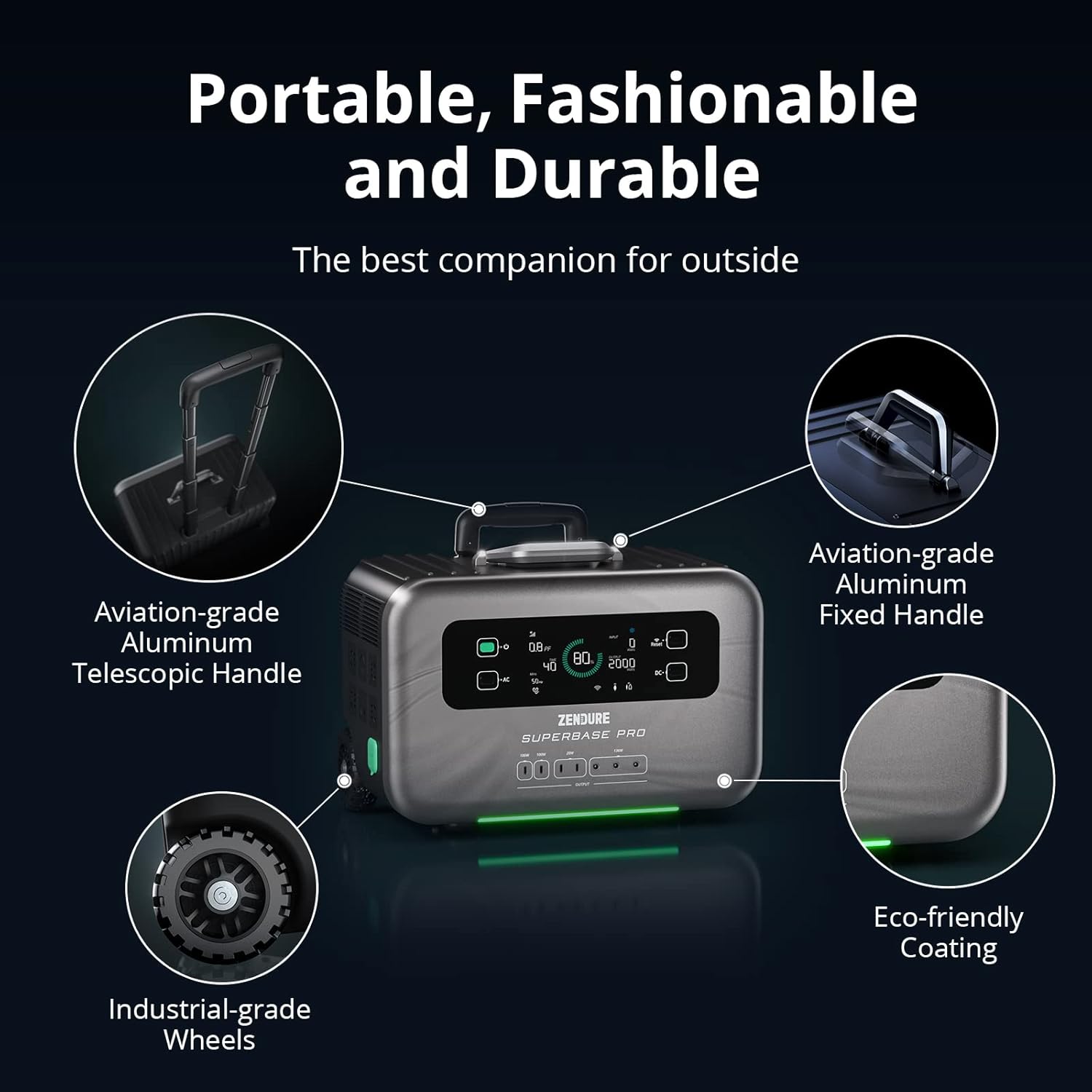
Image 6.1: Examples of devices that can be powered by the SuperBase Pro 1500 and their estimated run times.
6.3 4G IoT and App Control
The SuperBase Pro 1500 features built-in GPS and 4G IoT hardware, allowing for remote monitoring and control via the Zendure app. Ensure a 4G signal is available for off-grid app functionality.
- Download the Zendure app from your device's app store.
- Follow the in-app instructions to connect your SuperBase Pro 1500.
- The app allows you to turn ports on/off, activate Amp-Up mode, turn on sleep mode, schedule charging, control notifications, limit power, and track device location.

Image 6.2: Overview of the intelligent 4G IoT and app control features for remote management of your power station.
7. Maintenance
7.1 Cleaning
Wipe the exterior of the power station and solar panels with a dry, soft cloth. Do not use harsh chemicals or abrasive materials. Ensure all ports are free of dust and debris.
7.2 Storage
Store the SuperBase Pro 1500 and solar panels in a cool, dry place, away from direct sunlight and extreme temperatures. For long-term storage, it is recommended to discharge the power station to about 50% and recharge it every 3-6 months to maintain battery health.
8. Troubleshooting
- Unit Not Turning On: Ensure the battery is charged. If not, connect to a power source.
- No Output from AC/DC Ports: Verify that the respective AC/DC buttons are activated on the display. Check if the device connected exceeds the power station's output limits.
- Solar Panels Not Charging: Ensure panels are correctly connected and positioned towards direct sunlight. Check for any obstructions. Clean the panel surface if dirty.
- App Connectivity Issues: Ensure the power station has a 4G signal or is connected to Wi-Fi. Restart the app and the power station if necessary.
9. Specifications
| Feature | Specification |
|---|---|
| Brand | Zendure |
| Model | SuperBase Pro 1500 |
| Battery Capacity | 1440Wh |
| AC Output Wattage | 2000W (Peak 4000W) |
| Solar Panel Wattage | 200W per panel |
| Power Source | AC/DC |
| Fuel Type | Electric |
| Special Feature | Electric, 4G IoT, App Control |
| Color | Black |
| Product Dimensions (Power Station) | 17.6"L x 10.9"W x 13.9"H |
| Solar Panel IP Rating | IP67 (Dust & Water Resistant) |
10. Warranty and Support
Zendure products come with a limited warranty. For detailed warranty information, product support, or service inquiries, please visit the official Zendure website or contact their customer service directly. Keep your purchase receipt as proof of purchase.


