
Introduction
Thank you for choosing the DEVAISE 3-Drawer Mobile File Cabinet. This manual provides essential information for the safe and efficient use of your new file cabinet. Please read these instructions carefully before assembly and operation, and retain them for future reference.
Safety Information
- Ensure all casters are securely attached before moving the cabinet.
- Do not overload drawers. Distribute weight evenly to maintain stability.
- Always lock the casters when the cabinet is in a stationary position to prevent accidental movement.
- Avoid opening more than one drawer at a time to prevent tipping.
- Keep keys in a safe place, away from children.
- Do not stand or sit on the cabinet.
Package Contents
The DEVAISE 3-Drawer Mobile File Cabinet comes fully assembled, with the exception of the casters. Please verify that all components are present:
- 1 x DEVAISE 3-Drawer Mobile File Cabinet (Main Unit)
- 5 x Casters (4 swivel with brakes, 1 anti-tip)
- 2 x Keys for the locking mechanism
- 1 x Removable Hanging Bar for file drawer
- 1 x Removable Stationery Tray
Setup: Caster Installation
Your file cabinet is mostly assembled. Only the casters require attachment.
- Prepare the Cabinet: Carefully lay the cabinet on its side or back on a soft, clean surface to avoid scratching the finish. Ensure the bottom is accessible.
- Identify Casters: You will have four swivel casters (two with locking brakes) and one auxiliary anti-tip caster.
- Install Swivel Casters: Insert the stems of the four swivel casters into the designated holes at each corner of the cabinet's base. Twist clockwise until they are securely tightened. Ensure the two casters with brakes are installed on the front side of the cabinet for easy access.
- Install Anti-Tip Caster: Locate the central hole at the front underside of the bottom drawer. Insert the stem of the auxiliary anti-tip caster into this hole and twist clockwise until secure. This caster provides stability when the bottom drawer is fully extended.
- Upright the Cabinet: Carefully return the cabinet to its upright position.

Image: Underside view of the cabinet with all five casters installed. This includes four main swivel casters and one anti-tip caster positioned under the front of the bottom drawer for enhanced stability.


Images: From left to right, an auxiliary anti-tip caster, a brake caster, and a standard swivel caster. These illustrate the different types of wheels included for installation.
Operating Instructions
Drawer Operation
The drawers feature full-extension slides, allowing them to open completely for easy access to contents. To open a drawer, gently pull the hidden handle located at the top edge of each drawer. To close, push the drawer firmly until it is fully seated.

Image: A drawer smoothly extending from the cabinet, demonstrating the full-extension slides.
Locking Mechanism
The cabinet is equipped with an interlock system that secures all three drawers simultaneously. Insert one of the provided keys into the lock cylinder located on the top drawer. Turn the key to the locked position to secure all drawers. Turn the key to the unlocked position to release them. Remove the key after locking or unlocking.

Image: A close-up of the lock on the top drawer, showing the two keys provided for securing all drawers.
File Organization
The bottom drawer is designed for hanging files and includes a removable hanging bar. This drawer accommodates Letter, Legal, and A4 size folders. Adjust the hanging bar as needed to fit your preferred file size.

Image: The bottom drawer open, illustrating its capacity for Letter, Legal, and A4 size hanging files.
Stationery Tray
The top drawer includes a removable stationery tray for organizing small office supplies such as pens, clips, and sticky notes.
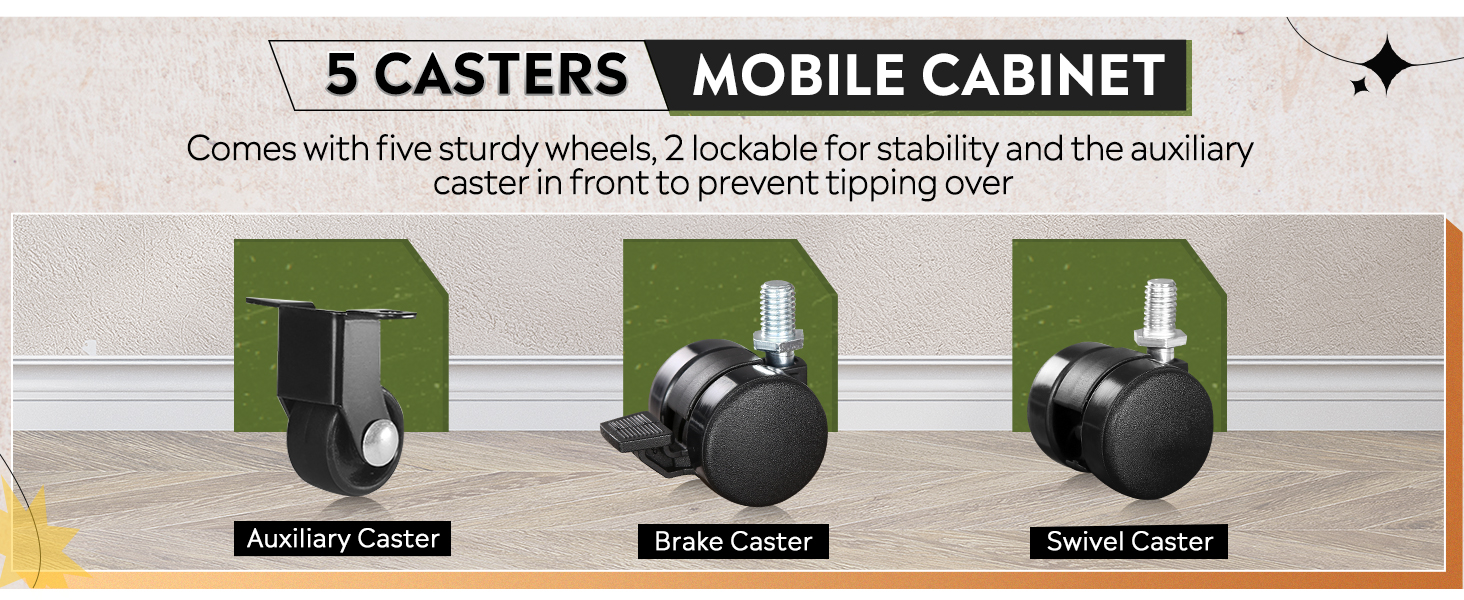
Image: A close-up of the top drawer, showing the removable stationery tray with organized office supplies.
Mobility and Stability
The cabinet is equipped with five casters for easy mobility. Two of the front casters have locking brakes. To move the cabinet, unlock the casters. To keep the cabinet stationary, engage the brakes on the front casters. The central anti-tip caster provides additional stability when the bottom drawer is open.

Image: The file cabinet placed under an office desk, demonstrating its mobile functionality and how the open bottom drawer is supported.
Maintenance
- Cleaning: Wipe the cabinet surfaces with a soft, damp cloth. Avoid abrasive cleaners or harsh chemicals that may damage the finish.
- Casters: Periodically check casters for debris or hair that may impede movement. Clean as necessary.
- Drawer Slides: If drawers do not slide smoothly, a small amount of silicone-based lubricant can be applied to the slides.
Troubleshooting
| Problem | Possible Cause | Solution |
|---|---|---|
| Cabinet tips when drawer is open | Overloaded drawer; multiple drawers open; anti-tip caster not installed or damaged. | Ensure only one drawer is open at a time. Distribute weight evenly. Verify anti-tip caster is installed and functioning. |
| Drawers do not slide smoothly | Debris in slides; slides require lubrication; drawer overloaded. | Clean drawer slides. Apply silicone lubricant. Reduce drawer load. |
| Cabinet moves unintentionally | Caster brakes not engaged. | Engage the brakes on the front casters. |
| Lock mechanism not working | Drawer not fully closed; mechanism jammed. | Ensure all drawers are fully closed before attempting to lock. Do not force the key. |
Specifications

Image: Detailed product dimensions, including width, depth, and height, with and without casters.
| Feature | Detail |
|---|---|
| Brand | DEVAISE |
| Model Name | AHDG |
| Color | Black |
| Product Dimensions (D x W x H) | 17.1" x 14.6" x 23.8" |
| Material | Cold-Rolled Steel (Frame, Top, Back) |
| Weight Limit | 330 Pounds |
| Special Feature | Lockable, Mobile, Full-Extension Drawers |
| File Compatibility | Letter, Legal, A4 Size |
| Assembly Required | No (Casters only) |
| Included Components | Key Box, Removable Hanging Bar, Removable Stationery Tray |
Warranty and Support
DEVAISE products are manufactured to high-quality standards. For warranty information, product support, or to purchase replacement parts, please contact DEVAISE customer service. Refer to your purchase documentation for specific warranty terms and contact details.
Customer Service: Please visit the official DEVAISE website or refer to the contact information provided with your purchase.


