
Introduction
The Insta360 X3 is a versatile waterproof 360 action camera designed to capture immersive content. It features advanced sensors, high-resolution video and photo capabilities, and robust stabilization technology, making it suitable for a wide range of activities and environments. This manual provides essential information for setting up, operating, and maintaining your Insta360 X3.

Figure 1: Insta360 X3 camera and included accessories.
This image displays the Insta360 X3 camera alongside its standard accessories, including a selfie stick, a 128GB SD card, a battery, a charging cable, a protective pouch, and a lens cloth. These components are essential for the camera's operation and protection.
What's in the Box
- 1x Insta360 X3 Camera
- 1x Charge Cable
- 1x Protective Pouch
- 1x Lens Cloth
- 1x User Guide
- 1x Invisible Selfie Stick
- 1x 128GB SD Card
- 1x EVO Gimbals Lens Cloth
Setup
1. Battery Installation
Locate the battery compartment on the side of the Insta360 X3. Gently open the compartment and insert the included Lithium Ion battery, ensuring it is oriented correctly according to the markings. Close the compartment securely.

Figure 2: Insta360 X3 battery. The Insta360 X3 uses an 1800 mAh Lithium Ion battery, providing ample power for extended recording sessions.
2. SD Card Installation
The Insta360 X3 requires a Micro SDXC card for storing video and photo content. Insert the 128GB SD card into the designated slot within the battery compartment. Ensure it clicks into place. The camera will not record without a properly installed SD card.
3. Initial Power-On and Language Selection
Press and hold the power button to turn on the Insta360 X3. Upon the first startup, you will be prompted to select your preferred language and complete initial setup steps. Follow the on-screen instructions on the 2.29-inch touchscreen display.

Figure 3: Insta360 X3 Massive Touchscreen. The large touchscreen allows for intuitive navigation and control of the camera's settings and features.
4. App Synchronization
For full functionality and advanced editing features, download the official Insta360 app on your smartphone. Follow the app's instructions to connect and synchronize your Insta360 X3 camera. This enables remote control, live preview, and AI-powered editing tools.

Figure 4: AI Editing Interface. The Insta360 app offers AI-powered editing features to simplify the post-production process and enhance your footage.
Operating
1. 360 Capture & Reframing
The X3 captures 5.7K 360 Active HDR video, ensuring you capture every angle. After recording, use the easy reframing tools in the AI-powered Insta360 app to select your favorite perspectives and create traditional flat videos from your 360 footage.

Figure 5: 360 Creative Powerhouse. The camera's dual lenses capture a full 360-degree spherical view, allowing for creative reframing and immersive content creation.
2. Dual 1/2'' 48MP Sensors
Equipped with new 1/2'' 48MP sensors, the X3 delivers greater clarity and detail in both bright and low-light conditions. This allows for the capture of high-resolution 72MP photos and stunning 8K timelapses.

Figure 6: Bigger 1/2'' 48MP Sensor. The larger sensor size contributes to improved image quality, especially in challenging lighting conditions, capturing more detail and vibrant colors.
3. 4K Single-Lens Mode
For traditional wide-angle footage, select a single lens to shoot in 4K30fps. You can also achieve an extremely wide 170° field of view with 2.7K MaxView, providing excellent first-person perspective video.

Figure 7: 4K Single Lens Mode. This mode allows the X3 to function as a traditional action camera, capturing high-resolution, wide-angle footage from a single lens.
4. FlowState Stabilization & 360 Horizon Lock
Experience incredibly smooth videos thanks to Insta360's FlowState Stabilization and horizon leveling algorithms. This technology ensures your footage remains stable and level, even during intense action.
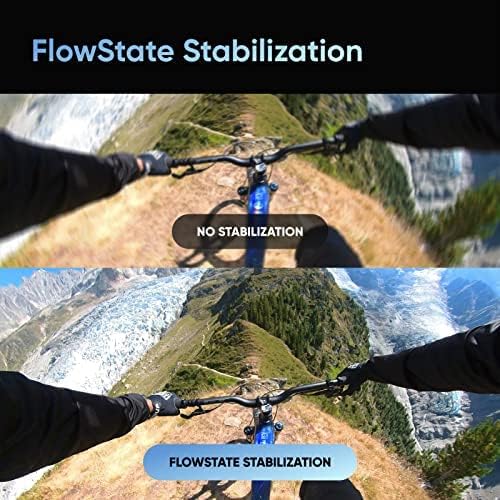
Figure 8: FlowState Stabilization. This visual comparison demonstrates the effectiveness of FlowState Stabilization in producing smooth, shake-free video, crucial for action camera footage.
5. Impossible Third Person View
The 360 Lens technology allows the Invisible Selfie Stick to disappear from your shots, creating drone-like footage and unique third-person perspectives without the need for complex equipment.
Maintenance
1. Lens Cleaning
Regularly clean the camera lenses using the provided lens cloth to ensure optimal image quality. Avoid using abrasive materials or harsh chemicals that could damage the lens coating.
2. Protective Pouch
Utilize the protective pouch when the camera is not in use or during transport. This helps prevent scratches and minor impacts, especially to the sensitive lenses.
3. Waterproofing
The Insta360 X3 is waterproof. Ensure all ports and battery compartments are securely closed before exposing the camera to water to maintain its waterproof integrity.

Figure 9: IPX8 Waterproof. The Insta360 X3 is designed to be waterproof, allowing it to be used in aquatic environments without additional housing.
Troubleshooting
If you encounter any issues with your Insta360 X3, consider the following general troubleshooting steps:
- Camera Not Powering On: Ensure the battery is fully charged and correctly inserted.
- Recording Issues: Verify that the SD card is properly inserted and has sufficient free space. Check the SD card's speed rating; a high-speed card is recommended.
- Connectivity Problems: Restart both the camera and your smartphone. Ensure Bluetooth and Wi-Fi are enabled on your phone and that the Insta360 app is up to date.
- Firmware Update: Check the Insta360 app for available firmware updates. Keeping your camera's firmware updated can resolve many issues and improve performance.
- Image Quality Concerns: Clean the camera lenses thoroughly with the provided lens cloth.
For persistent issues, refer to the official Insta360 support website or contact customer service.
Specifications
| Feature | Specification |
|---|---|
| Brand Name | Insta360 |
| Item Weight | 1.1 pounds |
| Product Dimensions | 2 x 4 x 6 inches |
| Item Model Number | CINSAAQ/B_SELFIE-STICK_128GB |
| Batteries | 1 Lithium Ion batteries required (included) |
| Special Features | 360 action camera, AI editing, live stream, 5.7K Active HDR 360 Video, 72MP Photo, 4K Single-Lens Mode, 8K Timelapse, FlowState Stabilization |
| Photo Sensor Technology | CMOS |
| Video Capture Resolution | 5.7K |
| Maximum Focal Length | 6.7 Millimeters |
| Maximum Aperture | 2 f |
| Flash Memory Type | Micro SDXC |
| Video Capture Format | MP4 |
| Supported Audio Format | MP4 |
| Screen Size | 2.29 Inches |
| Connectivity Technology | Bluetooth |
Additional Information
- Visible Screen Diagonal: 3 inches / 6 cm
- First Available: September 8, 2022
Warranty and Support
Your Insta360 X3 comes with a manufacturer's warranty. Please refer to the included warranty card for detailed terms and conditions. For technical support, product registration, or further assistance, visit the official Insta360 website or contact their customer service.


