
1. Introduction
This manual provides essential information for the proper installation, operation, and maintenance of the SILENT KNIGHT Firelite ES-50X Addressable Fire Alarm Control Panel (FACP). The ES-50X is a sophisticated fire alarm system designed for commercial and institutional applications, featuring an integrated communicator, compatibility with SWIFT devices, independently programmable Notification Appliance Circuits (NACs), a built-in programmer, and an LCD display for clear status indication.
For detailed technical specifications and advanced programming, refer to the complete documentation available from the manufacturer.
2. Safety Information
WARNING: Installation and servicing of this Fire Alarm Control Panel must be performed by qualified and authorized personnel only. Failure to comply with these instructions may result in property damage, serious injury, or death.
- Always disconnect all power sources, including battery backup, before servicing or installing the unit.
- Adhere to all local and national electrical codes, fire codes, and standards (e.g., NFPA 72).
- Ensure proper grounding of the FACP.
- Do not operate the FACP with damaged wiring or components.
- This device is designed to detect fire conditions; it does not prevent fire. Regular testing and maintenance are crucial for reliable operation.
3. Package Contents
Carefully unpack the Firelite ES-50X FACP and inspect for any shipping damage. Retain all packaging materials for future use or return if necessary. The package should contain the following items:
- SILENT KNIGHT Firelite ES-50X Addressable FACP Unit
- Accessory Bag (containing wiring harnesses, resistors, and mounting hardware)
- Installation and Programming Manual (may be included or available online)

Image: The Firelite ES-50X FACP unit as received in its protective cardboard packaging.

Image: The Firelite ES-50X FACP unit, removed from its packaging, shown alongside the accessory bag containing various cables and components.
4. Product Overview
The ES-50X is an addressable fire alarm control panel designed for flexibility and reliability. Key features include:
- Addressable Technology: Supports intelligent devices for precise fire detection and location.
- Built-in Communicator: Facilitates communication with central monitoring stations.
- SWIFT Device Compatibility: Integrates seamlessly with wireless SWIFT devices.
- Independently Programmable NACs: Allows for flexible configuration of notification appliance circuits.
- Built-in Programmer: Simplifies system setup and configuration directly from the panel.
- LCD Display: Provides clear, real-time system status and event information.
- Dual Path Communications: Enhances reliability of alarm transmission.
- Combined Fire and CO Detection: Supports devices capable of detecting both fire and carbon monoxide.

Image: The ES-50X FACP with its enclosure open, showing the internal components, main circuit board, and the user interface panel.
5. Setup and Installation
Installation of the ES-50X FACP requires adherence to specific guidelines and should only be performed by certified fire alarm technicians. This section provides a general overview; refer to the detailed installation manual for complete instructions.
- Mounting: Securely mount the FACP enclosure to a wall using appropriate hardware, ensuring it is level and accessible for servicing.
- Wiring: Connect all field wiring, including initiating device circuits (IDCs), signaling line circuits (SLCs), notification appliance circuits (NACs), and communication lines, according to the provided wiring diagrams. Pay close attention to polarity and supervision requirements.
- Power Connections: Connect the primary AC power source and the backup battery power. Ensure all power connections are secure and meet local electrical codes.
- Programming: Utilize the built-in programmer or compatible software to configure the system, including device addressing, zone assignments, NAC programming, and communicator settings.
- Testing: After installation and programming, conduct thorough system testing as per NFPA 72 and local authority having jurisdiction (AHJ) requirements to ensure all components function correctly.

Image: Internal view of the FACP door displaying comprehensive wiring diagrams and operating instructions, crucial for proper installation and setup.
6. Operating Instructions
The ES-50X FACP features an intuitive LCD display and control buttons for system interaction. Basic operations include:
- LCD Display: Shows current system status (e.g., Normal, Alarm, Trouble, Supervisory), event messages, and menu options.
- ACKNOWLEDGE Button: Silences audible alarms and acknowledges new events.
- SILENCE Button: Silences notification appliances (horns, strobes) after an alarm has been acknowledged.
- RESET Button: Clears alarm conditions and restores the system to normal operation after an alarm has been acknowledged and silenced.
- Navigation Buttons: Use the arrow keys and 'MENU' button to navigate through system menus, view event history, and access programming options (requires appropriate access level).

Image: A detailed view of the ES-50X's user interface, highlighting the LCD screen and control buttons for system operation.
7. Maintenance
Regular maintenance is essential to ensure the continued reliable operation of your Firelite ES-50X FACP. All maintenance should be performed by qualified personnel.
- Routine Inspections: Visually inspect the panel and connected devices regularly for any signs of damage or tampering.
- Battery Testing: Test backup batteries annually or as required by local codes to ensure they can provide sufficient power during an AC power failure. Replace batteries every 3-5 years, or as recommended by the manufacturer.
- System Testing: Conduct periodic functional tests of the entire fire alarm system, including detectors, manual pull stations, and notification appliances, according to NFPA 72 and local requirements.
- Cleaning: Keep the FACP enclosure clean and free of dust. Do not use abrasive cleaners or solvents.
8. Troubleshooting
The ES-50X FACP is designed for reliability, but occasional issues may arise. The LCD display will provide specific trouble messages to assist in diagnosis.
- Trouble Signal: If a trouble signal activates, check the LCD display for the specific message. Common troubles include open circuits, ground faults, or low battery.
- False Alarms: Investigate the cause of any false alarms immediately. This could be due to environmental factors, dirty detectors, or system malfunctions.
- Communication Failure: If the communicator reports a failure, verify telephone line connections or network connectivity, depending on the communication method.
For persistent issues or complex troubleshooting, contact a certified fire alarm technician or SILENT KNIGHT technical support.
9. Specifications
| Feature | Detail |
|---|---|
| Brand | SILENT KNIGHT |
| Model | ES-50X |
| Type | Addressable Fire Alarm Control Panel (FACP) |
| Communicator | Built-in Dual Path Communications |
| Device Compatibility | SWIFT Devices, Combined Fire and CO Detection |
| NACs | Independently Programmable Notification Appliance Circuits |
| Programming | Built-in Programmer, Programmable Buttons |
| Display | LCD Display, Integrated SWIFT Display Driver |
| Certifications | UL Listed, FM Approved, Accepted for use by City of New York Dept. of Buildings (COA #6261) |
| UPC/GTIN | 808237774875 |
| Country of Origin | US |
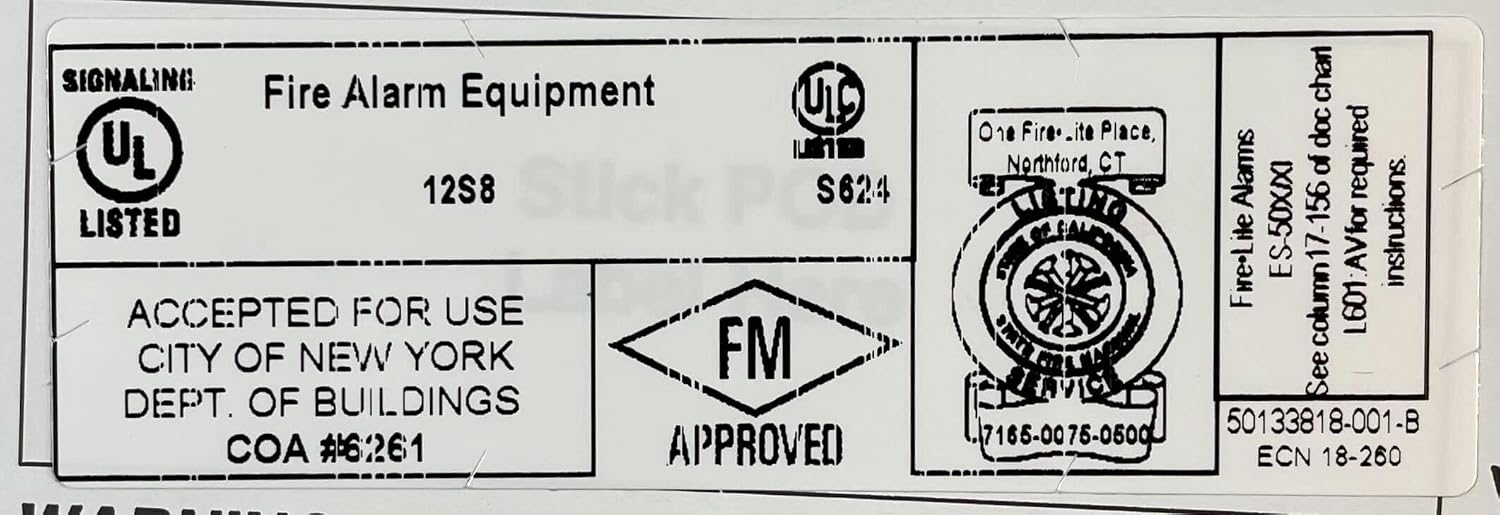
Image: A label indicating various certifications and approvals for the Firelite ES-50X, including UL, FM, and NYC Department of Buildings.

Image: A label confirming the country of origin as the United States.

Image: An internal component label displaying firmware version details and confirming the country of origin as the United States.
10. Warranty and Support
For warranty information, technical support, or to locate an authorized service provider, please contact SILENT KNIGHT directly or refer to the official product documentation.
Additional resources, including detailed manuals and technical bulletins, can be found on the manufacturer's website:


