
XDOBO Vibe Plus
XDOBO Vibe Plus Bluetooth Speaker User Manual
Model: Vibe Plus | Brand: XDOBO
1. Introduction
The XDOBO Vibe Plus is a powerful portable Bluetooth speaker designed to deliver high-quality audio with enhanced bass and versatile connectivity. Its robust construction and IPX5 waterproof rating make it suitable for various indoor and outdoor environments. This manual will guide you through the features, setup, operation, and maintenance of your speaker.

Front view of the XDOBO Vibe Plus Bluetooth speaker, showcasing its robust design, illuminated speaker cones, and top-mounted control panel.
2. Key Features
- High Power Output: This speaker is larger than typical portable speakers and features dual passive radiators for superior bass. It delivers a maximum output of 80W with 2.1 channel audio for an immersive music experience.
- Versatile Playback Modes: Supports Bluetooth playback, USB memory playback, and AUX cable playback.
- Long Battery Life: Equipped with a 20000mAh rechargeable battery that fully charges in approximately 5-6 hours using the included Type-C cable. The large capacity battery allows for extended music playback at high power.
- TWS Functionality: Purchase two speakers and use the TWS (True Wireless Stereo) pairing function to link them for a 360° stereo sound experience, similar to a movie theater.
- Mood Lighting: Features 3 types of mood light settings to enhance your listening environment.
- High-Quality Audio with EQ: Constructed with high-quality materials. The built-in EQ equalizer function allows for clear high and mid-range sounds, and especially powerful bass reproduction. Sound remains clear even at maximum volume.
- USB-A Output: Equipped with a USB-A output (2A output) to charge smartphones and other devices.
- IPX5 Waterproof: Features IPX5 waterproof rating, protecting against harmful effects from water jets from any direction (splash-proof type). Ideal for use in bathrooms, by the pool, at the beach, or during other outdoor activities.

Exploded view of the XDOBO Vibe Plus speaker components, highlighting the three speaker units and passive radiators that contribute to its 80W maximum output.
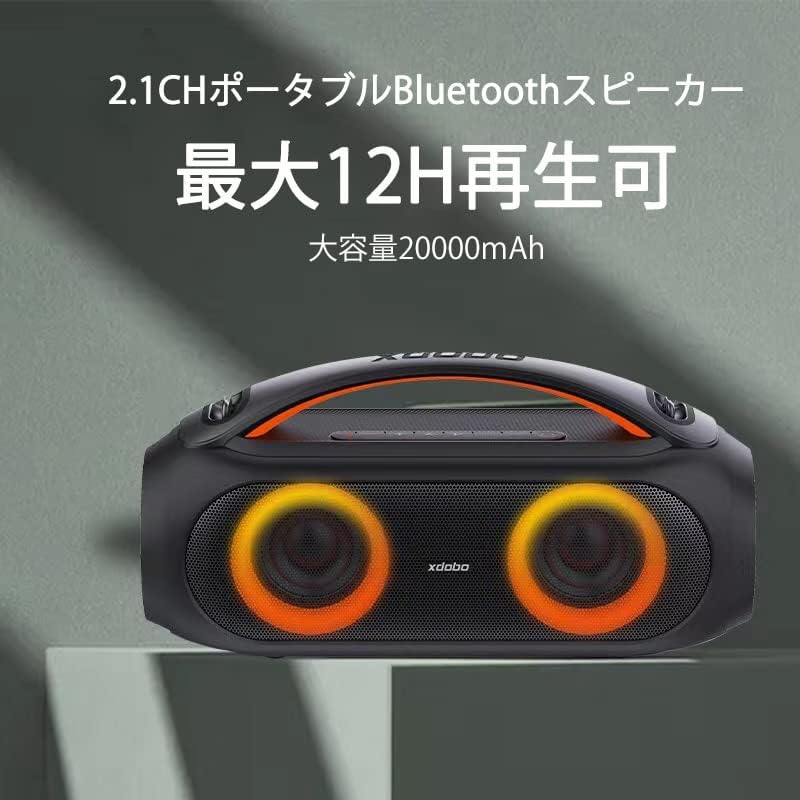
The XDOBO Vibe Plus speaker with illuminated cones, representing its large 20000mAh battery capacity and extended playback time.

The XDOBO Vibe Plus speaker positioned outdoors, demonstrating its IPX5 waterproof rating suitable for beach, poolside, and other outdoor activities.
3. Setup
3.1 Charging the Speaker
- Connect the included Type-C USB charging cable to the speaker's charging port.
- Connect the other end of the cable to a compatible USB power adapter (not included).
- The battery indicator lights will show charging progress. Charging is complete when all lights are solid.
3.2 Power On/Off
- Power On: Press and hold the Power button until the speaker powers on and you hear an audible prompt.
- Power Off: Press and hold the Power button until the speaker powers off.
3.3 Bluetooth Pairing
- Turn on the speaker. It will automatically enter Bluetooth pairing mode, indicated by a flashing LED light.
- Enable Bluetooth on your device (smartphone, tablet, computer).
- Search for "XDOBO Vibe Plus" in your device's Bluetooth list and select it to connect.
- Once connected, the speaker will provide an audible confirmation, and the LED light will stop flashing.
3.4 TWS (True Wireless Stereo) Pairing
To achieve 360° stereo sound, you can pair two XDOBO Vibe Plus speakers together:
- Ensure both speakers are powered on and not connected to any other Bluetooth devices.
- On one speaker (this will be the primary speaker), press and hold the TWS button (if available, or a combination of buttons as per specific model instructions, typically the Play/Pause button for a few seconds).
- The primary speaker will search for the secondary speaker. Once connected, both speakers will provide an audible confirmation.
- Now, connect your device to the primary speaker via Bluetooth as described in section 3.3. Audio will play through both speakers in stereo.
4. Operating Instructions
4.1 Playback Control
- Play/Pause: Press the Play/Pause button to start or pause playback.
- Volume Up: Press the '+' button to increase volume.
- Volume Down: Press the '-' button to decrease volume.
- Next Track: Press and hold the '+' button to skip to the next track.
- Previous Track: Press and hold the '-' button to go to the previous track.
4.2 Mode Switching
The speaker supports Bluetooth, USB, and AUX input modes. Press the 'M' (Mode) button to cycle through the available input modes.
4.3 Mood Light Control
The speaker features three types of mood lighting. Press the Light button (often indicated by a lightbulb icon) to cycle through the different lighting patterns or to turn the lights off.
4.4 EQ Adjustment
The speaker has a built-in equalizer function. Press the EQ button (if available, or a specific button combination) to switch between different sound profiles (e.g., enhanced bass, balanced, vocal). This allows you to customize the audio to your preference.
4.5 USB-A Output for Charging
To use the speaker as a power bank, connect your device's charging cable to the USB-A output port on the speaker. The speaker will provide 2A output for charging.
5. Maintenance
- Cleaning: Use a soft, dry cloth to clean the speaker's surface. Do not use abrasive cleaners, alcohol, or other chemical solvents, as they may damage the finish.
- Water Exposure: While the speaker is IPX5 waterproof, avoid submerging it in water. Ensure the charging port cover is securely closed when near water to prevent damage.
- Storage: Store the speaker in a cool, dry place away from direct sunlight and extreme temperatures. If storing for a long period, charge the battery to about 50% every few months to maintain battery health.
- Handle with Care: The handle is designed for portability. Handle the speaker carefully to avoid damage, especially when carrying it.
6. Troubleshooting
| Problem | Possible Cause | Solution |
|---|---|---|
| Speaker does not power on. | Battery is depleted. | Charge the speaker fully. |
| No sound. | Volume is too low or muted. Incorrect input mode. | Increase volume. Press the 'M' button to switch to the correct input mode. |
| Cannot pair via Bluetooth. | Speaker is not in pairing mode. Device's Bluetooth is off. Speaker is connected to another device. | Ensure speaker is in pairing mode (flashing LED). Turn on Bluetooth on your device. Disconnect from other devices. |
| Sound distortion or delay. | Interference or older Bluetooth device. | Move closer to the speaker. Try connecting via AUX cable for a stable connection, especially with older devices. |
| TWS pairing fails. | Speakers are too far apart or already connected to other devices. | Ensure speakers are close to each other. Disconnect both speakers from any other Bluetooth devices before attempting TWS pairing. |
7. Specifications

Dimensions of the XDOBO Vibe Plus speaker.
| Feature | Detail |
|---|---|
| Model | Vibe Plus |
| Bluetooth Version | V5.0 |
| Output Power | 80W RMS |
| Charging Time | Approx. 5 hours |
| Battery Type | 3.7V/20000mAh |
| Waterproof Rating | IPX5 |
| Signal-to-Noise Ratio (SNR) | 75dB |
| Product Weight | 2460g |
| Max Communication Distance | 15m (without obstacles) |
| Input Power | Type-C 5V/2A |
| Playback Time | 8-12 hours |
| Supported Audio Formats | APE/FLC/WMA/WAV/MP3 |
| Playback Frequency Range | 70Hz~20kHz |
| Interfaces | Bluetooth/USB/AUX |
| Distortion | Less than 1.0% |
| Other Features | TWS, Line-in function |
| Product Dimensions | 13.4cm (Depth) x 36.5cm (Width) x 17.8cm (Height) |
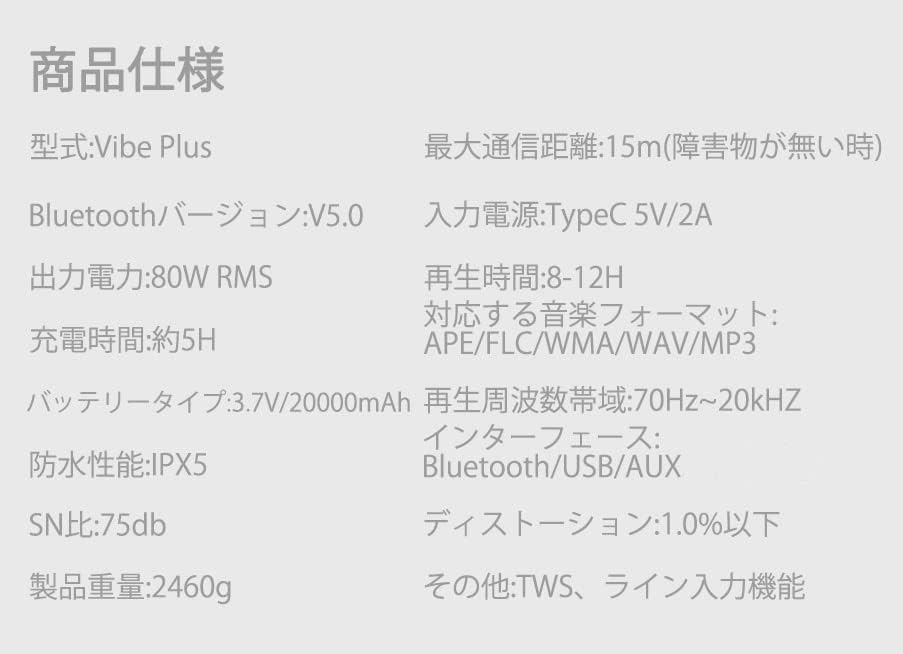
Detailed technical specifications of the XDOBO Vibe Plus speaker.
8. Warranty and Support
Information regarding product warranty and customer support was not available in the provided data. Please refer to the product packaging or the seller's website for specific warranty terms and contact information for support.
Related documentsVibe Plus


Ask a question about this manual
Ask about setup, troubleshooting, compatibility, parts, safety, or missing instructions. Manuals+ will review the question and use this page’s manual context to help answer it.