
1. Introduction
Thank you for choosing the SOAIY 2-Port Universal Smart Battery Charger. This intelligent charger is designed to safely and efficiently charge a wide range of rechargeable batteries, including 3.7V Li-Ion and 1.2V NiMh/NiCD types. Featuring an intuitive LCD display and adjustable charging currents, it provides a convenient solution for your battery charging needs. Please read this manual thoroughly before use to ensure proper operation and safety.
2. Safety Information
To prevent injury, property damage, or damage to the charger or batteries, please observe the following safety precautions:
- Only charge compatible battery types as listed in this manual. Charging incompatible batteries may cause explosion, rupture, or leakage.
- Do not disassemble, modify, or attempt to repair the charger.
- Keep the charger away from water, moisture, and high temperatures.
- Do not use the charger if it appears damaged.
- Ensure proper polarity when inserting batteries. The charger includes reverse polarity protection.
- Unplug the charger from the power source when not in use or before cleaning.
- Keep out of reach of children.
- The charger features built-in safety protections against overcharge, overheating, and short-circuiting.

3. Package Contents
Please check the package for the following items:
- 1 x SOAIY 2-Port Universal Smart Battery Charger
- 1 x Micro USB Charging Cable
- 1 x User Manual (this document)
Note: Batteries and power adapter are not included.
4. Product Overview
The SOAIY Smart Charger features two independent charging bays and an LCD display to monitor charging status.
4.1. LCD Display
The clear LCD screen provides real-time information for each charging bay:
- Current Charging Current: Displays the amperage being delivered to the battery.
- Charging Time: Shows how long the battery has been charging.
- Current Voltage: Indicates the battery's current voltage.
- Charge Level Percentage: A battery pictogram flashes and shows the charge level in 25% increments.

5. Setup
Follow these steps to set up your SOAIY Smart Battery Charger:
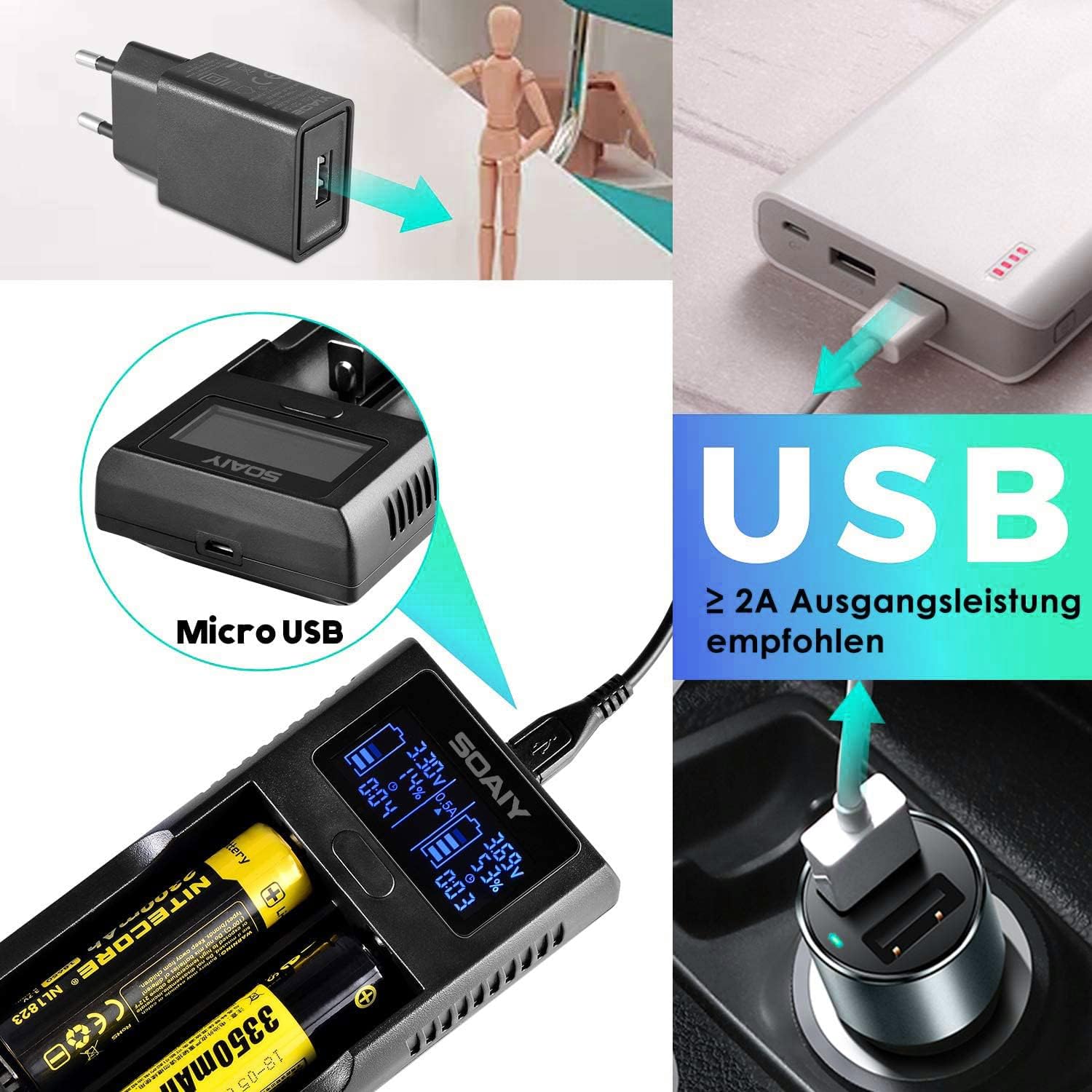
- Connect Power: Connect the provided Micro USB charging cable to the Micro USB port on the charger.
- Power Source: Plug the other end of the USB cable into a 5V DC USB power adapter (not included). A power adapter with 2A output is recommended for optimal performance. You can use a wall adapter, power bank, or car charger.
- The LCD display will light up, indicating the charger is ready for use.
6. Operating Instructions
6.1. Compatible Battery Types
The charger is compatible with the following battery types and sizes:
- 3.6V/3.7V Li-Ion Batteries: 26650, 22650, 26500, 18650, 18490, 18500, 18350, 17670, 17500, 17355, 16340, 14650, 14500, 10440. (Diameter ≤ 26mm, Height: 34-70mm)
- 1.2V Ni-MH/Ni-CD Batteries: AAA, AA, C.

6.2. Charging Process
- Insert Batteries: Carefully insert one or two compatible batteries into the charging bays, ensuring correct polarity (+ and -). The charger's integrated microprocessor will automatically detect the battery type and select the appropriate charging voltage.
- Monitor Display: The LCD display will show the charging status for each bay, including voltage, current, and charge percentage.
- Adjust Charging Current (for Li-Ion batteries only): For 3.6V/3.7V Li-Ion batteries, you can adjust the charging current between 0.5A and 1A using the function button. The default current is 0.5A. The charging current for 1.2V Ni-Mh/Ni-Cd batteries is fixed at a maximum of 500mA and cannot be changed.
- Automatic Stop: The charging process will automatically stop once the batteries are fully charged. The LCD display will remain on, showing the full charge status.

7. Maintenance
Proper maintenance ensures the longevity and optimal performance of your charger:
- Cleaning: Disconnect the charger from the power source before cleaning. Use a soft, dry cloth to wipe the surface. Do not use abrasive cleaners or solvents.
- Storage: Store the charger in a cool, dry place away from direct sunlight and extreme temperatures.
- Avoid Impact: Do not drop or subject the charger to strong impacts.
8. Troubleshooting
If you encounter issues with your charger, refer to the following common problems and solutions:
| Problem | Possible Cause | Solution |
|---|---|---|
| Charger display is off / Not powering on. | No power connection or faulty USB cable/adapter. | Ensure the Micro USB cable is securely connected to both the charger and a working 5V DC USB power source. Try a different USB cable or power adapter. |
| Battery not charging / "Err" displayed. | Incorrect battery insertion (reverse polarity) or incompatible/damaged battery. | Re-insert the battery with correct polarity. Ensure the battery type is compatible with the charger. Try charging a different battery to check if the issue is with the battery or the charger. |
| Charging is slow. | Low input current from USB power source or selected charging current is low. | Use a 5V DC USB power adapter with at least 2A output. For Li-Ion batteries, ensure the charging current is set to 1A if faster charging is desired (refer to section 6.2). |
| Charger feels warm during operation. | Normal operation, especially during fast charging. | This is normal. Ensure adequate ventilation around the charger. If it becomes excessively hot or emits smoke/odor, unplug immediately and discontinue use. |
9. Specifications
| Feature | Detail |
|---|---|
| Brand | SOAIY |
| Model | 2-Port Universal Smart Battery Charger |
| Input | DC 5V (Micro USB) |
| Output Current (Li-Ion) | 0.5A / 1A (selectable) |
| Output Current (Ni-MH/Ni-CD) | Max 500mA (fixed) |
| Compatible Li-Ion Batteries | 3.6V/3.7V Li-Ion (26650, 22650, 26500, 18650, 18490, 18500, 18350, 17670, 17500, 17355, 16340, 14650, 14500, 10440) |
| Compatible Ni-MH/Ni-CD Batteries | 1.2V Ni-MH/Ni-CD (AAA, AA, C) |
| Battery Dimensions (Li-Ion) | Diameter ≤ 26mm, Height: 34-70mm |
| Dimensions (Charger) | Length: 130mm, Width: 68mm, Height: 33.5mm |
| Weight | 95 Grams |
| Safety Features | Reverse polarity protection, overcharge protection, overheating protection, short-circuit protection. |

10. Warranty and Support
For warranty information or technical support, please refer to the documentation provided with your purchase or contact the retailer where the product was acquired. Keep your purchase receipt as proof of purchase.