
1. Introduction
Welcome to the user manual for your Doro 1380 mobile phone. This guide provides essential information on how to set up, operate, and maintain your device. The Doro 1380 is designed for ease of use, featuring large keys, a clear display, and practical functions like an assistance button and camera.
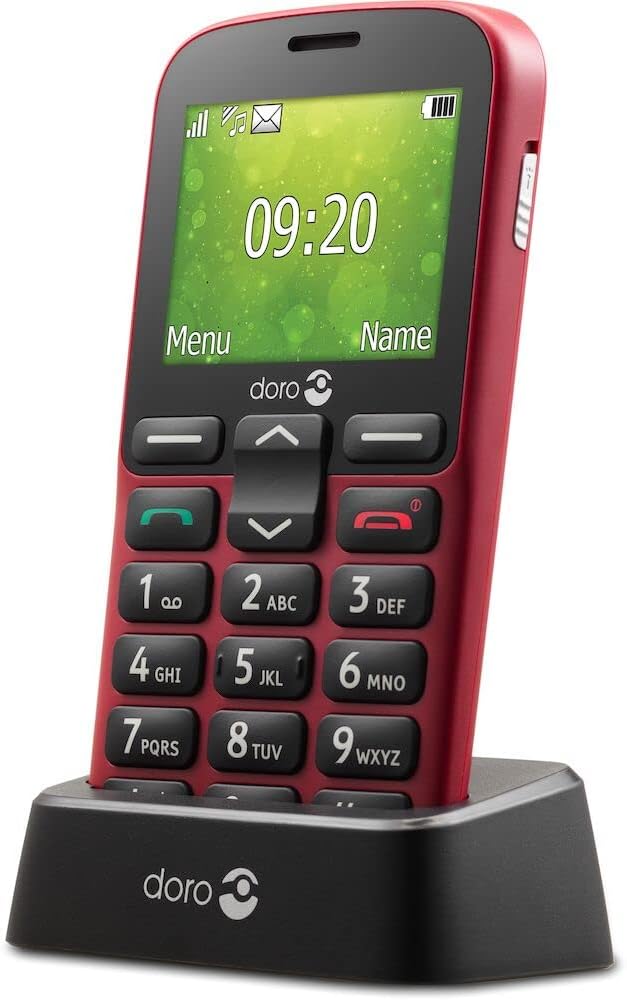
Image: The Doro 1380 mobile phone securely placed in its charging cradle.
2. Setup
2.1 Package Contents
Ensure your package contains the following items:
- Doro 1380 Mobile Phone
- Battery
- Charging Cradle
- Wall Charger
- Headset (may vary by region)
- User Manual (this document)
2.2 Inserting SIM Card(s) and Micro SD Card
- Remove the back cover: Gently pry open the back cover of the phone.
- Insert SIM card(s): The Doro 1380 supports Dual SIM. Carefully slide your Micro SIM card(s) (3FF) into the designated slot(s) with the gold contacts facing down.
- Insert Micro SD card (optional): If you wish to expand storage, insert a Micro SD card (up to 16GB) into its slot.
- Replace the back cover: Align the cover and press firmly until it clicks into place.

Image: Side view of the Doro 1380, showing the slim profile and button placement.
2.3 Battery Installation and Charging
- Install the battery: After inserting SIM/SD cards, place the battery into its compartment, ensuring the contacts align.
- Initial Charge: Connect the wall charger to the charging cradle, then place the phone in the cradle. Alternatively, connect the wall charger directly to the phone. Charge the phone for at least 4 hours before first use. The charging indicator will show progress.

Image: Icon illustrating the charging cradle, a convenient way to keep your phone charged.
2.4 Powering On/Off
- To Power On: Press and hold the red End Call/Power button until the Doro logo appears.
- To Power Off: Press and hold the red End Call/Power button, then confirm by selecting 'Power off' on the screen.
3. Operating Instructions
3.1 Making and Receiving Calls
- To Make a Call: Enter the phone number using the keypad and press the green Call button.
- To Answer a Call: Press the green Call button when the phone rings.
- To End a Call: Press the red End Call button.
3.2 Sending SMS Messages
- From the main menu, navigate to 'Messages'.
- Select 'Write new message'.
- Enter your message using the keypad.
- Select 'Options' then 'Send' and choose the recipient from your contacts or enter a new number.
3.3 Using the Camera
The Doro 1380 features a VGA camera to capture photos.
- From the main menu, select 'Camera'.
- Point the camera at your subject.
- Press the 'OK' button to take a picture.
- Photos are saved to the phone's memory or Micro SD card.

Image: Rear view of the Doro 1380, highlighting the camera lens and the assistance button.

Image: Icon symbolizing the camera function.
3.4 Assistance Button
The assistance button provides a quick way to alert pre-selected contacts in an emergency.
- Activation: Press and hold the assistance button on the back of the phone for 3 seconds, or press it twice consecutively within 1 second.
- Function: The phone will automatically send an assistance SMS message to your configured contacts and then attempt to call them in a pre-set order.
- Configuration: Ensure emergency contacts are set up in the phone's settings under 'Assistance'.

Image: Icon depicting a hand pressing a button, representing the assistance function.
3.5 Other Key Features
- Adjustable Font Size: Customize text size for better readability in the display settings.
- Flashlight: Activate the mini-torch feature from the menu for illumination.
- Bluetooth: Pair with compatible Bluetooth devices like headsets for hands-free communication.
- Speakerphone: Use the speakerphone function during calls for hands-free conversations.
- Ringtone Indicator: A visual indicator flashes when there is an incoming call.
- Calendar & Alarm: Utilize the built-in calendar for scheduling and set alarms for reminders.
- Whitelist Function: Restrict incoming calls to only numbers on your approved list.
- Dual SIM: The phone supports two SIM cards, allowing for separate numbers or plans.

Image: Icon symbolizing the integrated flashlight.

Image: Icon indicating the Whitelist feature for managing incoming calls.

Image: Icon illustrating the Dual SIM capability of the phone.
4. Maintenance
4.1 Battery Care
- Avoid exposing the battery to extreme temperatures.
- Do not puncture or damage the battery.
- If the phone will not be used for an extended period, charge it periodically to maintain battery health.
- Dispose of batteries responsibly according to local regulations.
4.2 Cleaning the Device
- Use a soft, dry cloth to clean the phone's surface.
- Avoid using harsh chemicals or abrasive materials.
- Keep the charging ports free from dust and debris.
4.3 General Handling
- Protect the phone from drops and impacts.
- Keep the phone away from water and excessive moisture.
- Do not attempt to disassemble the phone yourself.
5. Troubleshooting
If you encounter issues with your Doro 1380, refer to the following common problems and solutions:
| Problem | Possible Solution |
|---|---|
| Phone does not turn on | Ensure the battery is correctly installed and fully charged. Try charging the phone for at least 30 minutes. |
| No network signal | Check if the SIM card is correctly inserted. Move to an area with better network coverage. Contact your service provider. |
| Battery drains quickly | Reduce screen brightness. Close unused applications. Ensure the phone is not in an area with poor signal, which can increase battery usage. |
| Cannot hear caller / Caller cannot hear me | Check volume settings. Ensure microphone is not blocked. Try restarting the phone. |
| Assistance button not working | Verify that emergency contacts are correctly configured in the settings. Ensure the feature is enabled. |
If the problem persists, please refer to the Warranty and Support section for further assistance.
6. Specifications
Detailed technical specifications for the Doro 1380 mobile phone:
| Feature | Detail |
|---|---|
| Brand | Doro |
| Model Name | Doro 1380 |
| Model Number | 8322 |
| Operating System | Nucleus OS |
| Screen Size | 5.7 Centimeters (2.4 inches) |
| Resolution | 320 x 240 pixels |
| Cellular Technology | 2G |
| Connectivity Technology | Bluetooth |
| Special Features | Visual ring indicator, Hands-free, Mini-torch, Alarm, Assistance button |
| Battery Composition | Lithium-ion (800mAh) |
| Talk Time | Up to 8 hours |
| Standby Time | Up to 530 hours |
| SIM Card Type | Micro SIM (3FF) |
| Memory Card Support | Micro SD (up to 16GB) |
7. Warranty and Support
7.1 Warranty Information
Your Doro 1380 mobile phone comes with a standard manufacturer's warranty. Please refer to the warranty card included in your product packaging for specific terms, conditions, and duration. Keep your proof of purchase for any warranty claims.
7.2 Customer Support
For technical assistance, troubleshooting beyond this manual, or warranty inquiries, please contact Doro customer support. You can find contact information on the official Doro website or in the documentation provided with your phone.
Online Resources: Visit the official Doro website for FAQs, updated manuals, and support contact details.


