
1. Introduction
Thank you for choosing the CristalRecord EKOS LED Ceiling Fan. This manual provides essential information for the safe installation, operation, and maintenance of your new ceiling fan. Please read it thoroughly before installation and keep it for future reference.
The EKOS ceiling fan features an integrated LED light with three color temperature options (3000K warm white, 4000K neutral white, 6000K cool white). It is equipped with a silent DC motor offering 5 different speeds, a timer function (1h, 4h, 8h), and both summer and winter modes for year-round comfort. The fan includes a remote control for convenient operation and has a power-off memory function.
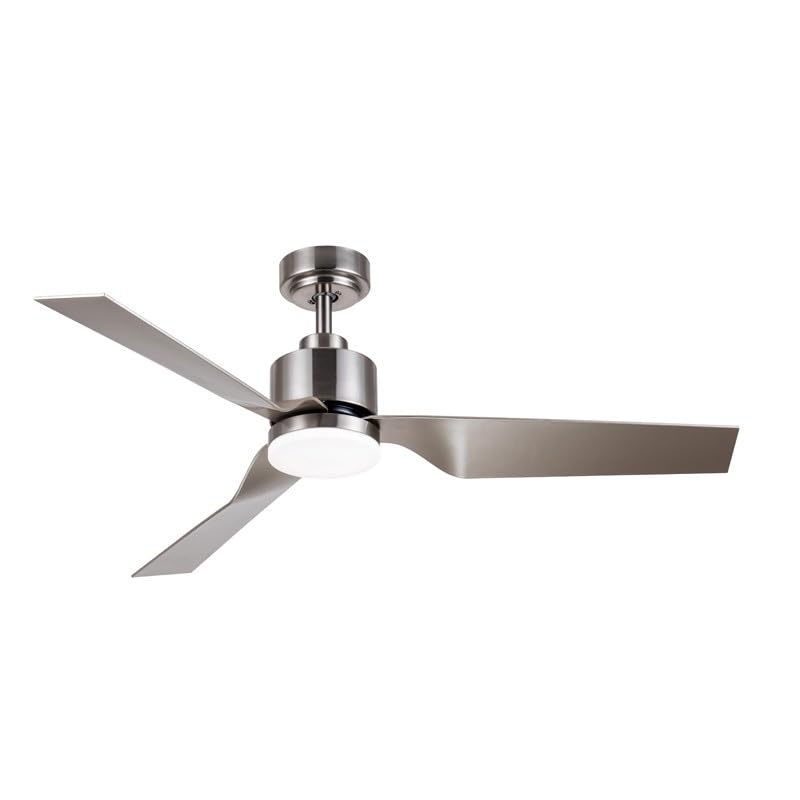
Image 1.1: Overview of the CristalRecord EKOS LED Ceiling Fan.
2. Safety Information
WARNING: To reduce the risk of fire, electric shock, or personal injury, always follow these safety guidelines:
- Read all instructions carefully before installation and use.
- Installation must be performed by a qualified electrician in accordance with all local and national electrical codes.
- Ensure the power supply is disconnected at the main circuit breaker before installation or servicing.
- The mounting structure must be capable of supporting the weight of the fan (refer to specifications for weight).
- Do not operate the fan with damaged wiring or if it is not functioning properly.
- Keep hands, clothing, and other objects away from the fan blades when the fan is operating.
- Do not attempt to repair or modify the fan yourself. Contact qualified service personnel.
3. Package Contents
Carefully unpack your ceiling fan and ensure all items are present. If any parts are missing or damaged, contact your retailer.
- Ceiling Fan Motor Housing with Integrated LED Light
- Fan Blades (3 units)
- Downrod and Canopy Assembly
- Mounting Bracket
- Remote Control with Wall Mount
- Hardware Pack (screws, washers, wire nuts)
- User Manual

Image 3.1: Close-up view of the fan's motor housing and integrated LED light.
4. Setup and Installation
IMPORTANT: Before beginning installation, ensure the power is turned OFF at the circuit breaker. Consult a qualified electrician if you are unsure about any part of the installation process.
- Prepare the Mounting Location: Ensure the ceiling joist or support structure is strong enough to hold the fan's weight and that there is adequate clearance for the blades.
- Install the Mounting Bracket: Secure the mounting bracket to the ceiling outlet box using the provided screws. Ensure it is firmly attached.
- Assemble the Downrod: Feed the electrical wires from the fan motor through the downrod. Attach the downrod to the fan motor housing.
- Hang the Fan: Carefully lift the fan assembly and hang it onto the mounting bracket hook. This will allow you to make electrical connections hands-free.
- Make Electrical Connections: Connect the fan's wires to the household wiring according to the wiring diagram provided in the full instruction manual (typically black to black, white to white, and green/bare copper to ground). Use wire nuts to secure connections.
- Secure the Fan: Once wiring is complete, carefully lift the fan off the hook and secure it to the mounting bracket with the screws provided.
- Attach Fan Blades: Securely attach each fan blade to the motor housing using the screws provided. Ensure all blades are tightened evenly.
- Install the Light Kit: Connect the light kit wiring to the fan's light wiring. Secure the LED light module to the fan housing.
- Install the Canopy: Slide the canopy up to the ceiling and secure it to cover the mounting bracket and wiring.

Image 4.1: Example of the CristalRecord EKOS LED Ceiling Fan installed in a modern living space.
5. Operating Instructions
Your CristalRecord EKOS LED Ceiling Fan is operated via the included remote control. Ensure batteries are correctly installed in the remote.
Remote Control Functions:
- ON/OFF Button: Turns the fan and light ON or OFF.
- Fan Speed Buttons (1-5): Adjusts the fan speed from 1 (lowest) to 5 (highest).
- Light CCT Button: Cycles through the three color temperatures: 3000K (Warm White), 4000K (Neutral White), and 6000K (Cool White).
- Timer Button (1h/4h/8h): Sets the fan to turn off automatically after 1, 4, or 8 hours.
- Summer/Winter Mode Button: Changes the direction of blade rotation.
- Summer Mode (Counter-clockwise): Creates a downward airflow, producing a cooling effect.
- Winter Mode (Clockwise): Creates an upward airflow, recirculating warm air trapped near the ceiling.
- Memory Function: The fan remembers the last light setting (CCT) and fan speed when turned off and on again.

Image 5.1: Detail of the integrated LED light module, capable of three color temperatures.
6. Maintenance
Regular maintenance ensures optimal performance and extends the life of your ceiling fan.
- Cleaning: Dust the fan blades and motor housing regularly with a soft, damp cloth. Do not use abrasive cleaners or solvents, as these can damage the finish.
- Blade Tightness: Periodically check that all blade screws are tight. Over time, they may loosen due to vibration.
- Light Source: The integrated LED light source is designed for long life and is not user-replaceable. If the LED light fails, contact customer support.
- Remote Control Batteries: Replace batteries in the remote control when its range decreases or it stops responding. Use the specified battery type.
WARNING: Always turn off the power at the circuit breaker before cleaning or performing any maintenance on the fan.
7. Troubleshooting
If you experience issues with your fan, refer to the following troubleshooting guide. If the problem persists, contact customer support.
| Problem | Possible Cause | Solution |
|---|---|---|
| Fan does not start | No power supply; Loose wire connections; Remote control battery low/dead. | Check circuit breaker; Ensure all wires are securely connected (power off first); Replace remote control batteries. |
| Light does not work | No power to light; Loose wire connection; LED module failure. | Check power supply; Verify light kit wiring (power off first); Contact customer support if LED module is faulty. |
| Fan wobbles | Loose blade screws; Unbalanced blades; Loose mounting bracket. | Tighten all blade screws; Ensure blades are balanced (use balancing kit if necessary); Verify mounting bracket is secure. |
| Remote control not working | Dead batteries; Remote not paired; Obstruction between remote and receiver. | Replace batteries; Refer to remote pairing instructions (if applicable); Ensure clear line of sight. |
8. Specifications
| Feature | Detail |
|---|---|
| Model Number | 85-636-18-281 |
| Brand | CristalRecord |
| Motor Type | DC Silent Motor |
| Number of Blades | 3 |
| Fan Speeds | 5 |
| Light Type | Integrated LED |
| Color Temperature (CCT) | 3000K (Warm), 4000K (Neutral), 6000K (Cool) |
| Timer Function | 1h, 4h, 8h |
| Operating Modes | Summer (cooling), Winter (heat recirculation) |
| Control Type | Remote Control |
| Power Source | Electric Corded |
| Mounting Type | Ceiling Mount |
| Finish | Satin |
| Room Type | Living Room (as per manufacturer suggestion) |

Image 8.1: Dimensional drawing showing key measurements of the fan (measurements in cm).
9. Warranty and Support
For warranty information, technical support, or service inquiries, please contact your retailer or the manufacturer directly. Keep your proof of purchase for warranty claims.
Manufacturer: CRISTALRECORD
For further assistance, please visit the official CristalRecord website or contact their customer service department.

