1. Introduction
Thank you for purchasing the XDUOO MT-605 Hybrid Tube Digital Power Amplifier. This manual provides essential information for the safe and efficient operation of your device. Please read it thoroughly before use and retain it for future reference.
The MT-605 combines the warmth of a 12AU7 vacuum tube with the efficiency of a TI TPA3116 digital amplifier chip, delivering a rich and detailed audio experience with 30W per channel output.
2. Safety Information
- Do not expose this device to rain or moisture.
- Do not disassemble the unit. Refer all servicing to qualified personnel.
- Ensure proper ventilation around the amplifier to prevent overheating.
- Use only the specified power adapter (DC 24V).
- Keep out of reach of children.
- Avoid placing the unit near heat sources or in direct sunlight.
3. Package Contents
- XDUOO MT-605 Amplifier Unit
- Power Adapter (DC 24V)
- User Manual (this document)
4. Product Overview
The XDUOO MT-605 is designed to deliver high-quality audio with a unique hybrid tube sound signature. Its robust construction and carefully selected components ensure reliable performance.
Key Features:
- 12AU7 Tube Pre-amplification: The 12AU7 vacuum tube processes the audio signal, imparting a sweet and delicate sound characteristic, reducing listening fatigue.
- TI TPA3116 Digital Amplifier Chip: Utilizes the efficient TI TPA3116 amplifier chip for powerful and clear sound reproduction, capable of driving bookshelf speakers with 30W per channel.
- Enthusiast-Grade Capacitors: Features Japanese Rubycon and Nichicon capacitors as main filter components, contributing to a smooth, warm sound and excellent high-frequency detail.
- Durable Aluminum Alloy Casing: The sand-blasted textured panel and hard aluminum alloy shell provide a simple, elegant appearance and effective resistance against external interference.
Front Panel
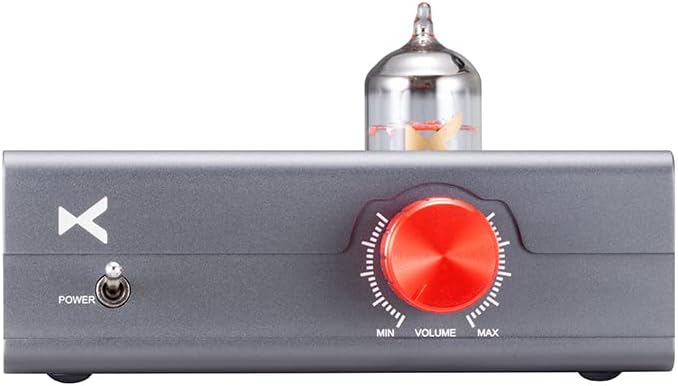
Figure 4.1: Front view of the MT-605 amplifier. Features include a power toggle switch on the left, a prominent red volume knob on the right, and the glowing 12AU7 vacuum tube centered on the top panel.
Rear Panel

Figure 4.2: Rear view of the MT-605 amplifier. From left to right, it features RCA L/R input jacks, speaker output terminals (R+ R- and L+ L-), and a DC 24V power input jack.
5. Setup Instructions
- Placement: Place the MT-605 on a stable, flat surface with adequate ventilation. Ensure it is away from direct sunlight, heat sources, and moisture.
- Connect Speakers: Connect your passive bookshelf speakers to the 'SPEAKER OUT' terminals on the rear panel. Ensure correct polarity (R+ to R+, R- to R-, L+ to L+, L- to L-). Use appropriate speaker cables.
- Connect Audio Source: Connect your audio source (e.g., CD player, DAC, streamer) to the 'INPUT' RCA jacks on the rear panel using RCA cables. Match left (L) and right (R) channels.
- Connect Power: Insert the DC 24V power adapter into the 'DC 24V' input jack on the rear panel, then plug the adapter into a suitable wall outlet.
- Initial Power On: Ensure the volume knob on the front panel is set to minimum ('MIN') before powering on the unit.
6. Operating Instructions
- Power On: Flip the 'POWER' toggle switch on the front panel to the 'ON' position. The 12AU7 tube will begin to warm up and glow.
- Select Source: (Not applicable for this model as it has only one input).
- Play Audio: Start playing audio from your connected source device.
- Adjust Volume: Slowly turn the 'VOLUME' knob clockwise to increase the sound level to your desired listening preference. Turn counter-clockwise to decrease volume.
- Power Off: When finished listening, turn the 'VOLUME' knob to minimum, then flip the 'POWER' toggle switch to the 'OFF' position.
7. Maintenance
- Cleaning: Use a soft, dry cloth to clean the exterior of the amplifier. Do not use liquid cleaners or abrasive materials.
- Tube Replacement: The 12AU7 tube has a finite lifespan. If you notice a degradation in sound quality or the tube stops glowing, it may need replacement. Consult a qualified technician or the manufacturer for guidance on tube replacement.
- Ventilation: Ensure the ventilation holes on the unit are not obstructed to prevent overheating.
8. Troubleshooting
- No Power:
- Check if the power adapter is securely connected to the amplifier and the wall outlet.
- Ensure the power switch is in the 'ON' position.
- Verify the wall outlet is functioning.
- No Sound:
- Confirm the audio source is playing and its volume is not muted or too low.
- Check all audio cable connections between the source and the amplifier.
- Ensure speaker cables are correctly connected to both the amplifier and speakers, with correct polarity.
- Increase the amplifier's volume knob.
- Distorted Sound:
- Reduce the volume level on both the source and the amplifier.
- Check for loose or damaged cables.
- Ensure speakers are correctly rated for the amplifier's output.
9. Specifications
The following are the technical specifications for the XDUOO MT-605 amplifier:
| Parameter | Value |
|---|---|
| Power Supply | DC 24V |
| Output Power | 2*30W (1KHz, 4Ω load) |
| THD+N | 0.1% @ 1KHz |
| SNR (Signal-to-Noise Ratio) | 85dB (A-weighted) |
| Crosstalk | 60dB |
| Frequency Response | 20Hz - 40KHz |
| Dimensions (L*W*H) | 12.0 * 11.4 * 6.7 cm |
| Weight | 0.39 kg |
| Tube Type | 12AU7 |
| Amplifier Chip | TI TPA3116 |

Figure 9.1: Dimensions of the MT-605 amplifier.
10. Warranty and Support
XDUOO products are designed and manufactured to the highest quality standards. For warranty information and technical support, please refer to the warranty card included with your product or visit the official XDUOO website. Please retain your proof of purchase for warranty claims.
For further assistance, contact your local dealer or the manufacturer's customer service.