
1. Introduction
The N-Gear The Flash Banger 777 is a portable Bluetooth speaker designed for powerful audio output and dynamic light effects. It features an 8-inch subwoofer, a clear wide-range tweeter, and synchronized RGB LED lighting. This versatile system supports various audio inputs and includes microphones for karaoke functionality, making it suitable for a wide range of entertainment needs.

Figure 1: N-Gear The Flash Banger 777 Portable Bluetooth Speaker
2. Package Contents
Please check the package for the following items:
- 1 x N-Gear The Flash Banger 777 Portable Bluetooth Speaker
- 1 x Wireless Microphone
- 1 x Wired Microphone
- 1 x Remote Control
- 1 x AUX Cable
- 1 x USB 220V Charger (Power Adapter)
- 1 x Quick Start Guide

Figure 2: Speaker and Included Accessories
3. Setup
3.1 Charging the Speaker
The Flash Banger 777 is powered by an integrated rechargeable Lithium-ion battery. Before first use, fully charge the speaker using the provided USB 220V charger. A full charge provides up to 5 hours of music playback. The USB port can also be used to charge external devices like smartphones.
3.2 Powering On/Off
Locate the POWER switch on the control panel. Slide the switch to the 'ON' position to power on the speaker. Slide it to 'OFF' to power off.
3.3 Control Panel Overview

Figure 3: Control Panel
The control panel features:
- VOLUME Knob: Adjusts the main speaker volume.
- BASS/TREBLE Knobs: Adjusts bass and treble levels for audio output.
- MIC.VOL Knob: Adjusts the volume of the connected microphones.
- ECHO Knob: Adjusts the echo effect for microphone input.
- MODE Button: Cycles through input modes (Bluetooth, USB, TF Card, AUX).
- EQ Button: Activates or changes equalizer presets.
- USB Port: For USB drive playback and charging external devices.
- TF CARD Slot: For MicroSD card playback.
- AUX IN Port: 3.5mm input for external audio devices.
- MIC Port: 6.35mm input for wired microphone.
- LED Switch: Toggles the RGB light effects.
4. Operating Instructions
4.1 Bluetooth Connection
- Power on the Flash Banger 777. The speaker will automatically enter Bluetooth pairing mode, indicated by a flashing light or display message.
- On your smartphone or Bluetooth-enabled device, navigate to the Bluetooth settings.
- Search for available devices and select "FLASH BANGER 777" from the list.
- Once connected, the speaker will emit a confirmation sound, and the Bluetooth indicator will become solid.
4.2 USB/MicroSD Card Playback
- Insert a USB drive or MicroSD card (up to 64GB) containing MP3 audio files into the respective port.
- The speaker will automatically switch to USB or TF Card mode and begin playback. If not, press the MODE button to select the correct input.
- Use the playback controls (Play/Pause, Next/Previous Track) on the speaker or remote control to manage your music.
4.3 AUX Input
- Connect an external audio device (e.g., MP3 player, laptop) to the AUX IN port using the provided 3.5mm AUX cable.
- Press the MODE button until "AUX" is displayed or the speaker switches to AUX mode.
- Control playback and volume from your connected device.
4.4 Microphone Usage (Karaoke Function)
The Flash Banger 777 includes both a wired and a wireless microphone for karaoke.
- Wired Microphone: Connect the wired microphone to the MIC port on the control panel.
- Wireless Microphone: Ensure the wireless microphone is powered on. It should automatically connect to the speaker.
Adjust microphone volume using the MIC.VOL knob and add echo effects with the ECHO knob. Bass and treble for the microphone can also be adjusted.

Figure 4: Wireless Microphone
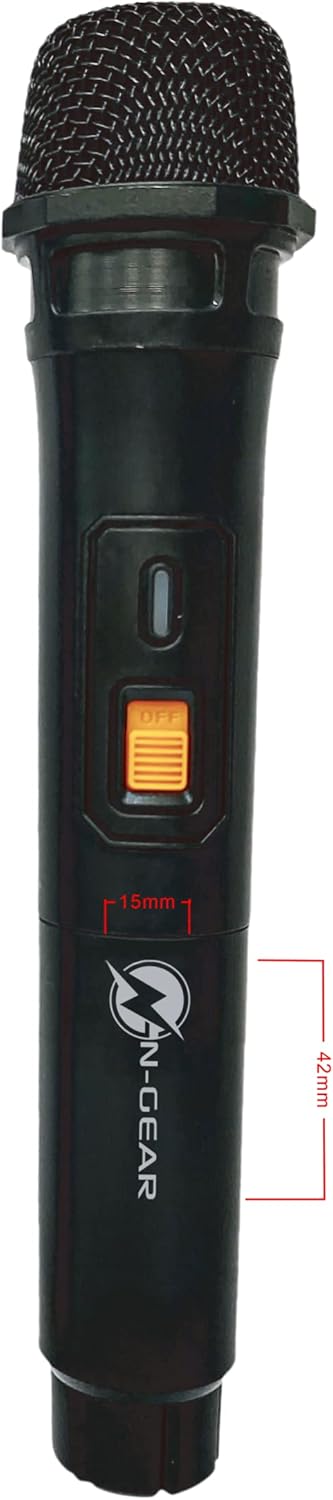
Figure 5: Wired Microphone
4.5 TWS (True Wireless Stereo) Function
The TWS function allows you to connect two Flash Banger 777 speakers wirelessly for a stereo sound experience. Refer to the Quick Start Guide for detailed pairing instructions for TWS mode.
4.6 RGB Light Effects
Toggle the RGB light effects using the LED switch on the control panel. The lights synchronize with the music to enhance the atmosphere.
5. Maintenance
- Cleaning: Use a soft, dry cloth to clean the speaker's exterior. Do not use abrasive cleaners or solvents.
- Storage: Store the speaker in a cool, dry place away from direct sunlight and extreme temperatures.
- Battery Care: To prolong battery life, avoid fully discharging the battery frequently. Charge the speaker regularly, even if not in use for extended periods.
- Water Resistance: This product is not waterproof. Avoid exposure to water or moisture.
6. Troubleshooting
- No Power: Ensure the speaker is charged and the POWER switch is in the 'ON' position.
- No Sound: Check the main VOLUME knob and ensure it is not set to minimum. Verify the audio source is playing and correctly connected (Bluetooth, USB, AUX).
- Bluetooth Pairing Issues: Ensure the speaker is in pairing mode. Turn off Bluetooth on other nearby devices to avoid interference. Try restarting both the speaker and your Bluetooth device.
- Microphone Not Working: Check microphone connections (for wired mic) and ensure the microphone is powered on (for wireless mic). Adjust the MIC.VOL knob.
- Distorted Sound: Reduce the volume of the speaker or the connected audio source. Ensure audio files are not corrupted.
7. Specifications
| Feature | Specification |
|---|---|
| Model Name | The Flash Banger 777 |
| Model Number | FB777 |
| Brand | N-Gear |
| Speaker Output Power | 160 Watts (Max) |
| Subwoofer Diameter | 8 Inches |
| Tweeter Size | 1 Inch |
| Connectivity Technology | Bluetooth, USB, AUX, Micro SD |
| Wireless Communication | Bluetooth |
| Power Source | Battery Powered (Lithium-ion) |
| Battery Life | Up to 5 hours |
| Dimensions (L x W x H) | 25 x 24 x 38 cm |
| Item Weight | 4.47 Kilograms |
| Color | Black |
| Material | Plastic, paper or polypropylene |
| Waterproof | False |
| Control Method | Remote Control |

Figure 6: Speaker Dimensions
8. Warranty and Support
For warranty information and customer support, please refer to the documentation included with your purchase or contact N-Gear customer service directly. Keep your proof of purchase for any warranty claims.


