
1. Introduction
The Volt Polska AVR PRO 5000VA Servo Voltage Stabilizer is designed to automatically regulate input voltage, providing stable and clean power to connected devices. It combines the functions of a voltage regulator and a surge protection device, enhancing the quality of power from the local grid or a generator. This device also suppresses electrical interference.
It is suitable for protecting sensitive electronic equipment such as computer kits, servers, routers, modems, network components, RTV equipment (amplifiers, audio mixers, speakers, musical equipment, televisions, stereo systems, CD-DVD players, receivers), and other similar devices.
2. Safety Instructions
- Read all instructions: Before operating the device, carefully read and understand all safety and operating instructions.
- Indoor use only: This device is designed for indoor use in dry environments. Do not expose it to rain, moisture, or excessive humidity.
- Proper grounding: Ensure the device is connected to a properly grounded electrical outlet.
- Ventilation: Do not block ventilation openings. Ensure adequate airflow around the unit to prevent overheating.
- Qualified personnel: Installation and servicing should only be performed by qualified personnel. High voltage is present inside the unit.
- Overload protection: Do not exceed the maximum load capacity of 5000VA. Overloading can damage the device and connected equipment.
- Liquid contact: Keep liquids away from the device. In case of accidental spillage, immediately disconnect power and contact qualified service personnel.
- Temperature: Operate the device within specified temperature ranges. Avoid extreme heat or cold.
- Cleaning: Disconnect the device from the power source before cleaning. Use a dry cloth; do not use liquid or aerosol cleaners.
3. Product Overview
The Volt Polska AVR PRO 5000VA features a robust design with clear indicators for operational status.
3.1 Front Panel
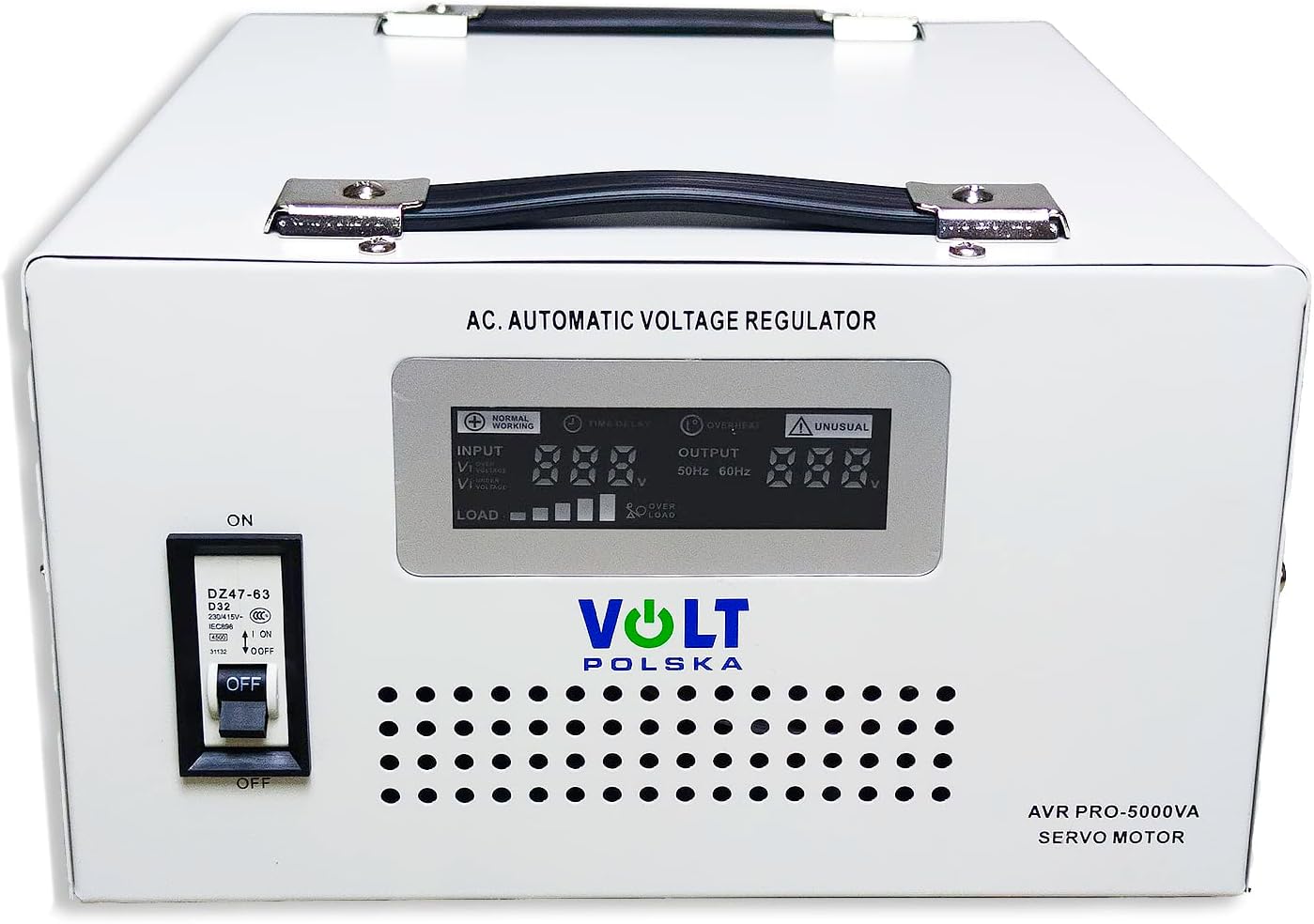
Image 1: Front view of the Volt Polska AVR PRO 5000VA Servo Voltage Stabilizer. This image displays the main digital display panel, the "ON/OFF" circuit breaker switch on the left, and ventilation grilles at the bottom. The display shows "INPUT" voltage, "OUTPUT" voltage, "LOAD" level, and indicators for "NORMAL WORKING" and "UNUSUAL" conditions.
- Digital Display: Shows real-time input voltage, output voltage, and load level.
- Status Indicators: LEDs for "NORMAL WORKING" and "UNUSUAL" conditions.
- Circuit Breaker (ON/OFF): Main power switch and overload protection.
- Ventilation Grilles: For heat dissipation.
3.2 Rear Panel

Image 2: Rear view of the Volt Polska AVR PRO 5000VA Servo Voltage Stabilizer. This image highlights the input power socket, two output sockets, a circuit breaker button, and various warning labels and product information, including the model number and specifications.
- Input Socket: For connecting the stabilizer to the main power supply.
- Output Sockets: For connecting devices that require stabilized power.
- Circuit Breaker Button: Additional protection and reset function.
- Ventilation Fan/Grille: For active cooling.
- Product Label: Contains model information, serial number, and basic specifications.
4. Setup
- Unpacking: Carefully remove the stabilizer from its packaging. Inspect for any signs of damage during transit.
- Placement: Place the stabilizer on a stable, flat surface in a well-ventilated area. Ensure there is sufficient space around the unit for proper airflow. Avoid direct sunlight, heat sources, and areas with high humidity or dust.
- Initial Power Connection:
- Ensure the circuit breaker on the front panel is in the "OFF" position.
- Connect the power cord from the stabilizer's input socket to a grounded wall outlet.
- Connecting Devices:
- Ensure all devices to be connected are turned off.
- Plug the power cords of your electronic devices into the output sockets on the rear panel of the stabilizer.
- Do not exceed the total rated power of 5000VA for all connected devices.
5. Operating Instructions
- Power On:
- After connecting all devices, switch the circuit breaker on the front panel to the "ON" position.
- The digital display will illuminate, showing the input voltage, output voltage, and load.
- The stabilizer will perform a brief self-test and then begin regulating the voltage. There might be a short delay (approximately 6 seconds) before the output stabilizes.
- Monitoring:
- Observe the digital display to monitor the input and output voltage levels. The output voltage should remain stable at approximately 230V (±3%).
- The "NORMAL WORKING" indicator should be lit. If the "UNUSUAL" indicator lights up, refer to the Troubleshooting section.
- Power Off:
- Before disconnecting devices or turning off the stabilizer, ensure all connected devices are powered off.
- Switch the circuit breaker on the front panel to the "OFF" position.
- Disconnect the stabilizer from the wall outlet if it will not be used for an extended period.
6. Maintenance
- Cleaning: Regularly clean the exterior of the stabilizer with a soft, dry cloth. Do not use liquid or abrasive cleaners. Ensure ventilation grilles are free from dust and debris.
- Ventilation: Periodically check that the ventilation openings are not obstructed. Blocked vents can lead to overheating and reduced performance.
- Cable Inspection: Inspect power cords and connections for any signs of wear, damage, or loose connections. Replace damaged cables immediately.
- Storage: If storing the unit for an extended period, disconnect it from power, clean it, and store it in a cool, dry place away from direct sunlight and extreme temperatures.
- Internal Servicing: Do not attempt to open the unit or perform internal servicing. This should only be done by qualified service personnel.
7. Troubleshooting
| Problem | Possible Cause | Solution |
|---|---|---|
| Stabilizer does not power on. |
|
|
| "UNUSUAL" indicator is lit. |
|
|
| Output voltage is unstable. |
|
|
| Unit makes unusual noise. |
|
|
8. Specifications
| Model | AVR PRO 5000VA 3% SERVO (5AVRZP5000) |
| Power Capacity | 5000 VA / 5000 W |
| Input Voltage Range | 100-260 VAC |
| Input Frequency | 50 Hz |
| Output Voltage | 230 V |
| Output Precision | ±3% |
| Delay Time | 6 seconds |
| Protections | Overload, Overvoltage, Undervoltage, Temperature, Short Circuit |
| Dimensions (L x W x H) | 302 x 260 x 146 mm |
| Weight | 12.5 kg |
| Material | Metal |
9. Warranty and Support
For warranty information and technical support, please refer to the contact details provided by Volt Polska or your retailer. Keep your purchase receipt as proof of purchase.
Importer Contact Information:
- Company: Volt Polska Sp. z o.o.
- Address: ul. Swierkowa 76, 62-771 Sopot, POLAND
- Website: www.voltpolska.pl
- Email: sales@voltpolska.pl
- Telephone: +4858 341 05 06, +4858 341 38 80
Note: The manufacturer guarantees software updates up to an unknown date. For the latest information, please visit the official Volt Polska website.

