
1. Product Overview
The Volt Polska SINUS 2000 24V electronic inverter is designed to supply 230V AC power to electrical devices from 24V DC batteries and vehicle electrical systems. It is particularly effective in vehicles and locations where direct connection to the main power grid is not possible.
Key Features:
- Pure Sine Wave Output: This inverter produces an output voltage with a sinusoidal waveform, identical to that of the utility grid. This allows it to power inductive loads such as power tools, air compressors, air conditioners, refrigerators, and freezers.
- Total Power (Peak): 2000VA
- Continuous Power: 1000W
- Battery Voltage: 24V DC
- Input Voltage: 21-31V DC
- Output Voltage: 225-235V AC
- Output Voltage Frequency: 50Hz (+-2Hz)
Compatible Devices:
- Refrigerators, Freezers
- Air Conditioners
- RTV devices (e.g., televisions, consoles, speakers)
- LED Lighting
- Home automation and smart home devices
- Power tools (e.g., drills, grinders)
- Household appliances (e.g., washing machines, microwaves)
- Central heating pumps
- Automatic gate motors and lifts
2. Safety Instructions
Read all safety instructions carefully before installing and operating the inverter. Failure to follow these instructions may result in electric shock, fire, or serious injury.
- Ventilation: Ensure the inverter is placed in a well-ventilated area to prevent overheating. Do not block ventilation openings.
- Dry Environment: Operate the inverter in a dry environment. Avoid exposure to water, rain, or excessive humidity.
- Correct Voltage: Connect the inverter only to a 24V DC power source. Connecting to a different voltage may damage the unit.
- Grounding: Ensure proper grounding of the inverter and connected devices as per local electrical codes.
- Avoid Overloading: Do not exceed the inverter's continuous power rating (1000W) or peak power rating (2000VA). Overloading can cause damage to the inverter and connected appliances.
- Disconnect Before Maintenance: Always disconnect the inverter from both the DC power source and AC loads before performing any maintenance or cleaning.
- Children and Pets: Keep the inverter out of reach of children and pets.
- Flammable Materials: Do not operate the inverter near flammable liquids, gases, or other combustible materials.
3. Package Contents
Verify that all items are present in the package:
- 1x Volt Polska SINUS 2000 24/230V Power Inverter Unit
- 1x Set of DC input cables (red for positive, black for negative)
4. Setup
Follow these steps to properly set up your power inverter:
- Prepare the Inverter: Ensure the inverter's power switch is in the OFF position.
- Positioning: Place the inverter in a stable, dry, and well-ventilated location. Ensure there is adequate space around the unit for airflow.
- Connect DC Cables to Inverter:
- Connect the red DC input cable to the inverter's positive (+) terminal.
- Connect the black DC input cable to the inverter's negative (-) terminal.
- Tighten the terminal screws securely to ensure a good connection.
- Connect DC Cables to Battery:
- Connect the other end of the red DC input cable to the battery's positive (+) terminal.
- Connect the other end of the black DC input cable to the battery's negative (-) terminal.
- Ensure all battery connections are tight and secure. Loose connections can cause overheating and damage.
- Final Check: Double-check all connections to ensure they are correct and secure before proceeding to operation.
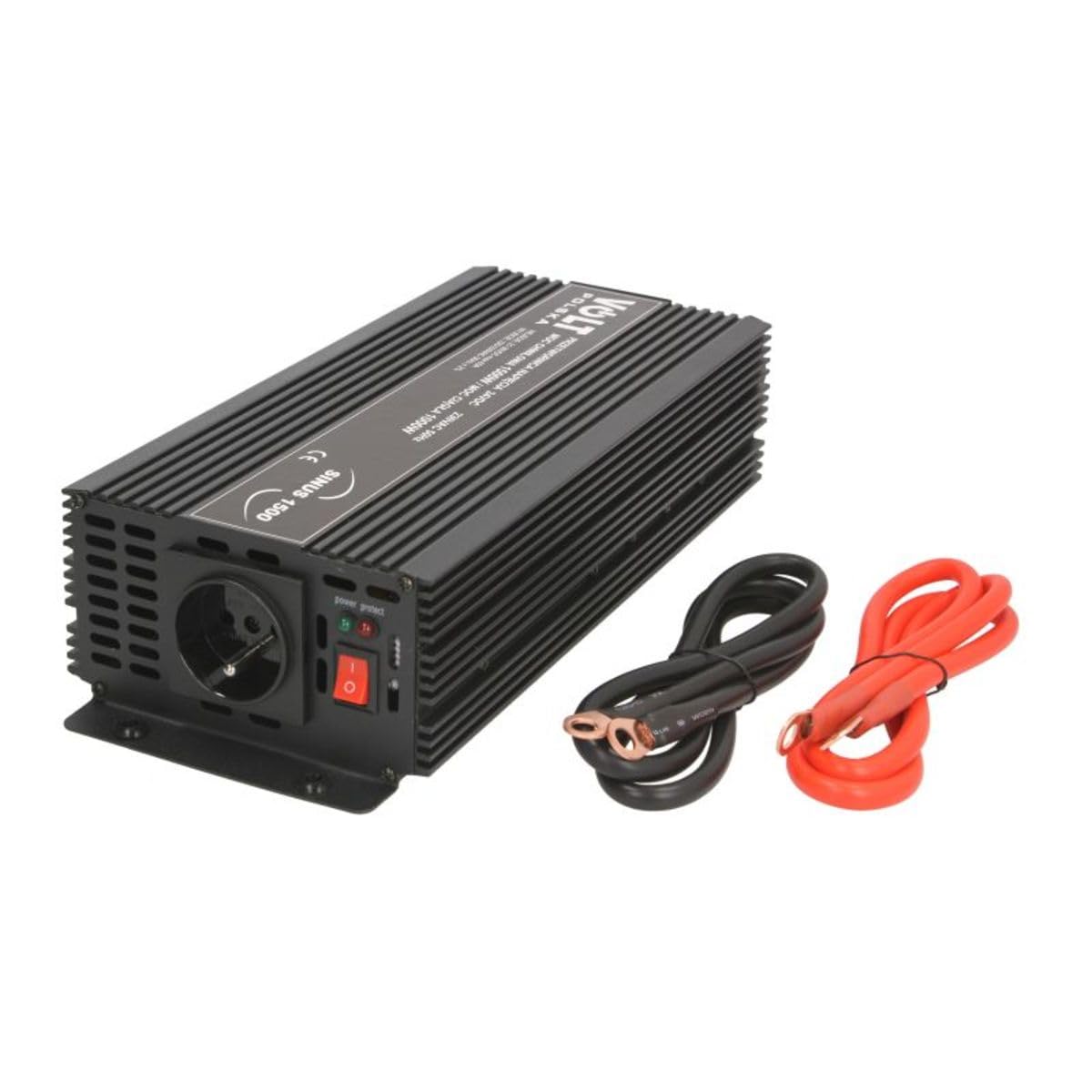
Image 1: Volt Polska SINUS 2000 24/230V Power Inverter with included DC input cables. The inverter unit is black with cooling fins, a fan, and clearly marked positive and negative terminals. The red and black cables are shown coiled next to the unit.
5. Operating Instructions
Once the inverter is properly set up, follow these steps for operation:
- Power On: Flip the inverter's power switch to the ON position. The indicator light should illuminate, indicating the inverter is active.
- Connect AC Devices: Plug your 230V AC devices into the inverter's AC output sockets. Ensure the total power consumption of all connected devices does not exceed the inverter's continuous power rating (1000W).
- Monitor Operation: Observe the inverter for any unusual noises, smells, or excessive heat. If any issues arise, immediately disconnect the AC loads and turn off the inverter.
- Power Off: When you are finished using the inverter, first disconnect all AC devices, then turn the inverter's power switch to the OFF position.
- Disconnect from Battery (for storage): For long-term storage or if the inverter will not be used for an extended period, disconnect the DC input cables from the battery to prevent battery discharge.
6. Maintenance
Regular maintenance ensures optimal performance and longevity of your inverter.
- Cleaning: Periodically clean the exterior of the inverter with a dry, soft cloth. Do not use liquid cleaners or solvents. Ensure ventilation openings are free from dust and debris.
- Connection Check: Regularly inspect all DC and AC connections for tightness and corrosion. Tighten any loose connections and clean any corrosion.
- Battery Maintenance: Ensure your 24V battery system is well-maintained and charged according to the battery manufacturer's recommendations.
- Storage: When not in use, store the inverter in a cool, dry place, away from direct sunlight and extreme temperatures. Disconnect it from the battery during storage.
7. Troubleshooting
This section addresses common issues you might encounter with your inverter.
| Problem | Possible Cause | Solution |
|---|---|---|
| No power output / Inverter not turning on |
|
|
| Low or unstable AC output voltage |
|
|
| Inverter shuts down automatically |
|
|
| Fan not operating |
|
|
8. Specifications
| Feature | Specification |
|---|---|
| Brand | Volt Polska |
| Model Name | SINUS 2000 24/230V (1000/2000W) |
| Manufacturer Model Number | 3SIP200024 |
| Part Number | 24/230 AC-1000 SINUS |
| Total Power (Peak) | 2000VA |
| Continuous Power | 1000W |
| Battery Voltage | 24V DC |
| Input Voltage Range | 21-31V DC |
| Output Voltage | 225-235V AC |
| Output Frequency | 50Hz (+-2Hz) |
| Output Waveform | Pure Sine Wave |
| Product Dimensions (L x W x H) | 31.5 x 13 x 7.5 cm |
| Product Weight | 2.2 kg |
| Batteries Included | No |
| Batteries Required | Yes (24V DC source) |
9. Warranty and Support
For warranty information, technical support, or service inquiries, please contact Volt Polska directly through their official website or customer service channels. Keep your purchase receipt as proof of purchase.


