
1. Introduction
Thank you for choosing the Ecarke 54W 5400LM Cordless LED Work Light. This versatile and portable work light is designed to provide bright illumination for various tasks, compatible with Milwaukee 18V lithium-ion batteries. It features dual brightness modes, a 140° adjustable head, and integrated USB and Type-C charging ports for added convenience. Please read this manual thoroughly before use to ensure safe and optimal operation.
2. Safety Information
WARNING: Read all safety warnings and instructions before using this product.
- Always ensure the work light is securely attached to a compatible battery before operation.
- Do not look directly into the LED light when it is on, as it can cause eye damage.
- Keep the work light away from flammable materials.
- Do not expose the work light to rain or wet conditions unless specifically designed for it.
- Use only with specified battery types (Milwaukee 18V lithium-ion batteries).
- Disconnect the battery when not in use or before cleaning.
- Do not modify or attempt to repair the work light. Contact customer support for assistance.
- This product is not a toy. Keep out of reach of children.
3. Package Contents
The Ecarke 54W 5400LM Cordless LED Work Light package includes:
- 1 x Ecarke 54W 5400LM Cordless LED Work Light
Note: Milwaukee 18V lithium-ion battery is not included and must be purchased separately.
4. Product Features
- High Brightness: 54W power output providing up to 5400 Lumens of bright illumination.
- Dual Brightness Modes: Easily switch between low and high brightness settings to suit your needs and conserve battery life.
- 140° Adjustable Head: The light head can be adjusted up to 140 degrees, allowing for flexible light direction.
- USB & Type-C Charging Ports: Equipped with USB-A and Type-C ports (5V 2.1A output) to charge your mobile devices, tablets, or other small electronic devices.
- Milwaukee 18V Battery Compatibility: Designed to work seamlessly with Milwaukee 18V lithium-ion batteries (battery not included).
- 4-Layer Safety Protection: Built-in overload, overcurrent, overheating, and low-voltage protection to safeguard your batteries and the device.
- Efficient Heat Dissipation: Features ultra-thin aluminum fins and a multi-layer heat sink for effective cooling and extended lifespan.
- Durable Construction: Sturdy build with ABS & V2 materials for heat and shock resistance.
- Portable Design: Lightweight and compact, making it easy to carry in tool bags, backpacks, or car trunks.
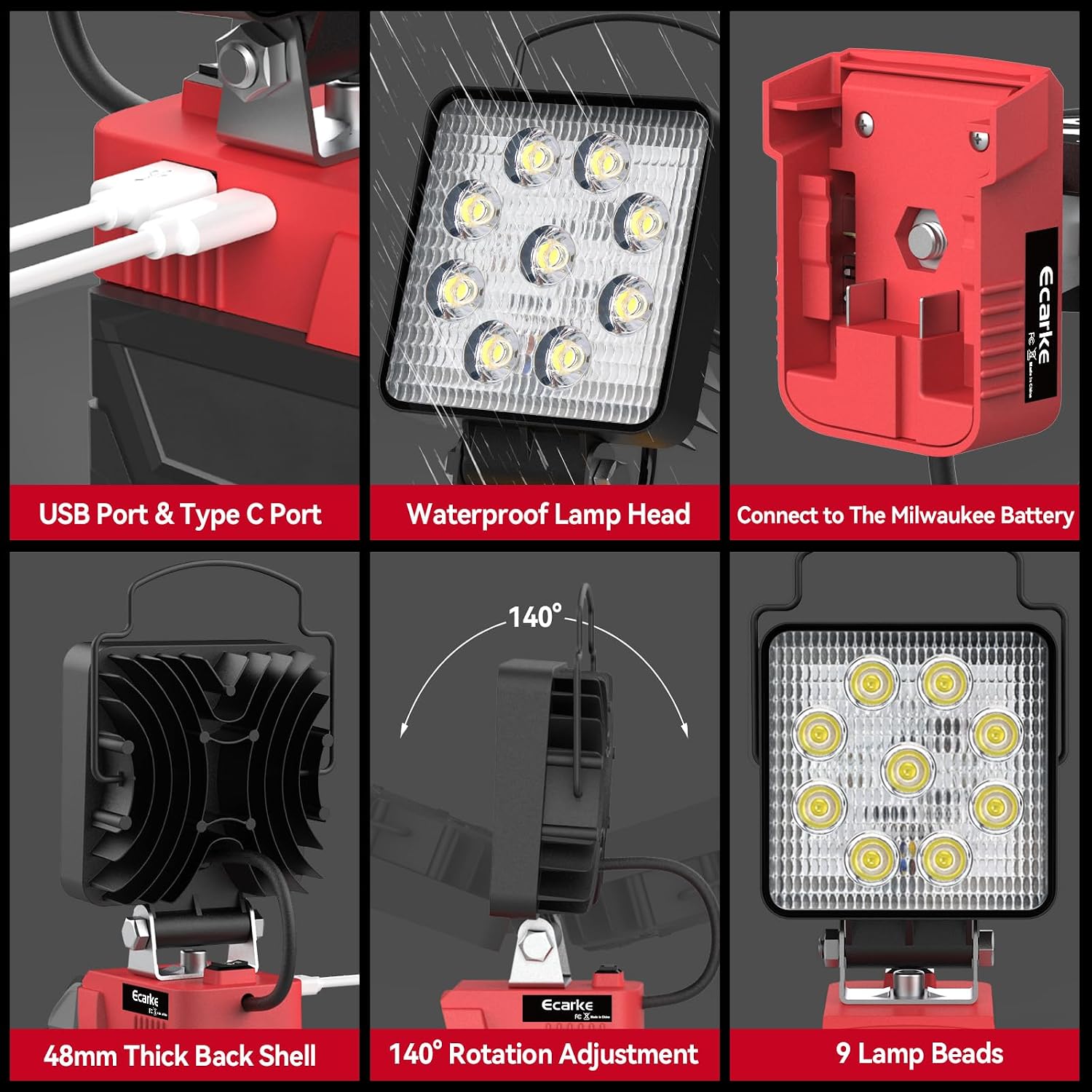
This image highlights the integrated USB and Type-C charging ports, the waterproof design of the lamp head, and the secure connection point for Milwaukee 18V batteries. It also shows the 140° rotation adjustment and the 9 lamp beads.

This graphic illustrates the internal circuitry providing 15V low voltage protection, ensuring reliable power for safe, bright, and stable lighting while protecting the connected battery.
5. Setup
- Prepare Battery: Ensure your Milwaukee 18V lithium-ion battery is fully charged.
- Attach Battery: Align the battery with the base of the work light. Slide the battery onto the light's base until it clicks securely into place.
- Adjust Angle: Use the adjustable bracket to set the desired lighting angle (up to 140° rotation).

This image visually demonstrates the simple three-step process: inserting the battery, powering on the light, and the finished setup ready for use.
6. Operating Instructions
6.1 Powering On/Off and Brightness Adjustment
- Power On: Locate the rocker switch on the back of the battery adapter. Push the switch to the 'I' position for low brightness.
- High Brightness: Push the switch further to the 'II' position for high brightness (5400 Lumens).
- Power Off: Return the switch to the center 'O' position to turn off the light.

This image provides a detailed view of the work light's controls, including the power switch for 2-speed adjustment (high and low brightness), USB port, and Type-C port.
6.2 Using Charging Ports
The work light features USB-A and Type-C output ports (5V 2.1A) to charge your electronic devices.
- Connect Device: Plug your device's charging cable into the appropriate USB-A or Type-C port on the side of the battery adapter.
- Charging: Your device will begin charging. The light does not need to be on for the charging ports to function.
- Disconnect: Once charging is complete, disconnect your device.

This image shows the dual USB-A and Type-C charging ports being used to power mobile devices, illustrating the convenience for emergency outdoor charging during activities like camping.
6.3 Applications
This work light is suitable for a wide range of applications, including:
- Garage projects and car repairs
- Outdoor activities like camping, hiking, and fishing
- Job site lighting and workshop tasks
- Emergency lighting during power outages

This composite image demonstrates the versatility of the Ecarke LED Work Light across different settings, including workshops, car repairs, fishing, camping, hiking, and general garage use.
This video from EcarkeWorks provides a general overview of the cordless work light, demonstrating its compatibility with Milwaukee 18V batteries and its compact design.
This video from EcarkeWorks showcases the LED work light's functionality and how it attaches to a Milwaukee M18 18V battery, highlighting its ease of use.
This video from EcarkeWorks demonstrates the portability and practical use of the LED work light with a Milwaukee M18 18V battery, showing its compact size and bright output.
7. Maintenance
- Cleaning: Wipe the light with a soft, damp cloth. Do not use harsh chemicals or abrasive cleaners.
- Storage: Store the work light in a dry place, away from direct sunlight and extreme temperatures. Remove the battery if storing for extended periods.
- Inspection: Periodically check for any damage to the housing, cable, or switch. Do not use if damaged.
8. Troubleshooting
| Problem | Possible Cause | Solution |
|---|---|---|
| Light does not turn on | Battery not connected properly Battery is depleted Switch is in 'Off' position | Ensure battery is clicked in securely Charge or replace battery Move switch to 'I' or 'II' position |
| Light is dim | Low brightness mode selected Battery is low | Switch to 'II' position for high brightness Charge or replace battery |
| Device not charging via USB/Type-C | Cable not connected properly Battery is depleted Device incompatible | Ensure cable is fully inserted Charge or replace battery Verify device compatibility with 5V 2.1A output |
| Light turns off unexpectedly | Low-voltage protection activated Overheating protection activated | Charge or replace battery Allow light to cool down before resuming use |
9. Specifications
| Feature | Specification |
|---|---|
| Brand | Ecarke |
| Model Number | SKU066950005-US-FBA-5 |
| Power Source | Battery Powered (Compatible with Milwaukee 18V Lithium-Ion) |
| Wattage | 54W (Light Source Wattage: 27 Watts) |
| Brightness | 5400 Lumens |
| Voltage | 18 Volts |
| Light Source Type | LED |
| Color Temperature | 6000 Kelvin |
| Number of Light Sources | 9 |
| Beam Angle | 140 Degrees |
| Product Dimensions | 5"L x 3"W x 2"H |
| Item Weight | 12 ounces |
| Material | Aluminum, ABS |
| Special Features | Low Voltage Protection, Portable, USB & Type-C Charging Ports |
10. Warranty and Support
For warranty information or technical support, please refer to the product packaging or contact Ecarke customer service directly. Keep your purchase receipt as proof of purchase.