
1. Safety Information
Please read and understand this entire manual before attempting to assemble, install, or operate this product. Failure to follow these instructions could result in electric shock, fire, or serious personal injury.
- All electrical connections must be in accordance with local codes, ordinances, and the National Electric Code (NEC).
- Installation should be performed by a qualified electrician.
- Always disconnect power at the main circuit breaker before installation or maintenance.
- Ensure the installation site can support the fan's weight (approximately 30.8 pounds).
- Do not bend blade holders during installation or cleaning.
2. Package Contents
Verify that all components are present before beginning installation:
- Fan Motor Assembly
- 8 Aluminum Blades
- LED Light Kit (32W, 3000K/4500K/6000K)
- Remote Control with Wall Holder
- Mounting Bracket
- Downrods (4.5", 12", and 24" lengths)
- Canopy
- Light Globe
- Hardware Pack (screws, wire nuts, pins)
3. Installation Instructions
Refer to the installation video for a visual guide. Ensure power is disconnected at the circuit breaker before starting.
Video: Step-by-step guide on installing the WINGBO 80 Inch Industrial Ceiling Fan.
- Install Fan Mounting Bracket: Secure the mounting bracket to the ceiling junction box using appropriate screws. Ensure it is firmly attached and can support the fan's weight.
- Attach Blades: Attach each aluminum blade to the fan motor assembly using the provided screws. Ensure all screws are tightened securely.
- Install LED Light Kit: Connect the LED light kit wires to the corresponding wires on the fan motor assembly. Secure the light kit in place.
- Install Downrod: Select the desired downrod length (4.5", 12", or 24"). Feed the fan wires through the downrod. Secure the downrod to the fan motor assembly with the provided pin and screws.
- Hang the Motor Assembly: Carefully lift the fan motor assembly and hang it onto the mounting bracket.
- Connect Wires: Connect the fan's wires to the receiver module, matching colors (e.g., White to White, Blue to Blue, Red to Red, Yellow to Yellow, Grey to Grey). Then, connect the receiver module's wires to the ceiling's electrical wires (White to Neutral, Black to Hot, Green/Yellow to Ground) using wire nuts.
- Install Receiver Module: Carefully tuck the connected wires and the receiver module into the mounting bracket.
- Attach Canopy: Slide the canopy up the downrod and secure it to the mounting bracket with screws, covering the wiring connections.
- Install Light Globe: Twist or snap the light globe onto the LED light kit, ensuring it is securely fastened.

Image: Product dimensions and available downrod lengths for various ceiling heights.

Image: The three included downrod options for flexible installation.
4. Operating Instructions
The WINGBO ceiling fan is operated using the included remote control. Ensure the remote has working batteries.

Image: Remote control for fan and light functions.
Fan Speed Control
- The remote features 6-speed settings. Press the corresponding number button (1-6) to adjust the fan speed.
- Press the power button to turn the fan on or off.
Light Control
- The integrated LED light offers 3 color temperature settings (3CCT: 3000K Warm White, 4500K Natural White, 6000K Cool White).
- Press the light button to cycle through the color temperatures or turn the light on/off.
Reversible Motor Function (Summer/Winter Mode)
The fan features a reversible DC motor to optimize airflow for different seasons:
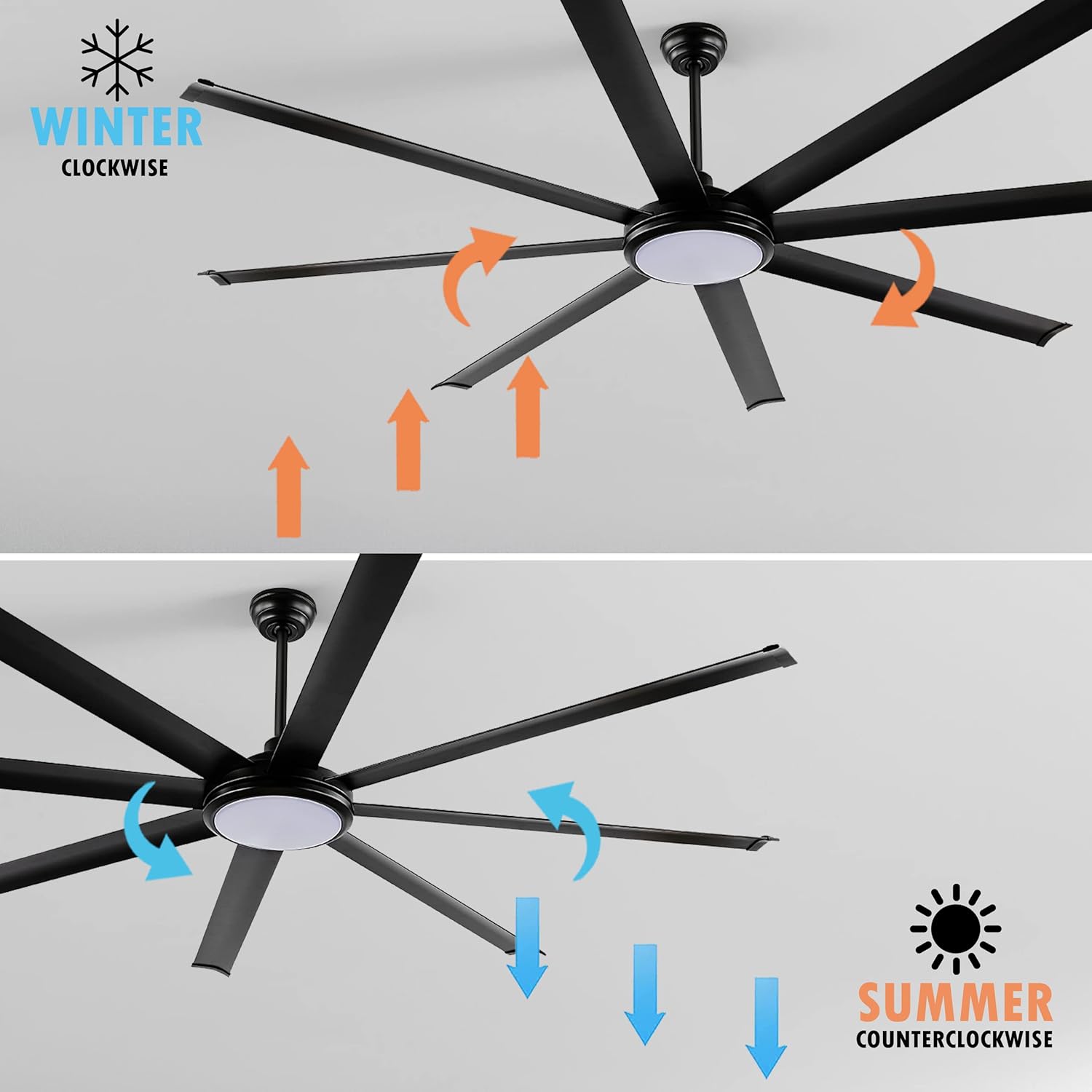
Image: Fan direction for optimal airflow in summer and winter.
- Summer Mode (Counter-Clockwise): The fan blades rotate counter-clockwise, pushing air downwards to create a cooling breeze.
- Winter Mode (Clockwise): The fan blades rotate clockwise, drawing air upwards to circulate warm air trapped near the ceiling, helping to warm the room.
- Use the reverse button on the remote control to switch between these modes.
5. Maintenance
Regular maintenance ensures optimal performance and longevity of your ceiling fan.
- Cleaning: Periodically clean the fan blades and motor housing with a soft, damp cloth. Do not use abrasive cleaners or solvents.
- Check Connections: Annually, check all screws and connections for tightness. Due to the fan's movement, some connections may become loose over time.
- Lubrication: The DC motor is permanently lubricated and does not require additional oiling.
6. Troubleshooting
If you experience issues with your fan, consult the following common problems and solutions:
| Problem | Possible Cause | Solution |
|---|---|---|
| Fan does not start | No power to the fan; Loose wire connections; Remote control battery dead. | Check circuit breaker and wall switch; Ensure all wire connections are secure; Replace remote control batteries. |
| Fan is noisy | Loose motor housing screws; Loose blade attachment screws; Fan blades unbalanced. | Tighten all screws on the motor housing and blade attachments; Use a balancing kit to balance the blades. |
| Light does not work | Loose wire connection to light kit; Faulty LED light kit. | Check light kit wiring connections; Contact customer support if the LED light kit is faulty. |
| Remote control not working | Dead batteries; Incorrect pairing. | Replace batteries; Refer to remote control pairing instructions (if applicable, usually in a separate remote manual). |
7. Specifications
| Feature | Detail |
|---|---|
| Brand | WINGBO |
| Model Name | WINGBO 80" Ceiling Fan (SYCF8002) |
| Color | Matte Black |
| Product Dimensions | 80"D x 80"W x 33"H |
| Number of Blades | 8 |
| Power Source | DC |
| Light Wattage | 32 watts (LED) |
| Voltage | 120 Volts |
| Control Method | Remote |
| Number of Power Levels | 6 |
| Motor Type | DC |
| Installation Type | Hardwired |
| Indoor/Outdoor Usage | Indoor (suitable for damp places) |
| Included Components | Remote, 3 Downrods (4.5", 12", 24") |
8. Warranty and Support
WINGBO is committed to providing quality products and customer satisfaction.

Image: WINGBO After-Sales Assurance details.
- Motor Warranty: 10 Years
- Accessories Warranty: 3 Years
- Technical Support: 24/7 assistance is available for any product-related inquiries or issues.
For further assistance, please refer to the contact information provided with your purchase or visit the official WINGBO website.