
LANGYU B0BD86XD7G
Portable Electric Cleaning Brush User Manual
Model: B0BD86XD7G
Product Overview
The LANGYU Portable Electric Cleaning Brush is a powerful, rechargeable, and cordless cleaning tool designed to simplify your household chores. Featuring a one-button start and 360-degree rotating action, it efficiently tackles stubborn stains on various surfaces, reducing strain on your wrists and arms. Its lightweight and portable design, combined with interchangeable brush heads, makes it a versatile solution for comprehensive cleaning.
This cleaning brush is ideal for use on tiles, floors, sinks, walls, windows, and more. It comes with a USB charging cable and a convenient wall-mounted holder for easy storage and drainage.

The LANGYU Portable Electric Cleaning Brush, showcasing its main unit and the three included brush heads: a cashmere head, a PP brush head, and a sponge brush head. This image highlights the product's compact design and versatility.
Package Contents
Please ensure all items are present in the package:
- 1 x Main Unit of the Electric Cleaning Brush
- 1 x USB Charging Cable
- 3 x Replaceable Brush Heads (Cashmere, PP, Sponge)
- 1 x Wall-mounted Holder
- 1 x Instruction Manual
Setup
- Initial Charge: Before first use, fully charge the device using the provided USB cable. Connect the USB cable to the charging port on the main unit and plug the other end into a standard USB power adapter (not included). The charging time is approximately 1-2 hours.
- Attaching Brush Heads: Select the appropriate brush head for your cleaning task. Align the chosen brush head with the rotating mechanism on the main unit and gently push until it clicks securely into place. The brush heads are designed for easy removal and replacement.

A close-up view of the three interchangeable brush heads included with the electric cleaning brush: the soft cashmere head, the durable PP brush head, and the absorbent sponge brush head. These heads are easily attached and detached for various cleaning needs.
Operating Instructions
- Power On/Off: Press the power button located on the handle to turn the device on. Press it again to turn it off. The device features a simple one-button operation.
- Cleaning Surfaces: Apply a suitable cleaning solution to the surface or directly to the brush head. Gently press the rotating brush head against the surface you wish to clean. The 360-degree rotation will help scrub away dirt and grime.
- Recommended Uses:
- PP Brush Head: Ideal for tough stains on tiles, grout, and bathroom surfaces.
- Sponge Brush Head: Suitable for delicate surfaces like glass, windows, and sinks, or for applying polish.
- Cashmere Head: Best for gentle cleaning and polishing of sensitive surfaces.
- Battery Life: A full charge provides approximately 120 minutes of continuous operation. Recharge the device when the power indicator suggests low battery.

A hand demonstrating the "one-button start" feature of the electric cleaning brush, highlighting the ease of operation.
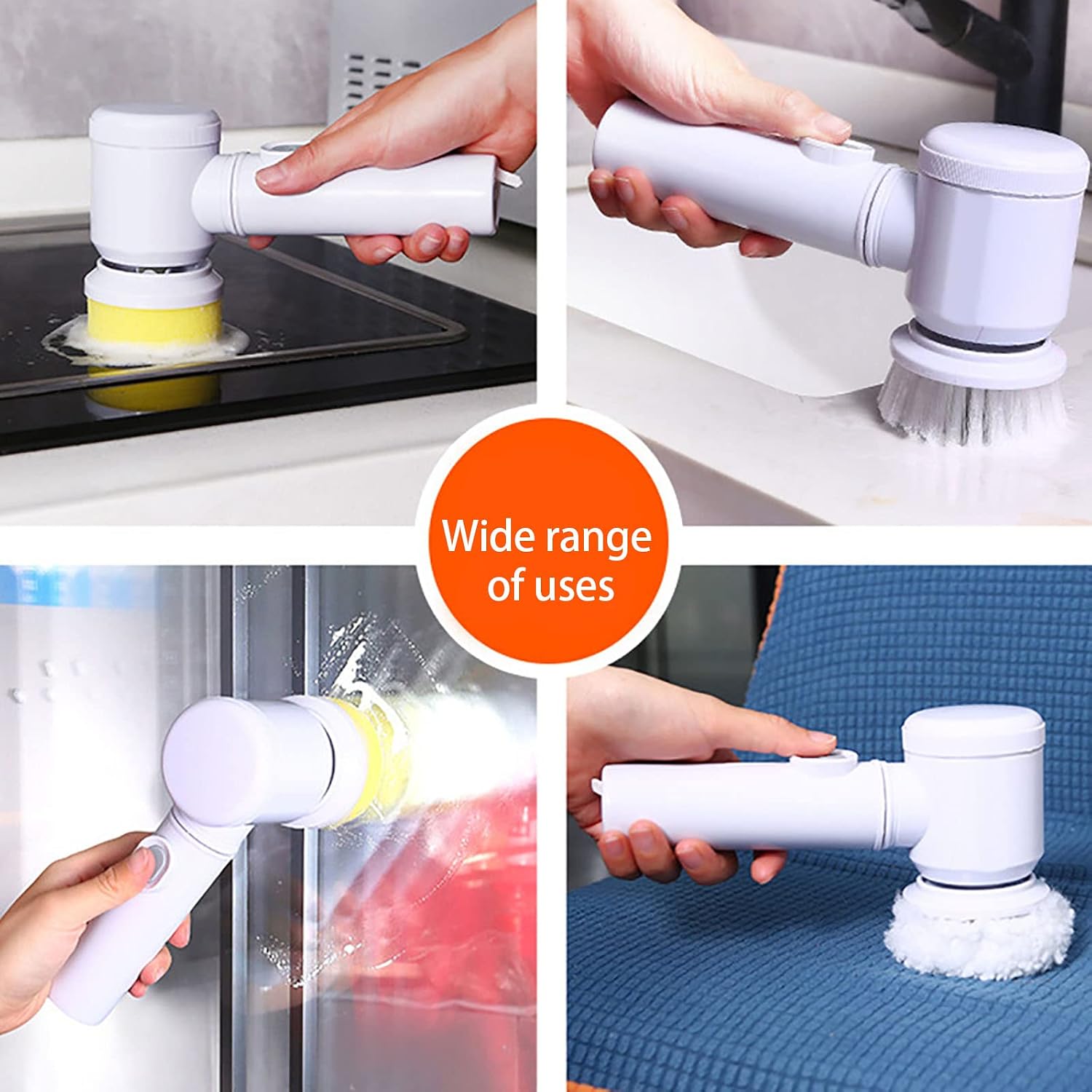
A collage illustrating the wide range of uses for the electric cleaning brush, including cleaning kitchen counters, sinks, glass surfaces, and even fabric, demonstrating its versatility for different household cleaning tasks.
Maintenance
- Cleaning the Brush Heads: After each use, remove the brush head and rinse it thoroughly under running water to remove any dirt or cleaning solution residue. Allow the brush heads to air dry completely before storing.
- Cleaning the Main Unit: Wipe the main unit with a damp cloth. Do not submerge the main unit in water.
- Storage: For convenient storage and drainage, utilize the included wall-mounted holder. Attach the holder to a clean, dry wall surface using its sticky hooks. Hang the cleaning brush on the holder after use.
- Battery Care: To prolong battery life, avoid completely draining the battery before recharging. Store the device in a cool, dry place when not in use for extended periods.

The electric cleaning brush conveniently stored on its wall-mounted holder, demonstrating its space-saving design and ease of access in a kitchen environment.
Troubleshooting
| Problem | Possible Cause | Solution |
|---|---|---|
| Device does not turn on. | Battery is depleted. | Charge the device fully using the USB cable. |
| Brush head does not rotate or rotates weakly. | Low battery; Brush head not properly attached; Obstruction. | Ensure device is fully charged. Reattach the brush head securely. Check for any debris obstructing the rotation. |
| Reduced cleaning effectiveness. | Brush head is worn out or dirty; Inappropriate brush head for task. | Clean or replace the brush head. Ensure you are using the correct brush head for the surface and type of dirt. |
| Device stops working unexpectedly. | Battery depleted; Internal malfunction. | Recharge the device. If the issue persists after charging, contact customer support. |
Specifications
- Product Name: Portable Electric Cleaning Brush
- Model: B0BD86XD7G
- Brand: LANGYU
- Dimensions: Approximately 7.9 x 4.3 inches (Main Unit)
- Weight: Approximately 400g
- Material: ABS (Acrylonitrile Butadiene Styrene) + Electronic Components
- Battery: 1500mAh Lithium Battery
- Charging Time: 1-2 hours
- Continuous Operation Time: Up to 120 minutes
- Charging Interface: USB
- Special Features: Portable, Cordless, Rechargeable, 360-degree Rotation, Wall-mounted Design
Warranty and Support
While specific warranty details are not provided in this manual, we are committed to your satisfaction. If you encounter any issues or have questions regarding your LANGYU Portable Electric Cleaning Brush, please do not hesitate to contact our customer support team.
We aim to respond to all inquiries within 24 hours to provide assistance and resolve any concerns you may have.
For support, please refer to the contact information provided on the product packaging or the retailer's website where you purchased the item.
Important Notices
- Due to different lighting effects and monitors, the color of the actual item may slightly differ from the images shown.
- Please allow a difference of 1-2 cm in measurements due to manual configuration.
- Keep the device out of reach of children.
- Do not use the device for purposes other than its intended cleaning function.
Ask a question about this manual
Ask about setup, troubleshooting, compatibility, parts, safety, or missing instructions. Manuals+ will review the question and use this page’s manual context to help answer it.