
WELLFOR 28W x 36L LED Framed Mirror
WELLFOR 28W x 36L Wall LED Framed Mirror User Manual
Model: 28W x 36L LED Framed Mirror (Brushed Gold)
Introduction
Thank you for choosing the WELLFOR 28W x 36L Wall LED Framed Mirror. This mirror features both backlit and front-lighted LED strips, a dimmer, and a defogger function, designed to enhance your bathroom or hotel vanity space. This manual provides essential information for safe installation, operation, and maintenance of your new mirror. Please read it thoroughly before installation and keep it for future reference.

Image: The WELLFOR 28W x 36L Wall LED Framed Mirror in brushed gold, showcasing its dual lighting and elegant design in a modern bathroom setting.
Safety Information
WARNING: Follow package instructions for safe use. Improper installation or use can lead to electric shock, fire, or personal injury.
- Ensure power is disconnected at the circuit breaker before installation or servicing.
- All wiring must be in accordance with national and local electrical codes.
- This product is designed for indoor use only. Do not expose to direct water spray.
- Handle the mirror with care to prevent breakage. The mirror features safety shatter-proof film glass.
- Do not attempt to modify or repair the mirror. Contact qualified personnel for assistance.

Image: Demonstration of the safety shatter-proof film glass, showing how the glass remains intact even if broken, enhancing user safety.
Key Features
- Dual Lighted Mirror: Features both Back LED and Front LED Stripes for synchronous lighting control. Minimum 90 CRI ensures true color rendering.
- Dimmable Smart Mirror: Adjustable brightness from 100% to 10% with brightness memory function.
- Adjustable Color Temperature: Tap to change light temperature between 3000K (Warm Light), 4000K (Natural Light), and 6000K (White Light).
- Defogging Function: Integrated anti-fog system prevents mirror fogging. Automatically shuts off after 60 minutes for energy saving.
- Durable Construction: Anti-Corrosion Anodized Aluminum frame with IP44 waterproof rating.
- Flexible Installation: Can be installed horizontally or vertically using Z-bars.
- Wall Switch Control: Supports direct control of mirror light and defogger ON/OFF via a wall switch.

Image: Detail of the mirror's construction, highlighting the anti-corrosion anodized aluminum frame and the placement of the dimmable back LED strips.

Image: Detailed view of the mirror's slope edge design and the super bright light emitted from the front LED strip.
Setup and Installation
The WELLFOR LED Framed Mirror is designed for easy and safe installation. It can be mounted either horizontally or vertically to suit your space and preference.
Mounting Options:
- Vertical Mounting: Ideal for taller spaces or when a portrait orientation is desired.
- Horizontal Mounting: Suitable for wider vanity areas or a landscape orientation.
The mirror is installed using Z-bars (included). Ensure the mounting surface is sturdy and capable of supporting the mirror's weight (approximately 25.6 pounds).

Image: Illustration showing the flexibility of installing the mirror either horizontally or vertically to fit different bathroom layouts.
Electrical Connection:
Connect the mirror's electrical wiring to your home's electrical system according to local codes. It is recommended to have a qualified electrician perform the installation to ensure safety and proper functionality.
Operating Instructions
Your WELLFOR LED Framed Mirror features intuitive touch controls for various functions.
Light Control:
- Power ON/OFF: Tap the power icon on the mirror surface to turn the lights on or off.
- Adjust Color Temperature: Tap the light color changing icon (usually a circle or light bulb icon) to cycle through 3000K (Warm Light), 4000K (Natural Light), and 6000K (White Light).
- Adjust Brightness (Dimming): Touch and hold the light color changing icon to dim the light from 100% down to 10%. Release when desired brightness is reached. The mirror has a brightness memory function.

Image: Visual representation of the three available light color temperatures (Warm, Natural, White) and how to switch between them using a short press on the touch control.

Image: Illustration demonstrating the dimming capability of the mirror, showing 100%, 50%, and 10% brightness levels, controlled by a long press.
Defogger Function:
- Activate Defogger: Tap the defogger icon (usually a fan or steam icon) on the mirror surface to activate the anti-fog function.
- Automatic Shut-off: The defogger will automatically turn off after 60 minutes to conserve energy.
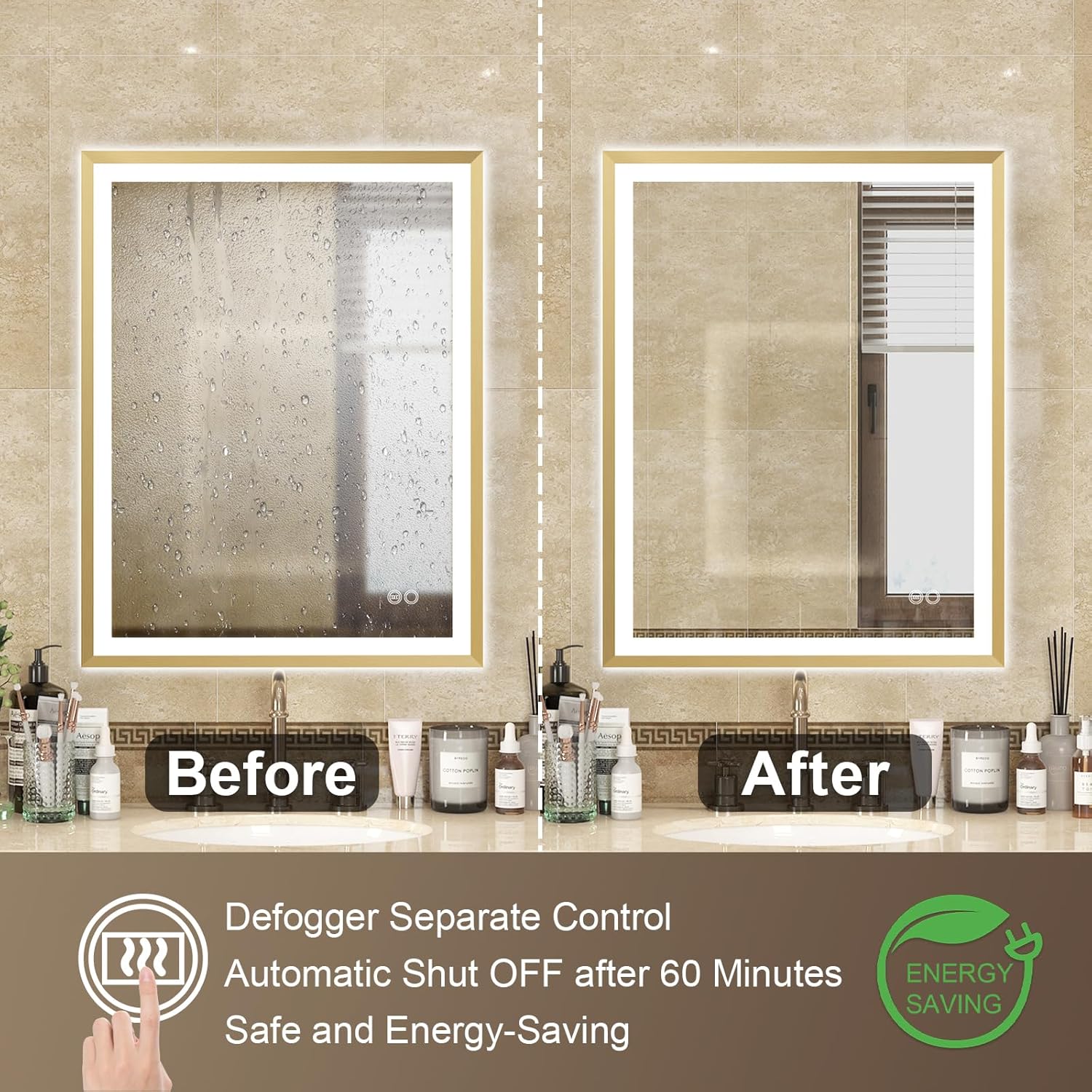
Image: Before and after comparison showing the effectiveness of the defogging function, clearing condensation from the mirror surface.
Wall Switch Control:
The mirror supports control via an external wall switch. The wall switch can directly control the mirror light and defogger ON/OFF, providing convenience for daily use.

Image: Depiction of the mirror being controlled by a standard wall switch, illustrating its compatibility with external power controls.
Product Video:
Video: An official product video demonstrating the key features and operation of the WELLFOR Wall LED Framed Mirror, including touch controls for light and defogger, and installation options. (Duration: 0:28)
Maintenance
To ensure the longevity and optimal performance of your WELLFOR LED Framed Mirror, follow these maintenance guidelines:
- Cleaning: Use a soft, damp cloth and a mild, non-abrasive glass cleaner to clean the mirror surface. Avoid using harsh chemicals or abrasive materials that could damage the mirror or frame finish.
- Frame Care: Wipe the aluminum frame with a soft, dry cloth. Do not use metal polish or abrasive cleaners on the frame.
- Electrical Components: Ensure the mirror is dry before reconnecting power after cleaning. Do not spray water directly onto electrical components.
- Regular Inspection: Periodically check the mounting hardware to ensure it remains secure.
Troubleshooting
If you encounter any issues with your WELLFOR LED Framed Mirror, please refer to the following common troubleshooting steps:
| Problem | Possible Cause | Solution |
|---|---|---|
| Lights not turning on. | No power supply; loose wiring; faulty touch switch. | Check circuit breaker. Ensure all connections are secure. Try tapping the touch switch firmly. |
| Defogger not working. | Defogger not activated; automatic shut-off engaged. | Tap the defogger icon to activate. If recently used, wait for it to cool down or reactivate. |
| Lights flickering or dim. | Incorrect brightness setting; power fluctuation. | Adjust brightness using the touch and hold function. Ensure stable power supply. |
| Mirror is fogged. | Defogger not active or insufficient time. | Activate the defogger. Allow a few minutes for it to clear the fog. |
If the problem persists after trying these steps, please contact WELLFOR customer support for further assistance.
Specifications
| Attribute | Detail |
|---|---|
| Brand | WELLFOR |
| Model Dimensions | 36"L x 28"W |
| Frame Material | Anodized Aluminum |
| Frame Color | Brushed Gold |
| Light Source | LED (Backlit and Front Lighted) |
| Color Temperature | 3000K (Warm), 4000K (Natural), 6000K (White) |
| Brightness | Up to 2200 lumens, 10%-100% Dimmable |
| CRI | Minimum 90 |
| Special Features | Defogger (60-min auto shut-off), Touch Sensor, Explosion Proof Glass, Brightness Memory, Wall Switch Control |
| Mounting Type | Wall Mount (Vertical/Horizontal) |
| IP Rating | IP44 (Full Enclosed back sheet) |
| Item Weight | 25.6 pounds |
| UPC | 731262633223 |
| ASIN | B0BD7YD449 |
Warranty and Support
WELLFOR is committed to providing high-quality products. For specific warranty details, please refer to the documentation included with your purchase or visit the official WELLFOR website.
If you require technical assistance, have questions about installation, or need to report a defect, please contact WELLFOR customer support:
- Manufacturer: WELLFOR
- Online Store: Visit the WELLFOR Store on Amazon
- User Manual (PDF): Download PDF User Manual
- For further assistance, please refer to the contact information provided on the product packaging or the official WELLFOR website.
Related documents28W x 36L LED Framed Mirror


Ask a question about this manual
Ask about setup, troubleshooting, compatibility, parts, safety, or missing instructions. Manuals+ will review the question and use this page’s manual context to help answer it.