
LEKATO PD705
Contents
LEKATO PD705 Percussion Sample Pad User Manual
Model: PD705 | Brand: LEKATO
1. Product Overview
The LEKATO PD705 Percussion Sample Pad is a versatile electronic drum pad designed for musicians of all levels. It features 9 velocity-sensitive pads, a vast library of sounds, and extensive connectivity options for seamless integration into any musical setup. This manual provides essential information for setting up, operating, and maintaining your PD705.

Figure 1: LEKATO PD705 Percussion Sample Pad
2. Setup
2.1 Unboxing and Included Components
Upon opening the package, ensure all components are present:
- LEKATO PD705 Percussion Sample Pad
- Power Adapter
- User Manual (this document)
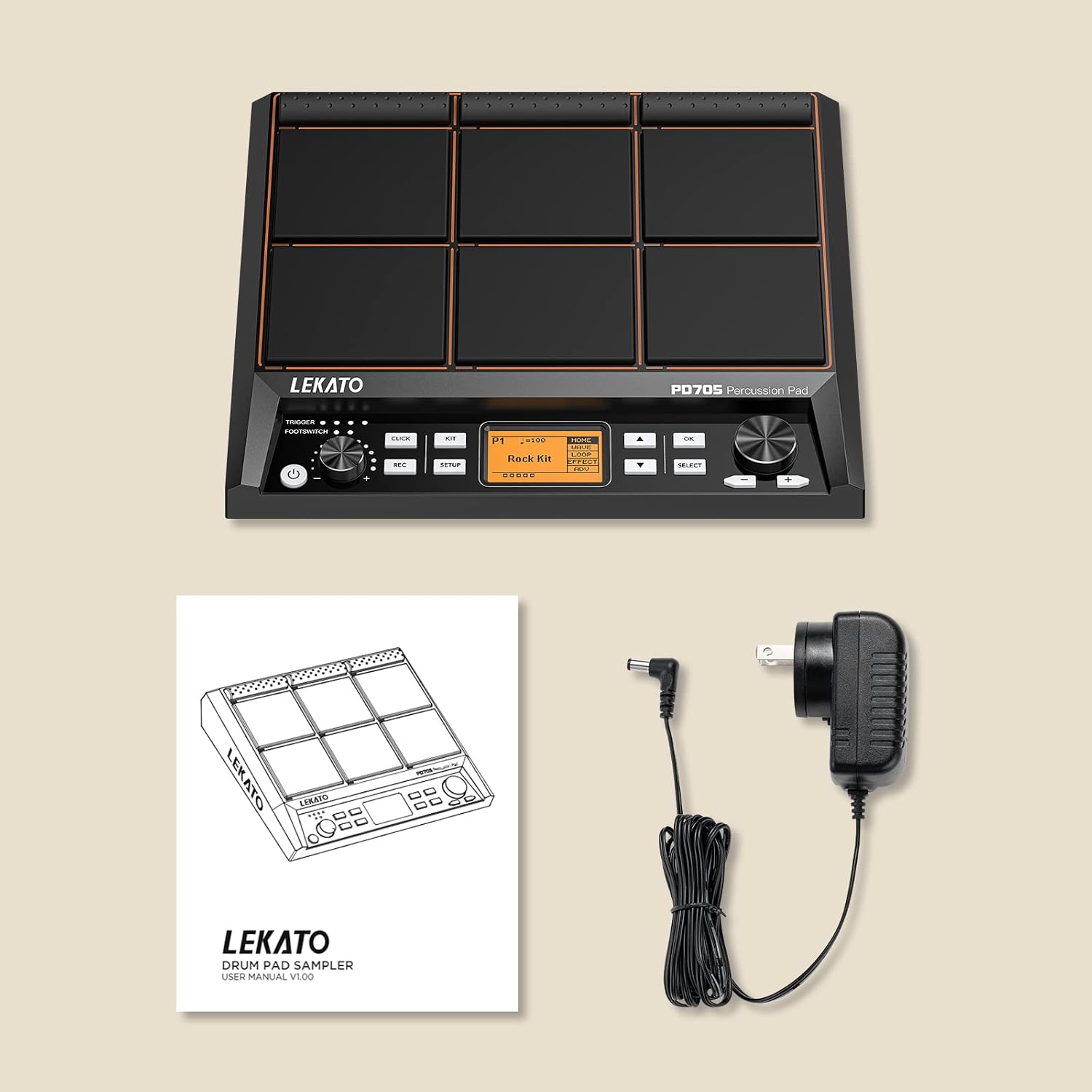
Figure 2: Included Components
2.2 Connecting the Device
The PD705 offers various connection options for integration into your setup:
- Power: Connect the included power adapter to the DC input on the rear panel.
- Audio Output: Use the L/R (Main Out) jacks to connect to an amplifier, mixer, or audio interface.
- Headphones: Plug your headphones into the dedicated headphone jack for private practice.
- AUX Input: Connect an external audio source (e.g., smartphone, MP3 player) to the AUX input to play along with backing tracks.
- MIDI I/O: Use the 5-PIN MIDI IN/OUT ports for traditional MIDI connections with other MIDI devices.
- USB MIDI: Connect the USB-B port to your computer for MIDI communication and sample management.
- USB Storage: The USB-A port allows connection of a USB memory drive for importing custom samples and kits.
- Trigger Inputs: Expand your setup with external pads or triggers using the dedicated trigger inputs (TRG 1/2, TRG 3/4). These can be split for additional triggers.
- Footswitch: Connect velocity-sensitive footswitches to the FS1 and FS2 inputs for controlling kick drum and hi-hat.

Figure 3: Rear Panel Connections
3. Operating the PD705
3.1 Pads and Sound Selection
The PD705 features 9 dual-zone, velocity-sensitive pads that respond dynamically to your playing. It comes pre-loaded with over 592 percussion sounds and 30 drum kits, offering a wide range of sonic possibilities.

Figure 4: Velocity-Sensitive Pads in Use
To select a drum kit, use the KIT button and navigation controls. The dot matrix LCD provides clear visual feedback on the selected kit and audio-level activity.

Figure 5: In-Demand Sound Library
3.2 Customization and Looping
The PD705 allows you to customize your sound by saving up to 20 custom kits. You can import your own samples using the WaveManager software (available for Windows and macOS) via a 32GB SD card or USB memory drive.

Figure 6: Robust Firmware for Customization
Utilize the built-in looper and metronome functions for practice and performance. The REC button allows for recording your performances.
3.3 MIDI and USB Functionality
The PD705 can function as a MIDI controller for synthesizer modules and can connect to your computer via USB-B for easy backing track triggering and DAW/VST integration.
Video 1: LEKATO Percussion Pad Review by AlternativeDrummer. This video demonstrates the pad's features and sound capabilities.
Video 2: LEKATO Electric Drum Pad Sample Multipad Percussion Pad. This video showcases the pad's performance and various sounds.
Video 3: LEKATO Percussion Sample Pad Review by Williams. This video provides a detailed review of the pad's features and usability.
4. Maintenance
To ensure the longevity and optimal performance of your LEKATO PD705, follow these maintenance guidelines:
- Cleaning: Use a soft, dry cloth to wipe down the pads and casing. Avoid abrasive cleaners or solvents.
- Storage: Store the unit in a cool, dry place away from direct sunlight and extreme temperatures.
- Handling: Avoid dropping the unit or subjecting it to strong impacts.
5. Troubleshooting
If you encounter issues with your PD705, refer to the following common troubleshooting steps:
- No Sound: Check all cable connections (power, audio output, headphones). Ensure the volume knob is turned up.
- Pads Not Responding: Verify that the unit is powered on. Check pad sensitivity settings in the menu.
- Connectivity Issues: For MIDI or USB problems, ensure drivers are correctly installed on your computer (if required) and check cable integrity.
- Firmware Updates: The manufacturer provides frequent updates to optimize performance and fix bugs. Refer to the official LEKATO website or the full User Manual (PDF) for instructions on how to check your current firmware version and perform updates.
For more detailed troubleshooting and advanced settings, please consult the comprehensive User Manual (PDF).
6. Specifications
| Feature | Detail |
|---|---|
| Brand | LEKATO |
| Model Name | PD705 |
| Product Dimensions | 14.29 x 12.01 x 1.46 inches |
| Item Weight | 6.96 pounds |
| Body Material | Plastic |
| Material Type | Silicone |
| Color | Black |
| Connector Type | Audio L/R, USB, MIDI IN/OUT, Trigger Inputs |
| Sounds | 592+ preset percussion sounds, 30 drum kits |
| Custom Kits | Up to 20 custom kits (via SD card/USB drive) |
7. Warranty and Support
For warranty information and technical support, please refer to the official LEKATO website or contact their customer service directly. Keep your purchase receipt as proof of purchase for warranty claims.
Additional resources, including the WaveManager software and firmware updates, are available on the manufacturer's support page.
Documents and downloads
Ask a question about this manual
Ask about setup, troubleshooting, compatibility, parts, safety, or missing instructions. Manuals+ will review the question and use this page’s manual context to help answer it.