
eppfun AK3040Pro
eppfun AK3040Pro USB-C Bluetooth 5.2 Transmitter User Manual
Model: AK3040Pro
Introduction
The eppfun AK3040Pro is a versatile USB-C Bluetooth 5.2 audio transmitter designed to provide high-quality wireless audio for various devices. Featuring Qualcomm aptX-Adaptive technology, it minimizes audio delay for synchronized audio and video, making it ideal for gaming and media consumption. This manual provides detailed instructions for setting up, operating, and maintaining your AK3040Pro.

Image: The eppfun AK3040Pro USB-C Bluetooth transmitter shown with its included 3.5mm analog microphone.
What's in the Box
- eppfun AK3040Pro USB-C Bluetooth 5.2 Transmitter
- 3.5 mm Analog Mic
- User Manual (this document)
Key Features
- Qualcomm aptX-Adaptive: Equipped with a Qualcomm QCC3040 Chip, this technology minimizes audio delay to approximately 60ms, ensuring perfectly synchronized audio and video for an immersive experience.
- Advanced Bluetooth 5.2: Offers enhanced stability and reliability with four times the range and two times the speed compared to older Bluetooth versions.
- Wireless Communication: Includes a mini analog microphone for seamless voice chat. Supports HFP mode for using your Bluetooth headset's built-in mic for calls.
- Plug & Play Simplicity: Easy to use with automatic pairing mode upon first use. Simply plug into a USB 2.0/3.0 port.
- Audio Decoding Support: Supports multiple audio codecs including aptX-LL, SBC, Aptx, Aptx-Adaptive, and Aptx-HD. Note: Your headphones must also support the same standard for optimal performance.
Compatibility
The eppfun AK3040Pro is compatible with a wide range of operating systems and devices:
- Operating Systems: Windows 8/10/11, Nintendo Switch OS, Linux OS, Mac OS.
- Devices: PS4, PS5, PC, Mac, Nintendo Switch.
- Compatible with all Bluetooth headphones from version 2.1 and onwards.

Image: The eppfun AK3040Pro connected to a Nintendo Switch, demonstrating its plug-and-play compatibility.

Image: A comparison table highlighting the eppfun AK3040Pro's features, including Bluetooth 5.2 and various aptX codec supports, against other devices.
Setup and Pairing
Follow these steps to set up and pair your eppfun AK3040Pro with your audio device:
- Plug In: Insert the eppfun AK3040Pro into an available USB-C port on your PC, Mac, PS5, PS4, or Nintendo Switch.
- Initial Pairing Mode: For the first time use, the LED indicator on the adapter will automatically flash red and blue, indicating it has entered pairing mode.
- Pair with Headphones/Speakers: Put your Bluetooth headphones or speakers into their pairing mode.
- Connection Confirmation: Once successfully paired, the LED indicator on the AK3040Pro will turn solid (stay on).
- Second Headset Pairing (Optional): If you wish to connect a second headset, touch the LOGO button on the adapter for 2 seconds to re-enter pairing mode and connect the second device.

Image: The eppfun AK3040Pro plugged into a laptop's USB-C port, demonstrating a typical setup scenario.
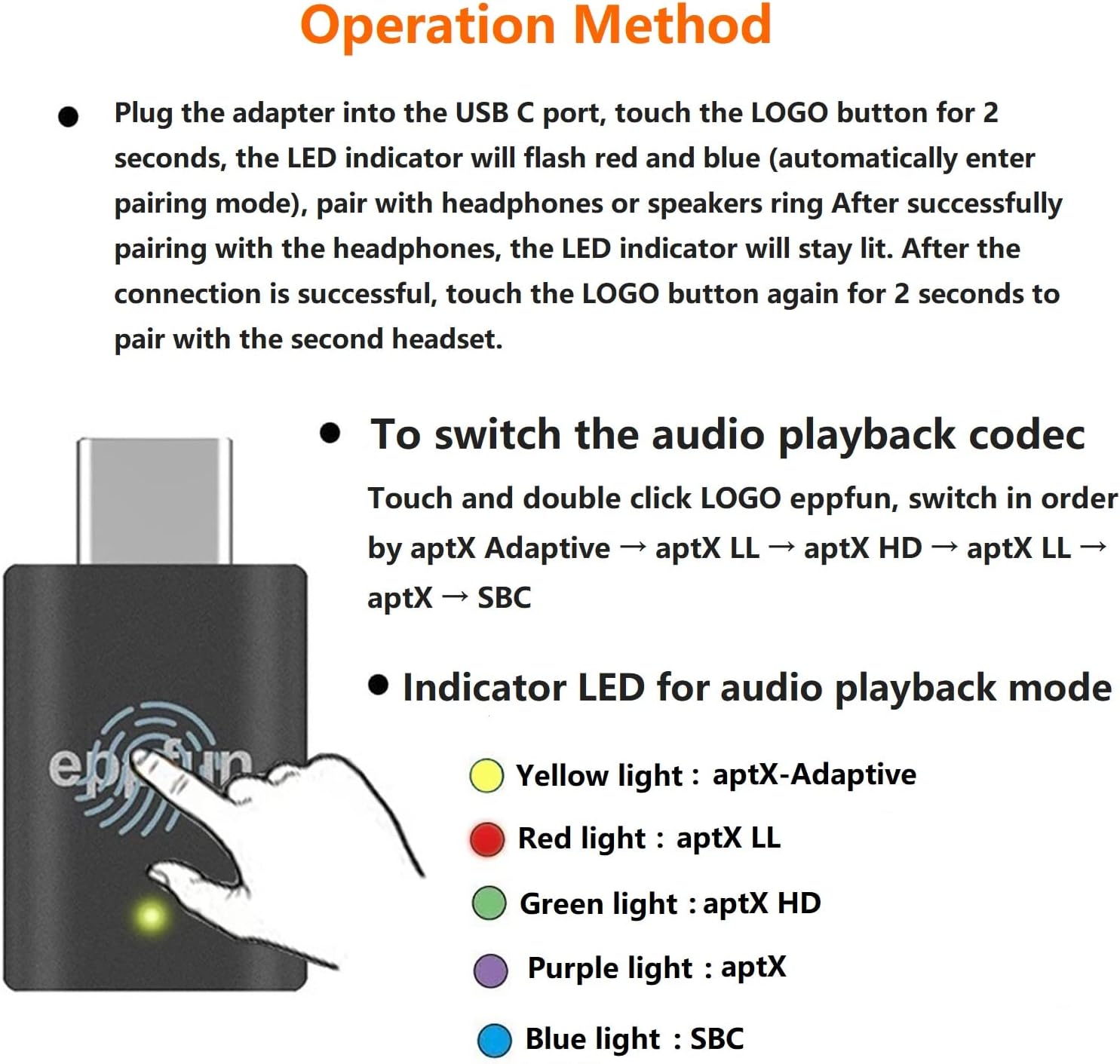
Image: A diagram illustrating the operation method, including plugging in the adapter and the LED indicator behavior during pairing.
Operating Instructions
Switching Audio Playback Codec
The AK3040Pro allows you to switch between different audio codecs to optimize your listening experience. To switch the codec, touch and double-click the "eppfun" LOGO button on the adapter. The codecs will cycle in the following order:
aptX Adaptive → aptX LL → aptX HD → aptX → SBC
If your transmitting device and headset do not support a particular codec, it will automatically switch to the next available audio codec.
Indicator LED for Audio Playback Mode
The LED indicator on the AK3040Pro changes color to indicate the currently active audio codec:
- Yellow light: aptX-Adaptive
- Red light: aptX LL
- Green light: aptX HD
- Purple light: aptX
- Blue light: SBC

Image: A visual representation of the codec switching process and the corresponding LED colors for each audio mode.
Maintenance
To ensure the longevity and optimal performance of your eppfun AK3040Pro, please follow these maintenance guidelines:
- Cleaning: Use a soft, dry cloth to clean the device. Avoid using liquid cleaners or aerosols.
- Storage: Store the device in a cool, dry place away from direct sunlight and extreme temperatures.
- Handling: Handle the device with care. Avoid dropping it or subjecting it to strong impacts.
- Moisture: Keep the device away from water and high humidity.
Troubleshooting
| Problem | Possible Cause | Solution |
|---|---|---|
| Device does not pair. | Adapter not in pairing mode; headphones/speakers not in pairing mode; interference. | Ensure the AK3040Pro LED is flashing red and blue. Put your audio device into pairing mode. Move closer to the adapter and away from other wireless devices. |
| No audio or low volume. | Incorrect audio output selected on host device; volume too low; incompatible codec. | Check your computer/console's audio output settings to ensure the AK3040Pro is selected. Increase volume on both the host device and your headphones. Ensure your headphones support the selected codec. |
| Audio delay/latency. | Codec not optimized for low latency; environmental interference. | Try switching to aptX-Adaptive or aptX LL codec if supported by your headphones. Reduce distance between adapter and headphones. |
| Microphone not working. | Analog mic not plugged in; incorrect audio input selected; headset not in HFP mode. | Ensure the 3.5mm analog mic is securely plugged into the AK3040Pro. Check your device's audio input settings. If using a headset's built-in mic, ensure it's in HFP mode. |
Specifications
| Attribute | Detail |
|---|---|
| Brand | eppfun |
| Model Number | AK3040Pro |
| Bluetooth Version | 5.2 |
| Chipset | Qualcomm QCC3040 |
| Supported Codecs | aptX-Adaptive, aptX-LL, aptX-HD, aptX, SBC |
| Interface | USB-C (compatible with USB 2.0/3.0 ports) |
| Included Microphone | 3.5 mm Analog Mic |
| Compatible Operating Systems | Windows 8/10/11, Nintendo Switch OS, Linux OS, Mac OS |
| Compatible Devices | PS4, PS5, PC, Mac, Nintendo Switch |
| Item Weight | 0.704 ounces |
| Package Dimensions | 4.76 x 3.54 x 0.71 inches |
| Color | Black |
| UPC | 792933358630 |

Image: The eppfun AK3040Pro shown with logos indicating compatibility with PS5, Nintendo Switch, PC, and Mac, along with supported Bluetooth versions and codecs.
Warranty and Support
eppfun products are designed for reliability and performance. For warranty information and technical support, please refer to the official eppfun website or contact their customer service directly. Keep your purchase receipt as proof of purchase for warranty claims.
For further assistance, visit the eppfun Store on Amazon.
Related Documents - AK3040Pro
 |
eppfun Cutemeet 818 Bluetooth Speaker User Manual and Specifications Comprehensive guide for the eppfun Cutemeet 818 Bluetooth speaker, covering product specifications, detailed user interface operations, packaging contents, and essential regulatory compliance information. |
 |
eppfun AK3040R PRO User Manual: Bluetooth Audio Receiver Setup & Operation Comprehensive user manual for the eppfun AK3040R PRO Bluetooth audio receiver. Learn how to connect, operate, charge, and troubleshoot this high-fidelity audio adapter. |
 |
EPPFUN Cute meet 600 Wireless Earbuds User Manual and Guide Comprehensive user manual for the EPPFUN Cute meet 600 wireless earbuds, covering product overview, specifications, setup, usage, troubleshooting, warranty, and safety information. |
 |
eppfun cute meet 150 LS002 Wireless Earbuds User Manual User manual for the eppfun cute meet 150 LS002 wireless earbuds. Provides instructions on charging, pairing, fitting, basic operations, warranty information, and safety guidelines. |
 |
HRD-392 FM Teaching Headset Operational Guideline Comprehensive operational guideline for the HRD-392 FM Teaching Headset by eppfun. Covers appearance, button functions, detailed usage instructions for battery installation, power, channel selection (manual and automatic), volume control, campus channel saving/retrieval, technical specifications, and important safety and maintenance precautions. |