
GreenTouch GT-TM-1332C-CTW-HD
GreenTouch 13.3 Inch Industrial PCAP Touchscreen Monitor User Manual
Model: GT-TM-1332C-CTW-HD
1. Introduction
This manual provides essential information for the proper installation, operation, and maintenance of your GreenTouch 13.3 Inch Industrial PCAP Touchscreen Monitor. Please read this manual thoroughly before using the product and retain it for future reference.
2. Safety Information
- Ensure the monitor is placed on a stable surface or securely mounted to prevent accidental falls.
- Do not expose the monitor to extreme temperatures, humidity, or direct sunlight.
- Avoid blocking ventilation openings to prevent overheating.
- Use only the power adapter supplied with the monitor.
- Disconnect the power cable from the outlet before cleaning or if the monitor will not be used for an extended period.
- Do not attempt to repair the monitor yourself. Refer all servicing to qualified personnel.
3. Product Overview
The GreenTouch 13.3 Inch Industrial PCAP Touchscreen Monitor is designed for robust performance in various commercial and industrial environments, offering a responsive 10-point projected capacitive touch solution.
Key Features
- TOUCH READY: Features (G+G) 10-point projected capacitive touch for optical clarity and touch durability.
- DURABILITY: 3mm tempered cover glass provides front IK08 vandal-proof rating.
- ENVIRONMENTAL PROTECTION: Sealed touch screen prevents dirt, dust, and liquid ingress, meeting front IP65 water-resistant requirements.
- VERSATILE INTERFACES: Equipped with HDMI, VGA, DVI, and Audio interfaces for diverse display applications.
- COMMERCIAL GRADE: Built for quality and reliability, designed for continuous operation.
- STABILITY: Undergoes rigorous reliability testing (over 20 tests) to deliver 50,000 MTBF (Mean Time Between Failures).
Design and Durability

The monitor features front IP65 water resistance and IK08 anti-vandal protection, ensuring durability in demanding environments.

Industrial metal back shell with porous heat dissipation design ensures strong stability and effectively protects service life.
Interfaces

Rear view of the monitor displaying available input/output ports including Earphone, Audio In, VGA, DVI, HDMI, DC 12V In, OSD, and USB.

The monitor offers a variety of rich interfaces including HDMI, VGA, DVI, Audio In, and USB for broad compatibility.
Applications
This industrial touchscreen monitor is suitable for a wide range of applications:
- Information Kiosks
- Game and Entertainment Systems
- Industrial Automation
- Self-checking Services
- Point of Sale (POS) Systems

Examples of GreenTouch monitors used in diverse settings such as information kiosks, industrial control panels, and self-service stations.
This video illustrates the internal structure and various applications of the GreenTouch 2C series touchscreen monitor, showcasing its versatility in different industrial and commercial settings.
This video provides detailed insights into the GreenTouch Open Frame Touchscreen Monitor, highlighting its design, features, and potential uses in various environments.
This video offers a comprehensive overview of the GreenTouch Open Frame Touch Screen Monitor (2C series), demonstrating its functionality and robust build quality.
4. Package Contents
Please check the package contents upon receipt to ensure all items are present and undamaged:
- GreenTouch 13.3 Inch Industrial PCAP Touchscreen Monitor
- Power Adapter
- Power Cord (US plug)
- VGA Cable
- HDMI Cable
- USB Cable (for touch functionality)
- RJ45 Cable (for OSD remote control)
- Mounting Brackets and Screws
- OSD Remote Control
This video demonstrates the unboxing process of the GreenTouch 2C series Touchscreen Monitor, showing all included accessories and how they are packaged.
5. Setup
Mounting Options
The monitor supports both embedded and VESA mounting options.

The back of the monitor features standard VESA mounting holes (75mm x 75mm and 100mm x 100mm) for flexible installation.

This diagram illustrates both embedded installation using the side brackets and VESA installation with a compatible stand.
Connecting the Monitor
- Power Connection: Connect the power adapter to the DC 12V IN port on the monitor and then plug the power cord into a suitable electrical outlet.
- Video Connection: Connect one end of the HDMI, VGA, or DVI cable to the corresponding port on the monitor and the other end to your computer or video source.
- Touch Functionality: Connect the USB cable from the monitor's USB port to an available USB port on your computer. This enables the touch screen feature.
- Audio Connection (Optional): If external speakers or headphones are desired, connect them to the AUDIO IN or EARPHONE jack.
- OSD Remote Control (Optional): Connect the RJ45 cable from the monitor's OSD port to the OSD remote control for external menu navigation.
6. Operating Instructions
Power On/Off
- To power on the monitor, ensure all cables are connected and press the power button on the rear of the monitor or on the OSD remote control.
- To power off, press and hold the power button until the display turns off.
Touchscreen Operation
The monitor supports 10-point multi-touch. Ensure the USB cable is connected to your computer for touch functionality. No additional drivers are typically required for Windows operating systems.
- Tap: Single touch for selection.
- Drag: Touch and slide your finger to move items or scroll.
- Pinch/Stretch: Use two fingers to zoom in or out.
OSD Menu Navigation
The On-Screen Display (OSD) menu allows you to adjust various display settings. Access the OSD menu using the buttons on the rear of the monitor or the provided OSD remote control.
- Press the 'Menu' button to open the OSD menu.
- Use the arrow buttons to navigate through options.
- Press 'Enter' or 'OK' to select an option or confirm a setting.
- Press 'Exit' or 'Menu' again to close the OSD menu.
7. Maintenance
- Cleaning the Screen: Gently wipe the screen with a soft, lint-free cloth. For stubborn marks, dampen the cloth with a mild, non-abrasive screen cleaner. Do not spray cleaner directly onto the screen.
- Cleaning the Casing: Use a soft, dry cloth to wipe the monitor casing. Avoid using strong detergents or solvents.
- Ventilation: Ensure the ventilation holes are free from dust and debris to maintain proper airflow and prevent overheating.
- Cable Management: Keep cables tidy and untangled to prevent damage and ensure a safe setup.
8. Troubleshooting
If you encounter issues with your monitor, refer to the table below for common problems and solutions.
| Problem | Possible Cause | Solution |
|---|---|---|
| No image on screen | Power cable disconnected; Video cable loose or incorrect input selected. | Check power and video cable connections. Ensure correct input source is selected via OSD menu. |
| Touchscreen not responding | USB cable disconnected; Driver issue. | Ensure USB cable is securely connected. Restart computer. Check device manager for touch screen drivers. |
| Image is distorted or blurry | Incorrect resolution; Faulty video cable. | Adjust display resolution on your computer. Try a different video cable. |
| OSD menu not appearing | Buttons not functioning; OSD remote control issue. | Ensure buttons are pressed correctly. Check OSD remote control battery or connection. |
9. Specifications
Detailed technical specifications for the GreenTouch 13.3 Inch Industrial PCAP Touchscreen Monitor.
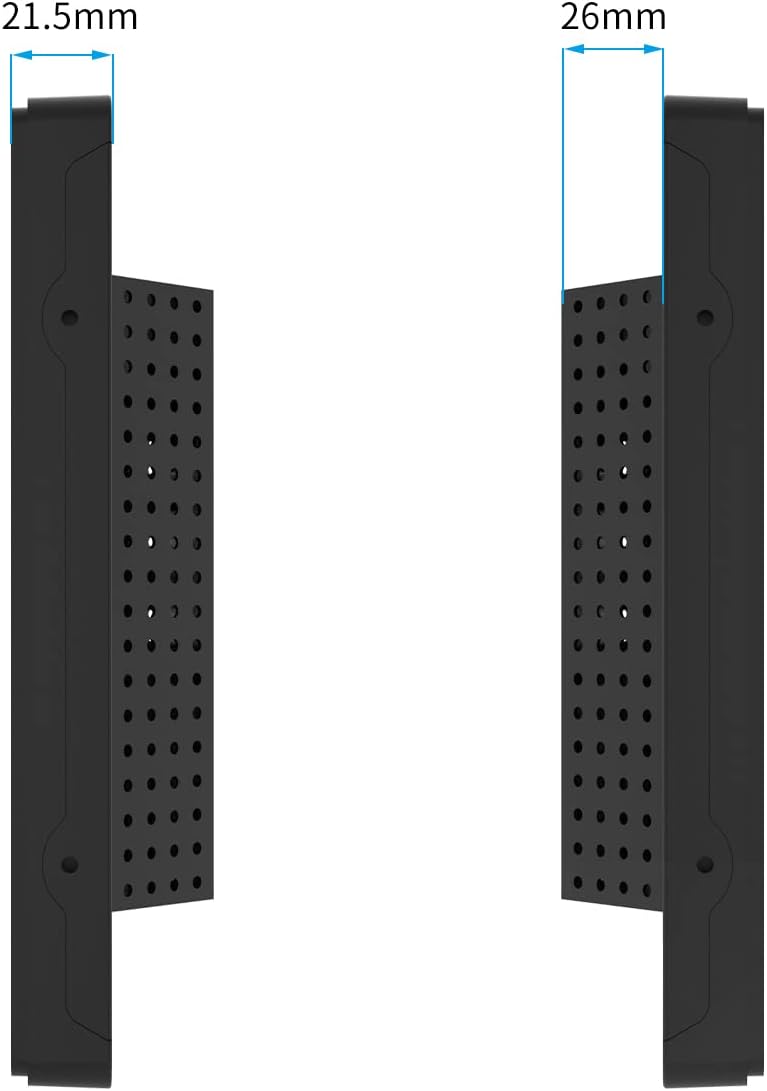
Side view of the monitor illustrating its slim profile and dimensions.

The monitor features an A+ Grade LCD Panel, ensuring high resolution, uniform brightness, high contrast, and rich color display.
| Feature | Description |
|---|---|
| Product Dimensions | 13.6 x 8.6 x 1.88 inches |
| Item Weight | 6.6 pounds |
| Manufacturer | GreenTouch |
| Item Model Number | GT-TM-1332C-CTW-HD |
| Standing Screen Display Size | 13.3 Inches |
| Aspect Ratio | 1.77:1 (16:9) |
| Voltage | 12 Volts (DC) |
| Resolution | 1920 x 1080 (FHD 1080p) |
| Image Brightness | 300cd/m² |
| Screen Surface Description | Glossy |
| Touch Technology | Projected Capacitive (PCAP) 10-point touch |
| Front Panel Protection | IP65 Water-resistant, IK08 Vandal-proof |
10. Warranty and Support
GreenTouch products are designed for reliability and performance. This monitor comes with a standard manufacturer's warranty. For specific warranty terms and conditions, please refer to the warranty card included in your package or visit the official GreenTouch website.
For technical support, troubleshooting assistance, or service inquiries, please contact GreenTouch customer service through the contact information provided on their official website or your purchase platform.
Ask a question about this manual
Ask about setup, troubleshooting, compatibility, parts, safety, or missing instructions. Manuals+ will review the question and use this page’s manual context to help answer it.