
1. Product Overview
The MI Xiaomi X Series 4K Ultra HD Smart Android LED TV L43M7-A2IN offers a high-quality viewing experience with its 4K Ultra HD resolution and smart features. This manual provides essential information for setting up, operating, and maintaining your television.

Image: Front view of the Xiaomi X Series 4K Ultra HD Smart Android LED TV.
Key Features:
- Display: 4K Ultra HD (3840 x 2160) resolution, 60 Hz refresh rate, 178-degree wide viewing angle.
- Picture Enhancement: Dolby Vision, HDR10, HLG, Reality Flow MEMC, Vivid Picture Engine, DCI-P3 94% Colour Gamut.
- Audio: 30 Watts Output, Dolby Audio, DTS Virtual:X, DTS-HD.
- Smart TV: Android TV 10, PatchWall 4 with IMDb integration, Kids Mode with Parental Lock, Universal search, Chromecast built-in, Ok Google.
- Performance: Quad core A55 CPU processor, 2GB RAM + 16GB Storage.
- Connectivity: Dual Band Wi-Fi (2.4 GHz/ 5 GHz), 3 HDMI ports, 2 USB ports, Bluetooth 5.0, Optical, Ethernet, 3.5mm earphone Jack.

Image: Visual summary of the TV's key features including display, audio, and smart capabilities.
2. Safety Information
Please read all safety instructions carefully before using the television. Keep this manual for future reference.
- Do not block ventilation openings. Ensure adequate space around the TV for proper airflow.
- Do not place the TV near heat sources or in direct sunlight.
- Protect the power cord from being walked on or pinched.
- Only use attachments/accessories specified by the manufacturer.
- Unplug the TV during lightning storms or when unused for long periods.
- Refer all servicing to qualified service personnel.
- Keep batteries out of reach of children. Dispose of used batteries responsibly.
3. What's in the Box
Verify that all components are present in the packaging:
- 1 x MI Xiaomi X Series 4K Ultra HD Smart Android LED TV
- 2 x Table Stand Base
- 1 x Remote Control
- 4 x Screws (for stand assembly)
- 2 x AAA Batteries (for remote control)
- 1 x User Manual (this document)
4. Setup
4.1 Installing the Table Stand
- Carefully place the TV face-down on a soft, flat surface to prevent screen damage.
- Align each table stand base with the corresponding screw holes on the bottom of the TV.
- Secure each base using the provided screws. Ensure they are tightened firmly.
- Carefully lift the TV to an upright position and place it on a stable, level surface.
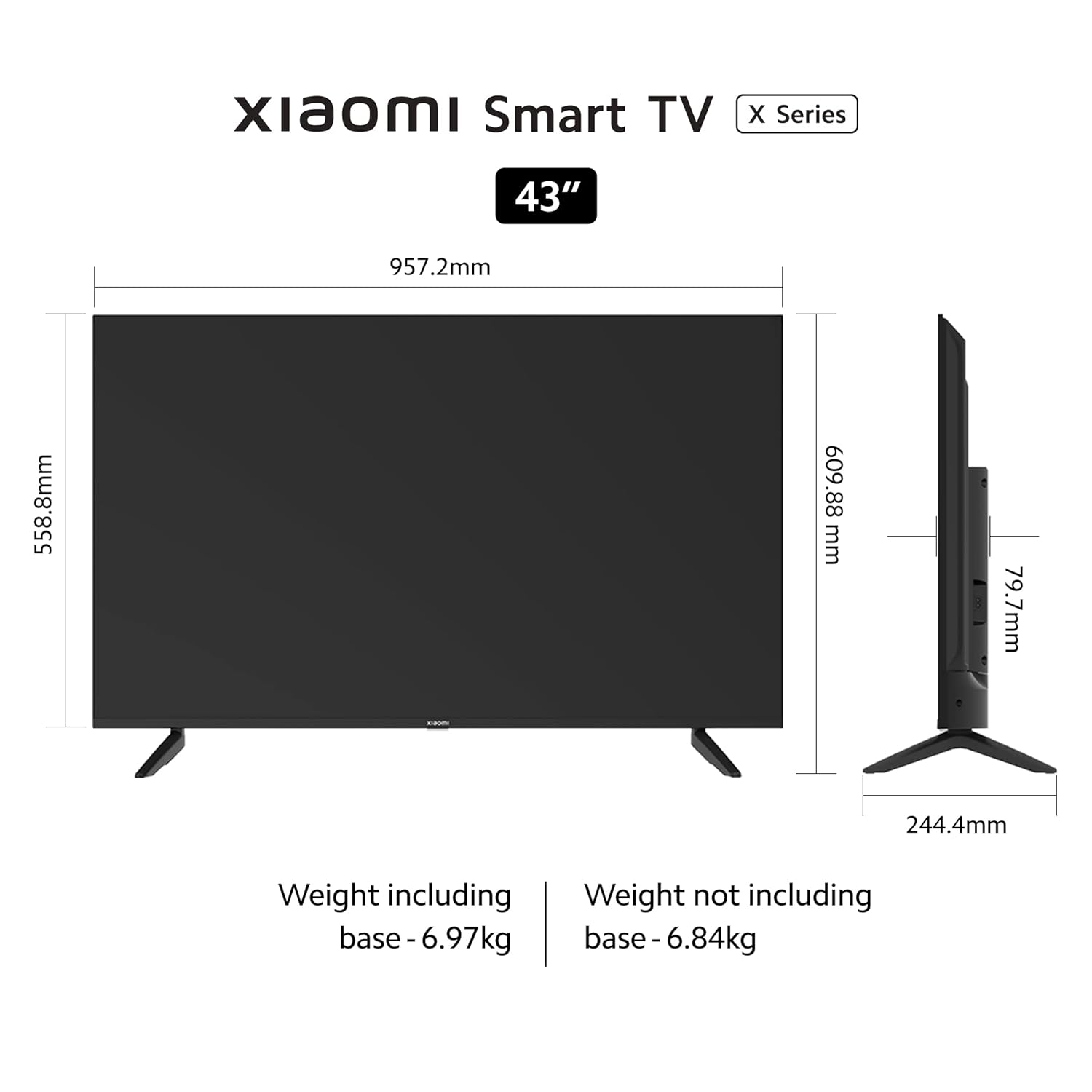
Image: Diagram showing the dimensions and weight of the TV, useful for stand installation and placement.
4.2 Wall Mounting (Optional)
If you choose to wall mount your TV, please use a VESA-compatible wall mount kit (200 x 200 mm) and follow the instructions provided with the wall mount. Professional installation is recommended.
4.3 Connecting Devices
The TV features various ports for connecting external devices:

Image: Close-up view of the rear connectivity ports on the Xiaomi X Series TV.
- HDMI Ports (x3): Connect gaming consoles, set-top boxes, Blu-ray players. Supports eARC on one port.
- USB Ports (x2): Connect hard drives, USB flash drives, or other USB devices.
- Ethernet Port: For wired internet connection.
- Optical Port: For digital audio output to soundbars or home theater systems.
- 3.5mm Earphone Jack: For connecting headphones or external speakers.
- AV Input: For connecting older devices with composite video and stereo audio outputs.
After connecting all desired devices, plug the TV's power cord into a wall outlet.
5. Operating Instructions
5.1 Remote Control
Insert the two AAA batteries into the remote control, observing the correct polarity. The remote control uses Bluetooth for connectivity.

Image: The sleek remote control for the Xiaomi X Series TV, highlighting quick access buttons.
- Power Button: Turns the TV on/off.
- Google Assistant Button: Activates voice control.
- Navigation Pad: For menu navigation.
- OK Button: Confirms selections.
- Back Button: Returns to the previous screen.
- Home Button: Accesses the Android TV home screen.
- Volume Buttons: Adjusts volume. Double tap volume down to mute.
- PatchWall Button: Long press to enter quick settings menu.
- App Shortcut Buttons: Direct access to popular streaming services like Netflix and Prime Video.
5.2 Initial Setup and Smart TV Features
Upon first power-on, the TV will guide you through the initial setup process, including language selection, network connection (Wi-Fi or Ethernet), and Google account sign-in.

Image: The Android TV 10 interface with Google Play, Ok Google, and Chromecast built-in features.
- Android TV 10: Access a wide range of apps from the Google Play Store.
- PatchWall 4: An integrated content platform with IMDb integration, offering personalized recommendations and access to 300+ free live channels.
- Kids Mode with Parental Lock: Manage content access for children.
- Chromecast built-in: Cast content from your smartphone or tablet directly to the TV.
- Ok Google: Use voice commands to search for content, control smart home devices, and more.
- Miracast: Mirror your Android device's screen to the TV.

Image: The PatchWall interface displaying various content categories and streaming apps.
5.3 Display and Audio Settings
Navigate to the TV settings menu to adjust picture and sound preferences.

Image: The TV screen displaying content with Dolby Vision, HDR10, and HLG support for enhanced picture quality.
- Picture Modes: Select from various preset picture modes (e.g., Standard, Vivid, Movie, Game) or customize settings like brightness, contrast, color, and sharpness.
- HDR Settings: The TV supports Dolby Vision, HDR10, and HLG for superior contrast and color with compatible content.
- Sound Modes: Choose from sound presets (e.g., Standard, Music, Movie) or adjust equalizer settings.
- Dolby Audio / DTS: Enable or configure Dolby Audio and DTS Virtual:X / DTS-HD for immersive sound experiences.

Image: The TV displaying content with an overlay highlighting 30W speakers, Dolby Audio, and DTS-HD sound technologies.
6. Maintenance
Proper maintenance ensures the longevity and optimal performance of your TV.
- Cleaning the Screen: Gently wipe the screen with a soft, lint-free cloth. For stubborn marks, slightly dampen the cloth with water or a specialized screen cleaner. Do not spray liquid directly onto the screen.
- Cleaning the Frame: Use a soft, dry cloth to wipe the TV frame and stand.
- Ventilation: Ensure the ventilation openings on the back of the TV are not obstructed by dust or debris.
- Power Cord: Regularly check the power cord for any damage. If damaged, contact service personnel.
7. Troubleshooting
If you encounter issues, refer to the following common solutions:
| Problem | Possible Solution |
|---|---|
| No power | Check if the power cord is securely plugged into the TV and the wall outlet. Try a different outlet. |
| No picture, but sound is present | Check the input source. Ensure external devices are powered on and connected correctly. |
| No sound, but picture is present | Check volume levels. Ensure TV is not muted. Check audio output settings if using external audio systems. |
| Remote control not working | Replace batteries. Ensure no obstructions between the remote and TV. Re-pair the Bluetooth remote if necessary. |
| Wi-Fi connection issues | Restart your router and TV. Check Wi-Fi password. Ensure TV is within range of the router. |
| Smart TV apps not loading | Check internet connection. Clear app cache/data in TV settings. Update apps or TV firmware. |
If the problem persists after trying these solutions, please contact MI customer support.
8. Specifications
Detailed technical specifications for the MI Xiaomi X Series 4K Ultra HD Smart Android LED TV L43M7-A2IN:
| Feature | Detail |
|---|---|
| Model Number | L43M7-A2IN |
| Screen Size | 43 Inches (108 cm) |
| Display Technology | LED |
| Resolution | 4K Ultra HD (3840 x 2160) |
| Refresh Rate | 60 Hz |
| Viewing Angle | 178 Degrees |
| HDR Support | Dolby Vision, HDR10, HLG |
| Audio Output | 30 Watts |
| Audio Technology | Dolby Audio, DTS Virtual:X, DTS-HD |
| Operating System | Android TV 10 |
| Processor | Quad core A55 CPU |
| RAM | 2GB |
| Storage | 16GB |
| Wi-Fi | Dual Band (2.4 GHz/ 5 GHz) |
| Bluetooth | Bluetooth 5.0 |
| HDMI Ports | 3 (with eARC support) |
| USB Ports | 2 |
| Other Connectivity | Optical, Ethernet, 3.5mm Earphone Jack, AV Input |
| Product Dimensions (D x W x H) | 24.4D x 95.7W x 61H Centimeters |
| Item Weight | 6970 Grams |
| VESA Mount Standard | 200 x 200 mm |
9. Warranty and Support
Your MI Xiaomi X Series 4K Ultra HD Smart Android LED TV L43M7-A2IN comes with a comprehensive warranty.
- Warranty Period: 1 year comprehensive warranty on the product, plus an additional 1 year free warranty on the display panel from the date of purchase.
- Warranty Claim: The brand warranty can be availed using your Amazon invoice.
- Exclusions: Any physical damages to the unit are not covered under warranty.
- Manufacturer: DIXON TECHNOLOGIES (INDIA) LIMITED.
- Customer Support: For assistance, contact the brand toll-free number at 1800 103 6286.
For further information regarding EMI options, replacement policy, or other details, please refer to the product detail page on Amazon or the official MI website.
10. Product Videos
Watch these official videos for more information about your Xiaomi X Series TV.
Video: An overview of the Xiaomi X Series Smart TV, highlighting its design and core features.
Video: A detailed look at the display technology and smart functionalities of the Xiaomi X Series TV.


