
1. Introduction
This manual provides detailed instructions for installing and operating your BrickBling LED Lighting Kit, specifically designed for the LEGO 42145 Technic Airbus H175 Rescue Helicopter model. This kit enhances your LEGO model with vibrant lighting, bringing it to life. Please read these instructions carefully before beginning installation.
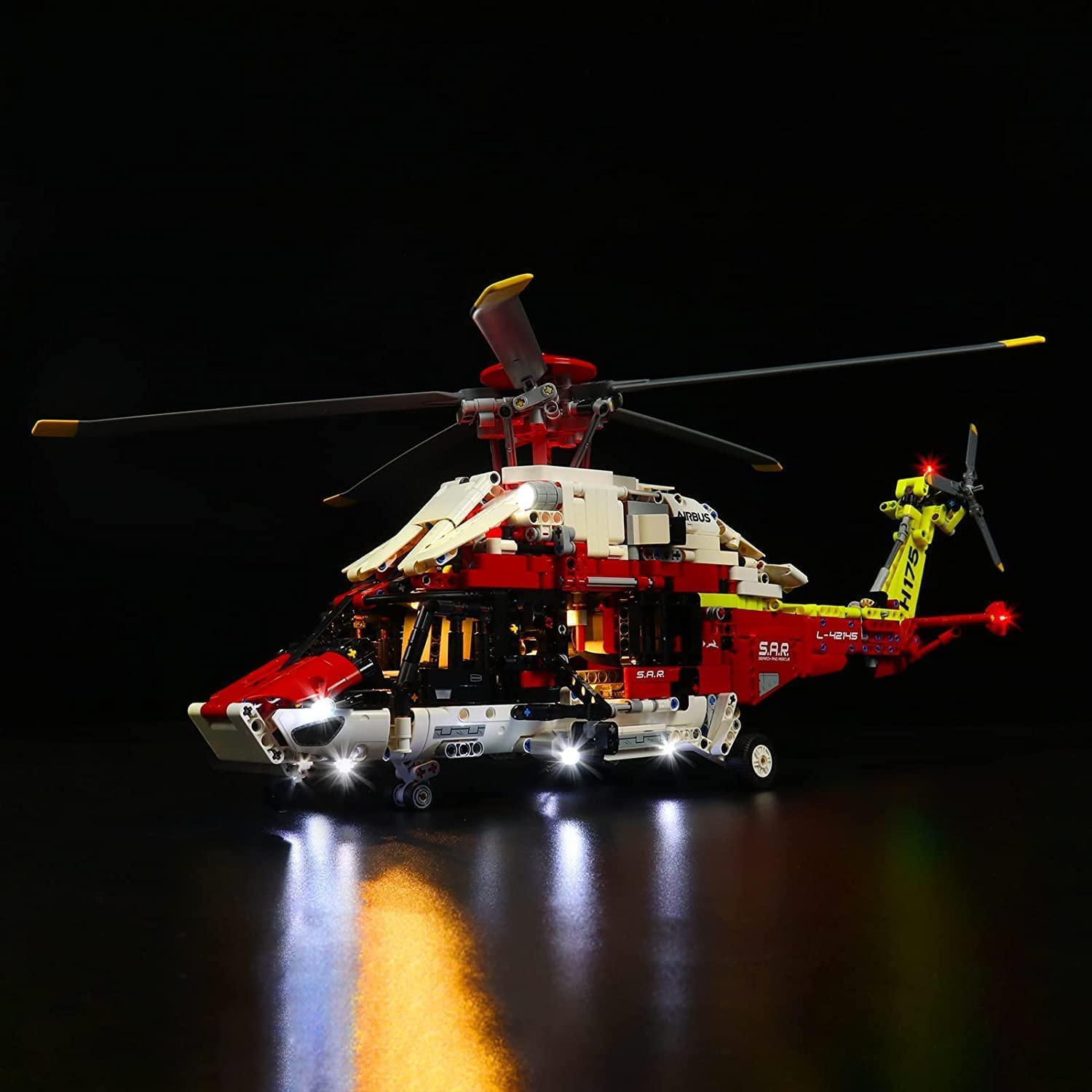
Image: The LEGO Technic Airbus H175 Rescue Helicopter model illuminated by the BrickBling LED lighting kit.
2. Safety Information
- The lighting kit operates at a low voltage of 5V, ensuring a safer user experience.
- All copper wires are designed with overheating and burning protection to extend product lifespan.
- Keep the product away from water and high humidity to prevent short circuits.
- Do not attempt to modify or disassemble the LED components, as this may damage the product and void the warranty.
- This product contains small parts and is not suitable for children under 3 years old due to choking hazards.
3. Package Contents
Please verify that all components listed below are present in your package:

Image: Overview of the LED lighting kit components.
- LED Light Kits (various types and colors)
- Instruction Manual
- Expansion Boards (multiple)
- Power Supply (USB cable and battery box)
- Connecting Cables (various lengths: 10cm, 15cm, 30cm)
- Specific LED components may include: 15cm White Lights, 30cm Red Lights, 30cm White Lights, Warm White LED Strips, 30cm Red Flash Lights, 30cm Green Flash Lights, Red Light Strips, 15cm High-Brightness White Lights.
4. Setup and Installation
The BrickBling LED lighting kit is designed for easy installation. For detailed, step-by-step visual guidance, please refer to the official video instructions provided by BrickBling. A general overview of the installation process is as follows:
- Prepare your LEGO model: Ensure your LEGO 42145 Technic Airbus H175 Rescue Helicopter model is fully assembled according to its original instructions.
- Identify installation points: The lighting kit is designed to integrate seamlessly with specific parts of the helicopter. Refer to the video instructions to locate these points.
- Connect LED lights: Carefully attach the individual LED lights to the designated areas on your model. The cables and connectors are designed to fit precisely.
- Route cables: Neatly route the connecting cables to the expansion boards, ensuring they are hidden within the model's structure where possible. Avoid pinching or sharply bending the wires.
- Connect expansion boards: Link the expansion boards together and to the main power supply cable.
- Test connections: Before fully securing all components, connect the power supply and briefly test the lights to ensure all connections are correct and functioning.
- Final assembly: Once confirmed, secure all components and cables.

Image: Front view of the helicopter with installed lights.

Image: Tail section with navigation lights.
5. Operating Instructions
Your BrickBling LED Lighting Kit offers flexible power options:
- USB Power: Connect the provided USB cable to a power bank, wall charger, USB socket, laptop, or any other device with a USB port.
- Battery Box Power: Alternatively, use the included battery box. Insert the required batteries (not included) into the battery box and connect it to the lighting kit.
Once connected to a power source, the LED lights will illuminate. Disconnect the power source to turn off the lights.

Image: The illuminated helicopter model in a display setting.
6. Maintenance
- Keep the LED lighting kit and your LEGO model clean by gently dusting with a soft, dry cloth.
- Avoid using liquid cleaners or abrasive materials, as these can damage the LED components or the LEGO bricks.
- Ensure all cable connections remain secure. If lights flicker or fail, check the connections.
- Store the model in a cool, dry place away from direct sunlight to prevent material degradation.
7. Troubleshooting
- Lights not turning on:
- Check if the power source (USB or battery box) is properly connected and functional.
- If using the battery box, ensure batteries are correctly inserted and have sufficient charge.
- Verify all cable connections between the LEDs, expansion boards, and power supply are secure.
- Some lights not working:
- Inspect the specific LED and its connecting cable for any damage or loose connections.
- Ensure the LED is correctly plugged into the expansion board.
- Flickering lights:
- Check for loose connections at the power source or along the cable path.
- Ensure the power source provides stable 5V output.
8. Specifications
| Brand | BrickBling |
| Model Number | DE-42145-P41301 |
| Compatible LEGO Model | LEGO 42145 Technic Airbus H175 Rescue Helicopter |
| Light Source Type | LED |
| Voltage | 5 Volts |
| Power Source | USB or Battery-powered (batteries not included) |
| Material | Copper (for wiring) |
| Special Features | Overheat and burning protection, easy installation, multiple power options |
9. Warranty and Support
This BrickBling LED Lighting Kit comes with a 1-year warranty from the date of purchase, covering manufacturing defects. Please retain your proof of purchase for warranty claims.
For technical support, installation assistance, or warranty inquiries, please contact BrickBling customer service through the retailer where you purchased the product or visit the official BrickBling website for contact information.


