
Introduction
The Dr.meter S10Plus Soil Moisture Meter is designed to help you accurately assess the moisture levels in your plant soil. This tool eliminates guesswork, ensuring your plants receive optimal watering, preventing both over-watering and under-watering. It is suitable for various applications, including houseplants, gardens, farms, and lawns.
Product Features
- Compact & Portable: Easy to handle and transport for use with various plants.
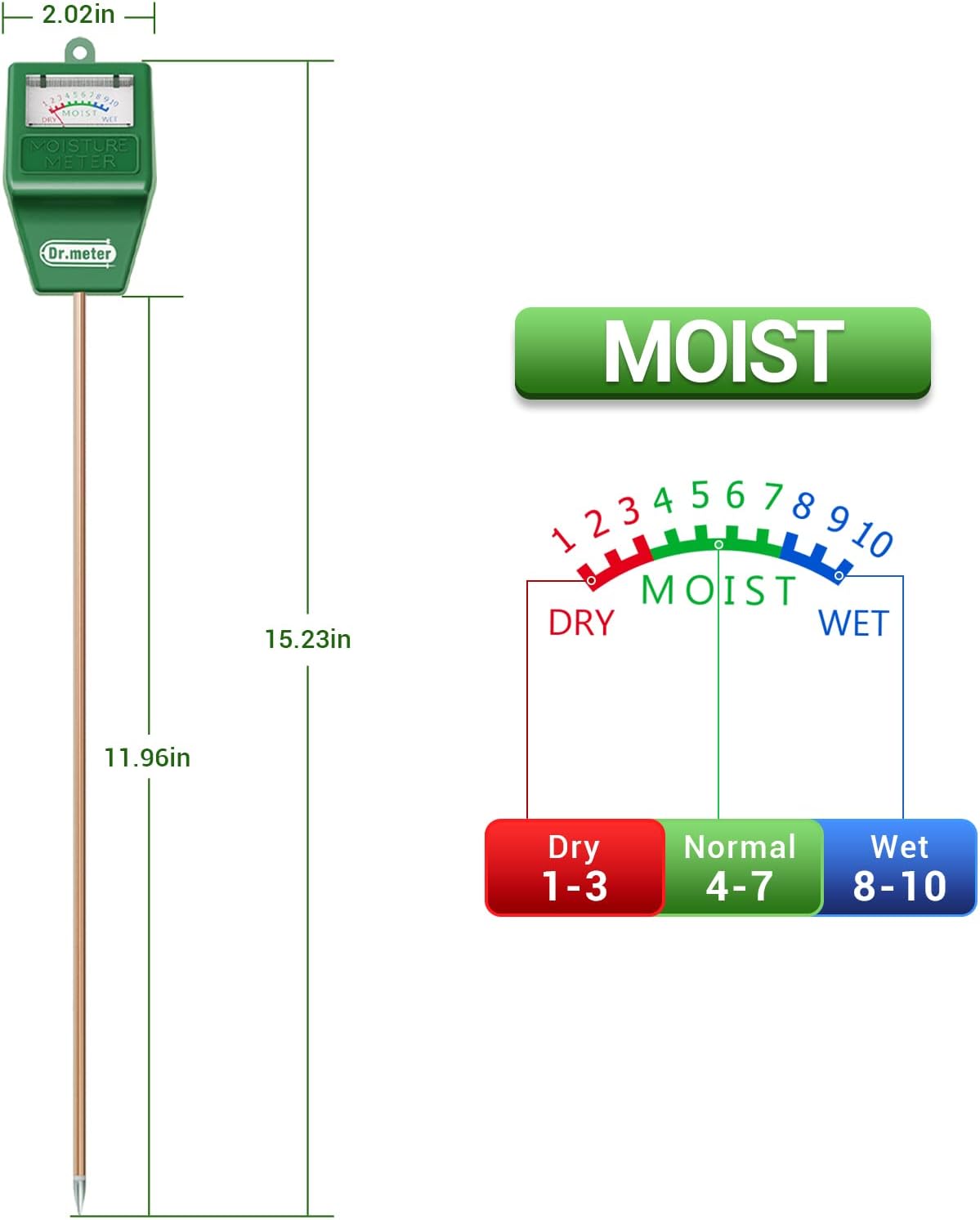
- Easy to Read: Features a clear, color-coded reading system with ten scales (Red for Dry, Green for Moist, Blue for Wet).
- No Batteries Required: Operates mechanically without the need for batteries or electricity.
- Gentle to Plant Roots: The single probe design minimizes disturbance to sensitive plant roots during use.
- Designed for Soil Testing: Specifically calibrated for soil moisture measurement.
Setup
- Carefully remove the Dr.meter S10Plus Soil Moisture Meter from its packaging.
- Inspect the device for any visible damage.
- No assembly is required. The meter is ready for immediate use.
Operating Instructions
- Insert the Probe: Gently insert the metal probe into the soil, approximately 2/3 to 3/4 of the way down, near the plant's root zone. Ensure the probe is inserted vertically. Avoid forcing the probe into hard soil or hitting rocks.
- Read the Meter: Wait for a few minutes (typically 1-2 minutes) for the needle on the display to stabilize and indicate the current moisture level.
- Interpret the Reading: Refer to the 'Reading the Meter' section below to understand what the indicated moisture level means for your plant.
- Remove and Clean: After obtaining a reading, gently pull the probe straight out of the soil. Wipe the metal probe clean with a soft, dry cloth to remove any soil residue. This prevents rust and corrosion and ensures accurate future readings.
Reading the Meter
The Dr.meter S10Plus features a clear, color-coded dial for easy interpretation of soil moisture levels:
- Red Zone (1-3): DRY
This indicates that the soil is dry and your plant requires watering. - Green Zone (4-7): MOIST
This is the optimal moisture range for most plants. Continue to monitor regularly. - Blue Zone (8-10): WET
This indicates the soil is very wet or saturated. Avoid watering to prevent root rot.
Always consider the specific watering needs of your plant species. Some plants prefer drier conditions, while others thrive in consistently moist soil.

Important Tips and Precautions
- Soil Use Only: This meter is designed exclusively for testing soil moisture. Do not use it in water or any other liquids, as this can damage the device and lead to inaccurate readings.
- Avoid Hard Surfaces: Do not force the probe into extremely hard soil or against rocks. This can bend or break the probe.
- Temporary Insertion: Do not leave the meter inserted in the soil for prolonged periods. Remove it after each use.
- Post-Watering Wait: If you have recently watered your plants, wait at least 15 minutes before using the meter to allow the water to distribute evenly in the soil.
- Clean After Use: Always wipe the probe clean and dry after each use to prevent rust and ensure longevity and accuracy.


Maintenance
- Cleaning: Always clean the metal probe thoroughly with a dry cloth after each use to prevent soil buildup, rust, and corrosion.
- Storage: Store the meter in a dry, cool place away from direct sunlight and extreme temperatures.
- No Battery Replacement: As the meter operates without batteries, no battery maintenance or replacement is required.
Troubleshooting
- No Reading or Inaccurate Reading:
Ensure the probe is inserted deep enough into the soil (2/3 to 3/4 of the way). The soil must be sufficiently moist for a reading to register. If the soil is extremely dry, pre-moisten it slightly before testing. Ensure the probe is clean. - Probe Damage:
If the probe is bent or broken, it may be due to forcing it into hard soil or hitting an obstruction. Always insert gently. - Inconsistent Readings:
Ensure the probe is clean and dry before each use. Test in multiple spots around the plant for a more comprehensive understanding of soil moisture.
If you encounter persistent issues not covered here, please contact Dr.meter customer support for assistance.
Specifications
| Model Number | S10Plus |
| Brand | Dr.meter |
| Color | Green |
| Item Weight | 0.13 Kilograms (4.6 ounces) |
| Product Dimensions | 15.47 x 1.96 x 1.33 inches |
| Battery Requirement | No batteries needed |
| Storage/Display Type | Tabletop |
Visual Guides



Warranty and Support
Dr.meter products are manufactured to high-quality standards. For warranty information, product support, or any questions regarding your Dr.meter S10Plus Soil Moisture Meter, please refer to the contact information provided on the product packaging or visit the official Dr.meter website. Please retain your proof of purchase for warranty claims.