
Introduction
Thank you for choosing the SGNICS T59 Wireless Earbuds. These earbuds are designed to provide a high-quality audio experience with features like dual LED power display, long battery life, wireless and USB-C charging, and a secure fit for sports. This manual will guide you through the setup, operation, maintenance, and troubleshooting of your new earbuds.

Image: SGNICS T59 Wireless Earbuds shown inside their charging case, displaying battery levels on an LED screen.
Setup
1. Initial Charging
Before first use, fully charge the earbuds and the charging case. The case supports both wireless charging and USB Type-C charging.
- USB Type-C Charging: Connect the provided Type-C cable to the charging case and a compatible USB power source. The battery display on the left will flash while charging.
- Wireless Charging: Place the charging case on a wireless charging pad (not included) with the LED display facing up.
A 15-minute charge can provide up to 1 hour of listening time. The LED bar on the case indicates the charging status of the earbuds, fading when fully charged.
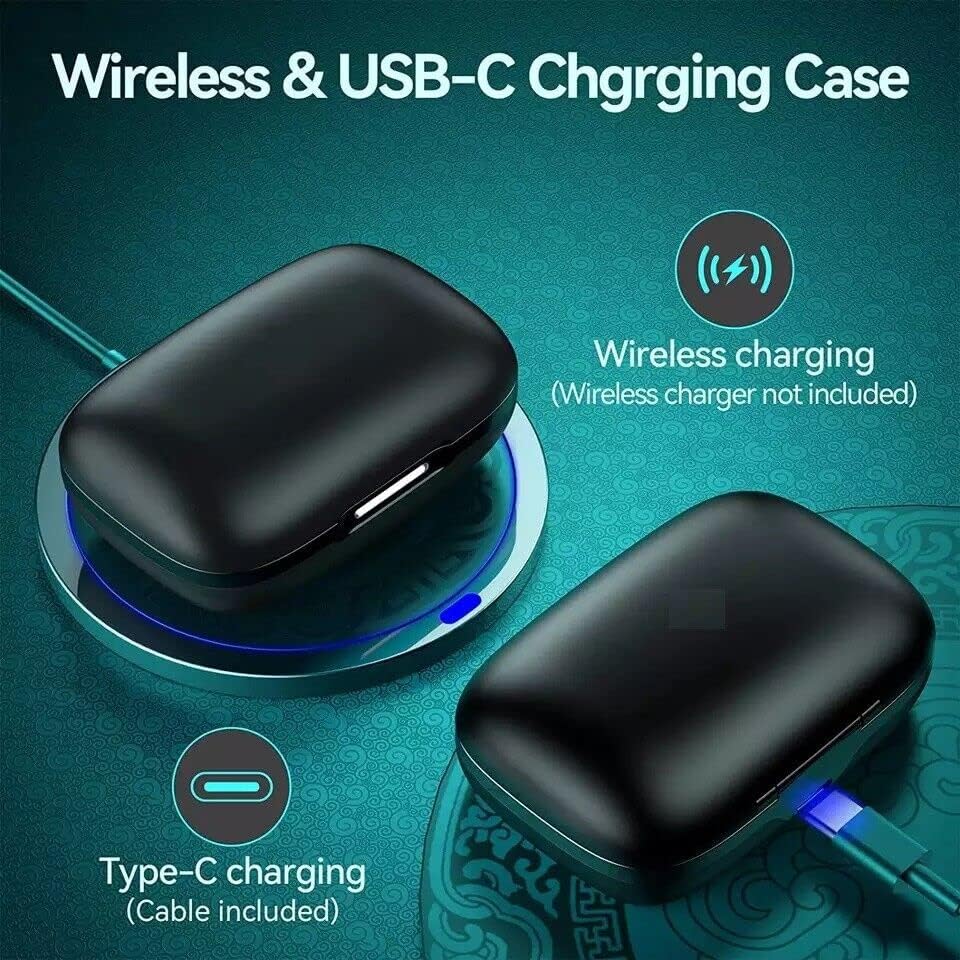
Image: The SGNICS T59 charging case demonstrating both wireless charging on a pad and wired charging via a USB-C cable.
2. Bluetooth Pairing
- Ensure the earbuds are charged.
- Open the charging case. The earbuds will automatically power on and enter pairing mode.
- On your device (smartphone, tablet, computer), enable Bluetooth and search for available devices.
- Select "SGNICS T59" from the list of devices to connect.
- Once connected, you will hear an audio prompt, and the earbuds will be ready for use.
The earbuds will automatically reconnect to the last paired device when removed from the case, if Bluetooth is enabled on the device.
Operating Instructions
Power On/Off
- Power On: Remove the earbuds from the charging case. They will automatically power on.
- Power Off: Place the earbuds back into the charging case. They will automatically power off and begin recharging.
Basic Controls (Multi-function Button)
Each earbud features a multi-function button for easy control of audio and calls.
- Play/Pause: Single tap on either earbud.
- Next Song: Double tap the right earbud.
- Previous Song: Double tap the left earbud.
- Answer/End Call: Single tap on either earbud during an incoming call or active call.
- Reject Call: Press and hold either earbud for 2 seconds during an incoming call.
- Activate Voice Assistant: Triple tap on either earbud (functionality may vary by device).

Image: A person wearing the SGNICS T59 earbuds, illustrating the secure fit provided by the flexible earhooks and the location of the button control. Also shows different ear tip sizes (S, M, L).
Wearing the Earbuds
The SGNICS T59 earbuds are designed with flexible earhooks and an ergonomic shape for a secure and comfortable fit, especially during physical activity.
- Select the appropriate ear tip size (S, M, L) for a snug fit.
- Place the earbud into your ear canal.
- Adjust the flexible earhook over the top and behind your ear until it feels secure and comfortable.
Battery Display
The charging case features a dual LED digital display to monitor battery levels:
- The number on the screen indicates the remaining battery percentage of the charging case.
- The LED bars (L and R) show the charging status of the individual earbuds. These bars will fade as the earbuds reach full charge.
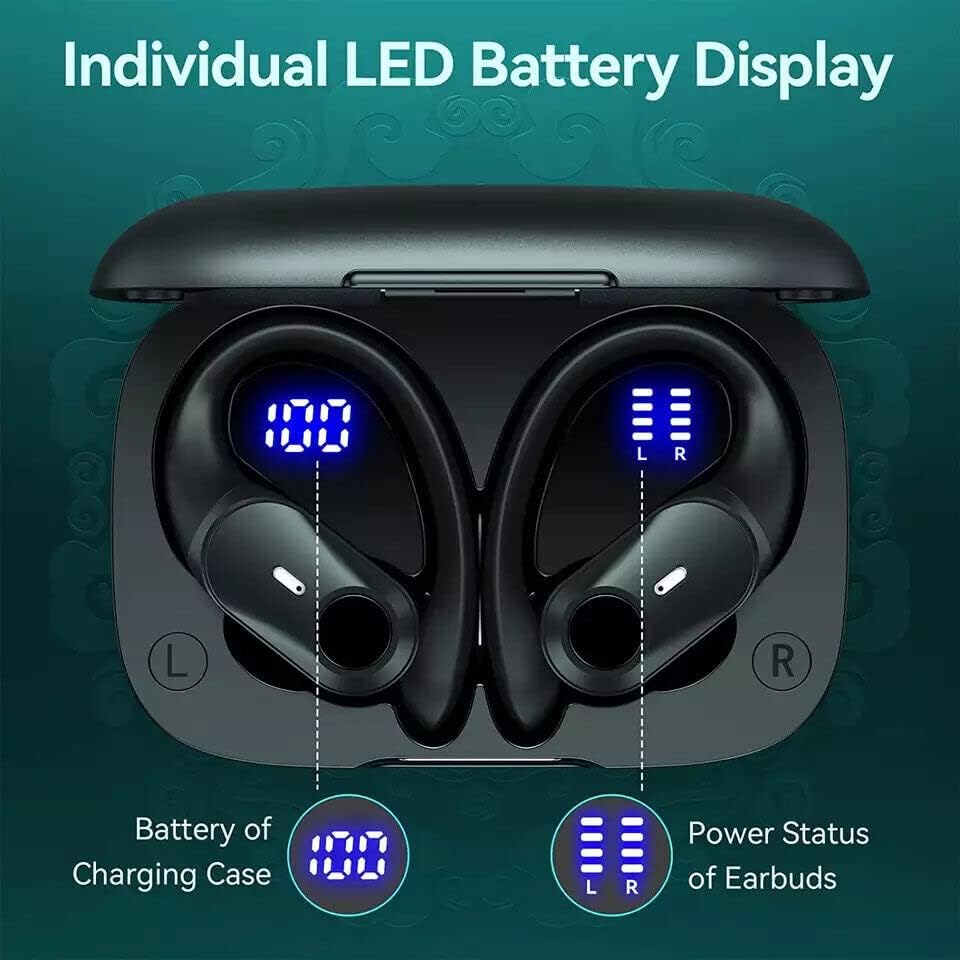
Image: Close-up of the SGNICS T59 charging case's LED display, clearly showing the numerical battery percentage for the case and separate bar indicators for the left and right earbuds.
Maintenance
- Cleaning: Regularly clean the earbuds and charging case with a soft, dry, lint-free cloth. Avoid using harsh chemicals or abrasive materials.
- Ear Tips: Remove ear tips and clean them with water and mild soap if necessary. Ensure they are completely dry before reattaching.
- Storage: When not in use, store the earbuds in their charging case to protect them and keep them charged. Store in a cool, dry place away from extreme temperatures.
- Water Resistance (IPX7): The earbuds are IPX7 waterproof, meaning they can withstand splashes, rain, and sweat. However, they are not designed for swimming or prolonged submersion. Ensure the charging port is dry before charging.
Troubleshooting
- Earbuds not pairing with device:
- Ensure earbuds are charged and removed from the case.
- Turn off and on Bluetooth on your device.
- Forget/delete "SGNICS T59" from your device's Bluetooth list and try pairing again.
- Restart your device.
- Only one earbud working:
- Place both earbuds back into the charging case, close the lid, wait a few seconds, then remove them.
- Ensure both earbuds are charged.
- Try re-pairing the earbuds with your device.
- Earbuds not charging:
- Ensure the charging case has power (check LED display).
- Verify the USB-C cable is securely connected to both the case and the power source.
- If using wireless charging, ensure the case is correctly positioned on the charging pad.
- Clean the charging contacts on both the earbuds and inside the case.
- Poor sound quality:
- Ensure earbuds are properly seated in your ears with the correct ear tip size.
- Clean any debris from the earbud speakers.
- Move closer to your connected device to avoid Bluetooth interference.
- Check the audio source for quality issues.
Specifications
| Feature | Detail |
|---|---|
| Model Number | T59 |
| Brand | SGNICS |
| Connectivity Technology | Wireless (Bluetooth) |
| Wireless Communication | Bluetooth |
| Charging Case Battery | 650mAh |
| Earbud Playtime | Up to 6 hours per charge |
| Total Playtime (with case) | Up to 36 hours |
| Charging Type | USB Type-C, Wireless Charging |
| Drivers | 11mm |
| Water Resistance | IPX7 (Sweat and splash resistant) |
| Control Method | Touch (Multi-function button) |
| Microphone | Integrated for calls |
| Ear Placement | Over Ear (with earhooks) |
| Compatible Devices | Tablets, Cell Phones, Computers, Smart Phones |
Warranty and Support
SGNICS products are designed for reliability and performance. For specific warranty information, please refer to the warranty card included with your purchase or visit the official SGNICS website.
If you encounter any issues or have questions regarding your SGNICS T59 Wireless Earbuds, please contact SGNICS customer support through the retailer where you purchased the product or via the contact information provided on the official SGNICS website.