
Galanz D90D25AP-H7
Galanz Microwave Oven User Manual
Model: D90D25AP-H7 | Brand: Galanz
Introduction
Thank you for choosing the Galanz Microwave Oven, Model D90D25AP-H7. This 25-liter, 900-watt microwave with a 1000-watt grill function is designed for convenient and efficient cooking. This manual provides essential information for the safe and effective operation, maintenance, and troubleshooting of your new appliance. Please read it thoroughly before use and keep it for future reference.
Key Features:
- Microwave Power Output: 900 W
- Grill Power: 1000 W
- Capacity: 25 Liters
- Touch Pad Control Panel
- 5 Microwave Power Levels
- 2 Combination Cooking Levels
- Jet Defrost/Weight Defrost functions
- Preset and Express Functions
- 265mm Diameter Glass Tray
Important Safety Instructions
When using electrical appliances, basic safety precautions should be followed, including the following:
- Read all instructions before using the appliance.
- Do not attempt to operate this oven with the door open as this can result in harmful exposure to microwave energy.
- Do not place any object between the oven front face and the door or allow soil or cleaner residue to accumulate on sealing surfaces.
- Do not operate the oven if it is damaged. It is particularly important that the oven door closes properly and that there is no damage to the: (1) door (bent), (2) hinges and latches (broken or loosened), (3) door seals and sealing surfaces.
- The oven should not be adjusted or repaired by anyone except properly qualified service personnel.
- Ensure the appliance is properly grounded.
- Do not use corrosive chemicals or vapors in this appliance.
- Do not heat liquids or other foods in sealed containers since they are liable to explode.
- Always use microwave-safe cookware.
Product Overview
Familiarize yourself with the components of your Galanz Microwave Oven.



Setup
Unpacking:
- Remove all packing materials from the oven cavity and the accessories.
- Check the oven for any damage, such as dents or a misaligned door. Do not operate the oven if it is damaged.
Placement:
- Place the oven on a flat, stable surface that can support its weight and the heaviest food likely to be cooked in the oven.
- Ensure adequate ventilation. Leave a minimum of 20 cm (8 inches) of space above the oven, 10 cm (4 inches) at the rear, and 5 cm (2 inches) on each side for proper airflow.
- Do not block air vents.
- Keep the oven away from heat sources and water.
Electrical Connection:
- Plug the oven into a properly installed and grounded wall outlet. The voltage and frequency should match the specifications on the rating label (230-240V/50Hz).
- Do not use extension cords or adapters.
Turntable Installation:
- Place the roller ring in the center of the oven bottom.
- Place the glass tray (265mm diameter) on top of the roller ring, ensuring it sits securely in the center hub.
Operating Instructions
Control Panel Overview:
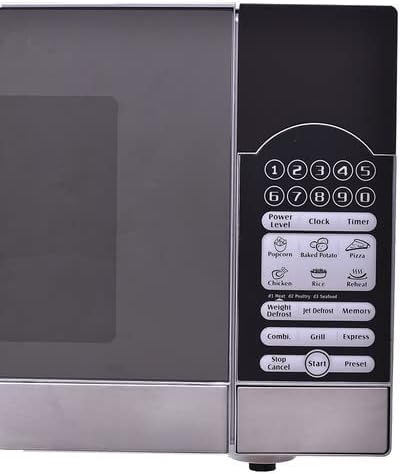
Refer to Figure 4 for a visual guide to the control panel. The panel features numerical buttons (0-9), function buttons like Power Level, Clock, Timer, Preset options (Popcorn, Baked Potato, Pizza, Chicken, Rice, Reheat), Defrost options (Weight Defrost, Jet Defrost), Combi, Grill, Express, Stop/Cancel, Start, and Preset.
Setting the Clock:
- Press the "Clock" button.
- Use the numerical buttons to enter the current time (e.g., 12:30).
- Press "Clock" again to confirm.
Basic Microwave Cooking:
- Place food in a microwave-safe container on the glass tray.
- Close the oven door.
- Press the "Power Level" button repeatedly to select the desired power level (e.g., P100 for 100% power, P80 for 80%, etc.).
- Use the numerical buttons to enter the cooking time.
- Press "Start" to begin cooking.
Defrosting:
- Jet Defrost: For quick defrosting. Press "Jet Defrost", then enter the desired defrosting time.
- Weight Defrost: For defrosting based on food weight. Press "Weight Defrost", enter the weight using numerical buttons, then press "Start". The oven will automatically calculate the defrosting time.
Grill Function:
The grill function is ideal for browning and crisping food. Place food on a suitable grill rack (if included) or a low, heat-resistant dish.
- Press the "Grill" button.
- Enter the desired grilling time using the numerical buttons.
- Press "Start".
Combination Cooking:
This oven offers 2 combination cooking levels, combining microwave and grill functions for faster cooking and browning.
- Press the "Combi" button repeatedly to select the desired combination level (e.g., Combi 1, Combi 2).
- Enter the cooking time.
- Press "Start".
Preset Functions:
The oven comes with convenient preset programs for common foods:
- Popcorn
- Baked Potato
- Pizza
- Chicken
- Rice
- Reheat
To use a preset function, simply press the corresponding button (e.g., "Popcorn"), then press "Start". The oven will automatically set the optimal cooking time and power level.
Express Function:
For quick cooking at full power, press the "Express" button. Each press adds 30 seconds of cooking time. Press "Start" to begin.
Stop/Cancel:
Press the "Stop/Cancel" button once to pause cooking, or twice to cancel the current program and clear the settings.
Maintenance
Cleaning the Oven:
- Always unplug the oven from the power outlet before cleaning.
- Oven Interior: Wipe the inside of the oven with a damp cloth after each use. For stubborn stains, use a mild detergent. Do not use abrasive cleaners or scouring pads.
- Oven Door: Clean the door seals and sealing surfaces regularly with a soft, damp cloth to ensure proper closure and prevent microwave leakage.
- Glass Tray and Roller Ring: These can be washed in warm soapy water or in a dishwasher. Ensure they are completely dry before placing them back in the oven.
- Exterior: Wipe the exterior surface with a soft, damp cloth. Avoid getting water into the ventilation openings.
Care Tips:
- Do not use the oven for storage.
- Do not operate the oven when empty.
- Avoid heating foods with tight skins (e.g., potatoes, whole eggs, sausages) without piercing them first, as they may explode.
- Stir liquids frequently during heating to prevent superheating and sudden boiling.
Troubleshooting
If you encounter issues with your microwave oven, consult the following table before contacting service.
| Problem | Possible Cause | Solution |
|---|---|---|
| Oven will not start | Power cord not plugged in; Door not closed properly; Fuse blown or circuit breaker tripped. | Ensure plug is firmly in outlet; Close door securely; Check household fuse/circuit breaker. |
| Food not cooking evenly | Food not stirred/turned; Incorrect power level/cooking time. | Stir or turn food halfway through cooking; Adjust power level and time as needed. |
| Light not working | Bulb needs replacement. | Contact qualified service personnel for bulb replacement. |
| Turntable not rotating | Turntable not properly seated; Debris under turntable. | Ensure glass tray and roller ring are correctly positioned; Clean under the turntable. |
| Excessive steam from door | Normal during cooking. | This is normal, especially with high-moisture foods. |
Specifications
| Feature | Specification |
|---|---|
| Brand Name | Galanz |
| Model Info | D90D25AP-H7 |
| Capacity | 25 Liters |
| Microwave Power Output | 900 Watts |
| Grill Power | 1000 Watts |
| Voltage | 230-240V/50Hz |
| Installation Type | Freestanding |
| Control Type | Touch Pad |
| Color | Silver |
| Material Type | Glass (Door, Turntable) |
| Item Weight | 15.4 Kilograms |
| Package Dimensions | 54.9 x 49.3 x 33.1 cm |
| Included Components | Glass Tray, User Manual |
Warranty and Support
This Galanz Microwave Oven comes with a manufacturer's warranty. Please refer to the warranty card included with your product for specific terms, conditions, and duration of coverage. Keep your purchase receipt as proof of purchase for warranty claims.
For technical support, service, or to inquire about replacement parts, please contact Galanz customer service through their official website or the contact information provided in your product packaging. Do not attempt to repair the appliance yourself.
Ask a question about this manual
Ask about setup, troubleshooting, compatibility, parts, safety, or missing instructions. Manuals+ will review the question and use this page’s manual context to help answer it.