
1. Introduction
This manual provides essential information for the safe and efficient operation, setup, and maintenance of the Canglan Technology YS-100 Automatic Heat-shrink Tube Cutting Machine. This machine is designed for precise cutting of various materials including PVC tubes, heat shrink tubes, fiberglass tubes, Teflon tubes, corrugated tubes, flat cables, wires, nickel straps, velcro, cotton tape, elastic bands, plastic tape, zippers, conductive tape, foam, battery separators, nickel sheets, diffuser sheets, plastic/rubber sheets, PVC sheets, plastic film, reflecting film, double-sided tape, Mylar film, insulation paper, PE, copper/aluminum foil, and release paper.
Please read this manual thoroughly before operating the machine to ensure proper usage and to prevent damage or injury.
2. Safety Instructions
Always adhere to the following safety guidelines to prevent accidents and ensure safe operation:
- Read the Manual: Familiarize yourself with all instructions and warnings before operating the machine.
- Power Supply: Ensure the machine is connected to a 220V, 50Hz power supply. Always disconnect power before performing any maintenance or adjustments.
- Work Area: Operate the machine in a clean, well-lit, and stable environment. Keep the work area free of clutter.
- Personal Protective Equipment (PPE): Wear appropriate safety glasses to protect against flying debris.
- Keep Hands Clear: Never place hands or fingers near the cutting blade or material feed mechanism while the machine is operating or connected to power. Observe the warning label on the machine.
- Material Compatibility: Only cut materials specified for this machine. Cutting unsuitable materials may damage the machine or cause injury.
- Emergency Stop: Locate and understand the function of the emergency stop button (red button on the control panel) before operation.
- Supervision: Do not allow untrained personnel to operate the machine.
3. Product Overview
The YS-100 Automatic Heat-shrink Tube Cutting Machine is a robust and efficient tool designed for precise material cutting. Below are images illustrating the machine's main components.
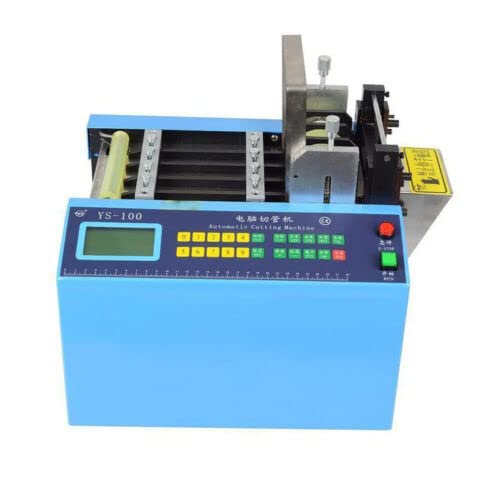
Figure 3.1: Front view of the YS-100 Automatic Heat-shrink Tube Cutting Machine. This image shows the overall design, including the control panel and material feed area.

Figure 3.2: Close-up of the YS-100 control panel. The panel features an LCD display, numerical keypad, function buttons (green and red), and emergency stop button (red circular button).
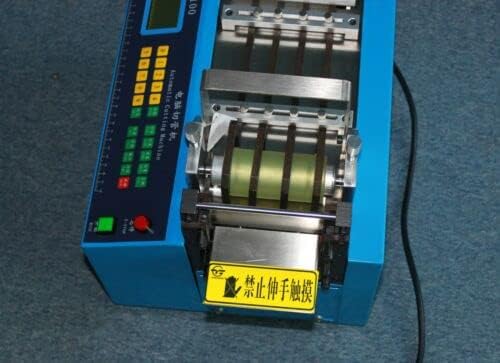
Figure 3.3: View of the material feed and cutting mechanism. This area includes rollers for material advancement and the cold cutting blade. A yellow warning label is visible, indicating to keep hands clear.
4. Specifications
| Feature | Specification |
|---|---|
| Voltage | 220V |
| Frequency | 50Hz |
| Power | 250W |
| Cutting Length | 0.1 - 9999.9 mm |
| Blade Width | 100 mm |
| Max Cutting Diameter | 11 mm |
| Weight | 28 kg |
| Dimensions (L x W x H) | 360 x 300 x 350 mm |
| Cut Speed (50mm length) | 100-120 cuts/minute |
5. Setup
- Unpacking: Carefully remove the machine from its packaging. Retain all packaging materials for future transport or storage.
- Placement: Place the machine on a stable, level, and sturdy surface capable of supporting its weight (28 kg). Ensure adequate space around the machine for material feeding and cut piece collection, as well as for ventilation.
- Power Connection: Connect the power cord to a grounded 220V, 50Hz electrical outlet. Ensure the power switch on the machine is in the 'OFF' position before connecting.
- Material Loading:
- Ensure the machine is powered off.
- Carefully feed the material (tube, cable, tape, etc.) into the designated material feed slot, ensuring it is straight and properly aligned with the rollers.
- Adjust any guides if present to secure the material in place without excessive tension or slack.
6. Operating Instructions
Follow these steps to operate the YS-100 cutting machine:
- Power On: Flip the main power switch to the 'ON' position. The LCD display on the control panel should illuminate.
- Set Cutting Length: Use the numerical keypad to input the desired cutting length in millimeters (e.g., 'LEN=0020.0mm' for 20mm). Press the appropriate function button to confirm the setting.
- Set Quantity: Input the total number of pieces to be cut using the numerical keypad. The machine will stop automatically once this quantity is reached.
- Set Speed: Adjust the cutting speed (SPD) as required for the material being processed. Start with a lower speed for delicate materials and increase as needed.
- Start Operation: Press the 'START' or 'RUN' button (typically a green button) to begin the cutting process. The machine will automatically feed the material and perform cuts according to the set parameters.
- Monitor Operation: Observe the machine during operation. The display will show current status, including cuts completed.
- Automatic Stopper: The machine is equipped with an automatic stopper that will halt operation if the material runs out.
- Memory Function: Set length, quantity, and speed parameters are retained even if the power is turned off and on again.
- Stop Operation: To pause or stop the cutting process, press the 'STOP' button or the emergency stop button (red circular button) for immediate cessation.
- Power Off: Once cutting is complete, turn off the main power switch.
7. Maintenance
Regular maintenance ensures the longevity and optimal performance of your YS-100 machine:
- Cleaning: Regularly clean the machine, especially the material feed area and cutting mechanism, to remove dust, debris, and material residue. Use a soft, dry cloth. Ensure the machine is powered off and unplugged before cleaning.
- Blade Inspection: Periodically inspect the cutting blade for sharpness and damage. A dull or damaged blade can lead to inaccurate or poor-quality cuts. Blade replacement should only be performed by qualified personnel or according to specific instructions (if provided separately).
- Roller Check: Ensure the material feed rollers are clean and free from obstructions to maintain consistent material feeding.
- Lubrication: Refer to any specific lubrication points mentioned in a more detailed service manual, if available. Generally, moving parts may require light lubrication.
- Storage: When not in use for extended periods, store the machine in a dry, clean environment, protected from dust and extreme temperatures.
8. Troubleshooting
This section addresses common issues you might encounter with the YS-100 machine:
| Problem | Possible Cause | Solution |
|---|---|---|
| Machine does not power on | No power supply; Power cord loose; Main switch off | Check power connection; Ensure main switch is ON; Check circuit breaker |
| Inaccurate cutting length | Incorrect length setting; Material slippage; Worn blade | Verify length setting; Ensure material is properly loaded and secured; Inspect and replace blade if necessary |
| Material not feeding | Material jam; Rollers dirty or worn; Material exhausted | Clear any obstructions; Clean rollers; Load new material |
| Poor cut quality (frayed edges) | Dull or damaged blade; Incorrect cutting speed for material | Replace blade; Adjust cutting speed (usually slower for better quality) |
| Machine stops unexpectedly | Material exhausted (automatic stop); Overload; Emergency stop activated | Load new material; Reduce load or check for jams; Reset emergency stop if safe to do so |
If you encounter problems not listed here or if the suggested solutions do not resolve the issue, please contact customer support.
9. Support and Warranty
For technical assistance, spare parts, or any inquiries regarding your Canglan Technology YS-100 Automatic Heat-shrink Tube Cutting Machine, please contact Canglan Technology customer support.
Warranty information for this product is typically provided at the point of purchase or with the product documentation. Please refer to your purchase receipt or contact your seller for specific warranty terms and conditions.