
Introduction
This manual provides comprehensive instructions for the installation, operation, and maintenance of your Dioche Fingerprint Password Keyless Entry Lock. Please read this manual thoroughly before installation and use to ensure proper function and security.
Product Features
- Multiple Unlocking Methods: Supports fingerprint, password, IC card, and emergency mechanical key access.
- Emergency Power Supply: Features a low voltage alarm and USB emergency charging port for power bank use.
- Durable Construction: Made from high-quality aluminum alloy and ABS material for rust resistance, strength, and durability.
- Easy Installation: Clip-on design requires no wiring or drilling, preventing glass damage. Suitable for 12mm frameless glass doors and wooden doors with 4-15mm seams.
- High User Capacity: Stores up to 100 user profiles.
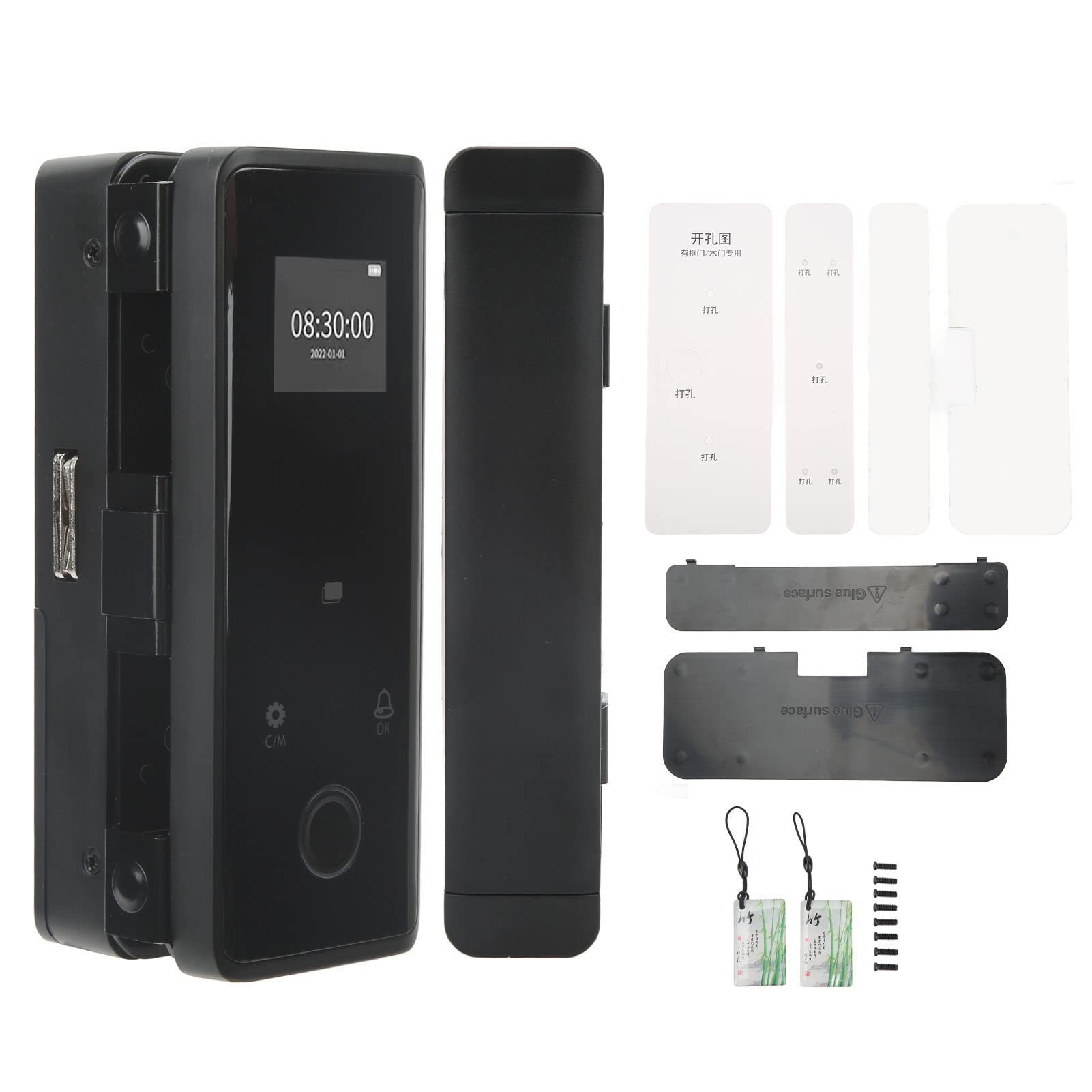
Image: Front and side view of the Dioche Smart Lock, illustrating its compact design.

Image: The Dioche Smart Lock highlighting its fingerprint unlocking capability.

Image: The Dioche Smart Lock demonstrating IC card access.
Video: Overview of the Smart Glass Door Safety Lock, showcasing its keyless entry features.
Video: Product overview of the LE-170 Black Glass Door Lock, detailing its design and functions.
Package Contents
Verify that all components are present before beginning installation:
- Main Lock Unit (Front and Rear Panels)
- Mounting Plates/Brackets
- IC Cards
- Emergency Keys
- Mounting Screws
- Installation Templates
- User Manual (this document)

Image: All components included in the Dioche Smart Lock package.
Specifications
| Feature | Detail |
|---|---|
| Brand | Dioche |
| Model Number | FGDL-001 |
| Lock Type | Keypad, Fingerprint, IC Card |
| Material | Aluminum Alloy, ABS |
| Color | Black |
| Special Features | Alarm, Fingerprint, Fob Unlock, Touchscreen, Emergency Power Supply |
| Recommended Uses | Office, Glass Doors, Wooden Doors |
| Door Thickness Compatibility | 12mm frameless glass doors; 4-15mm door seams for various door types |
| Item Weight | 1.04 Kilograms |
Installation Instructions
The Dioche Keyless Entry Lock is designed for easy, non-invasive installation. No drilling or wiring is required for frameless glass doors.
1. Prepare the Door
- Ensure the glass door thickness is 12mm. For other door types, ensure door seam is between 4-15mm.
- Clean the installation area on the door thoroughly.
- Verify sufficient clearance for the lock components.
Video: Detailed installation guide for glass door requirements, showing necessary clearances.
2. Mount the Lock Units
- Attach the front and rear lock panels to the door using the provided clip-on mechanism. Ensure they are aligned correctly.
- Secure the units with the appropriate screws, ensuring a snug fit without overtightening, especially on glass.
- Connect any internal cables between the front and rear units as instructed in the detailed diagram (refer to included paper manual for diagrams).
3. Install Batteries
- Open the battery compartment on the rear panel.
- Insert the required batteries (not included) according to polarity markings.
- Close the battery compartment securely.
4. Initial Setup
- Follow the on-screen prompts or refer to the detailed programming section in the included paper manual to set up the administrator fingerprint/password.
- Test the lock functionality to ensure it locks and unlocks smoothly.
Operating Instructions
Unlocking Methods
- Fingerprint: Place your registered finger on the fingerprint sensor. The lock will unlock upon successful verification.
- Password: Enter your registered password on the touchscreen keypad, then press '#' or 'OK' to confirm.
- IC Card: Present your registered IC card to the card reader area on the lock. The lock will unlock automatically.
- Emergency Key: In case of electronic failure or dead batteries, use the physical emergency key to unlock the door.

Image: The Dioche Smart Lock demonstrating its various unlocking methods, including fingerprint, password, IC card, and mobile app control.
Locking the Door
The lock typically features an automatic locking mechanism after the door closes. Verify this function after installation. Manual locking may also be available via a button or turning the interior knob.
User Management
Access the lock's menu (usually by pressing 'C/M' or a similar button) and enter the administrator password/fingerprint to manage users. You can add, modify, or delete fingerprints, passwords, and IC cards for up to 100 users.
Maintenance
- Cleaning: Wipe the lock's surface with a soft, dry cloth. Avoid abrasive cleaners or solvents that may damage the finish or electronic components.
- Battery Replacement: Replace batteries promptly when the low voltage alarm sounds. Use high-quality alkaline batteries for optimal performance.
- Emergency Power: If batteries die completely, use a power bank connected to the USB emergency charging port to temporarily power the lock for entry.
- Key Maintenance: Keep emergency keys in a safe, accessible location outside the locked area.
Troubleshooting
| Problem | Possible Cause | Solution |
|---|---|---|
| Lock does not respond. | Dead batteries. | Replace batteries or use emergency USB power. |
| Fingerprint not recognized. | Finger is dirty, wet, or not properly placed; fingerprint not registered. | Clean and dry finger, ensure proper placement, re-register fingerprint if necessary. |
| Password not accepted. | Incorrect password entered; keypad malfunction. | Verify password, try again. If issue persists, use another unlock method or emergency key. |
| IC card not working. | Card not registered; card damaged. | Ensure card is registered. Try a different registered card. |
| Lock is loose on the door. | Mounting screws are loose. | Carefully tighten mounting screws. |
Warranty and Support
For warranty information and technical support, please refer to the contact details provided with your purchase documentation or visit the official Dioche website. Keep your proof of purchase for warranty claims.