
1. Product Overview
The Y DIANS S SLA-01W is a robust motion sensor alarm system designed for industrial and commercial security applications. It features a powerful 120dB horn, an adjustable volume, multiple tones, and an LED strobe light. Its waterproof and dustproof design (IP65) ensures reliable operation in challenging outdoor environments such as factories, warehouses, and docks. The system utilizes microwave motion detection for sensitive and accurate alerts.

Figure 1.1: Y DIANS S SLA-01W Motion Sensor Alarm and its remote control.
2. Safety Information
- This alarm system requires wiring for power. Installation should be performed by a qualified professional to ensure safety and proper functionality.
- Ensure the power supply matches the specified voltage (AC110-120V for this model).
- Do not attempt to open or repair the device yourself. Refer to qualified service personnel.
- The alarm produces a very loud sound (up to 120dB). Avoid prolonged exposure to the siren at close range to prevent hearing damage.
- While the device is IP65 rated for water and dust resistance, avoid submerging it in water or exposing it to extreme conditions beyond its rating.
- This product is intended for industrial use and is not suitable for residential or farm environments.

Figure 2.1: The alarm is suitable for industrial use (factories, docks) but not for home or farm use.
3. Product Features
- Advanced Microwave Motion Detection: Highly sensitive sensor detects movement of people or objects within 0-32 feet (0-10 meters).
- High Decibel Siren: Produces an alarm sound up to 120dB, ensuring effective alerts.
- Adjustable Volume and Tones: Remote control allows separate adjustment of alarm volume and selection from 12 different tones.
- LED Strobe Light: Provides visual alerts in conjunction with the audible alarm.
- IP65 Waterproof and Dustproof: Durable construction suitable for outdoor and harsh industrial environments.
- Custom Audio Upload: Supports uploading customized audio files via a USB port.
- Remote Control: Infrared remote with an effective distance of up to 8 meters (26.2 feet).
4. Package Contents
Upon unpacking, please verify that all components are present:
- SLA-01W Motion Sensor Alarm Unit (with integrated LED Strobe Light)
- Infrared Remote Control
- Mounting Hardware (screws, anchors) - Typically included, verify upon receipt.
- User Manual (this document)
5. Setup and Installation
5.1 Mounting Location
Select an open area for installation to optimize microwave motion detection and avoid false alarms caused by interference. The recommended installation height is 2-2.5 meters (6.5-8.2 feet) for optimal detection of people or animals.

Figure 5.1: Sensing angle (120°) and distance (1-10m) of the motion sensor.
5.2 Wiring
The SLA-01W alarm requires direct wiring for power and does not come with a plug switch. Professional installation is highly recommended to ensure correct and safe electrical connections. Connect the alarm to an AC110-120V power source.
5.3 Detection Range Adjustment
The alarm's default detection distance is set to 5 meters (16.4 feet). You can adjust this range using the detection range adjustment button located inside the unit:
- To increase detection distance: Turn the button clockwise. The maximum detection distance is approximately 10 meters (32.8 feet).
- To decrease detection distance: Turn the button counter-clockwise. The minimum detection distance is approximately 1 meter (3.2 feet).
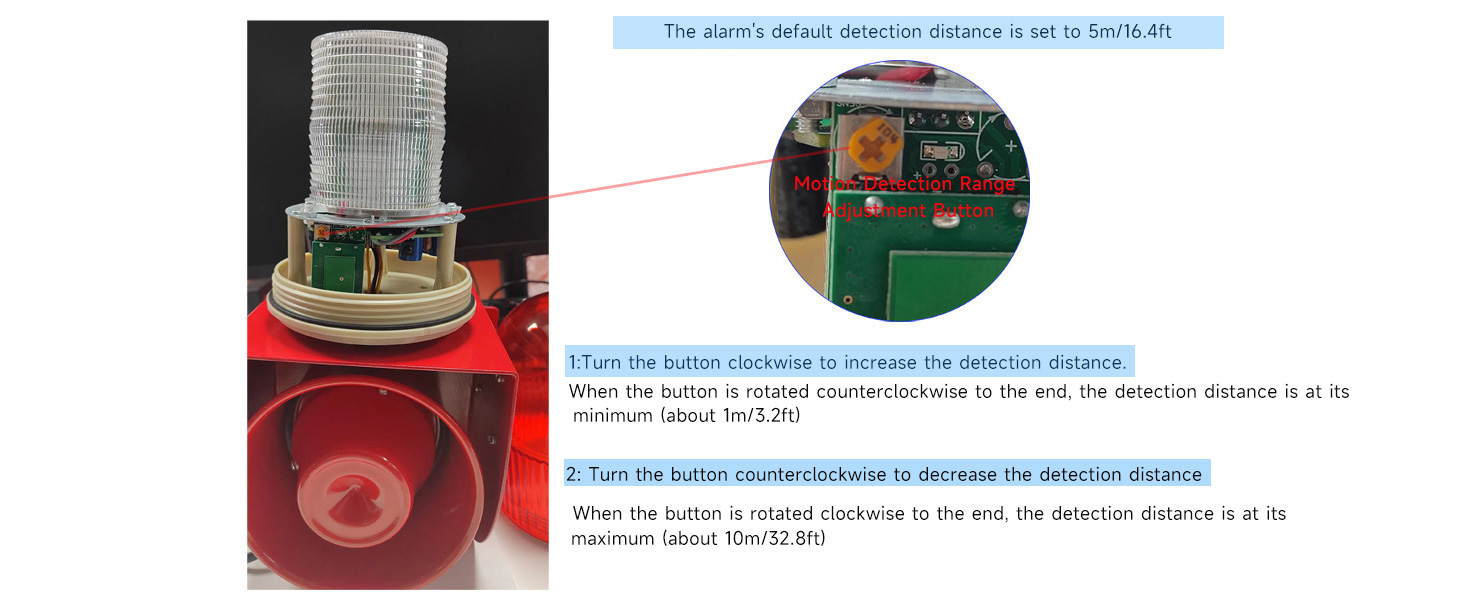
Figure 5.2: Location of the Motion Detection Range Adjustment Button.
6. Operating Instructions
Once powered on, the alarm will enter standby mode. It will activate the siren and strobe light upon detecting movement within its set range.
6.1 Remote Control Functions
The included infrared remote control allows for adjustment of various settings:
- Volume Up/Down: Adjusts the alarm sound level.
- Previous/Next (Tone): Cycles through the 12 available alarm tones.
- MODE: Switches between alarm modes.

Figure 6.1: Remote control layout and functions. Note: The remote adjusts sound and tone but does not turn the siren on or off.

Figure 6.2: The alarm volume can be adjusted up to 120 decibels.
6.2 Alarm Modes
The alarm supports different operational modes:
- Mode A: Only the sound alarm is activated upon detection.
- Mode B: Both the sound and light (strobe) alarms are activated upon detection.

Figure 6.3: Comparison of Mode A (Sound Only) and Mode B (Sound and Light Alarm).
6.3 Custom Audio Upload
The SLA-01W allows users to upload customized audio files via its USB port. This feature enables personalized alarm messages or specific warning sounds.

Figure 6.4: Uploading customized audio to the alarm via USB.
7. Maintenance
- Regular Cleaning: Periodically wipe the exterior of the alarm with a soft, damp cloth to remove dust and debris. Do not use harsh chemicals or abrasive cleaners.
- Inspect Wiring: Regularly check the power wiring for any signs of wear, damage, or loose connections. Address any issues promptly.
- Sensor Area Clearance: Ensure the area in front of the motion sensor remains clear of obstructions that could block detection or cause false alarms.
- Remote Control: Keep the remote control clean and dry. If the remote's range decreases, consider replacing its batteries (if applicable, though the product description doesn't specify remote battery type).
8. Troubleshooting
| Problem | Possible Cause | Solution |
|---|---|---|
| Alarm does not activate upon motion detection. | No power; Sensor obstructed; Detection range too low; Faulty sensor. | Check power connection; Clear obstructions; Adjust detection range (Section 5.3); Contact support if sensor is suspected faulty. |
| Alarm triggers false alarms. | Interference in detection area; Detection range too high; Environmental factors (e.g., strong wind, large moving objects). | Relocate alarm to a more open area; Decrease detection range (Section 5.3); Ensure no non-target movement in detection zone. |
| Remote control not working. | Out of range; Obstruction between remote and alarm; Remote batteries low/dead (if applicable); Faulty remote. | Move closer to the alarm; Ensure clear line of sight; Replace remote batteries; Contact support for a replacement remote if needed. |
| Alarm sound is too low or too high. | Volume setting is incorrect. | Use the remote control to adjust the volume (Volume Up/Down buttons). |
| Cannot change alarm tone. | Incorrect remote button used; Remote not working. | Use the Previous/Next buttons on the remote; Refer to 'Remote control not working' solution. |
9. Specifications
| Feature | Specification |
|---|---|
| Product Model | SLA-01W |
| Brand | Y DIANS S |
| Voltage | 110 Volts (AC) |
| Wattage | 25 watts |
| Noise Level | 120 dB |
| Control Method | Remote |
| Sensor Technology | Microwave |
| Maximum Detection Range | 10 Meters (32.8 feet) |
| Mounting Type | Wall Mount |
| Material | Cold Rolled Steel |
| Finish | Steel |
| Color | Red |
| Product Dimensions (L x W x H) | 12.2 x 5.91 x 7.09 inches (306 x 150 x 174 mm) |
| Item Weight | 7.13 pounds (3 KG) |
| IP Rating | IP65 (Waterproof, Dustproof) |
| Light Type | LED Strobe |

Figure 9.1: Detailed product specifications and dimensions.
10. Warranty and Support
Y DIANS S is committed to providing high-quality products. If you encounter any questions or problems with your SLA-01W Motion Sensor Alarm, please contact the manufacturer or seller directly. They aim to respond to inquiries within 24 hours.
For missing components, such as the remote control, please reach out to the seller for assistance.
Please retain your purchase receipt for warranty claims.