One For All Samsung TV Replacement Remote Control

Model: URC4810

Introduction

The One For All URC4810 is a dedicated replacement remote control designed specifically for Samsung televisions. This remote offers 100% compatibility with all Samsung TV models, providing a seamless and intuitive user experience. It features a quick setup process called SimpleSet and a learning function to transfer commands from your original remote, ensuring you retain all necessary functionalities.

Safety Information

Package Contents

Please check the package for the following items:

One For All URC4810 remote control in its retail packaging.

Image: The One For All URC4810 remote control displayed within its retail packaging, showing the product name and key features.

Setup

1. Battery Installation

The URC4810 remote control requires 2x AAA batteries (not included). Follow these steps to install them:

  1. Open the battery compartment cover on the back of the remote control.
  2. Insert two AAA batteries, ensuring the positive (+) and negative (-) terminals align with the markings inside the compartment.
  3. Close the battery compartment cover securely.
Side view of the One For All URC4810 remote control, showing its slim profile.

Image: A side profile view of the One For All URC4810 remote control, illustrating its ergonomic design and the location of the battery compartment seam.

2. SimpleSet Setup

The URC4810 remote features SimpleSet, allowing for quick setup in under 30 seconds. No codes are needed.

  1. Ensure your Samsung TV is turned on.
  2. Point the One For All remote at your Samsung TV.
  3. Press and hold the Power button on the One For All remote until your TV turns off. This may take a few seconds.
  4. Once the TV turns off, release the Power button immediately. The remote is now set up.
  5. Test other functions like Volume Up/Down and Channel Up/Down to confirm full functionality.
Front view of the One For All URC4810 remote control, showing all buttons.

Image: A direct front view of the One For All URC4810 remote control, showcasing its full button layout, including the power button at the top.

3. Learning Feature (Optional)

The learning feature allows you to copy functions from your original Samsung TV remote to the URC4810. This is useful for any specific buttons not covered by the default setup.

  1. Place the One For All remote and your original Samsung remote on a flat surface, facing each other, about 1-2 inches apart.
  2. On the One For All remote, press and hold the SETUP button (if available, otherwise refer to the specific manual for learning mode entry, typically a combination of buttons like SHIFT + LEARN or similar) until the LED blinks twice and then stays lit.
  3. Press the button on the One For All remote that you wish to program (e.g., a specific app button). The LED will blink rapidly.
  4. On your original Samsung remote, press the corresponding button you want to copy. The LED on the One For All remote will blink twice to confirm successful learning.
  5. Repeat steps 3 and 4 for any other buttons you wish to learn.
  6. To exit learning mode, press the SETUP button again (or the button used to enter learning mode). The LED will turn off.
Angled view of the One For All URC4810 remote control, highlighting its ergonomic design.

Image: An angled view of the One For All URC4810 remote control, showcasing its comfortable grip and button placement.

Operating Instructions

Once set up, the URC4810 remote functions like your original Samsung TV remote. Here are some common button functions:

Maintenance

Cleaning

To clean your remote control, use a soft, dry cloth. Do not use abrasive cleaners, waxes, or solvents. Avoid spraying liquids directly onto the remote.

Battery Replacement

If the remote control's range decreases or buttons become unresponsive, it may be time to replace the batteries. Follow the "Battery Installation" steps in the Setup section to replace the old batteries with new AAA alkaline batteries.

Troubleshooting

Problem Possible Cause Solution
Remote does not work after setup. Incorrect setup or dead batteries. Ensure batteries are correctly inserted and charged. Repeat the SimpleSet process carefully.
Some buttons do not work. Button not recognized by SimpleSet or not learned. Use the Learning Feature to copy the function from your original remote. Ensure the remote is pointed directly at the TV.
Remote range is poor. Low batteries or obstruction. Replace batteries. Ensure there are no obstructions between the remote and the TV's IR receiver.
LED on remote does not light up. No batteries or incorrect battery insertion. Check battery orientation and ensure they are new and correctly inserted.

Specifications

Brand One For All
Model Number URC4810
Compatible Devices Samsung Televisions
Power Source Battery Powered (2x AAA, not included)
Color White (Note: Product images show black, but specification states white. Please refer to product packaging for exact color.)
Item Weight 3.52 ounces (approx. 100 grams)
Product Dimensions (L x W x H) Approx. 4"D x 3"W x 1"H (Note: Dimensions may refer to packaging or a specific part. Actual remote dimensions are typically longer and narrower.)
UPC 810209030940

Warranty and Support

One For All products are designed and manufactured to the highest standards. For information regarding warranty, technical support, or frequently asked questions, please visit the official One For All website or contact their customer service directly.

For the most up-to-date support information, please refer to the manufacturer's official channels:

">

One For All Samsung TV Replacement Remote Control

Model: URC4810

Introduction

The One For All URC4810 is a dedicated replacement remote control designed specifically for Samsung televisions. This remote offers 100% compatibility with all Samsung TV models, providing a seamless and intuitive user experience. It features a quick setup process called SimpleSet and a learning function to transfer commands from your original remote, ensuring you retain all necessary functionalities.

Safety Information

Package Contents

Please check the package for the following items:

One For All URC4810 remote control in its retail packaging.

Image: The One For All URC4810 remote control displayed within its retail packaging, showing the product name and key features.

Setup

1. Battery Installation

The URC4810 remote control requires 2x AAA batteries (not included). Follow these steps to install them:

  1. Open the battery compartment cover on the back of the remote control.
  2. Insert two AAA batteries, ensuring the positive (+) and negative (-) terminals align with the markings inside the compartment.
  3. Close the battery compartment cover securely.
Side view of the One For All URC4810 remote control, showing its slim profile.

Image: A side profile view of the One For All URC4810 remote control, illustrating its ergonomic design and the location of the battery compartment seam.

2. SimpleSet Setup

The URC4810 remote features SimpleSet, allowing for quick setup in under 30 seconds. No codes are needed.

  1. Ensure your Samsung TV is turned on.
  2. Point the One For All remote at your Samsung TV.
  3. Press and hold the Power button on the One For All remote until your TV turns off. This may take a few seconds.
  4. Once the TV turns off, release the Power button immediately. The remote is now set up.
  5. Test other functions like Volume Up/Down and Channel Up/Down to confirm full functionality.
Front view of the One For All URC4810 remote control, showing all buttons.

Image: A direct front view of the One For All URC4810 remote control, showcasing its full button layout, including the power button at the top.

3. Learning Feature (Optional)

The learning feature allows you to copy functions from your original Samsung TV remote to the URC4810. This is useful for any specific buttons not covered by the default setup.

  1. Place the One For All remote and your original Samsung remote on a flat surface, facing each other, about 1-2 inches apart.
  2. On the One For All remote, press and hold the SETUP button (if available, otherwise refer to the specific manual for learning mode entry, typically a combination of buttons like SHIFT + LEARN or similar) until the LED blinks twice and then stays lit.
  3. Press the button on the One For All remote that you wish to program (e.g., a specific app button). The LED will blink rapidly.
  4. On your original Samsung remote, press the corresponding button you want to copy. The LED on the One For All remote will blink twice to confirm successful learning.
  5. Repeat steps 3 and 4 for any other buttons you wish to learn.
  6. To exit learning mode, press the SETUP button again (or the button used to enter learning mode). The LED will turn off.
Angled view of the One For All URC4810 remote control, highlighting its ergonomic design.

Image: An angled view of the One For All URC4810 remote control, showcasing its comfortable grip and button placement.

Operating Instructions

Once set up, the URC4810 remote functions like your original Samsung TV remote. Here are some common button functions:

Maintenance

Cleaning

To clean your remote control, use a soft, dry cloth. Do not use abrasive cleaners, waxes, or solvents. Avoid spraying liquids directly onto the remote.

Battery Replacement

If the remote control's range decreases or buttons become unresponsive, it may be time to replace the batteries. Follow the "Battery Installation" steps in the Setup section to replace the old batteries with new AAA alkaline batteries.

Troubleshooting

Problem Possible Cause Solution
Remote does not work after setup. Incorrect setup or dead batteries. Ensure batteries are correctly inserted and charged. Repeat the SimpleSet process carefully.
Some buttons do not work. Button not recognized by SimpleSet or not learned. Use the Learning Feature to copy the function from your original remote. Ensure the remote is pointed directly at the TV.
Remote range is poor. Low batteries or obstruction. Replace batteries. Ensure there are no obstructions between the remote and the TV's IR receiver.
LED on remote does not light up. No batteries or incorrect battery insertion. Check battery orientation and ensure they are new and correctly inserted.

Specifications

Brand One For All
Model Number URC4810
Compatible Devices Samsung Televisions
Power Source Battery Powered (2x AAA, not included)
Color White (Note: Product images show black, but specification states white. Please refer to product packaging for exact color.)
Item Weight 3.52 ounces (approx. 100 grams)
Product Dimensions (L x W x H) Approx. 4"D x 3"W x 1"H (Note: Dimensions may refer to packaging or a specific part. Actual remote dimensions are typically longer and narrower.)
UPC 810209030940

Warranty and Support

One For All products are designed and manufactured to the highest standards. For information regarding warranty, technical support, or frequently asked questions, please visit the official One For All website or contact their customer service directly.

For the most up-to-date support information, please refer to the manufacturer's official channels:

" />

One For All Samsung TV Replacement Remote Control

Model: URC4810

Introduction

The One For All URC4810 is a dedicated replacement remote control designed specifically for Samsung televisions. This remote offers 100% compatibility with all Samsung TV models, providing a seamless and intuitive user experience. It features a quick setup process called SimpleSet and a learning function to transfer commands from your original remote, ensuring you retain all necessary functionalities.

Safety Information

Package Contents

Please check the package for the following items:

One For All URC4810 remote control in its retail packaging.

Image: The One For All URC4810 remote control displayed within its retail packaging, showing the product name and key features.

Setup

1. Battery Installation

The URC4810 remote control requires 2x AAA batteries (not included). Follow these steps to install them:

  1. Open the battery compartment cover on the back of the remote control.
  2. Insert two AAA batteries, ensuring the positive (+) and negative (-) terminals align with the markings inside the compartment.
  3. Close the battery compartment cover securely.
Side view of the One For All URC4810 remote control, showing its slim profile.

Image: A side profile view of the One For All URC4810 remote control, illustrating its ergonomic design and the location of the battery compartment seam.

2. SimpleSet Setup

The URC4810 remote features SimpleSet, allowing for quick setup in under 30 seconds. No codes are needed.

  1. Ensure your Samsung TV is turned on.
  2. Point the One For All remote at your Samsung TV.
  3. Press and hold the Power button on the One For All remote until your TV turns off. This may take a few seconds.
  4. Once the TV turns off, release the Power button immediately. The remote is now set up.
  5. Test other functions like Volume Up/Down and Channel Up/Down to confirm full functionality.
Front view of the One For All URC4810 remote control, showing all buttons.

Image: A direct front view of the One For All URC4810 remote control, showcasing its full button layout, including the power button at the top.

3. Learning Feature (Optional)

The learning feature allows you to copy functions from your original Samsung TV remote to the URC4810. This is useful for any specific buttons not covered by the default setup.

  1. Place the One For All remote and your original Samsung remote on a flat surface, facing each other, about 1-2 inches apart.
  2. On the One For All remote, press and hold the SETUP button (if available, otherwise refer to the specific manual for learning mode entry, typically a combination of buttons like SHIFT + LEARN or similar) until the LED blinks twice and then stays lit.
  3. Press the button on the One For All remote that you wish to program (e.g., a specific app button). The LED will blink rapidly.
  4. On your original Samsung remote, press the corresponding button you want to copy. The LED on the One For All remote will blink twice to confirm successful learning.
  5. Repeat steps 3 and 4 for any other buttons you wish to learn.
  6. To exit learning mode, press the SETUP button again (or the button used to enter learning mode). The LED will turn off.
Angled view of the One For All URC4810 remote control, highlighting its ergonomic design.

Image: An angled view of the One For All URC4810 remote control, showcasing its comfortable grip and button placement.

Operating Instructions

Once set up, the URC4810 remote functions like your original Samsung TV remote. Here are some common button functions:

Maintenance

Cleaning

To clean your remote control, use a soft, dry cloth. Do not use abrasive cleaners, waxes, or solvents. Avoid spraying liquids directly onto the remote.

Battery Replacement

If the remote control's range decreases or buttons become unresponsive, it may be time to replace the batteries. Follow the "Battery Installation" steps in the Setup section to replace the old batteries with new AAA alkaline batteries.

Troubleshooting

Problem Possible Cause Solution
Remote does not work after setup. Incorrect setup or dead batteries. Ensure batteries are correctly inserted and charged. Repeat the SimpleSet process carefully.
Some buttons do not work. Button not recognized by SimpleSet or not learned. Use the Learning Feature to copy the function from your original remote. Ensure the remote is pointed directly at the TV.
Remote range is poor. Low batteries or obstruction. Replace batteries. Ensure there are no obstructions between the remote and the TV's IR receiver.
LED on remote does not light up. No batteries or incorrect battery insertion. Check battery orientation and ensure they are new and correctly inserted.

Specifications

Brand One For All
Model Number URC4810
Compatible Devices Samsung Televisions
Power Source Battery Powered (2x AAA, not included)
Color White (Note: Product images show black, but specification states white. Please refer to product packaging for exact color.)
Item Weight 3.52 ounces (approx. 100 grams)
Product Dimensions (L x W x H) Approx. 4"D x 3"W x 1"H (Note: Dimensions may refer to packaging or a specific part. Actual remote dimensions are typically longer and narrower.)
UPC 810209030940

Warranty and Support

One For All products are designed and manufactured to the highest standards. For information regarding warranty, technical support, or frequently asked questions, please visit the official One For All website or contact their customer service directly.

For the most up-to-date support information, please refer to the manufacturer's official channels:

" />

One For All URC4810

One For All Samsung TV Replacement Remote Control

Model: URC4810

Introduction

The One For All URC4810 is a dedicated replacement remote control designed specifically for Samsung televisions. This remote offers 100% compatibility with all Samsung TV models, providing a seamless and intuitive user experience. It features a quick setup process called SimpleSet and a learning function to transfer commands from your original remote, ensuring you retain all necessary functionalities.

Safety Information

  • Keep batteries out of reach of children.
  • Do not mix old and new batteries, or different types of batteries.
  • Remove batteries if the remote control is not used for an extended period.
  • Avoid exposing the remote control to direct sunlight, heat sources, or excessive moisture.
  • Do not attempt to disassemble or modify the remote control.

Package Contents

Please check the package for the following items:

  • One For All Samsung TV Replacement Remote Control (URC4810)
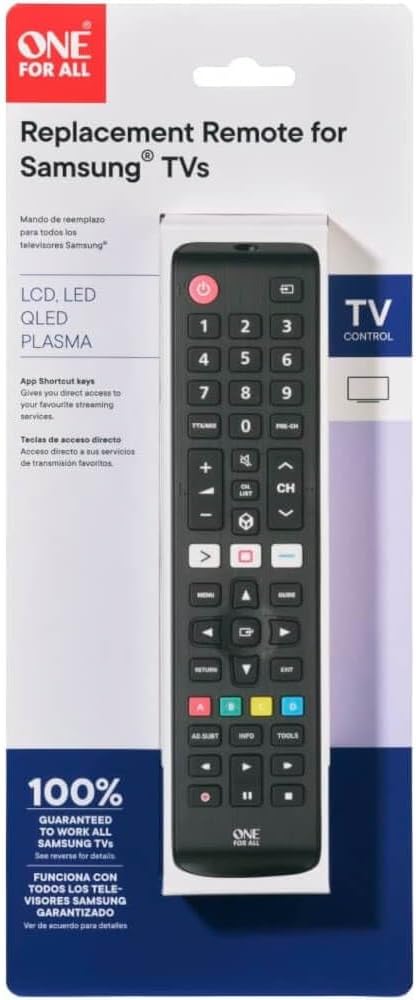
One For All URC4810 remote control in its retail packaging.

Image: The One For All URC4810 remote control displayed within its retail packaging, showing the product name and key features.

Setup

1. Battery Installation

The URC4810 remote control requires 2x AAA batteries (not included). Follow these steps to install them:

  1. Open the battery compartment cover on the back of the remote control.
  2. Insert two AAA batteries, ensuring the positive (+) and negative (-) terminals align with the markings inside the compartment.
  3. Close the battery compartment cover securely.
Side view of the One For All URC4810 remote control, showing its slim profile.

Image: A side profile view of the One For All URC4810 remote control, illustrating its ergonomic design and the location of the battery compartment seam.

2. SimpleSet Setup

The URC4810 remote features SimpleSet, allowing for quick setup in under 30 seconds. No codes are needed.

  1. Ensure your Samsung TV is turned on.
  2. Point the One For All remote at your Samsung TV.
  3. Press and hold the Power button on the One For All remote until your TV turns off. This may take a few seconds.
  4. Once the TV turns off, release the Power button immediately. The remote is now set up.
  5. Test other functions like Volume Up/Down and Channel Up/Down to confirm full functionality.
Front view of the One For All URC4810 remote control, showing all buttons.

Image: A direct front view of the One For All URC4810 remote control, showcasing its full button layout, including the power button at the top.

3. Learning Feature (Optional)

The learning feature allows you to copy functions from your original Samsung TV remote to the URC4810. This is useful for any specific buttons not covered by the default setup.

  1. Place the One For All remote and your original Samsung remote on a flat surface, facing each other, about 1-2 inches apart.
  2. On the One For All remote, press and hold the SETUP button (if available, otherwise refer to the specific manual for learning mode entry, typically a combination of buttons like SHIFT + LEARN or similar) until the LED blinks twice and then stays lit.
  3. Press the button on the One For All remote that you wish to program (e.g., a specific app button). The LED will blink rapidly.
  4. On your original Samsung remote, press the corresponding button you want to copy. The LED on the One For All remote will blink twice to confirm successful learning.
  5. Repeat steps 3 and 4 for any other buttons you wish to learn.
  6. To exit learning mode, press the SETUP button again (or the button used to enter learning mode). The LED will turn off.
Angled view of the One For All URC4810 remote control, highlighting its ergonomic design.

Image: An angled view of the One For All URC4810 remote control, showcasing its comfortable grip and button placement.

Operating Instructions

Once set up, the URC4810 remote functions like your original Samsung TV remote. Here are some common button functions:

  • Power (Red Button): Turns the TV on or off.
  • Number Buttons (0-9): Direct channel selection.
  • Volume Up/Down (+/-): Adjusts the TV volume.
  • Channel Up/Down (CH +/-): Changes TV channels.
  • Mute: Mutes or unmutes the TV sound.
  • Menu: Accesses the TV's main menu.
  • Navigation (Arrow Buttons): Navigates through menus and options.
  • OK/Enter: Confirms selections.
  • Return/Back: Goes back to the previous screen or menu.
  • Exit: Exits the current menu or application.
  • Colored Buttons (Red, Green, Yellow, Blue): Functionality varies by TV model and application.
  • Smart Hub/Home: Accesses the TV's Smart Hub or Home screen.

Maintenance

Cleaning

To clean your remote control, use a soft, dry cloth. Do not use abrasive cleaners, waxes, or solvents. Avoid spraying liquids directly onto the remote.

Battery Replacement

If the remote control's range decreases or buttons become unresponsive, it may be time to replace the batteries. Follow the "Battery Installation" steps in the Setup section to replace the old batteries with new AAA alkaline batteries.

Troubleshooting

Problem Possible Cause Solution
Remote does not work after setup. Incorrect setup or dead batteries. Ensure batteries are correctly inserted and charged. Repeat the SimpleSet process carefully.
Some buttons do not work. Button not recognized by SimpleSet or not learned. Use the Learning Feature to copy the function from your original remote. Ensure the remote is pointed directly at the TV.
Remote range is poor. Low batteries or obstruction. Replace batteries. Ensure there are no obstructions between the remote and the TV's IR receiver.
LED on remote does not light up. No batteries or incorrect battery insertion. Check battery orientation and ensure they are new and correctly inserted.

Specifications

Brand One For All
Model Number URC4810
Compatible Devices Samsung Televisions
Power Source Battery Powered (2x AAA, not included)
Color White (Note: Product images show black, but specification states white. Please refer to product packaging for exact color.)
Item Weight 3.52 ounces (approx. 100 grams)
Product Dimensions (L x W x H) Approx. 4"D x 3"W x 1"H (Note: Dimensions may refer to packaging or a specific part. Actual remote dimensions are typically longer and narrower.)
UPC 810209030940

Warranty and Support

One For All products are designed and manufactured to the highest standards. For information regarding warranty, technical support, or frequently asked questions, please visit the official One For All website or contact their customer service directly.

For the most up-to-date support information, please refer to the manufacturer's official channels:

  • One For All Website: www.oneforall.com
  • Customer Service: Refer to the website for regional contact details.

Related Documents - URC4810

Preview One For All URC 1823 Vizio Universal Replacement Remote User Guide
User guide for the One For All URC 1823 Universal Replacement Remote for Vizio TVs, including setup, troubleshooting, and learning functions.
Preview One For All URC 1916 Hisense Universal Replacement Remote Quick Start Guide
Learn how to set up and use your One For All URC 1916 universal replacement remote for Hisense TVs. Includes setup instructions, battery replacement, and learning functions.
Preview One For All URC 3110 Universal Remote Control Setup and Programming Guide
User manual for the One For All URC 3110 universal replacement remote control. Learn how to install batteries, set up and program your remote for TVs, VCRs, DVD players, cable boxes, and satellite receivers. Includes troubleshooting and a comprehensive list of manufacturer codes.
Preview One For All URC 4110 Universal Replacement Remote Control User Manual
User manual for the One For All URC 4110 Universal Replacement Remote Control, detailing setup, features, programming, troubleshooting, warranty information, and manufacturer codes for various home entertainment devices.
Preview One For All URC 4812 Universal Replacement Remote for Sony TVs - User Manual
User manual for the One For All URC 4812 universal replacement remote control, designed for Sony TVs. This guide provides detailed instructions on setup, programming, troubleshooting, and controlling audio devices, along with warranty information.
Preview One For All URC 4811 Universal Replacement Remote for LG TVs - Setup and User Guide
Comprehensive guide for the One For All URC 4811 universal replacement remote, designed for LG TVs. Learn how to set up, program, and troubleshoot your remote, including controlling audio devices and learning new functions.