
1. Introduction
This manual provides detailed instructions for the VAVOFO Rechargeable Reading Light, Model KM-6720. Please read this manual thoroughly before using the product to ensure proper operation and longevity. This device is designed to provide adjustable illumination for reading, studying, crafting, and other activities.
2. Product Features
- 7 LEDs & 9 Color Temperature Modes: Equipped with 7 upgraded SMD LEDs with a lifespan exceeding 50,000 hours. Offers 9 distinct color temperature modes: warm white (2800K/3000K/3200K), warm cool white (4000K/4500K/5000K), and cool white (6000K/6500K/7000K).
- 9 Brightness Levels: Features 3 brightness settings (Low, Medium, High) across 9 color temperatures, totaling 9 modes to suit various needs. Brightness is adjustable via a single button.
- Rechargeable & Long-lasting Battery: Built-in 1000mAh lithium battery provides up to 32 hours of use at low brightness or 5 hours at high brightness. USB rechargeable.
- Convenient Power Indicator: An integrated power indicator displays the battery level.
- Infinitely Flexible Goose Neck & Non-slip Clip: 360-degree adjustable neck allows precise light positioning. The multi-use non-slip clip securely attaches to books, tables, or other surfaces.
- Lightweight & Portable: Weighs only 2.59 oz, making it ideal for travel and on-the-go use.

Figure 1: VAVOFO Rechargeable Reading Light overview.

Figure 2: Illustration of the 9 color temperature and brightness modes.
3. Setup
3.1 Charging the Device
- Connect the provided USB cable to the charging port on the base of the reading light.
- Connect the other end of the USB cable to a compatible 5V USB power source (e.g., charger adapter, power bank, laptop, PC). Note: A US plug adapter is not included.
- During charging, the four blue LED indicator lights on the base will flash in sequence.
- Once fully charged, all four blue LED indicator lights will remain steadily lit.
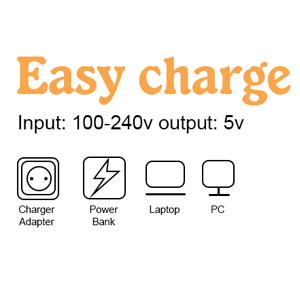
Figure 3: Various methods for charging your reading light.
3.2 Checking Battery Level
When not charging, press the switch on the base of the desk lamp. The blue indicator lights will show the corresponding battery level for a few seconds before turning off.

Figure 4: Power indicator lights on the base of the reading light.
4. Operating Instructions
4.1 Power On/Off and Brightness Adjustment
- To turn the light on, short press the power button located on the light head.
- Each subsequent short press will cycle through the 3 brightness settings (Low, Medium, High) for the current color temperature.
- To turn the light off, continue short pressing until the light turns off, or long press the button.
4.2 Color Temperature Adjustment
- While the light is on, long press the power button to cycle through the 9 color temperature modes (warm white, warm cool white, cool white).
- Release the button when your desired color temperature is reached.
4.3 Positioning the Light
The flexible goose neck allows for 360-degree adjustment. Bend and twist the neck to direct the light exactly where needed for optimal illumination.

Figure 5: Demonstrating the flexible neck for optimal positioning.
4.4 Using the Non-slip Clip
The sturdy non-slip clip can be attached to books, e-readers, laptops, desks, headboards, or other surfaces up to 0.8 inches thick. Ensure the clip is securely fastened before use.

Figure 6: Reading light clipped onto a book.
4.5 Operational Videos
Video 1: Demonstration of the VAVOFO Rechargeable Clip Light's features, including clipping, adjusting, and light modes.
Video 2: Real-time usage of the book light, showing its practical application while reading.
Video 3: Illustrates the brightness and color temperature settings, ideal for bedtime reading.
5. Maintenance
- Cleaning: Wipe the light with a soft, dry cloth. Avoid using abrasive cleaners or solvents.
- Battery Care: To prolong battery life, charge the device regularly and avoid fully depleting the battery frequently. Store in a cool, dry place when not in use for extended periods.
- Storage: When not in use, fold the flexible neck for compact storage.
6. Troubleshooting
- Light not turning on: Ensure the battery is charged. Connect to a power source and check the power indicator lights.
- Light not charging: Verify that the USB cable is securely connected to both the light and the power source. Try a different USB cable or power adapter.
- Short battery life: Ensure the device is fully charged before use. Battery life varies based on brightness settings (up to 32 hours at low, 5 hours at high).
- Inconsistent light output: If the light flickers or dims unexpectedly, recharge the device.
7. Specifications
| Feature | Specification |
|---|---|
| Model Number | KM-6720 |
| Light Source Type | LED (7 LEDs) |
| Color Temperature Modes | 9 (2800K-7000K) |
| Brightness Levels | 9 (Low, Medium, High across 3 main color temperatures) |
| Battery Capacity | 1000mAh Lithium Battery |
| Max Battery Life (Low Brightness) | Up to 32 hours |
| Max Battery Life (High Brightness) | Up to 5 hours |
| Charging Interface | USB (5V) |
| Flexible Neck | 360-degree adjustable |
| Mounting Type | Clip-On (Non-slip) |
| Item Weight | 2.59 ounces |
| Product Dimensions (D x W x H) | 1.97"D x 1.97"W x 3.94"H |
| Material Type | Plastic |
| Control Method | Touch (Push Button) |
| Indoor/Outdoor Usage | Indoor |
8. What's in the Box
- 1x VAVOFO Rechargeable Reading Light
- 1x USB Cable
- 1x Instruction Manual
Note: A US plug adapter is NOT included.
9. Warranty and Support
For warranty information and customer support, please refer to the documentation included with your product or contact VAVOFO directly. The product is manufactured by VAVOFO. Amazon's return policy allows for returns or replacements within 30 days of purchase.