
1. Safety Information
Please read and understand all safety information before operating this multimeter. Failure to follow these instructions may result in electric shock, fire, or damage to the device.
- Always ensure the multimeter is in good working condition before use. Inspect the test leads for any damage.
- Do not apply voltage or current that exceeds the maximum specified limits for the multimeter.
- Exercise extreme caution when working with live circuits. High voltages can be dangerous.
- Do not use the multimeter in wet environments or when your hands are wet.
- Replace batteries promptly when the low battery indicator appears to ensure accurate readings.
- Always disconnect the test leads from the circuit before changing functions.
2. Product Overview
The BSIDE Pen-Type Digital Multimeter A3X is a compact and intelligent tool designed for various electrical measurements. It features automatic identification of tested parameters, a 3-results display, and a built-in flashlight for convenience.
Key Features:
- 3-Results Display: Provides clear and easy-to-interpret readings.
- Automatic Identification: Automatically detects and measures AC/DC voltage, resistance, and continuity.
- Triple-Mode Alarm: Visual (backlight flashing), analog bar, and audible (beeping) alerts for AC voltage detection.
- Bright LED Flashlight: Enhances visibility in dimly lit work areas.
- Back Probe Pins: Included for precise electronic maintenance and testing.
- Additional Functions: Capacitance, Diode, Frequency, V-Alert (Non-contact Voltage Detection), Live/Neutral Wire Check, and Ambient Temperature measurement.
3. Package Contents
Verify that all items listed below are present in your package:
- 1 x BSIDE Digital Multimeter (A3X)
- 1 x Test Leads (Red and Black)
- 2 x Back Probe Pins
- 1 x Carrying Case
- 2 x AAA Batteries
- 1 x Screwdriver
- 1 x User Manual (this document)

Image: The BSIDE A3X Pen-Type Digital Multimeter shown with its complete set of accessories, including test leads, back probe pins, carrying case, batteries, and screwdriver.
4. Setup
4.1 Battery Installation
- Locate the battery compartment cover on the back of the multimeter.
- Use the included screwdriver to loosen the screw securing the battery cover.
- Remove the cover.
- Insert two AAA batteries, ensuring correct polarity (+/-).
- Replace the battery cover and tighten the screw.
4.2 Connecting Test Leads and Back Probe Pins
For measurements requiring test leads or back probe pins:
- Insert the red test lead into the red input jack and the black test lead into the black input jack on the multimeter.
- The back probe pins can be attached to the test leads for finer probing in electronic circuits.
5. Operating Instructions
5.1 Power On/Off
Press the POWER button to turn the multimeter on or off. The device will automatically power off after a period of inactivity to conserve battery life.
5.2 Auto Mode Selection
The A3X multimeter features an intelligent auto mode. When powered on, it automatically enters auto mode, which can identify and measure AC/DC voltage, resistance, and continuity with optimal resolution.

Image: The multimeter display showing 'AUTO' mode, indicating automatic measurement selection for voltage, resistance, and continuity.
5.3 Manual Function Selection
Press the SEL button to cycle through manual measurement functions such as Capacitance, Diode, Frequency, and Ambient Temperature. The selected function will be indicated on the display.
5.4 AC/DC Voltage Measurement
In auto mode, the multimeter will automatically detect and measure AC or DC voltage. Connect the test leads across the circuit or component to be measured. The display will show the voltage value and type (AC or DC).
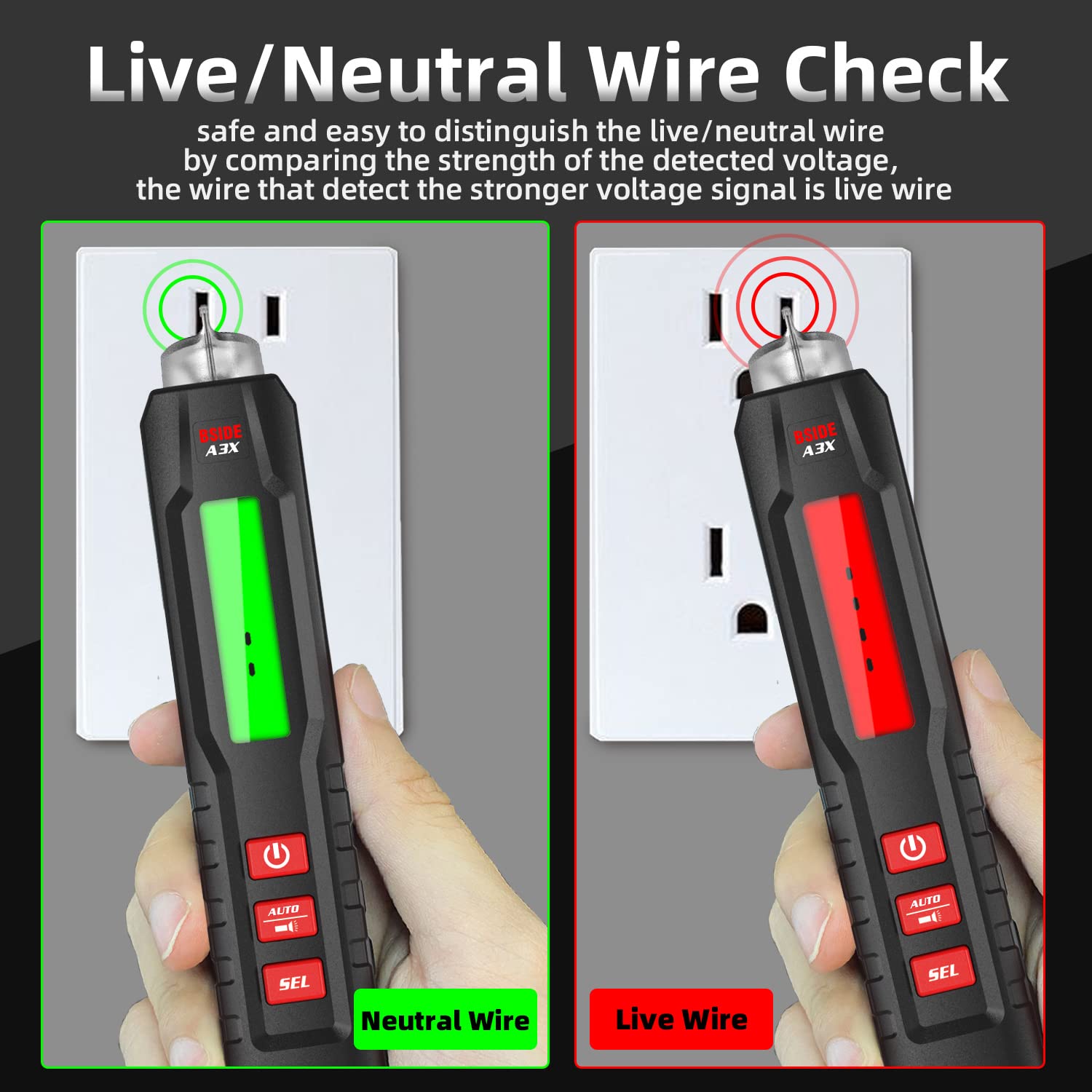
Image: The multimeter measuring voltage in an automotive circuit, demonstrating its application in vehicle electrical diagnostics.
5.5 Resistance and Continuity Test
In auto mode, the multimeter can measure resistance and test for continuity. For continuity, if the resistance is less than 50Ω, an audible beeper will sound.
5.6 Capacitance Measurement
Select the capacitance function using the SEL button. Connect the test leads or back probe pins across the capacitor. The display will show the capacitance value in Farads (F).

Image: The multimeter measuring the capacitance of an electronic component, highlighting its use in electronic maintenance.
5.7 Diode Test
Select the diode function. Connect the red test lead to the anode and the black test lead to the cathode of the diode. The multimeter will display the forward voltage drop (within 1.5V).
5.8 V-Alert (Non-contact Voltage Detection)
This function allows for non-contact detection of AC voltage. Hold the tip of the multimeter near a live AC source. The device will indicate the presence of voltage through visual and audible alarms.

Image: The multimeter performing a V-Alert (non-contact voltage detection) test on an electrical panel, showing the red indicator for detected voltage.
5.9 Live/Neutral Wire Check
This function helps distinguish between live and neutral wires by comparing the strength of the detected voltage signal. The wire with the stronger voltage signal is typically the live wire.

Image: The multimeter indicating a neutral wire (green light) and a live wire (red light) during a socket test, demonstrating the Live/Neutral Wire Check function.
5.10 Bright LED Flashlight
Press the flashlight button to turn on the integrated LED flashlight. This is useful for illuminating dark work areas.

Image: The multimeter with its bright LED flashlight activated, providing illumination for testing in low-light conditions.
5.11 Display Features
The A3X features a 3-results display with red and green backlighting for enhanced readability.

Image: The multimeter display showing both red and green backlight options, illustrating the clear and easy-to-read screen.
6. Maintenance
6.1 Cleaning
Wipe the multimeter casing with a damp cloth. Do not use abrasive cleaners or solvents. Ensure the device is dry before storage or next use.
6.2 Battery Replacement
When the low battery indicator appears on the display, replace the AAA batteries as described in Section 4.1. Remove batteries if the device will not be used for an extended period.
6.3 Storage
Store the multimeter in its carrying case in a cool, dry place, away from direct sunlight and extreme temperatures.
7. Troubleshooting
- No Display: Check battery installation and ensure batteries are not depleted.
- Inaccurate Readings: Ensure test leads are properly connected and not damaged. Verify the correct function is selected for the measurement. Replace batteries if low.
- No Continuity Beep: Check if the resistance is above 50Ω. Ensure the continuity function is active.
- V-Alert Not Detecting: Ensure the V-Alert function is active and the tip is close enough to the AC source.
If issues persist, contact customer support for assistance.
8. Specifications
| Parameter | Value |
|---|---|
| Display | 4000 counts |
| Screen Size | 1.9 inch |
| DC Voltage Range | 0.05V-600V (DC mode) / 0.8V-600V (auto mode) |
| DC Voltage Accuracy | 0.001V (0.8%+3) |
| AC Voltage Range | 0.05V-600V (AC mode) / 0.5V-600V (auto mode) |
| AC Voltage Accuracy | 0.001V (1.2%+5) |
| Resistance Range | 0Ω-10MΩ (0.1Ω accuracy), 10MΩ-40MΩ (0.1Ω accuracy) |
| Resistance Accuracy | (1.2%+3) for 0-10MΩ; (2.0%+10) for 10MΩ-40MΩ |
| Capacitance Range | 1nF-1mF (0.001nF accuracy), 1mF-4mF (0.001nF accuracy) |
| Capacitance Accuracy | (3.5%+8) for 1nF-1mF; (4.5%+10) for 1mF-4mF |
| Frequency Range | 0-4MHz (900mVrms-20Vrms) |
| Frequency Accuracy | 0.1Hz (2.0%+10) |
| Diode Test | Measures diode within 1.5V |
| Ambient Temperature | 0-50℃ (2℃ accuracy) |
| Continuity | Beeper sounds if resistance < 50Ω |
| V-Alert (NCV) | Yes |
| Power | 1.5V (AAA) x 2 |
| Size | 169 x 30 x 31mm |
| Weight | 77g |
| Safety Rating | CAT III 600V |
9. Warranty and Support
This product is covered by the manufacturer's standard warranty. For warranty claims, technical support, or service inquiries, please refer to the contact information provided on the product packaging or the official BSIDE website.
Please retain your purchase receipt as proof of purchase for any warranty-related issues.


