
Product Overview
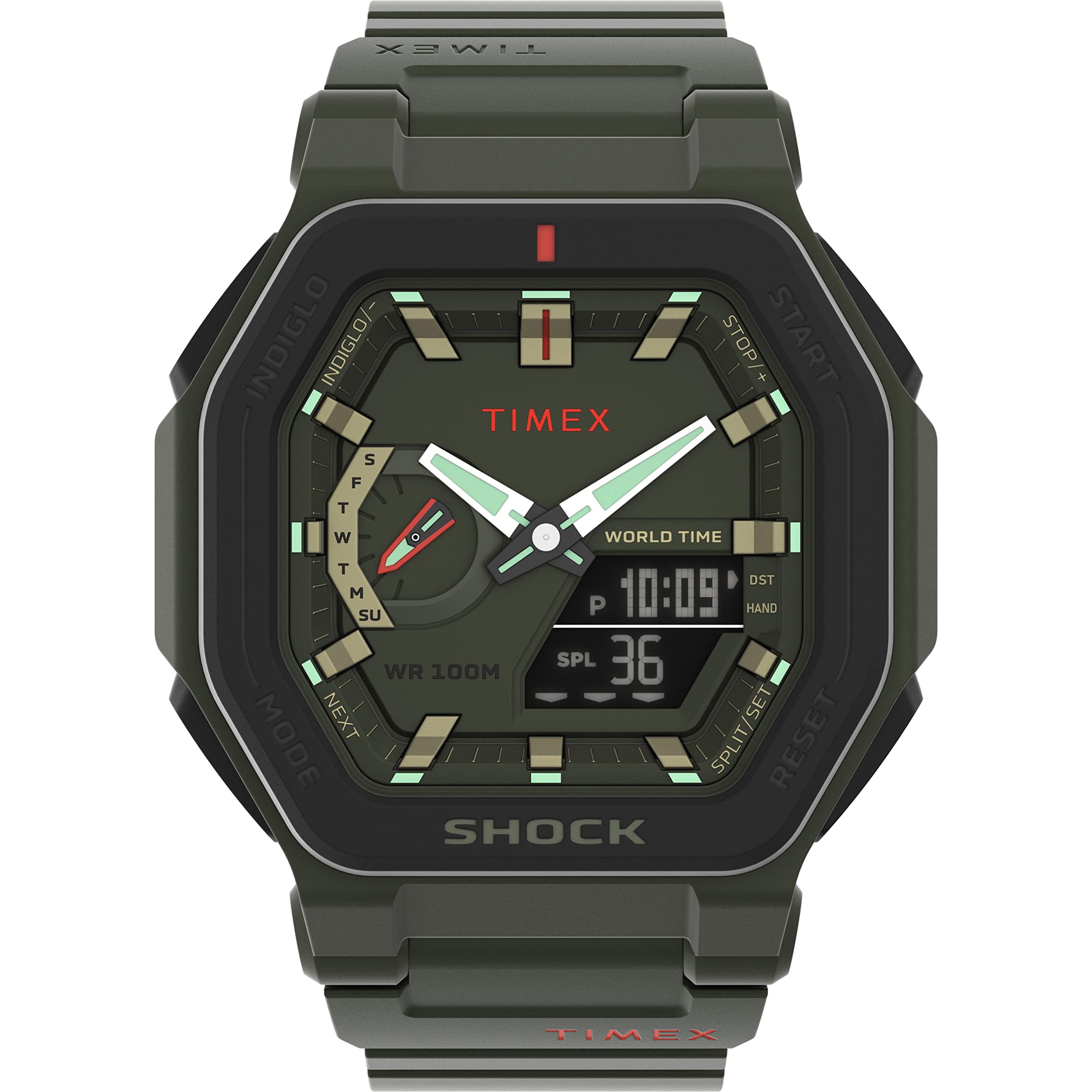
The Timex Command Encounter is a robust analog-digital watch designed for active lifestyles. It features a durable resin case, a comfortable plastic strap, and a combination of analog hands with a digital display for versatile timekeeping. Its shock-resistant design and 100-meter water resistance make it suitable for various environments.
Key Features:
- Analog and Digital Time Display
- Chronograph (Stopwatch) Function
- Countdown Timer
- Daily Alarm Function
- Date Display
- INDIGLO Night-Light for low-light visibility
- 100-meter Water Resistance
- Shock Resistant Construction
Setup
Initial Setup
Your watch comes with a battery installed. Remove any protective film from the watch face before use.
Button Functions

This image displays the watch face and its control buttons. Familiarize yourself with these buttons for proper operation.
- START/STOP Button (Top Left): Used to start and stop the chronograph, and to increase values during setting.
- RESET Button (Top Right): Used to reset the chronograph, decrease values during setting, or exit setting modes.
- INDIGLO Button (Bottom Left): Activates the INDIGLO night-light.
- MODE/NEXT Button (Bottom Right): Cycles through different watch modes (Time, Chronograph, Timer, Alarm) and advances to the next setting option.
Setting Time and Date
- In the standard Time mode, press and hold the MODE/NEXT button until a segment of the digital display begins to flash.
- Use the START/STOP button to increase the flashing value or the RESET button to decrease it.
- Press the MODE/NEXT button to move to the next segment (e.g., hours, minutes, year, month, day).
- Repeat steps 2 and 3 until all desired time and date settings are adjusted.
- Once all settings are complete, press the RESET button to exit the setting mode and save your changes.
Operating Instructions
Mode Navigation
Press the MODE/NEXT button repeatedly to cycle through the watch's various functions: Time, Chronograph, Countdown Timer, and Alarm.
Using the Chronograph (Stopwatch)
- Navigate to the Chronograph mode using the MODE/NEXT button.
- Press the START/STOP button to begin timing.
- Press the START/STOP button again to pause the timing.
- Press the RESET button to clear the chronograph display to zero.
Using the Countdown Timer
- Navigate to the Countdown Timer mode using the MODE/NEXT button.
- Press and hold the MODE/NEXT button to enter setting mode for the timer.
- Use the START/STOP or RESET buttons to set the desired countdown time (hours, minutes, seconds).
- Press MODE/NEXT to confirm each segment of the time.
- Press the START/STOP button to begin the countdown.
- An audible alarm will sound when the countdown reaches zero.
Setting and Using the Alarm
- Navigate to the Alarm mode using the MODE/NEXT button.
- Press and hold the MODE/NEXT button to enter setting mode for the alarm time.
- Use the START/STOP or RESET buttons to set the desired alarm time.
- Press MODE/NEXT to confirm each segment of the time.
- Press the RESET button to exit setting mode.
- To activate or deactivate the alarm, press the START/STOP button while in Alarm mode. A bell icon on the display typically indicates that the alarm is active.
INDIGLO Night-Light
Press the INDIGLO button (bottom left) to illuminate the watch face, providing clear visibility of the display in low-light conditions.
Maintenance
Cleaning Your Watch
Clean your watch regularly with a soft, damp cloth. Avoid using harsh chemicals, solvents, or abrasive materials, as these can damage the watch case or strap.
Water Resistance
Your Timex Command Encounter watch is water-resistant to 100 meters (10 ATM). This means it is suitable for showering, swimming, and snorkeling. Important: Do not press any buttons while the watch is submerged in water, as this can compromise the water resistance.
Battery Replacement

This image shows the back of the watch, where the battery compartment is located. The watch uses one CR2025 battery. When the display dims, becomes erratic, or stops functioning, it is likely time for a battery replacement. It is highly recommended to have battery replacement performed by a qualified watch technician to ensure the watch's water resistance is properly maintained after the battery compartment is opened.
Troubleshooting
| Problem | Solution |
|---|---|
| Watch display is blank or dim. | The battery may be low or depleted. Replace the CR2025 battery. |
| Buttons are unresponsive. | Ensure the watch is not in a locked mode (refer to specific model features if applicable). If the issue persists, the battery may be low. |
| Time is incorrect. | Re-set the time and date following the instructions in the "Setting Time and Date" section. |
| Condensation or water appears inside the watch. | Immediately take the watch to a qualified service center. Water resistance may have been compromised. Do not attempt to open the watch yourself. |
Specifications
| Feature | Detail |
|---|---|
| Model Number | TW2V35400 |
| Display Type | Analog-Digital |
| Movement | Quartz |
| Case Dimensions | 45 x 45 mm |
| Case Thickness | 14 mm |
| Case Material | Resin |
| Strap Material | Plastic |
| Strap Width | 25 mm |
| Water Resistance | 100 Meters (10 ATM) |
| Battery Type | CR2025 (1 required) |
| Weight | 58 g |
| Functions | Alarm, Chronograph, Countdown Timer, Date |
Warranty and Support
Warranty Information
Your Timex Command Encounter watch comes with a 2-year limited warranty from the date of purchase. This warranty covers manufacturing defects under normal use. Please retain your proof of purchase for warranty claims. For full warranty terms and conditions, please refer to the official Timex website or contact their customer service department.
Customer Support
For further assistance, technical support, or service inquiries regarding your Timex watch, please visit the official Timex website or contact their customer service department directly.


