
Introduction
Thank you for choosing the LEKATO Mini 5W Rechargeable Guitar Amplifier. This compact and versatile amplifier is designed for guitarists seeking a portable solution for practice and small performances. Featuring both Clean and Overdrive channels, Bluetooth connectivity, and a long-lasting rechargeable battery, it offers a comprehensive set of features in a small package. Please read this manual carefully to ensure proper use and maintenance of your amplifier.
Product Features
- Dual Channels: Offers two distinct tone channels (Clean and Overdrive) for versatile sound options.
- Rich Interfaces: Includes a 3.5mm AUX input for media players or CDs and a 3.5mm headphone output for silent practice.
- Bluetooth Functionality: Integrated Bluetooth 5.0 allows connection to Bluetooth-enabled devices for music playback.
- Rechargeable Battery: Built-in rechargeable battery provides 1.5 to 6 hours of playtime on a full charge. USB charging cable included.
- Innovative Design: Compact size with independent volume controls for AUX/Bluetooth input and instrument input, allowing precise mixing.
Package Contents
- LEKATO Mini 5W Guitar Amplifier (White)
- USB Charging Cable
- User Manual
Product Overview
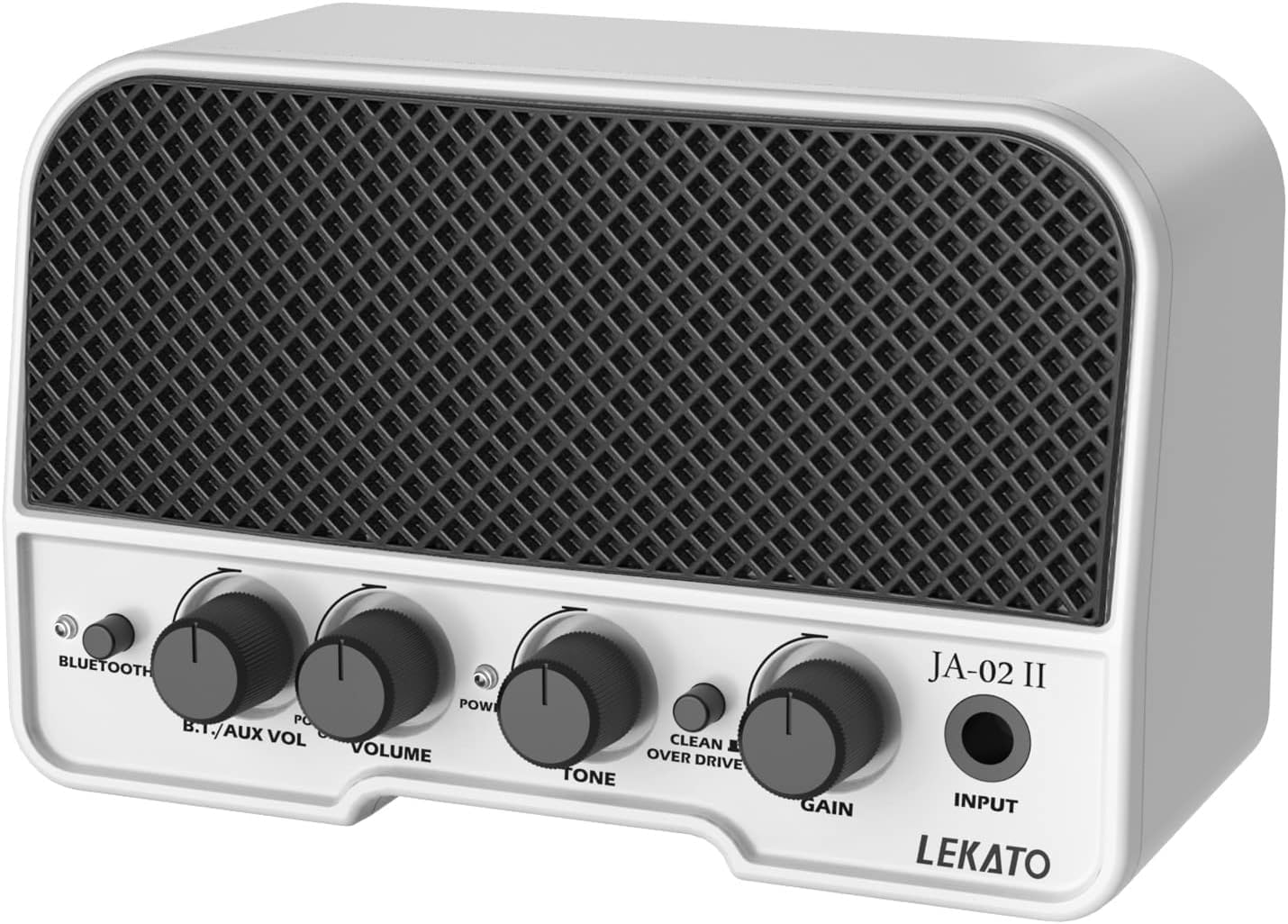
Figure 1: Front view of the LEKATO Mini Guitar Amplifier, highlighting its controls and input.
Controls and Ports:
- Bluetooth Button: Press to activate Bluetooth pairing mode.
- B.T./AUX VOL Knob: Adjusts the volume of Bluetooth and AUX input audio.
- VOLUME Knob: Controls the overall output volume of the guitar.
- TONE Knob: Adjusts the tonal characteristics of your guitar sound.
- CLEAN / OVERDRIVE Switch: Toggles between the clean and distorted (overdrive) sound channels.
- GAIN Knob: Controls the amount of gain or distortion, primarily affecting the Overdrive channel.
- INPUT Jack: 6.35mm (1/4") input for connecting your guitar.

Figure 2: Rear view of the amplifier showing auxiliary input, headphone output, and charging port.
- AUX IN Jack: 3.5mm input for connecting external audio sources like smartphones or MP3 players.
- Headphone Output Jack: 3.5mm output for connecting headphones for silent practice.
- DC 5V Port: USB-C port for charging the amplifier's internal battery.
Setup
Initial Charging:
Before first use, fully charge the amplifier. Connect the provided USB charging cable to the DC 5V port on the amplifier and the other end to a 5V USB power adapter (not included, a standard smartphone charger with ≥1A output is suitable). The charging indicator light will show charging status.
Connecting Your Guitar:
Insert your guitar cable into the INPUT jack on the front of the amplifier.
Operating Instructions
Power On/Off:
Locate the power switch, usually integrated with the VOLUME knob. Turn the VOLUME knob clockwise to power on the amplifier. Turn it counter-clockwise until it clicks to power off.
Adjusting Volume, Tone, and Gain:
- VOLUME: Adjust this knob to control the overall loudness of your guitar.
- TONE: Rotate this knob to shape the equalization of your sound, from darker to brighter tones.
- GAIN: This knob controls the amount of distortion or saturation, particularly effective when the Overdrive channel is active.
Clean and Overdrive Modes:

Figure 3: Visual representation of the Clean and Overdrive channels.
Use the CLEAN / OVERDRIVE switch to select your desired sound channel. The Clean channel provides a clear, undistorted tone, while the Overdrive channel offers a rich, distorted sound suitable for rock and blues.
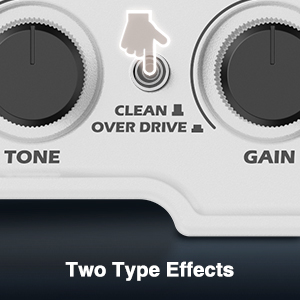
Figure 4: Close-up of the Clean/Overdrive switch.
Bluetooth Connection:

Figure 5: Connecting the amplifier to a smartphone via Bluetooth.
- Press the Bluetooth Button on the amplifier. The Bluetooth indicator light will flash, indicating pairing mode.
- On your device (smartphone, tablet, etc.), enable Bluetooth and search for available devices.
- Select "LEKATO JA-02 II" from the list to pair. Once connected, the indicator light will remain solid.
- Play music from your device. Adjust the B.T./AUX VOL knob to control the playback volume.
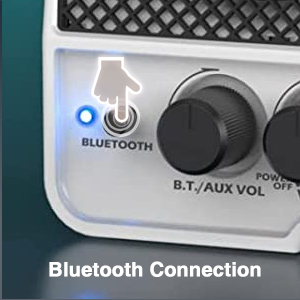
Figure 6: Close-up of the Bluetooth button and indicator.
Using AUX Input:
Connect an audio cable (not included) from your external audio source's headphone jack to the AUX IN jack on the amplifier. Adjust the B.T./AUX VOL knob to control the volume of the auxiliary input.
Using Headphone Output:
For silent practice, connect your headphones to the Headphone Output jack. The main speaker will be muted when headphones are connected.
Charging the Battery
The LEKATO Mini Guitar Amplifier features a built-in rechargeable lithium-polymer battery. A full charge provides approximately 1.5 to 6 hours of playtime, depending on usage and volume levels. To charge, connect the USB charging cable to the DC 5V port on the amplifier and a compatible 5V USB power source. The charging indicator will illuminate during charging and turn off or change color when fully charged.

Figure 7: Close-up of the charging port.
Maintenance
- Cleaning: Use a soft, dry cloth to clean the amplifier's exterior. Do not use abrasive cleaners or solvents.
- Storage: Store the amplifier in a cool, dry place away from direct sunlight and extreme temperatures.
- Battery Care: For optimal battery life, avoid fully discharging the battery frequently. If storing for extended periods, charge the battery to about 50% every few months.
- Handling: Handle the amplifier with care. Avoid dropping it or subjecting it to strong impacts.
Troubleshooting
| Problem | Possible Cause | Solution |
|---|---|---|
| No sound from guitar | Amplifier not powered on; Volume knob too low; Guitar cable faulty; Guitar volume off. | Ensure amplifier is on; Increase VOLUME knob; Check guitar cable and guitar volume. |
| Bluetooth not connecting | Amplifier not in pairing mode; Device Bluetooth off; Already connected to another device. | Press Bluetooth button to enter pairing mode; Enable Bluetooth on your device; Disconnect from other devices. |
| Low volume or distorted sound | Low battery; Incorrect gain/tone settings; Speaker obstruction. | Recharge the amplifier; Adjust GAIN and TONE knobs; Ensure speakers are clear. |
| Amplifier not charging | Faulty USB cable or power adapter; Charging port damaged. | Try a different USB cable and power adapter; Contact support if issue persists. |
Specifications
| Specification | Value |
|---|---|
| Brand | LEKATO |
| Model Name | Mini Guitar Amp (JA-02 II) |
| Model Number | M0-2294-03 |
| Color | White |
| Compatible Devices | Guitar |
| Material | Plastic |
| Output Power | 5 Watts |
| Product Dimensions | 9D x 16W x 11H centimeters (approx. 3.5D x 6.3W x 4.3H inches) |
| Speaker Size | 8 Inches (likely referring to speaker equivalent size or total output, not physical speaker diameter) |
| Power Source | Battery Powered, Electric Corded (via USB charging) |
| Battery Composition | Lithium-polymer |
| Rechargeable Battery | Yes |
| Connectivity | Bluetooth 5.0, 3.5mm AUX, 3.5mm Headphone Jack, 6.35mm Guitar Input |
| Country of Origin | China |

Figure 8: Amplifier dimensions for reference.
Warranty and Support
LEKATO products are designed for reliability and performance. For any questions, technical support, or warranty inquiries, please contact LEKATO customer service through the retailer where you purchased the product or visit the official LEKATO website for support information. Please retain your proof of purchase for warranty claims.