
1. Product Overview
The LEDLUX Wireless RF WiFi Thermostat Kit is designed to provide efficient and convenient temperature control for your gas boiler system. This kit includes a 220V AC powered RF WiFi receiver and a wireless RF thermostat powered by 2 AA batteries (not included). It offers smart home integration with Amazon Alexa, Google Home, TUYA, and Smart Life applications, allowing for remote control and voice commands.
Key features include a large rectangular LCD touchscreen with intuitive icons, weekly programming options (5+2 or 6+1 days with up to 6 periods per day), and a manual mode for temporary adjustments. The wireless design eliminates the need for extensive wiring, making it ideal for renovations or system upgrades. It also incorporates features like child lock and frost protection for enhanced safety and energy efficiency.

Figure 1: The Wireless RF WiFi Thermostat Kit, including the thermostat display unit and the RF receiver.
2. Components
- Wireless RF Thermostat: Battery-powered unit with LCD display for temperature control and programming. Requires 2 AA batteries (not included).
- RF WiFi Receiver/Case: 220V AC powered unit that connects to your gas boiler and communicates wirelessly with the thermostat.
3. Setup and Installation
3.1 Receiver Installation
The RF WiFi receiver should be mounted on the wall in close proximity to your gas boiler. Ensure it is connected to a 220V AC power source. The maximum wireless operating distance between the receiver and the thermostat is 30 meters.
3.2 Thermostat Placement
The wireless RF thermostat can be placed anywhere in your home, providing flexibility in controlling your heating without the need for wall wiring. It is compatible with a 503 recessed box or can be directly installed on the wall.
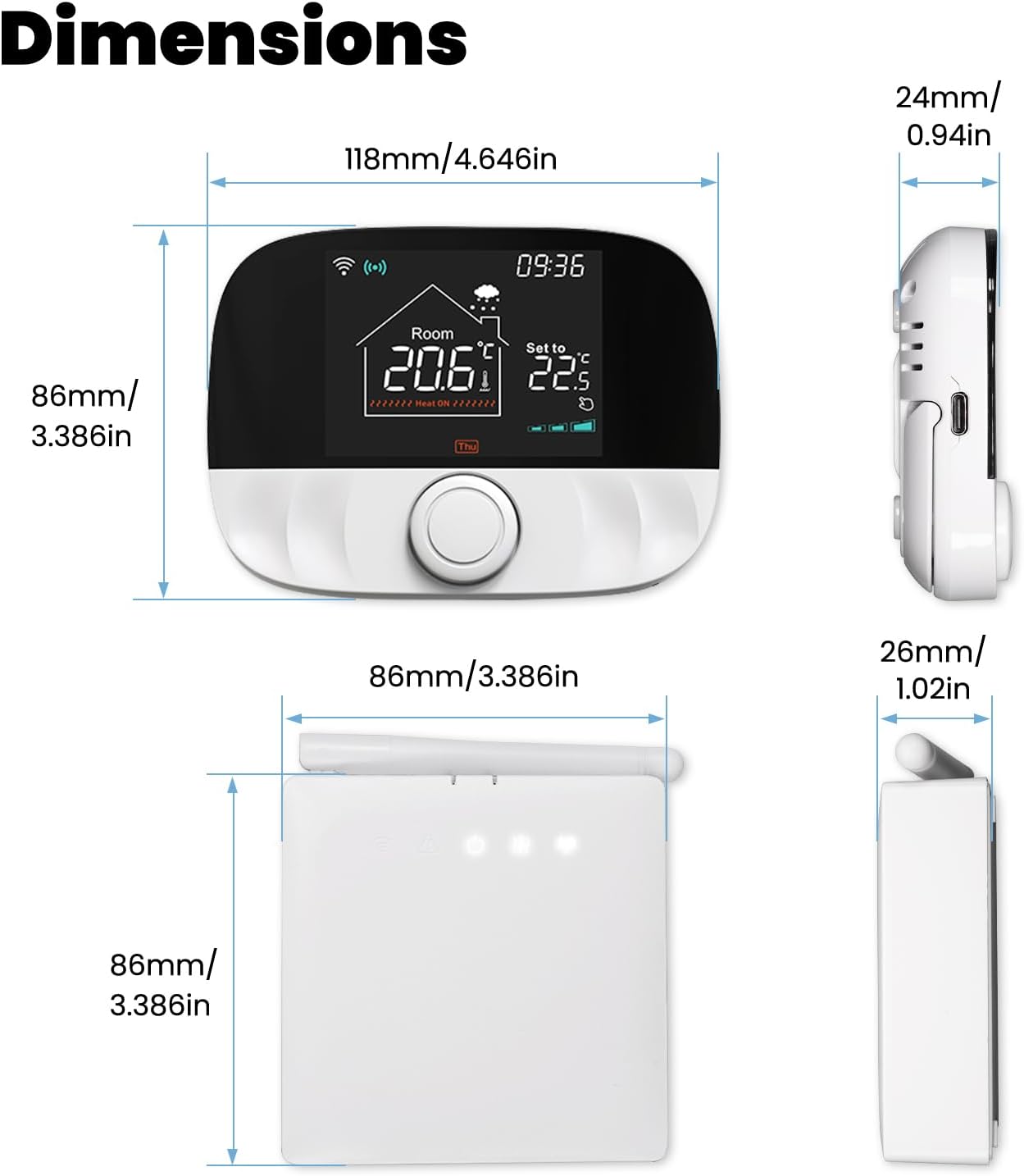
Figure 2: Dimensions of the Wireless Thermostat (130 x 90 x 27 mm) and RF WiFi Receiver (86 x 86 x 29 mm).
3.3 Initial Setup
After installation, it is recommended to remove the almost invisible protective film from the thermostat screen to ensure optimal brightness and display clarity.
4. Operating Instructions
4.1 Weekly Programming
The thermostat supports weekly programming with options for 5+2 (weekdays + weekend) or 6+1 (Monday-Saturday + Sunday) schedules. You can set up to 6 distinct periods per day, each with its own time and temperature settings. This feature helps maximize comfort and reduce energy consumption by adapting to your daily routine.
4.2 Manual Mode
To temporarily override the programmed schedule, activate the manual mode. This allows you to adjust the current temperature setting as needed, suspending the pre-configured settings until the next programmed period or until manual mode is deactivated.
4.3 Smart Home Integration
The RF receiver is WiFi-enabled and compatible with Amazon Alexa Echo, Google Home, TUYA, and Smart Life applications. This allows for remote control of your heating system from anywhere and voice control for convenient adjustments.
4.4 Knob Control
The thermostat features a physical knob for easy and intuitive temperature adjustments and navigation through settings.

Figure 3: The thermostat's display and knob control, illustrating the user interface.
4.5 Child Lock
Activate the child lock feature to prevent unauthorized changes to the thermostat settings, ensuring consistent temperature control and safety.

Figure 4: The child lock feature helps prevent accidental or unauthorized adjustments to the thermostat settings.
4.6 Frost Protection
The thermostat includes a frost protection function, which automatically activates heating if the room temperature drops below 5°C, preventing pipes from freezing in cold conditions.

Figure 5: Frost protection ensures the temperature does not drop below a critical level, preventing damage.
4.7 Temperature Calibration
The thermostat allows for temperature calibration to ensure accurate readings and consistent heating performance.

Figure 6: Temperature calibration helps fine-tune the thermostat's accuracy for optimal comfort.
4.8 High Accuracy and Sensitivity
The thermostat offers high measurement accuracy of 0.1°C and setting accuracy of 0.5°C, ensuring precise temperature control.

Figure 7: The thermostat provides high accuracy and sensitivity for precise temperature management.
5. Care and Maintenance
To ensure the longevity and optimal performance of your thermostat kit, follow these maintenance guidelines:
- Cleaning: Wipe the thermostat and receiver surfaces with a soft, dry cloth. Do not use abrasive cleaners or solvents.
- Battery Replacement: The wireless thermostat is powered by 2 AA batteries. Replace them when the low battery indicator appears on the display to ensure continuous operation.
- Environmental Conditions: Avoid exposing the units to extreme temperatures, direct sunlight, or high humidity.
6. Troubleshooting
If you encounter issues with your thermostat kit, refer to the following common problems and solutions:
- Thermostat Display Not Working:
- Check if the 2 AA batteries in the thermostat are correctly inserted and have sufficient charge. Replace if necessary.
- RF Signal Loss / Loss of Connection:
- Ensure the thermostat is within the 30-meter wireless range of the receiver.
- Check for potential sources of interference (e.g., thick walls, other wireless devices).
- Try resetting both the thermostat and the receiver by temporarily removing power/batteries and then reconnecting.
- Re-establish the pairing between the thermostat and receiver if a pairing function is available (refer to specific pairing instructions if provided in the product packaging).
- Inaccurate Temperature Readings:
- Ensure the thermostat is not placed near heat sources (e.g., direct sunlight, lamps) or drafts.
- Perform a temperature calibration if the option is available (refer to section 4.7).
- No Heating/Cooling Response:
- Verify that the receiver is properly connected to the gas boiler and receiving 220V AC power.
- Check the thermostat's settings to ensure it is in heating mode and the set temperature is above the current room temperature.
- Confirm that the boiler itself is operational.
If problems persist after attempting these solutions, please contact customer support.
7. Technical Specifications

Figure 8: Overview of product features and specifications.
| Specification | Value |
|---|---|
| Brand | LEDLUX |
| Model Number | LL0259RF |
| Color | White, Blue |
| Thermostat Dimensions | 130 x 90 x 27 mm (Display 75 x 60 mm) |
| Receiver Dimensions | 86 x 86 x 29 mm |
| Voltage (Receiver) | 220 Volts AC |
| Power Source (Thermostat) | 2 x AA Batteries (not included) |
| Connectivity Technology | Wireless (RF, WiFi) |
| Wireless Frequency | 433MHz (FSK) / 433MHz (Bidirectional FSK) |
| Transmission Distance | <200m in open space (up to 30m indoors) |
| Temperature Setting Range | 5-95°C |
| Ambient Temperature Range | -5-50°C |
| Temperature Measurement Accuracy | 0.1°C |
| Temperature Setting Accuracy | 0.5°C |
| Protection Level | IP20 |
| Special Features | Voice control with Alexa and Google Assistant, Weekly Programming, Child Lock, Frost Protection |
| Controller Type | Google Assistant |
| Item Weight | 370 g |
8. Warranty and Support
For warranty information or technical support, please refer to the documentation included with your product or contact the seller/manufacturer directly. Keep your proof of purchase for any warranty claims.

