
1. Introduction
This manual provides comprehensive instructions for the installation, use, and maintenance of your Lamshaw Full Coverage Screen Protector for the Moowhsh G35 and AMZOMIGA G35 1.3-inch smartwatches. Please read these instructions carefully before installation to ensure optimal performance and protection for your device.

This image displays three clear, circular screen protectors designed for the Moowhsh G35 / AMZOMIGA G35 smartwatch, positioned alongside a smartwatch with a digital display.
2. Package Contents
Your package should contain the following items:
- 3 x Lamshaw Full Coverage Screen Protectors for Moowhsh G35 / AMZOMIGA G35 Smartwatch
- Installation accessories (e.g., wet wipes, dry wipes, dust removal stickers)
3. Installation Guide
Follow these steps carefully for a bubble-free installation:
- Clean the Watch Screen: Use the provided wet wipe to thoroughly clean the smartwatch screen. Follow with the dry wipe to ensure the screen is completely dry and free of dust or smudges.
- Remove Protective Film: Gently pull the tab to remove the first protective film from the screen protector. Avoid touching the adhesive side.
- Align the Protector: Carefully align the screen protector with your smartwatch screen. Ensure it is centered before proceeding. Do not press the middle of the protector to adhere it to the watch screen at this stage.
- Apply and Remove Air: Once aligned, gently push the protector from one side to the other, squeezing out any air until the screen protector fits the entire watch face perfectly. If small bubbles remain, gently lift the nearest corner of the protector to release the air, then slowly re-apply.
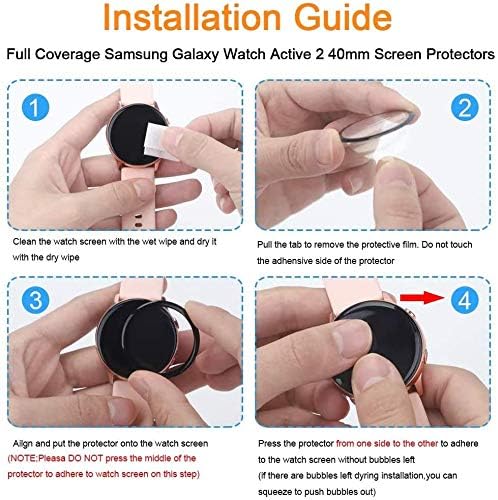
This four-step visual guide details the installation process for the Lamshaw G35 Smartwatch Screen Protector. It shows cleaning the watch screen, removing the protective film, aligning the protector, and pressing it to adhere without bubbles. Note: The visual steps are applicable to the Moowhsh G35 / AMZOMIGA G35 smartwatch, despite the image text referencing a different model.

This image illustrates the installation process, showing a hand applying the screen protector to a smartwatch. The arrows indicate the action of gently pushing from one side to the other to remove air and ensure stable adhesion across the entire watch face.
4. Product Features
The Lamshaw G35 Smartwatch Screen Protector offers the following key features:
- 3D Full Coverage: Designed to cover the entire curved screen of your Moowhsh G35 / AMZOMIGA G35 smartwatch, providing edge-to-edge protection.
- Touch Sensitivity & HD Clarity: The protector adheres tightly, ensuring no reduction in screen sensitivity and maintaining a smooth touch experience. Its optically transparent level provides a high-definition visual experience.
- Safety Protection: Offers robust protection against drops, scratches, and scrapes, safeguarding your smartwatch from daily wear and tear.
- Anti-Scratch: Resistant to scratches from common objects such as keys, coins, and pens.
- Bubble-Free Installation: Engineered for easy, bubble-free application when following the installation instructions.
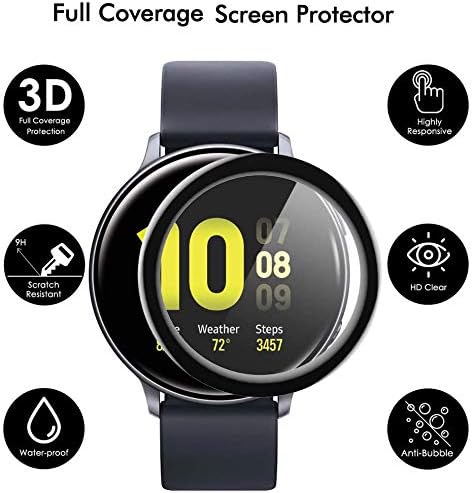
This diagram visually represents the key features of the full coverage screen protector. Icons and text indicate '3D Full Coverage Protection', 'Scratch Resistant', 'Water-proof', 'Highly Responsive', 'HD Clear', and 'Anti-Bubble' properties, all centered around an image of the protector on a smartwatch.

This image showcases the 'Anti-Scratch' capability of the screen protector. A utility knife is shown near the protector on a smartwatch, illustrating its resistance to scratches from objects like keys, coins, or pens.

This image demonstrates the 'Bubble Free' feature, comparing a perfectly applied screen protector on the left with an improperly applied one on the right showing visible air pockets. It highlights the design for maintaining touch sensitivity and accuracy.
5. Maintenance
To maintain the clarity and effectiveness of your screen protector:
- Clean the screen protector regularly with a soft, lint-free cloth.
- Avoid using harsh chemicals or abrasive materials, as these can damage the protector's surface.
- If the protector becomes heavily scratched or damaged, replace it with a new one from the pack to ensure continued protection.
6. Troubleshooting
Issue: Bubbles remain after installation.
- Solution: Gently lift the corner of the screen protector closest to the bubble. Slowly re-apply the protector, pushing the air out towards the edge. Ensure the screen is free of dust before re-application.
Issue: Screen protector does not adhere properly.
- Solution: Ensure the smartwatch screen was thoroughly cleaned and dried before installation. Any dust, oil, or moisture can prevent proper adhesion. If the issue persists, use a new protector from the pack.
7. Specifications
| Attribute | Detail |
|---|---|
| Brand | Lamshaw |
| Compatible Devices | Moowhsh G35 Smartwatch, AMZOMIGA G35 Smartwatch |
| Screen Size | 1.3 Inches |
| Special Features | Scratch Resistant, Full Coverage, Bubble Free, HD Clarity, High Touch Sensitivity |
| Screen Surface Description | Glossy |
| Number of Items | 3 |
8. Warranty and Support
For any questions, concerns, or support regarding your Lamshaw G35 Smartwatch Screen Protector, please refer to the seller's contact information on your purchase platform. We are committed to providing quality products and customer satisfaction.