
BENKS MP08
BENKS Magnetic Power Bank Instruction Manual
Model: MP08
1. Introduction
Thank you for choosing the BENKS Magnetic Power Bank. This portable charger is designed to provide convenient and efficient power to your devices, featuring both wireless magnetic charging and wired charging capabilities, along with a versatile foldable kickstand. This manual will guide you through the setup, operation, and maintenance of your new power bank to ensure optimal performance.
2. What's in the Box
- 1x 10000mAh Magnetic Power Bank
- 1x USB-C to USB-C Cable (11.8 inches)
- Instruction Manual
3. Product Overview and Features
The BENKS Magnetic Power Bank is a compact and powerful charging solution. Key features include:
- 10,000mAh Capacity: Provides extended power for your devices, capable of charging an iPhone 14 up to 1.9 times.
- Foldable Kickstand: Integrated stand allows for hands-free viewing in both portrait and landscape orientations while charging.
- MagSafe Compatibility: Designed for seamless magnetic attachment and wireless charging with iPhone 12/13/14/15 series and MagSafe-compatible cases.
- Enhanced Magnetic Attraction: Strong built-in magnets ensure a secure connection.
- Flexible 2-in-1 Charging: Supports up to 15W magnetic wireless charging and 20W USB-C wired charging. Includes a USB-A output port for broader compatibility.
- Intelligent Temperature Control: Ensures safe and efficient charging without overheating.
- LED Indicator Lights: Displays remaining battery level.

Figure 3.1: BENKS Magnetic Power Bank attached to an iPhone, showcasing its compact design and integrated kickstand.
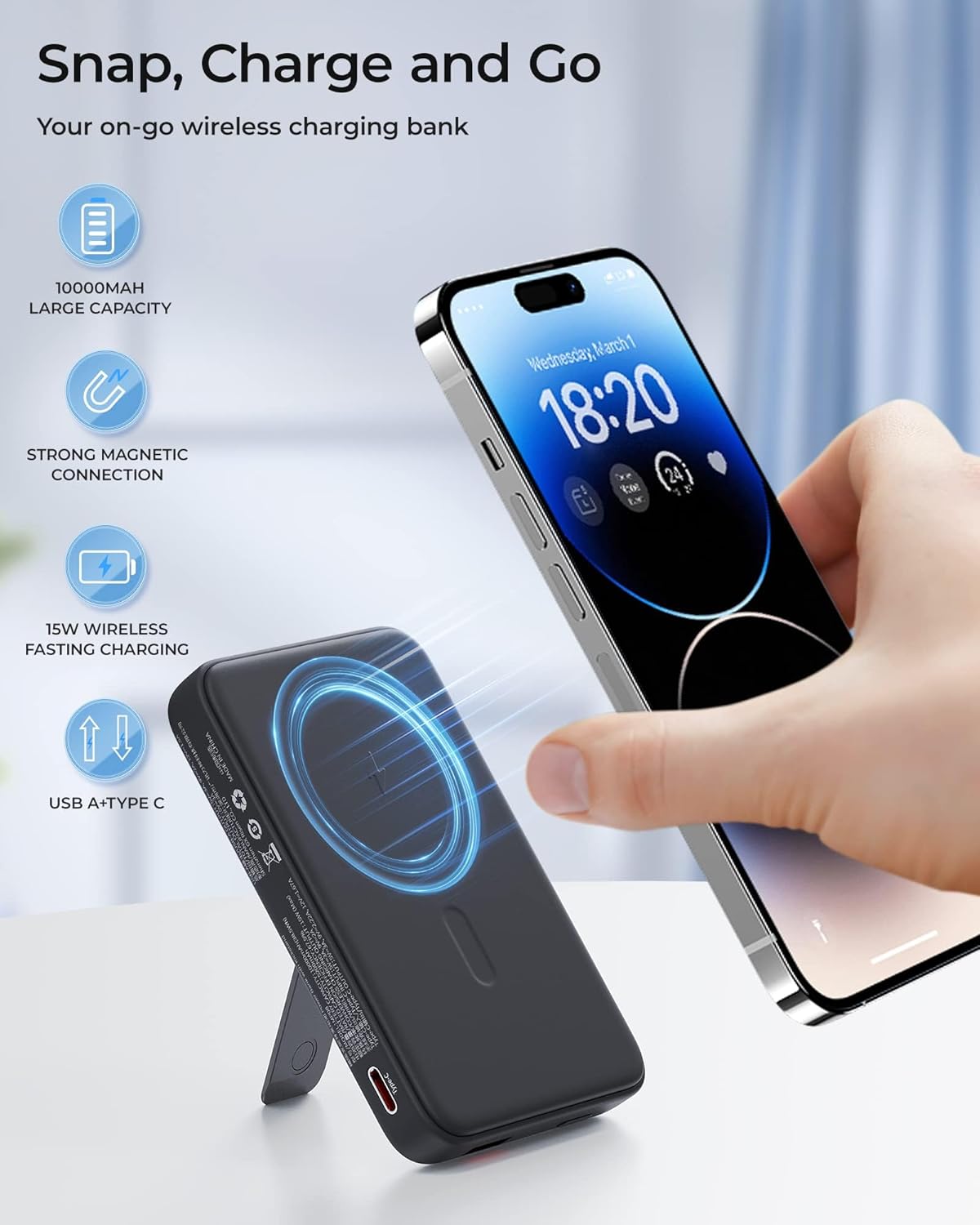
Figure 3.2: Illustration of the power bank's 'Snap, Charge and Go' functionality, highlighting its 10,000mAh capacity, strong magnetic connection, and 15W wireless fast charging.

Figure 3.3: The power bank's 2-in-1 foldable kickstand supporting an iPhone for hands-free viewing, demonstrating its versatility.

Figure 3.4: The power bank simultaneously charging multiple devices via wireless and wired connections, showcasing its broad compatibility.
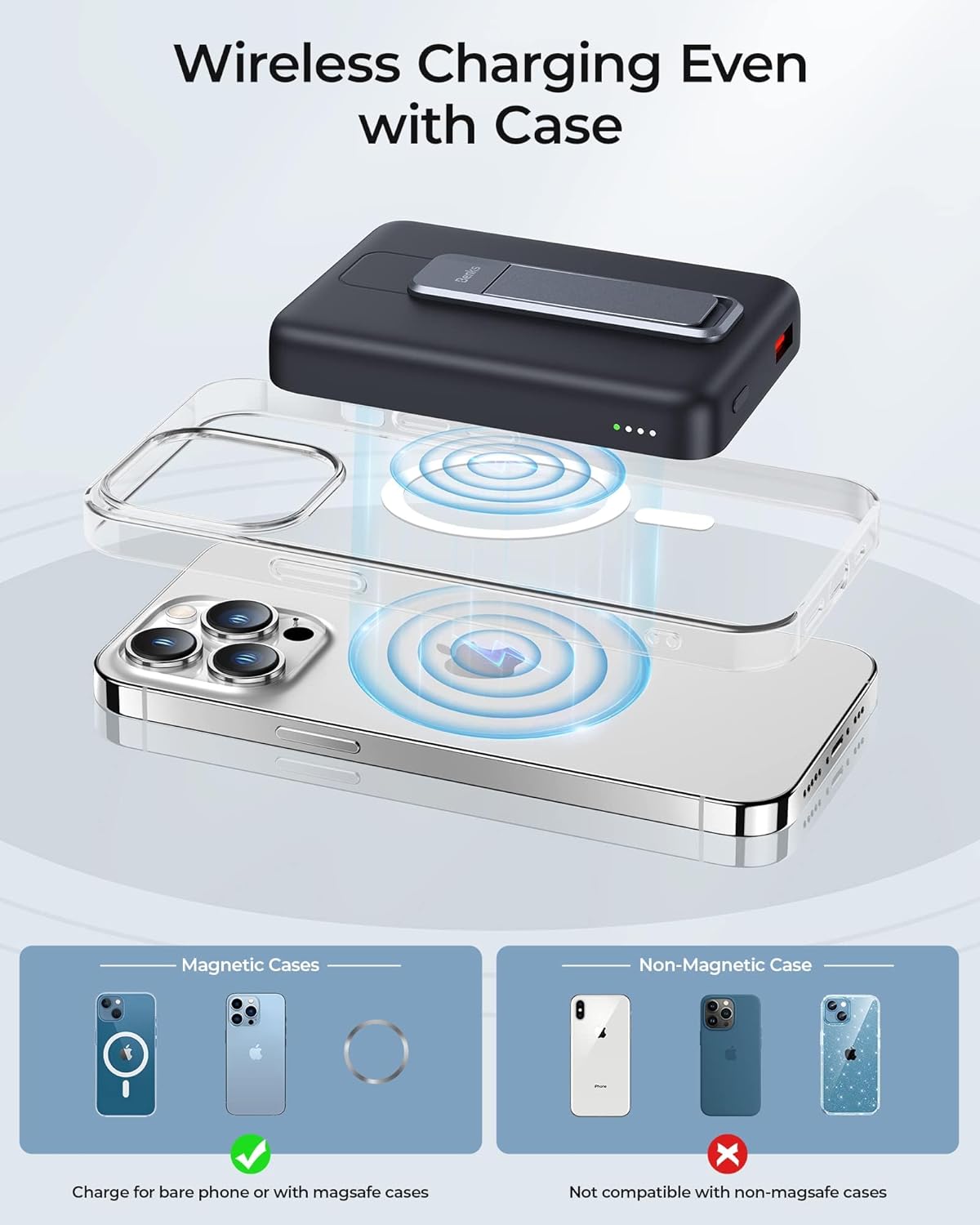
Figure 3.5: Diagram illustrating that the power bank supports wireless charging with MagSafe cases, but not with standard non-MagSafe cases.
4. Setup
4.1 Initial Charging of the Power Bank
- Connect the provided USB-C to USB-C cable to the USB-C port on the power bank.
- Plug the other end of the cable into a compatible USB-C power adapter (not included).
- The LED indicator lights on the power bank will illuminate to show the charging progress. All four lights will be solid when fully charged.
4.2 Power Bank Layout

Figure 4.1: Diagram showing the 20W Type-C (2-in-1 input & output) port, USB-A Output port, Switch Button, and LED indicator lights on the power bank.
5. Operating Instructions
5.1 Wireless Magnetic Charging
- Ensure your device is MagSafe compatible (iPhone 12 series or newer) or has a MagSafe-compatible case.
- Align the power bank with the back of your iPhone. The magnets will snap it into place.
- Press the power button on the side of the power bank to initiate wireless charging. The LED indicators will show the power bank's remaining charge.
5.2 Wired Charging
- For USB-C devices, use the provided USB-C to USB-C cable to connect your device to the power bank's USB-C port.
- For other devices (e.g., Android phones, tablets, headphones) requiring USB-A, use an appropriate cable (not included) to connect your device to the power bank's USB-A output port.
- Press the power button to begin charging.
5.3 Using the Foldable Kickstand
- Gently pull out the integrated kickstand from the back of the power bank.
- Place your iPhone (with the attached power bank) on a flat surface.
- Adjust the angle of the kickstand for optimal viewing in either portrait or landscape mode.
- When not in use, fold the kickstand back into its recess until it clicks securely.

Figure 5.1: The power bank charging a phone while simultaneously using the kickstand for desktop viewing.

Figure 5.2: Using the power bank's kickstand to prop up a phone for a video call, demonstrating its practical application.
6. Maintenance
- Keep the power bank dry and away from moisture.
- Avoid extreme temperatures.
- Clean the surface with a soft, dry cloth. Do not use harsh chemicals or abrasive materials.
- Store in a cool, dry place when not in use for extended periods.
7. Troubleshooting
- Device not charging wirelessly: Ensure your device is MagSafe compatible or has a MagSafe-compatible case. Non-MagSafe cases will prevent magnetic attachment and wireless charging. Check if the power bank is turned on by pressing the power button.
- Slow charging: Ensure you are using a compatible power adapter and cable. Wired charging (20W) is generally faster than wireless charging (up to 15W).
- Power bank not charging: Verify that the charging cable and power adapter are functioning correctly. Ensure the cable is securely connected to both the power bank and the power source.
- Weak magnetic connection: Ensure there are no obstructions between the power bank and your device. If using a case, confirm it is a MagSafe-compatible case.
8. Specifications
| Feature | Detail |
|---|---|
| Product Dimensions | 4.16 x 2.71 x 0.74 inches |
| Item Weight | 9.1 ounces |
| Model Number | MP08 |
| Battery Type | 1 Lithium Ion battery required |
| Battery Capacity | 10000 Milliamp Hours |
| Wireless Charging Output | 5W, 7.5W, 10W, Max 15W |
| Wired Charging Output (USB-C) | Max 20W |
| Input (USB-C) | 20W (2-in-1 input & output) |
| Connector Type | USB Type C, USB Type A |
| Color | Black |
9. Warranty & Support
BENKS offers a worry-free 1-year warranty for this product. We are committed to providing excellent customer service.
- 24/7 Support: For any inquiries or assistance, please contact us at vip-service@benks.com.
- 30-Day Hassle-free Return: Refer to your purchase platform's return policy for details.
Please do not hesitate to contact us via Amazon message if you have any issues. We are here to help.
Related documentsMP08

Ask a question about this manual
Ask about setup, troubleshooting, compatibility, parts, safety, or missing instructions. Manuals+ will review the question and use this page’s manual context to help answer it.