
1. Safety Information
Please read all instructions carefully before assembly and use. Keep this manual for future reference.
- Children are not allowed to climb on the computer gaming desk for safety use.
- Ensure all screws and fasteners are securely tightened before use.
- Do not overload the desk or shelves beyond their weight capacity.
- Keep liquids away from electrical components (LED lights, power outlets, USB ports).
- Place the desk on a flat, stable surface to prevent tipping.
2. Product Overview & Features
The Armocity 55.2 Inch Computer Desk is designed for home office and gaming setups, offering a blend of functionality and modern aesthetics. Key features include:
- Integrated LED Lights & Power Hub: Equipped with 3 AC outlets and 2 USB ports for convenient charging of devices and powering accessories. The LED lights can be powered via USB.
- Modern Splice Board Design: Features a unique black and white splice board desktop for a contemporary look.
- Moveable Monitor Stand: An ergonomic monitor stand helps adjust screen height for correct sitting posture.
- Reversible Charging Station: The charging port can be positioned on either the left or right side of the desk to suit your setup.
- Ample Storage: Includes 4 storage shelves for organizing items and providing generous legroom.

Figure 2.1: Overview of the Armocity 55.2 Inch Computer Desk with LED lights and power outlet.
3. Package Contents
Please verify that all components are present before beginning assembly. Refer to the included assembly diagram for part identification.
- Desktop Panels (Main, Monitor Stand, Side Shelves)
- Metal Frame Components (Legs, Support Bars)
- Power Outlet Unit with USB Ports
- LED Light Strip with Remote Control
- Fabric Storage Pocket
- Headphone Hook
- Assembly Hardware (Screws, Allen Wrench)
- Instruction Manual
4. Setup & Assembly
Assembly typically requires two people and takes approximately 1-2 hours. Follow the steps below and refer to the provided diagrams for visual guidance.
4.1. Prepare the Workspace
- Clear a spacious area for assembly.
- Lay out all parts and hardware, checking against the package contents list.
4.2. Assemble the Desk Frame
- Attach the foot pads to the bottom of the desk legs.
- Connect the horizontal support bars to the vertical leg frames using the provided screws. Ensure all connections are firm.
- Assemble the side shelf frames, ensuring correct orientation for screw holes.
- Attach the side shelf boards to the assembled side shelf frames.
- Connect the main desktop frame components, paying attention to the orientation of the screw holes for the monitor stand and power outlet placement.
4.3. Install Monitor Stand & LED Lights
- Attach the monitor stand supports to the main desktop panel.
- Carefully peel the adhesive backing from the LED light strip and firmly press it onto the designated area under the monitor stand.
- Secure the USB wire for the LED lights using the provided cord organizer clips.
4.4. Attach Desktop Panels & Accessories
- Place the main desktop panels onto the assembled frame and secure them with screws.
- Install the power outlet unit into the pre-drilled slot on the desktop and secure it with screws.
- Attach the fabric storage pocket to the side of the desk using the provided hooks.
- Install the headphone hook to the desired side of the desk.
Video 4.1: Assembly guide for the Armocity Gaming Desk with LED Lights.

Figure 4.2: Desk dimensions and power cord length.
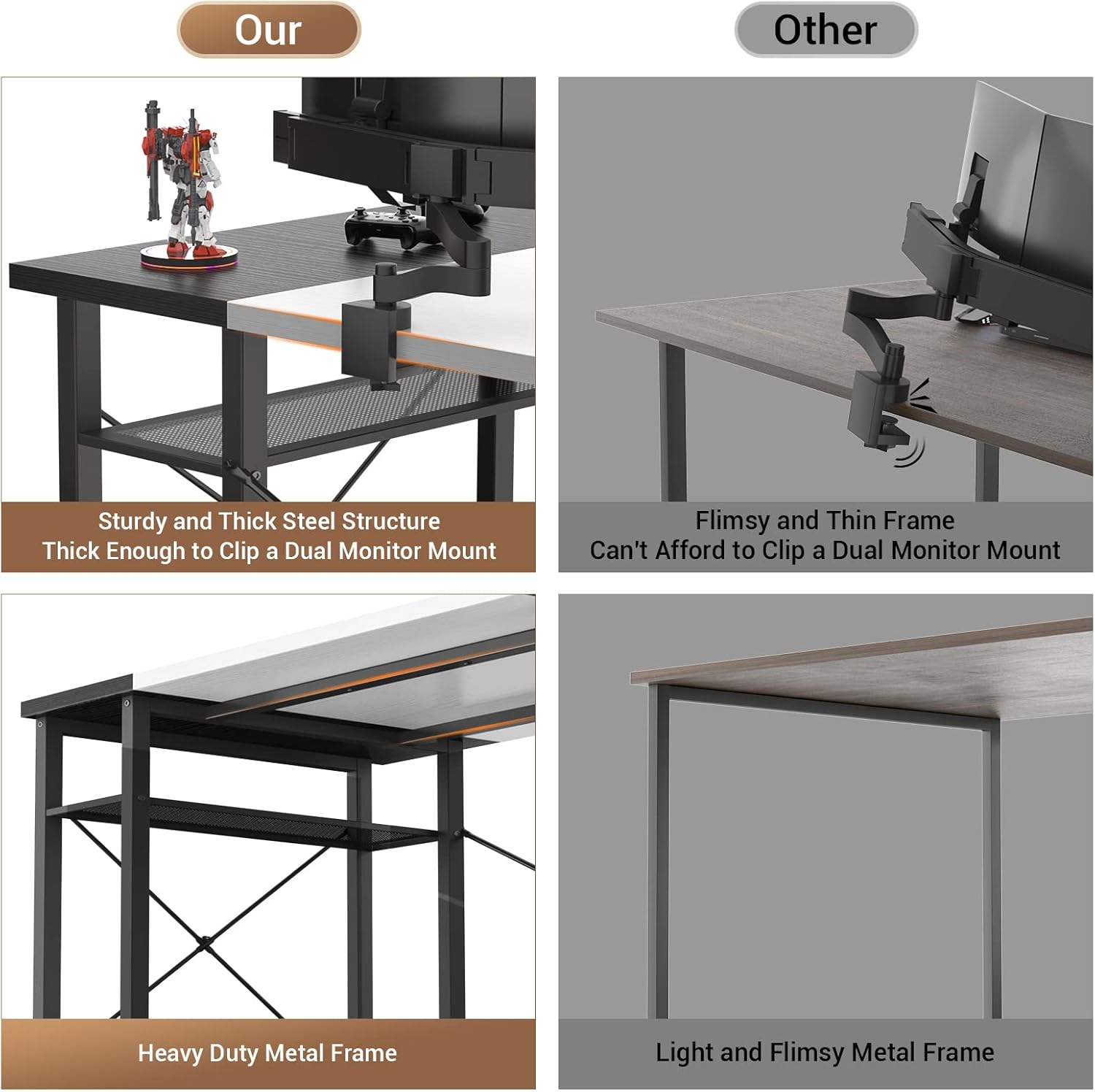
Figure 4.3: Illustration of the sturdy steel structure and heavy-duty metal frame.
5. Operating Instructions
5.1. LED Lights Operation
- Plug the USB cable of the LED light strip into one of the desk's USB ports or a compatible USB power adapter.
- Use the included remote control to power on/off, change colors (20 static colors), adjust brightness, and select from 21 dynamic modes.

Figure 5.1: Remote control for LED lighting modes, showing static colors and dynamic options.
5.2. Power Outlet & USB Charging
- Plug the desk's main power cord (6.57 ft long) into a wall outlet.
- Use the 3 AC outlets (120V/12A) and 2 USB ports (5V/2A) to power and charge your devices.

Figure 5.2: Detail of the integrated power outlet and USB charging station.
5.3. Movable Monitor Stand
- The monitor stand is designed to be movable, allowing you to adjust its position along the desktop for optimal ergonomic viewing.

Figure 5.3: Demonstrating the correct sitting position with the movable monitor stand.
5.4. Reversible Design
- The desk features a reversible design, allowing you to configure the side shelves and power outlet unit on either the left or right side during assembly, based on your preference and room layout.

Figure 5.4: Illustrates the reversible configuration options for the desk's side shelves and power hub.
6. Maintenance
- Cleaning: Wipe the desk surfaces with a soft, damp cloth. Avoid harsh chemicals that may damage the finish.
- Fasteners: Periodically check all screws and bolts to ensure they remain tight. Re-tighten as necessary to maintain stability.
- Cable Management: Utilize the included cord organizers or additional cable ties to keep wires tidy and prevent damage.
7. Troubleshooting
- LED Lights Not Working: Ensure the USB cable is securely plugged into a powered USB port. Check the remote control battery.
- Power Outlets/USB Ports Not Functioning: Verify the main power cord is fully plugged into a working wall outlet. Check for tripped circuit breakers.
- Desk Wobbles: Ensure all assembly screws are tightened. Adjust the foot pads on the bottom of the legs to level the desk on uneven floors.
- Missing Parts/Damage: If you received damaged parts or are missing components, please contact Armocity customer support for assistance.
8. Specifications
| Attribute | Value |
|---|---|
| Brand | Armocity |
| Shape | Rectangular |
| Desk Design | Computer Desk |
| Product Dimensions | 55.2"D x 19.6"W x 29.6"H |
| Color | White and Black |
| Style | Modern |
| Base Material | Metal |
| Top Material Type | Metal |
| Finish Type | Wood |
| Special Feature | Reversible |
| Room Type | Office |
| Recommended Uses | Computer Desk, Desk with Storage, Gaming, Office Desk, Writing |
| Age Range Description | Adult |
| Product Grade | Residential |
| Item Weight | 17.46 Kilograms |
| Number Of Shelves | 4 |
| Tabletop Thickness | 1 Inches |
| Maximum Weight Recommendation | 400 Pounds |
| Required Assembly | Yes |
9. Warranty & Support
Armocity offers a 2-YEAR WARRANTY for this 55.2'' computer desk. If you have any questions during installation, encounter damage, or require further assistance, please contact Armocity customer support.
For additional support or to purchase protection plans, please visit the Armocity store on Amazon or refer to your purchase documentation.
- 2-Year Protection Plan (available for purchase)
- 3-Year Protection Plan (available for purchase)