
1. Product Overview
The Lewmar 589274 Tt Gen2 ICU Assy (Integrated Control Unit Assembly) is a critical component designed to manage and provide logic for a panel controller, specifically for thruster systems. This unit is engineered to meet strict industry standards, ensuring reliable performance in marine environments. It features a health LED and an on-board fuse for enhanced safety and diagnostic capabilities. The ICU Assy is designed for seamless integration, with one unit typically required per thruster.
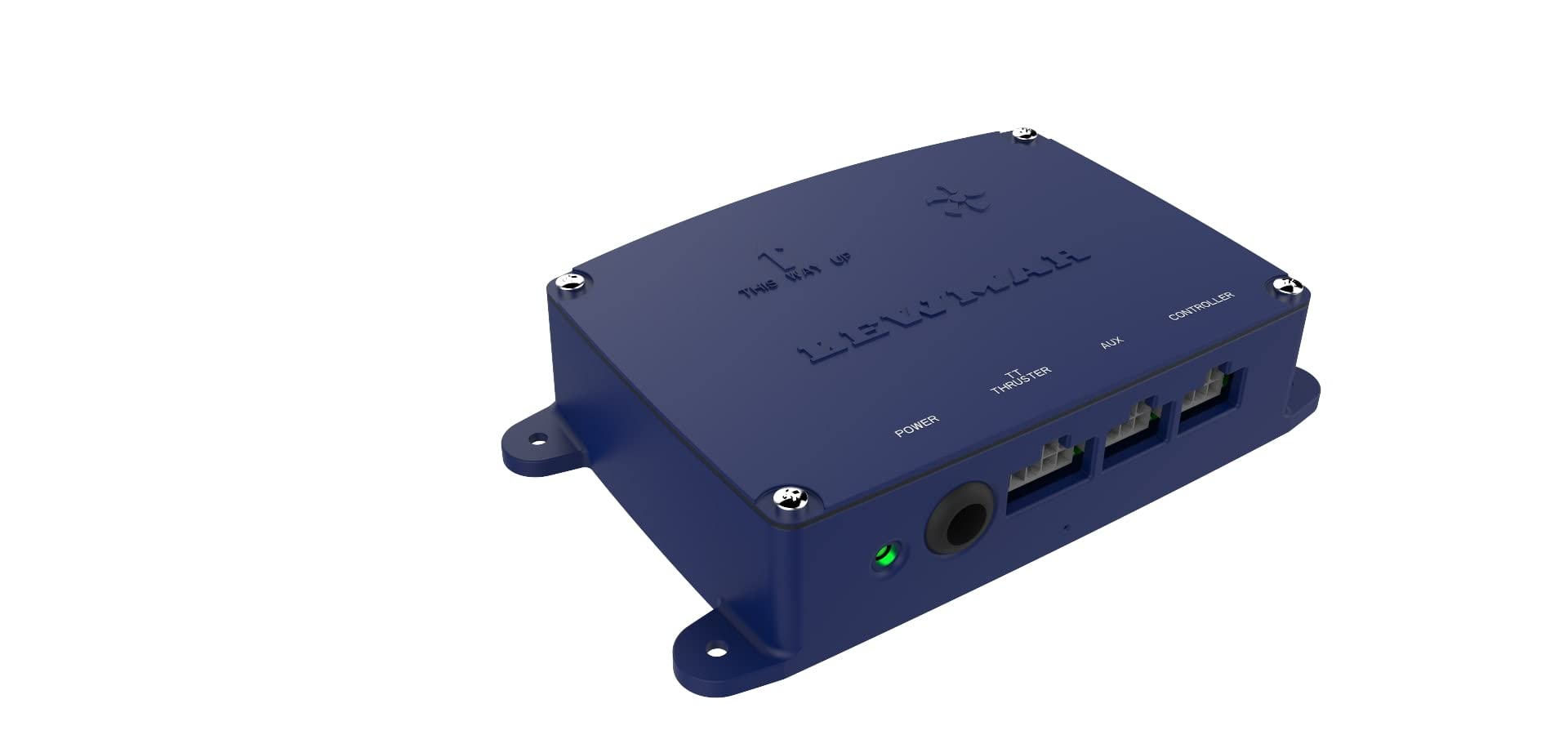
This image displays the Lewmar 589274 Tt Gen2 ICU Assy. It is a compact, dark blue electronic control unit. The top surface features the 'LEWMAR' logo and 'THIS WAY UP' text. The front face includes a power input, a green LED indicator, and multiple connection ports labeled 'POWER', 'TT THRUSTER', 'AUX', and 'CONTROLLER'. The unit has mounting flanges on its sides.
2. Setup and Installation
Proper installation of the ICU Assy is crucial for its functionality and safety. Always ensure the vessel's power is disconnected before beginning installation.
2.1 Mounting
- Select a dry, protected location away from direct exposure to water or excessive heat.
- Utilize the integrated mounting flanges to securely fasten the unit using appropriate marine-grade fasteners.
- Ensure adequate ventilation around the unit.
2.2 Electrical Connections
The ICU Assy features Phoenix contacts for power and neutral connections, along with dedicated ports for thruster, auxiliary, and controller connections.
- Power Connection: Connect the main power supply to the designated 'POWER' input. Ensure correct polarity and use appropriate gauge wiring for the current draw. The unit includes an on-board fuse for protection.
- TT Thruster Connection: Connect the thruster control wiring to the 'TT THRUSTER' port. Refer to your thruster's manual for specific wiring diagrams.
- Auxiliary Connection: The 'AUX' port provides an auxiliary connection point for additional system integration as required.
- Controller Connection: Connect the panel controller to the 'CONTROLLER' port. This connection enables the ICU Assy to provide logic and power to the control panel.
After all connections are made, double-check all wiring for secure fitment and correct routing before restoring power.
3. Operating Instructions
The Lewmar 589274 Tt Gen2 ICU Assy operates by powering and providing the necessary logic for your thruster's panel controller. Once properly installed and powered, the unit will automatically begin its function.
- Power-Up: Upon receiving power, the integrated health LED on the unit will illuminate, indicating operational status.
- Controller Interface: The ICU Assy facilitates communication between the thruster and the control panel. All thruster operations are initiated and managed via the connected panel controller.
- Diagnostic LED: Monitor the health LED for status indications. A steady green light typically indicates normal operation. Refer to the troubleshooting section for other LED states.
4. Maintenance
The Lewmar 589274 Tt Gen2 ICU Assy is designed for durability and minimal maintenance. However, regular checks can extend its lifespan and ensure continued reliable operation.
- Visual Inspection: Periodically inspect the unit for any signs of physical damage, corrosion, or loose connections.
- Connection Integrity: Ensure all electrical connections remain tight and free from corrosion. Clean any corroded terminals with a suitable contact cleaner.
- Environmental Check: Verify that the installation area remains dry and free from excessive moisture or heat.
- Fuse Check: If the unit loses power or the health LED is off, check the on-board fuse. Replace with a fuse of the exact same rating if necessary.
- Cleaning: Gently wipe the exterior of the unit with a clean, dry cloth to remove dust or debris. Do not use harsh chemicals or abrasive cleaners.
5. Troubleshooting
This section provides guidance for common issues you might encounter with your Lewmar 589274 Tt Gen2 ICU Assy.
| Symptom | Possible Cause | Solution |
|---|---|---|
| Unit not powering on / Health LED off | No power supply; Blown on-board fuse; Loose power connection. | Check vessel's power supply; Inspect and replace on-board fuse if blown; Verify power cable connections are secure. |
| Thruster not responding via panel controller | Loose controller connection; Faulty controller; Issue with thruster wiring. | Ensure controller cable is securely connected to the 'CONTROLLER' port; Test controller if possible; Inspect thruster wiring. |
| Intermittent operation | Loose or corroded connections; Power fluctuations. | Check all connections (power, thruster, aux, controller) for tightness and corrosion; Verify stable power supply. |
If issues persist after following these steps, please contact Lewmar customer support or a qualified marine technician.
6. Specifications
Key technical specifications for the Lewmar 589274 Tt Gen2 ICU Assy:
- Manufacturer: Lewmar
- Brand: Lewmar
- Model: Lewmar 589274: Tt Gen2 Icu Assy
- Item Model Number: 589274
- Manufacturer Part Number: 589274
- Item Weight: 322 g
- Parcel Dimensions: 20.2 x 15 x 5 cm
- ASIN: B0BCKM16NC
- Date First Available: Aug. 31 2022
7. Warranty and Support
For information regarding warranty coverage, technical support, or service for your Lewmar 589274 Tt Gen2 ICU Assy, please refer to the official Lewmar website or contact Lewmar customer service directly. Keep your purchase receipt and product model number handy when seeking support.
Lewmar is committed to providing high-quality products and support to ensure your satisfaction.


