
1. Introduction
This manual provides detailed instructions for the installation, use, and maintenance of your defean Silicone Gel Replacement Earpads. These earpads are designed to enhance comfort and sound isolation for compatible headsets, specifically Peltor Tactical 100, 300, 500 Rangeguard, and 3M WorkTunes models.

Image 1.1: defean Silicone Gel Replacement Earpads shown with a compatible headset. These earpads are designed for easy installation and improved comfort.
2. Product Compatibility
The defean Silicone Gel Replacement Earpads are compatible with the following headset models:
- Peltor Tactical 100
- Peltor Tactical 300
- Peltor Tactical 500 Rangeguard
- 3M WorkTunes Headsets
- Other compatible models may include: Rangeguard, ComTac Series, Shot Gunner II, Swat Tac, Tacticalpro, Work tunes Connect, Protac, Sound Trap, Tactical 6-s, Peltor X1A-X5A.

Image 2.1: Visual representation of various headset models compatible with defean replacement earpads.
3. Setup and Installation
Follow these steps to replace your old earpads with the new defean Silicone Gel Earpads:
- Remove Old Earpads: Carefully peel off and remove the existing earpads from your headset. Some earpads may be glued or clipped on. Ensure all old material is removed to provide a clean surface for the new earpads.
- Prepare New Earpads: The defean replacement earpads are designed for a precise fit. If they have an adhesive backing, gently peel off the protective paper to expose the sticky surface.
- Align and Attach: Align the new earpad with the ear cup of your headset. Press firmly around the edges to ensure a secure and complete seal. If your headset uses clips, ensure the earpad is properly seated within the clips.
- Verify Fit: Once attached, gently tug on the earpad to confirm it is securely in place. The earpads should fit snugly around the ear cups.
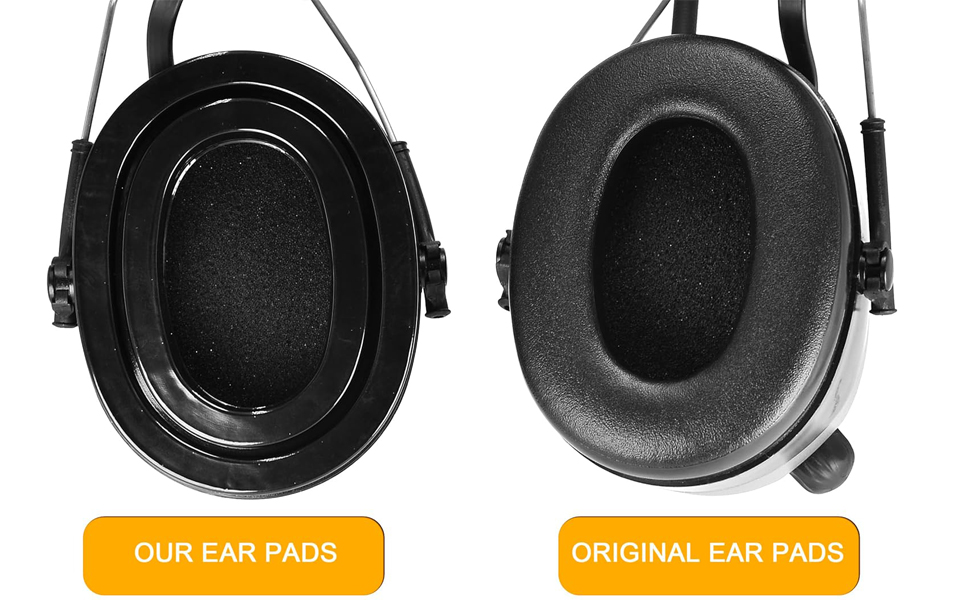
Image 3.1: A visual comparison between the original earpads and the defean replacement earpads, highlighting the improved design.
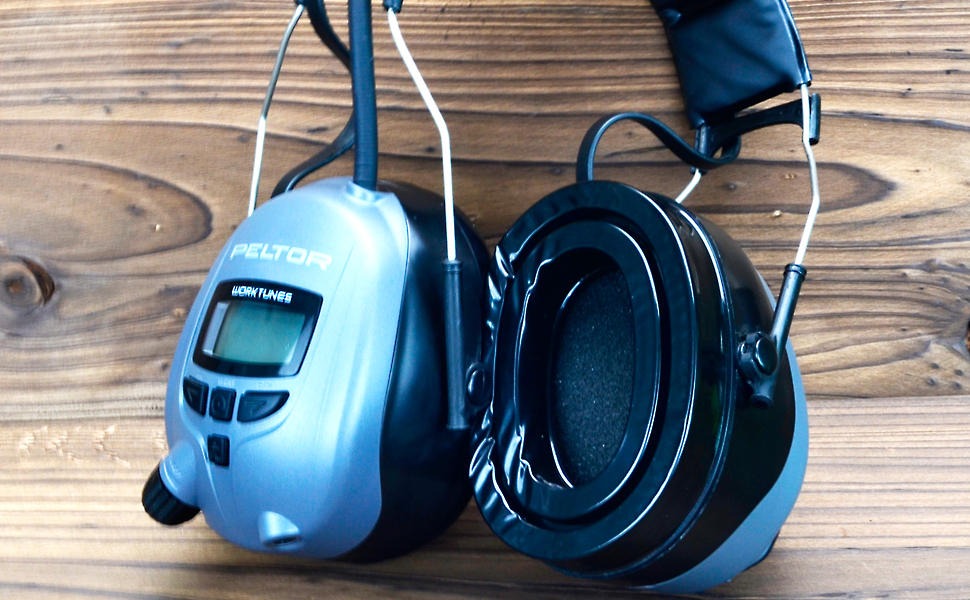
Image 3.2: The defean replacement earpads correctly installed on a Peltor Worktunes headset, demonstrating a proper fit.
4. Operating Benefits
The defean Silicone Gel Replacement Earpads offer several benefits during use:
- Enhanced Comfort: The soft silicone gel and new-type heat conduction fiber provide a comfortable fit, reducing pressure and heat buildup during extended wear.
- Improved Noise Isolation: The design ensures a superior seal around your ears, contributing to excellent noise isolation and an enhanced audio experience.
- "Instant Chill" Feature: The silicone gel material is designed to offer a cooling sensation, which can be particularly beneficial in warm environments or during prolonged use.
- Durability: Constructed with robust materials for extended product life.

Image 4.1: Cross-section diagram illustrating the multi-layered construction of the silicone gel earpad, including the cooling gel and heat conduction fiber, and highlighting benefits like cooling, soundproofing, softness, and durability.
5. Maintenance
To ensure the longevity and performance of your defean Silicone Gel Replacement Earpads, follow these maintenance guidelines:
- Cleaning: Wipe the surface of the earpads with a soft, damp cloth. Use mild soap if necessary, but avoid harsh chemicals or abrasive cleaners that could damage the silicone or fabric.
- Drying: Allow the earpads to air dry completely before using your headset again. Do not expose them to direct sunlight or high heat.
- Storage: When not in use, store your headset in a clean, dry environment to prevent dust and debris accumulation on the earpads.
- Inspection: Periodically inspect the earpads for any signs of wear, tears, or loss of seal. Replace them if significant damage is observed to maintain optimal performance.
6. Troubleshooting
If you encounter any issues with your replacement earpads, consider the following:
- Poor Fit or Seal:
- Ensure the old earpad material was completely removed.
- Re-align and firmly press the new earpad onto the ear cup, checking for any gaps.
- Verify that your headset model is listed under the compatible devices.
- Reduced Noise Isolation:
- A poor seal is the most common cause. Re-check the installation as described above.
- Inspect the earpads for any damage or tears that might compromise the seal.
- Discomfort During Use:
- Ensure the earpads are correctly positioned on your ears.
- Allow a short break-in period for the material to conform.
- If discomfort persists, verify the earpads are the correct type for your specific headset model.
If troubleshooting steps do not resolve the issue, please contact defean customer support for further assistance.
7. Specifications
| Feature | Detail |
|---|---|
| Brand | defean |
| Model Number | for 100 300 500 Rangeguard |
| Material | Silicone Gel, Soft Foam, New-type Heat Conduction Fibre |
| Color | Black |
| Compatible Devices | Peltor Tactical 100/300/500 Rangeguard, 3M WorkTunes Headsets |
| Package Dimensions | 6.42 x 4.37 x 1.02 inches |
| Item Weight | 3.2 ounces |

Image 7.1: Dimensional drawing of the defean replacement earpads, indicating measurements in millimeters.
8. Warranty and Support
defean is committed to providing high-quality products. While specific warranty details are not provided in this manual, we encourage customers to contact us directly for any product-related inquiries or support needs.
For assistance, please visit the official defean store on Amazon or contact customer service through your purchase platform. We are dedicated to developing professional and ergonomic earpads and are available to address any issues with your purchase.