
Eumspo G3
Eumspo G3 Bluetooth Headset User Manual
Model: G3 | Brand: Eumspo
1. Introduction
Thank you for choosing the Eumspo G3 Bluetooth Headset. This manual provides essential information for setting up, operating, and maintaining your headset. Please read it thoroughly to ensure optimal performance and longevity of your device.
2. What's in the Box
Verify that all items are present in your package:
- Eumspo G3 Bluetooth Headset
- Charging Case (400mAh)
- USB-C Charging Cable
- Replacement Eartips (various sizes)
- User Manual

Image: Contents of the Eumspo G3 Bluetooth Headset package.
3. Product Overview
Familiarize yourself with the main components and controls of your Eumspo G3 headset.
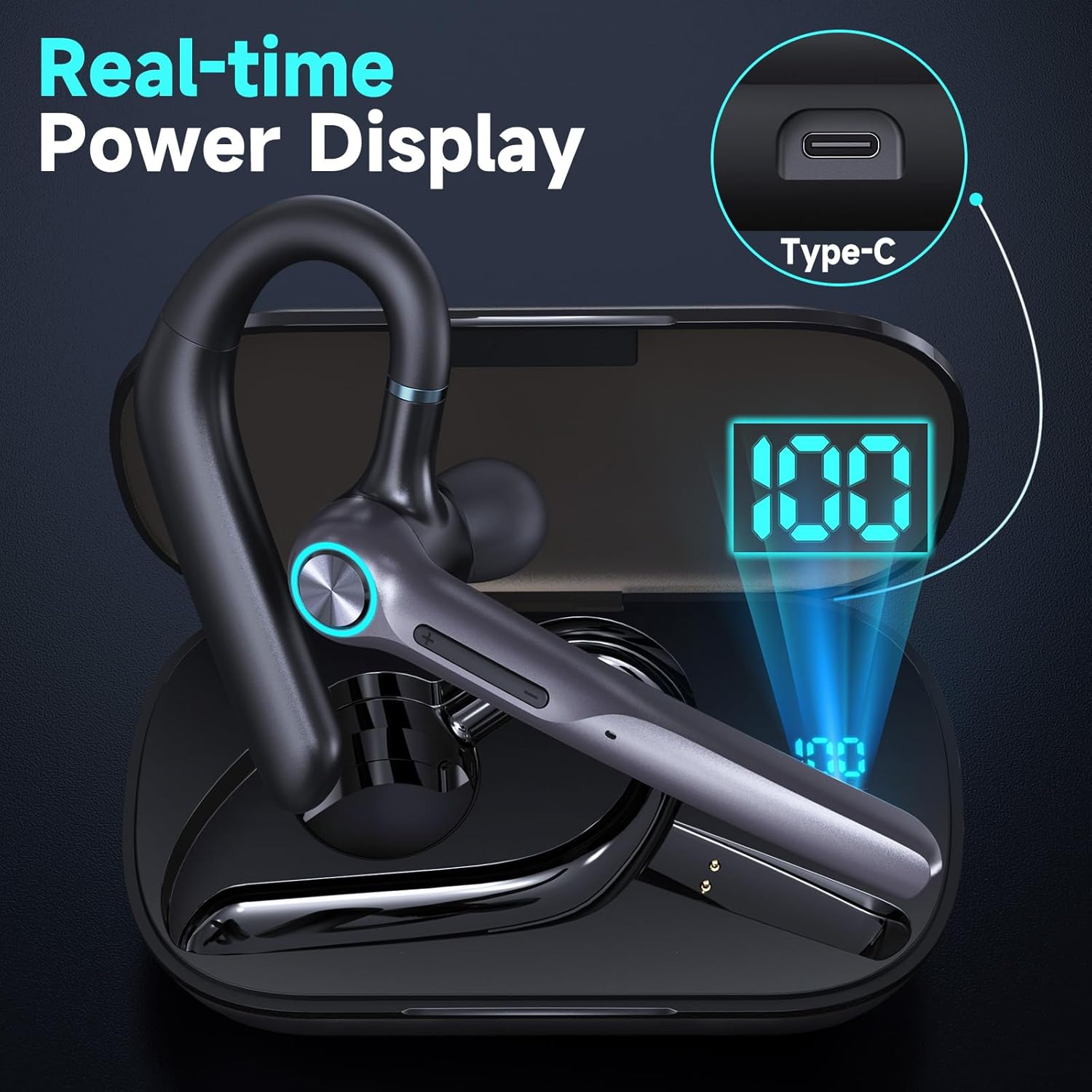
Image: Headset Features Showcase - MFB button, Power, Volume, and Dual Mic Noise Cancelling.
- Multi-Function Button (MFB): Controls power, calls, and voice assistant.
- Volume Buttons (+/-): Adjusts volume and navigates music tracks.
- Microphone: Features dual noise-canceling microphones.
- Ear Hook: Rotates for comfortable fit on either ear.
- Eartip: Soft silicone for in-ear comfort.
4. Setup
4.1 Initial Charging
Before first use, fully charge your headset and charging case.
- Place the headset into the charging case.
- Connect the USB-C cable to the charging case and a power source.
- The LED display on the case will show the charging status. A full charge takes approximately 1.5 hours for the headset and 2 hours for the case.

Image: Real-time Power Display on the charging case.
4.2 Bluetooth Pairing
To connect your headset to a device:
- Take the headset out of the charging case. It will automatically enter pairing mode.
- On your smartphone, tablet, or laptop, activate Bluetooth.
- Search for "G3 Bluetooth Headset" (or similar, e.g., M53) in the list of available devices and select it to connect.
- A voice prompt will confirm successful pairing.

Image: Dual Device Bluetooth Pairing with V5.3 chips.
4.3 Dual Device Connection
The Eumspo G3 supports connecting to two devices simultaneously:
- Pair the headset with the first device (e.g., Phone A).
- Turn off Bluetooth on Phone A. The headset will re-enter pairing mode.
- Pair the headset with the second device (e.g., Phone B).
- Turn on Bluetooth on Phone A. The headset will automatically connect to both devices.
5. Wearing the Headset
For optimal comfort and sound quality, adjust the headset to fit your ear.

Image: Comfortable for Both Ears - Ergonomic design minimizes ear strain.
- Select the appropriate eartip size for a secure and comfortable fit.
- Insert the eartip into your ear canal.
- Position the ear hook over the back of your ear. The ear hook rotates 180 degrees, and the microphone boom rotates 270 degrees for use on either ear.
- Adjust the microphone boom to point towards your mouth for clear voice pickup.
Video: Instructions on how to install the ear hook for the headset.
6. Operating Instructions
6.1 Power On/Off
- Power On: Press and hold the MFB button for 3 seconds.
- Power Off: Press and hold the MFB button for 3 seconds.
6.2 Call Management
- Answer/End Call: Click the MFB button once.
- Reject Call: Press and hold the MFB button for 3 seconds.
- Mute/Unmute: Press the power button for 2 seconds during a call. (Note: This function may not support PC calls).
6.3 Music Control
- Play/Pause: Click the MFB button once.
- Next Song: Press and hold the "+" button for 2 seconds.
- Previous Song: Press and hold the "-" button for 2 seconds.
6.4 Voice Assistant
- Activate Voice Assistant (Siri/Google Voice): Click the MFB button 3 times.
Video: Demonstration of how to use the X01 Bluetooth headset, which shares similar functionalities with the G3 model.
7. Key Features
- Long Playtime: Up to 12 hours talk/music time on a single charge, extended to 50 hours with the 400mAh charging case. 500 hours standby time.
- Dual Noise Cancelling Microphones: Built-in HD omnidirectional microphones with Bluetooth V5.3 technology for clear calls by blocking out ambient noise.
- Bluetooth V5.3: Ensures quick, stable, and low-latency connection up to 33 feet.
- Ergonomic Design: Rotatable ear hook and flip-boom microphone for comfortable wear on either ear, with multiple eartip sizes for a perfect fit.
- Voice Assistant Support: Quick activation of Siri/Google Voice for hands-free operation.

Image: Noise Cancelling Headset with Dual-Mic technology.
8. Specifications
| Model Name | G3 Bluetooth Headset |
| Connectivity Technology | Wireless (Bluetooth V5.3) |
| Headphones Jack | USB-C |
| Charging Time | Approx. 2 Hours |
| Battery Average Life | 60 Hours (with charging case) |
| Maximum Operating Distance | 10 Meters (33 feet) |
| Control Type | Touch, Siri |
| Noise Control | Active Noise Cancellation |
| Material | Plastic |
| Item Weight | 72.6 Grams |
| Water Resistance Level | Water Resistant |
9. Troubleshooting
- No Power: Ensure the headset and charging case are fully charged.
- Cannot Pair: Make sure the headset is in pairing mode (flashing indicator). Turn off and on Bluetooth on your device, then try pairing again. Ensure the headset is within 10 meters of your device.
- Poor Sound Quality: Check the headset's fit in your ear and try different eartip sizes. Ensure there are no obstructions between the headset and your device.
- Microphone Not Working: Ensure the microphone is not muted during a call. Check device settings for microphone input.
10. Maintenance
- Clean the eartips and headset regularly with a soft, dry cloth.
- Avoid exposing the headset to extreme temperatures, humidity, or corrosive liquids.
- Store the headset in its charging case when not in use to protect it and keep it charged.
11. Safety Information
- Do not disassemble or modify the headset.
- Keep out of reach of children.
- Avoid using the headset at high volumes for extended periods to prevent hearing damage.
- Use caution when driving or engaging in activities that require your full attention.
12. Warranty & Support
For warranty information or technical support, please refer to the contact details provided with your purchase or visit the official Eumspo website. Keep your proof of purchase for any warranty claims.
Related documentsG3

Ask a question about this manual
Ask about setup, troubleshooting, compatibility, parts, safety, or missing instructions. Manuals+ will review the question and use this page’s manual context to help answer it.