
Introduction
The Verdant VX Series Wireless Energy Management Thermostat is designed for robust, reliable, and efficient climate control, particularly suited for properties with varying occupancy patterns such as hotels. This thermostat integrates an LCD display and a built-in occupancy sensor to optimize heating and cooling costs.
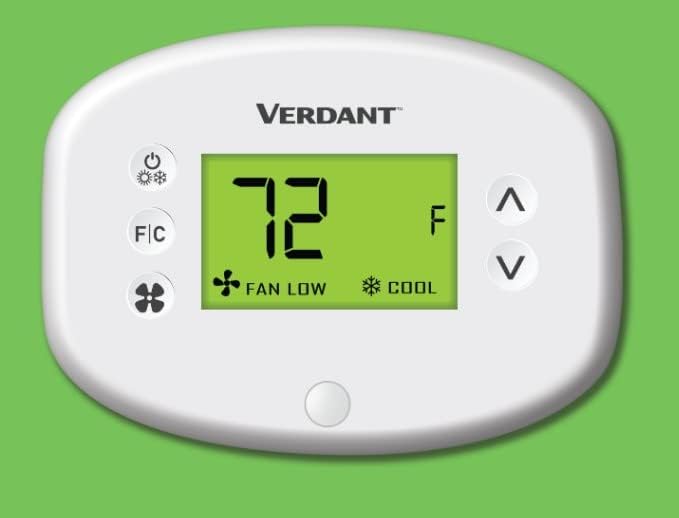
Figure 1: Front view of the Verdant VX Series Thermostat.
Key features include its ability to control PTAC, VTAC, and Hot Water Heat pump units, a quick installation time, and advanced energy-saving functionalities. It is trusted by numerous establishments for its performance and value.
Key Features Overview
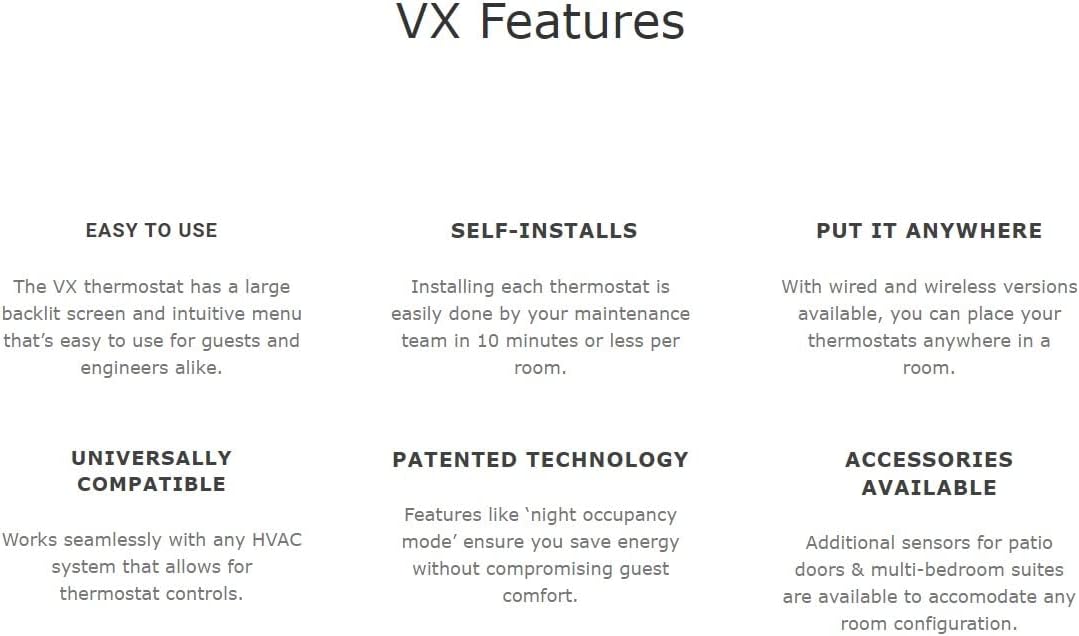
Figure 2: Overview of Verdant VX Thermostat features.
- High-Quality Control: Capable of managing PTAC, VTAC, and Hot Water Heat pump units.
- Rapid Installation: Designed for approximately 10-minute installation time.
- Energy Efficiency: Reduces heating & cooling costs by up to 40% through smart management.
- User-Friendly Interface: Features button control and an LCD display for ease of use.
- Wireless Connectivity: Utilizes RF technology for flexible placement and control.
- Occupancy Sensing: Built-in motion detector for intelligent energy management.
Setup
Proper setup ensures optimal performance and energy savings. The Verdant VX Series thermostat is designed for straightforward installation.
Included Components:
- Mounting Plate (Thermostat Base)
- Faceplate
- Mounting Hardware
- Wireless Transmitter (AC-CC)
- Amana/LG Converter Clip
Installation Overview:
The thermostat is designed for wall mounting. Ensure you have the necessary tools and follow the detailed wiring instructions provided in the full product manual. The wireless nature of the thermostat allows for flexible placement within the room, communicating with the HVAC system via RF technology.

Figure 3: Thermostat wiring components for installation.
Operating Instructions
The Verdant VX thermostat features intuitive button controls and a clear LCD display for easy operation.
Basic Controls:
- Power Button: Located on the top left, press to turn the thermostat on or off.
- Temperature Adjustment: Use the up (^) and down (v) arrow buttons on the right to set your desired temperature. The set temperature will be displayed on the LCD.
- F/C Button: Located on the middle left, press to switch the temperature display between Fahrenheit (F) and Celsius (C).
- Fan Button: Located on the bottom left, press to cycle through fan speeds (e.g., Auto, Low, High).
Modes:
The thermostat automatically manages heating and cooling based on your set temperature and the built-in occupancy sensor. The display will indicate whether the unit is currently heating (sun icon) or cooling (snowflake icon).
Official Product Videos:
No official "Seller" videos demonstrating product operation are available at this time. Please refer to the detailed instructions in this manual for comprehensive guidance.
Energy Management Features
The Verdant VX Series thermostat is equipped with advanced energy management capabilities to reduce operational costs.

Figure 4: Benefits of the Verdant Energy Management System.
- Built-in Occupancy Sensor: The integrated motion detector automatically adjusts temperature settings when a room is unoccupied, preventing energy waste.
- Night Occupancy Mode: A patented technology that ensures energy savings without compromising guest comfort by intelligently managing temperatures during periods of inactivity.
- Reduced HVAC Costs: By optimizing temperature control based on occupancy, the thermostat can significantly reduce heating and cooling expenses, potentially by up to 40%.
Maintenance
Regular maintenance ensures the longevity and efficient operation of your Verdant VX thermostat.
- Cleaning: Gently wipe the thermostat's surface with a soft, damp cloth. Avoid abrasive cleaners or solvents.
- Battery Replacement: While the thermostat is designed for long-term use, if it uses backup batteries (check your specific model's detailed manual), replace them annually or when the low battery indicator appears.
- Sensor Cleaning: Ensure the occupancy sensor lens (small circular button at the bottom) is clean and unobstructed for accurate detection.
Troubleshooting
If you encounter issues with your thermostat, try the following common troubleshooting steps:
| Problem | Possible Cause / Solution |
|---|---|
| No display / No power | Check power connections. Ensure the thermostat is properly seated on its mounting plate. |
| Incorrect temperature reading | Ensure the occupancy sensor is clean and not obstructed. Avoid placing near heat sources or direct sunlight. |
| HVAC unit not responding | Verify wiring connections. Check the mode setting (Heat/Cool). Ensure the set temperature is appropriate for the desired action. |
| Fan not operating | Check fan speed setting. Ensure the thermostat is powered on. |
For persistent issues, refer to the comprehensive troubleshooting guide in the full product manual or contact customer support.
Specifications
| Attribute | Value |
|---|---|
| Brand | Verdant |
| Model Name | VX Series Wireless |
| Controller Type | Push Button |
| Special Feature | Motion Detector |
| Color | White |
| Specific Uses For Product | Heat Pump |
| Connectivity Technology | RF |
| Item Weight | 6.4 ounces |
| Material | Plastic |
| Shape | Round |
| Display Type | LCD |
| Control Method | App, Touch |
| Mounting Type | Wall Mount |
| Backlight | Yes |
| Manufacturer | Verdant |
| Product Dimensions | 1 x 5.5 x 2 inches |
| Item model number | VX-TW-KT-W |
| Country of Origin | Canada |
Warranty and Support
Verdant is committed to providing excellent customer service and product reliability.
- Technical Support: The Verdant VX Series thermostat comes with free lifetime technical support. For assistance, please contact Verdant customer service.
- Protection Plans: Extended protection plans are available for purchase to provide additional coverage beyond the standard manufacturer's warranty. Options include 3-Year and 4-Year Protection Plans, as well as a monthly Complete Protect plan.


