
1. Introduction
The Andoer MF Super Telephoto Zoom Lens is a manual focus lens designed for capturing distant subjects. It features a focal length range of 420-800mm and an aperture range of f/8.3-16. This lens is compatible with Sony Alpha Mount cameras (such as A55, A33, A550, A500, A100, A200, A700, A300, A350, A900, A99, A77 II) and Minolta AF Mount cameras (A5D, A7D) when used with the included T2-AF adapter ring.
The lens construction consists of 4 elements in 2 groups, featuring multi-coated optical glass to reduce scattered light and ghosting, enhancing image clarity and color vibrancy. Its all-metal body ensures durability and stability.
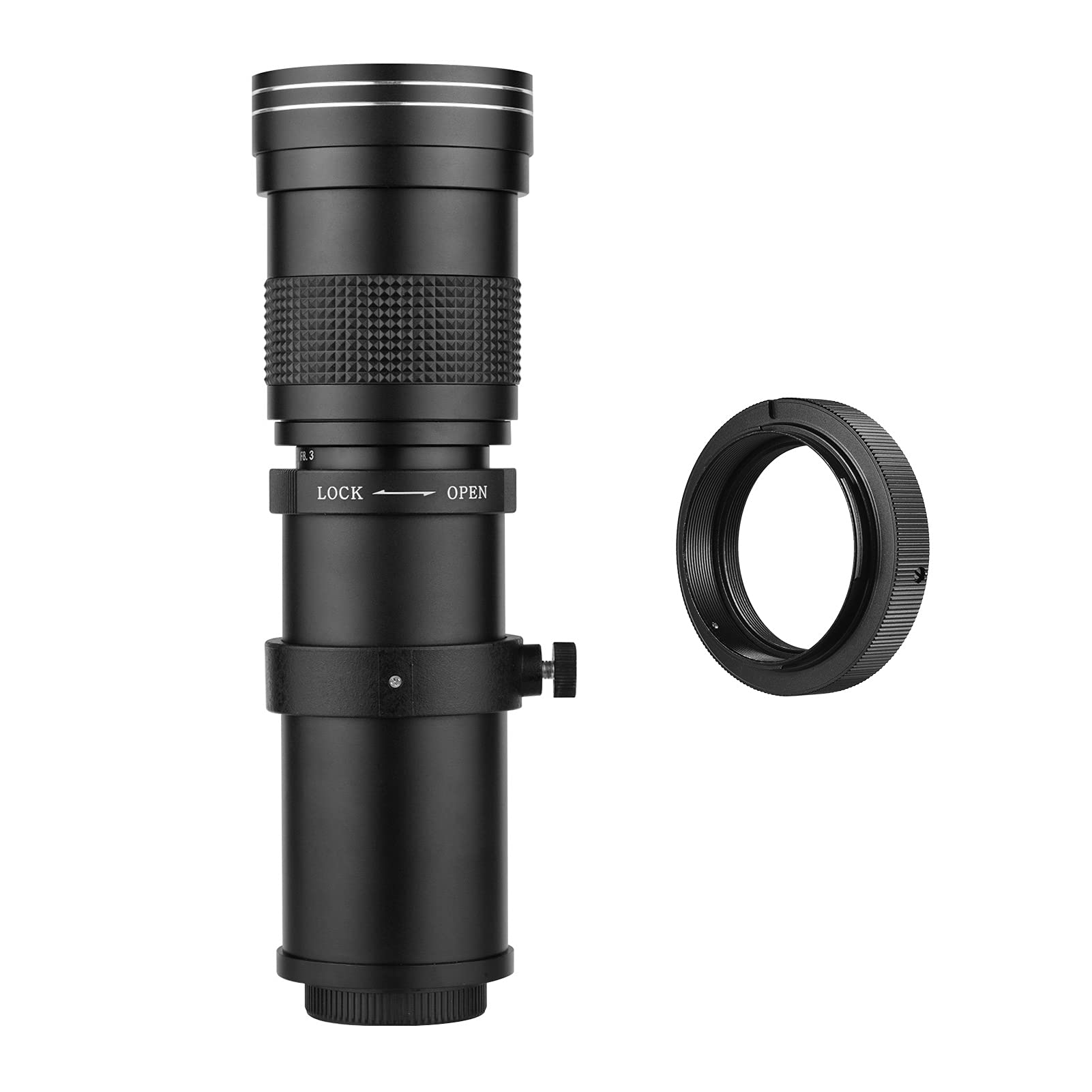
Image 1.1: Andoer 420-800mm Telephoto Zoom Lens with T2-AF Adapter Ring.

Image 1.2: Lens demonstrating its capability for distant subjects.
2. Package Contents
Verify that all items listed below are included in your package:
- 1 x MF Super Telephoto Zoom Lens (420-800mm)
- 1 x T2-AF Adapter Ring
- 1 x Front Lens Cap
- 1 x Rear Lens Cap
- 1 x Carry Bag

Image 2.1: Included package components.
3. Specifications
| Feature | Description |
|---|---|
| Material | Metal |
| Lens Mount | T2 |
| Adapter Ring Mount | T2-AF (for Sony Alpha / Minolta AF) |
| Focal Length | 420-800mm (Zoom) |
| Aperture Range | f/8.3 (at 420mm) - f/16 (at 800mm) |
| Optical Construction | 4 elements in 2 groups |
| Zoom System | Linear Push-Pull |
| Focusing | Manual Spiral Operation (No AF support) |
| Minimum Focusing Distance | 1.6 meters from front lens element |
| Filter Size | 62mm |
| Lens Diameter | 69mm |
| Lens Length | 24-35 cm (with caps, depending on zoom) |
| Lens Weight | 659g |
| Image Stabilization | Optical (Camera body dependent) |

Image 3.1: Lens and adapter ring dimensions.

Image 3.2: Lens showing focal length and aperture markings.
4. Setup
Follow these steps to attach the lens to your compatible camera body:
- Attach the T2-AF Adapter Ring: Align the red dot on the T2-AF adapter ring with the corresponding mark on your camera's lens mount. Rotate the adapter ring clockwise until it clicks into place, securing it to the camera body.
- Attach the Telephoto Lens: Remove the rear cap from the telephoto zoom lens. Align the T2 mount on the lens with the T2-AF adapter ring already attached to your camera. Rotate the lens clockwise until it locks securely onto the adapter ring.
- Remove Front Lens Cap: Once the lens is securely mounted, remove the front lens cap before use.

Image 4.1: Lens and adapter ring assembly.
5. Operating the Lens
5.1 Manual Focus
This is a manual focus lens. To focus, rotate the focusing ring located on the lens barrel until your subject appears sharp in the viewfinder or on your camera's LCD screen. For best results, use your camera's focus peaking or magnification features if available.
5.2 Zoom Operation
The lens features a linear push-pull zoom system. To adjust the focal length, gently push or pull the main barrel of the lens. Pushing the barrel extends the lens for longer focal lengths (up to 800mm), while pulling it retracts the lens for shorter focal lengths (down to 420mm).
5.3 Aperture and Exposure
The lens has a fixed aperture range of f/8.3-16, which changes with the focal length. Automatic exposure is only available in aperture priority mode (Av/A) for cameras equipped with TTL metering systems. For other camera modes or systems, exposure must be set manually. Adjust your camera's shutter speed and ISO settings to achieve the desired exposure.
5.4 Lock Mechanism
The lens includes a locking mechanism to secure the zoom position. To lock the lens at a specific focal length, rotate the ring marked 'LOCK' in the direction indicated. To unlock and adjust the zoom, rotate the ring to 'OPEN'.

Image 5.1: Lock/Open mechanism on the lens barrel.
5.5 Tripod Mounting
The lens features a base with a 1/4-inch screw thread, allowing it to be mounted directly onto a tripod or monopod for increased stability, especially at longer focal lengths. The base ring can be rotated for optimal positioning.
6. Maintenance
Proper care and maintenance will extend the life and performance of your lens:
- Cleaning: Use a soft, lint-free cloth or a lens brush to remove dust from the lens surfaces. For smudges or fingerprints, use a specialized lens cleaning solution and a microfiber cloth. Avoid harsh chemicals or abrasive materials.
- Storage: When not in use, always attach the front and rear lens caps to protect the optical elements. Store the lens in its carry bag in a cool, dry place, away from direct sunlight and extreme temperatures.
- Handling: Avoid dropping or subjecting the lens to strong impacts, as this can damage the internal optical components or mechanical parts.
7. Troubleshooting
If you encounter issues with your lens, consider the following common solutions:
- Image is blurry: Ensure the lens is properly focused using the manual focus ring. Check your camera's shutter speed; a faster shutter speed may be needed, especially at longer focal lengths, to prevent motion blur. Consider using a tripod.
- Images are too dark/bright: Adjust your camera's exposure settings (shutter speed, ISO) as the lens requires manual exposure control in most modes. Ensure the camera is set to Aperture Priority (Av/A) mode if you wish to use automatic exposure with TTL metering.
- Lens not attaching to camera: Verify that the T2-AF adapter ring is correctly mounted to your camera body and that the lens is properly aligned with the adapter ring before rotating to lock.
- Zoom mechanism is stiff: Ensure the 'LOCK' ring is set to 'OPEN'. If the issue persists, avoid forcing the mechanism and contact customer support.
8. Warranty and Support
Specific warranty details for this product are not provided in the available information. For warranty claims, technical support, or service inquiries, please refer to the documentation included with your purchase or contact your retailer or the manufacturer directly.