
Meross MSS305
Meross Smart Plug with Energy Monitoring User Manual
Model: MSS305
1. Introduction
The Meross Smart Plug with Energy Monitoring (Model MSS305) is a versatile device designed to enhance your home automation and energy management. This smart plug allows you to control connected appliances remotely via the Meross app, use voice commands with popular assistants like Alexa and Google Home, and monitor real-time and historical energy consumption. It also supports flexible scheduling and timer functions, providing convenience and helping you save on electricity bills.

Image: Meross Smart Plug MSS305, a compact white smart plug with a power button and an 'Energy Monitor' label.
2. Package Contents
- Meross Smart Plug (MSS305)
- User Manual
3. Setup Guide
Follow these steps to set up your Meross Smart Plug:
- Download the Meross App: Search for "Meross" in the Apple App Store or Google Play Store and download the official Meross app.
- Create an Account: Open the Meross app and register for a new account. If you already have an account, simply log in.
- Plug In the Device: Insert the Meross Smart Plug into a standard power outlet. Ensure the outlet is functioning correctly.
- Add Device in App:
- In the Meross app, tap the "+" icon in the top right corner to add a new device.
- Select "Smart Plug" from the device list.
- Follow the on-screen instructions to connect the smart plug to your 2.4GHz Wi-Fi network. The app will guide you through the Bluetooth pairing process for initial setup, followed by Wi-Fi configuration.
- Ensure your smartphone is connected to the same 2.4GHz Wi-Fi network during setup.

Image: Visual guide for Meross app setup, showing steps to download the app, create an account, and control the smart plug via the app.
4. Operating Instructions
4.1 Remote Control via Meross App
Once your smart plug is successfully added to the Meross app, you can control it from anywhere with an internet connection. Simply open the app, select your device, and tap the power icon to turn it on or off.

Image: A person using a smartphone to remotely control a Meross Smart Plug connected to an appliance.
4.2 Voice Control (Alexa & Google Home)
The Meross Smart Plug is compatible with Amazon Alexa and Google Home for convenient voice control. Follow the instructions within the Meross app to link your Meross account with your Alexa or Google Home account. Once linked, you can use voice commands such as:
- "Alexa, turn on the living room light."
- "Hey Google, turn off the fan."

Image: A person carrying laundry, with speech bubbles indicating voice commands for Alexa and Google Home to control lights.
4.3 Energy Monitoring
The Meross Smart Plug provides real-time energy consumption reports. You can view daily, weekly, monthly, and yearly power usage data for connected devices directly within the Meross app. This feature helps you understand and manage your energy consumption more effectively.
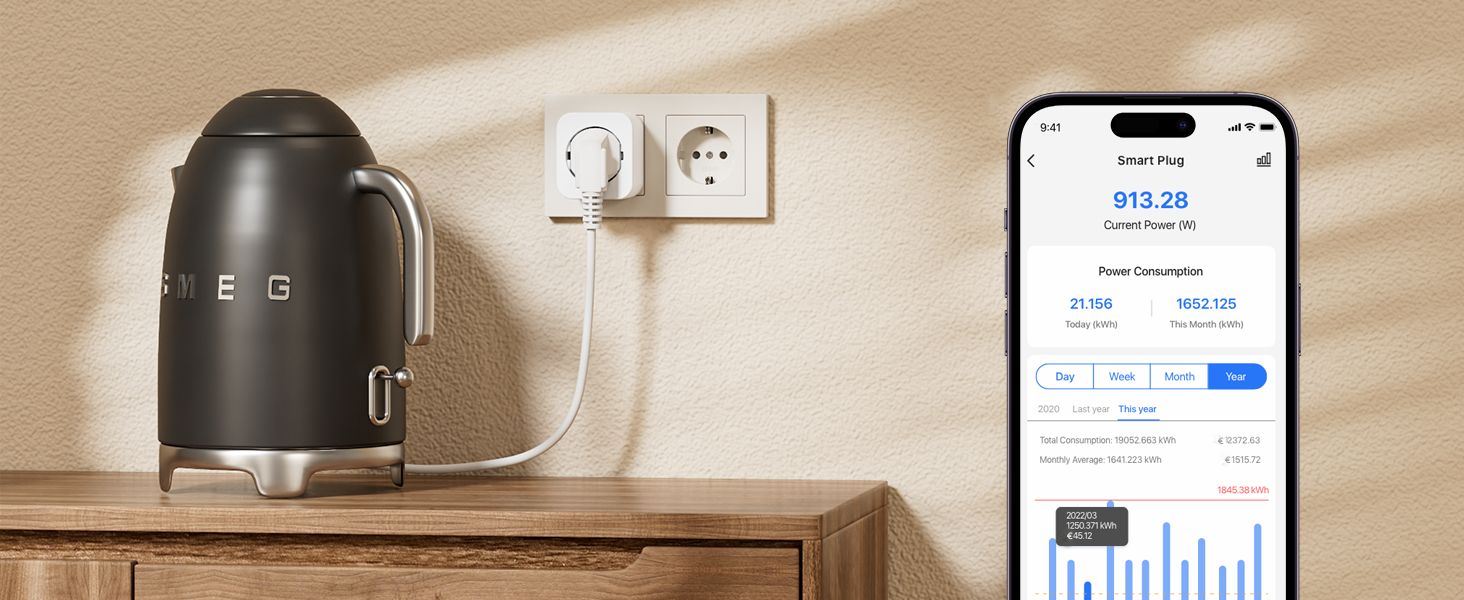
Image: A smartphone screen displaying the Meross app's energy consumption interface, showing current power and historical data for a connected appliance like a kettle.
4.4 Scheduling and Timer Functions
Set custom schedules and timers for your smart plug to automate your devices. You can program devices to turn on or off at specific times, or based on sunrise/sunset, aligning with your daily routines.
- Set a timer to turn off a charger after two hours.
- Schedule lights to turn on automatically at sunset.

Image: A bedside lamp connected to a smart plug, with text bubbles illustrating scheduling options like turning off a charger after two hours or turning on a lamp after sunset.
4.5 Offline and Local Control
Even if your internet router loses connection, you can still control the connected device via the Meross app, as long as your phone remains connected to the same local Wi-Fi network as the smart plug. This local control offers near-instantaneous response times.

Image: A person using their phone to control a smart plug, demonstrating that control is possible even if the internet connection is down, as long as the local Wi-Fi network is active.

Image: A diagram illustrating the local control pathway from the Meross app to the smart plug via the router, highlighting a fast response time of 0.01 seconds.
5. Maintenance
To ensure optimal performance and longevity of your Meross Smart Plug:
- Keep the device clean and free from dust. Use a dry, soft cloth for cleaning.
- Avoid exposing the device to extreme temperatures, humidity, or direct sunlight.
- Do not attempt to disassemble or repair the device yourself. Contact customer support if issues arise.
- Ensure the plug is securely inserted into the outlet and that connected appliances do not exceed the maximum load capacity (3840W, 16A).
6. Troubleshooting
| Issue | Possible Solution |
|---|---|
| Device not connecting to Wi-Fi. |
|
| Voice control not working. |
|
| Energy data not updating. |
|
| Plug is unresponsive. |
|
7. Specifications
- Model Number: MSS305
- Dimensions (L x W x H): 5.7 x 5 x 6.3 cm (2.24 x 1.97 x 2.48 inches)
- Weight: 83 grams
- Material: Plastic
- Operating Mode: ON-OFF
- Rated Current: 16 A
- Operating Voltage: 240 Volts
- Max Load: 3840W
- Contact Type: Normally Open
- Connector Type: Plug-in
- Switch Type: Push Button
- Terminal: Screw
- Wireless Connectivity: Wi-Fi (2.4 GHz only), Bluetooth (for setup)
8. Warranty and Support
Meross products come with a standard warranty. For detailed warranty information, product support, or technical assistance, please visit the official Meross website or contact their customer service directly. You can usually find contact information on the Meross app or their official website.
Meross Official Website: www.meross.com
Ask a question about this manual
Ask about setup, troubleshooting, compatibility, parts, safety, or missing instructions. Manuals+ will review the question and use this page’s manual context to help answer it.