1. Introduction
Thank you for choosing the ESSAGER 3-in-1 Foldable Wireless Charging Station. This device is designed to provide convenient and efficient wireless charging for your iPhone, Apple Watch, and AirPods simultaneously. Its foldable design makes it ideal for both home use and travel. Please read this manual carefully to ensure proper use and optimal performance.
What's in the Box:
- ESSAGER 3-in-1 Foldable Wireless Magnetic Charger
- Charging Cable (USB-C to USB-C)
- User Manual
2. Product Overview
The ESSAGER 3-in-1 Wireless Charging Station features a compact, foldable design with dedicated charging areas for your compatible devices. It also includes a touch-controlled night light for added convenience.

Image: The ESSAGER 3-in-1 Foldable Wireless Charging Station, showcasing its sleek, compact design when folded.
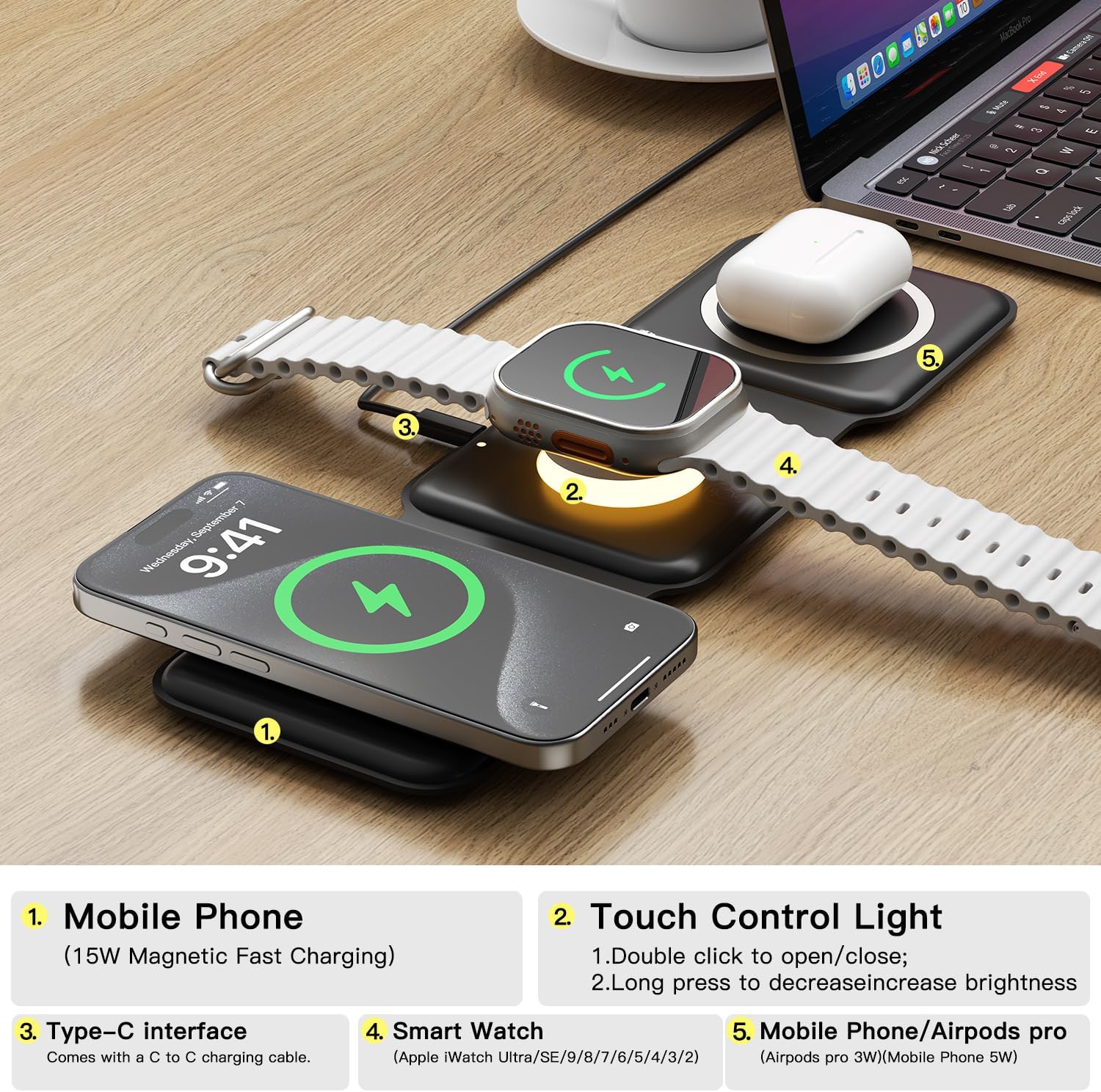
Image: Labeled diagram illustrating the different charging zones and features of the device, including the mobile phone charging area, touch control light, Type-C interface, smart watch charging area, and AirPods charging area.
Key Features:
- 3-in-1 Charging: Simultaneously charges compatible iPhone, Apple Watch, and AirPods.
- Foldable & Portable: Soft silicone construction allows for 360° folding, making it easy to carry.
- Magnetic Adsorption: Built-in magnets ensure secure alignment for efficient charging.
- Touch Control Night Light: Integrated light with adjustable brightness.
- Safety Protections: Features overcharge, overvoltage, overcurrent, trickle, foreign object, and overheat protection.
3. Setup Instructions
- Unpack: Carefully remove all components from the packaging.
- Connect Power: Use the provided USB-C to USB-C charging cable to connect the charging station to a power adapter. For optimal performance and fast charging, a power adapter of 15W or higher is recommended. Ensure the power adapter is plugged into a functional wall outlet.
- Unfold: Unfold the charging station to its desired configuration. It can be laid flat or folded into a stand for your phone.
4. Operating Instructions
Charging Devices:

Image: The charging station actively charging an iPhone, Apple Watch, and AirPods, demonstrating its multi-device capability.
- For iPhone: Place your compatible iPhone on the designated magnetic charging pad (typically the left or right panel when unfolded). The built-in magnets will help align your device for efficient charging. Ensure your phone case thickness is ≤ 0.2in/5mm and does not contain metal, as metal cases do not support wireless charging.
- For Apple Watch: Place your compatible Apple Watch on the central charging module. The watch will magnetically attach and begin charging.
- For AirPods: Place your compatible AirPods charging case on the remaining charging pad.
Charging indicators (if present) will illuminate to confirm charging status. When the phone's battery level exceeds 80%, the charger will reduce output power to protect battery life.
Using the Touch Control Night Light:

Image: The charging station on a nightstand, with its soft night light glowing, providing ambient illumination.
- Turn On/Off: Double-click the touch control area (located on the central module) to turn the night light on or off.
- Adjust Brightness: Long press the touch control area to decrease the brightness of the night light.
5. Compatibility
This wireless charging station is compatible with a wide range of devices that support wireless charging.

Image: A detailed compatibility chart outlining supported devices and their respective charging wattages.
Supported Devices:
- iPhones: iPhone 8/X/11/12/13/14/15/16 series (and other Android phones supporting wireless charging).
- Apple Watch: iWatch 2/3/4/5/6/7/8/9/Ultra/SE.
- AirPods: AirPods 2/3/4/Pro/Pro 2 (devices that support Qi wireless charging).
Note: Please ensure your device supports wireless charging. Metal phone cases are not compatible with wireless charging.
6. Safety Information and Protections
The ESSAGER charging station is designed with multiple safety mechanisms to protect your devices and ensure safe operation.

Image: An illustrative diagram detailing the various safety protections integrated into the charging station.
- Qi Certified: The charger is Qi certified, ensuring compatibility and safety standards.
- Intelligent Protection Technology: Includes overvoltage protection, short circuit protection, overcurrent protection, trickle protection, foreign object detection, and overheat protection.
- Magnetic Shield: Utilizes a professional magnetic shield to minimize radiation, making it safe for all users.
- Battery Preservation: Automatically reduces output power when the battery level exceeds 80% to prolong battery life.
7. Maintenance
- Cleaning: Disconnect the charger from the power source before cleaning. Use a soft, dry, lint-free cloth to wipe the surface. Avoid using harsh chemicals or abrasive materials.
- Storage: When not in use, store the charging station in a cool, dry place, away from direct sunlight and extreme temperatures. Its foldable design allows for compact storage.
8. Troubleshooting
Common Issues and Solutions:
- Device not charging or charging slowly:
- Ensure you are using a power adapter of 15W or higher. Lower wattage adapters may result in sporadic or slow charging.
- Verify that your device is properly aligned on the charging pad. Magnetic alignment is crucial for iPhones.
- Check for foreign objects (e.g., metal, credit cards) between the device and the charging pad.
- Remove any thick or metallic phone cases. Case thickness should be ≤ 0.2in/5mm.
- Ensure the charging cable is securely connected to both the charger and the power adapter.
- Indicator lights flashing:
- Flashing lights often indicate a connection problem or an incompatible power source. Try a different power adapter (15W+ recommended) or a different USB port.
- Remove and re-place your device on the charging pad to ensure proper alignment.
- Night light not responding:
- Ensure the charger is connected to a power source.
- Double-click the touch control area firmly.
If you continue to experience issues, please contact ESSAGER customer service for assistance.
9. Specifications
| Feature | Specification |
|---|---|
| Model Number | 3in1WC |
| Input Voltage | 12 Volts (AC) |
| Amperage | 2 Amps |
| Connector Type | USB Type C |
| Item Weight | 7 ounces |
| Package Dimensions | 4.33 x 4.33 x 1.57 inches |
| Special Feature | Foldable, Magsafe Compatible |
10. Warranty and Support
ESSAGER is committed to providing high-quality products and excellent customer service.
- Return Policy: Enjoy a full refund within 30 days of purchase.
- Quality Assurance: All ESSAGER products come with a one-year quality assurance, offering free replacement for any malfunctions.
- Technical Support: Lifelong technical support is provided for all ESSAGER products.
If you encounter any problems or malfunctions after receiving the product, please do not hesitate to contact the ESSAGER customer service team. We are dedicated to resolving your issues promptly.
For more information or to contact support, please visit the official ESSAGER Store.


