
TEIMO G1
TEIMO Bluetooth Headset G1 User Manual
Wireless Earpiece with Charging Case
Introduction
Thank you for choosing the TEIMO Bluetooth Headset G1. This manual provides detailed instructions for setting up, operating, and maintaining your new wireless earpiece. Please read this manual carefully before use to ensure optimal performance and longevity of your device.

Image: The TEIMO Bluetooth Headset G1, showcasing the earpiece and its compact charging case. The earpiece features an over-ear hook design and an in-ear bud, with the charging case displaying battery indicators.
Package Contents
Please verify that all items are present in your package:
- TEIMO Bluetooth Headset G1
- 400mAh Charging Case
- USB Type-C Charging Cable
- Multiple Sizes of Ear Tips (S, M, L)
- User Manual

Image: The TEIMO Bluetooth Headset G1 shown alongside three different sizes of ear tips (Small, Medium, Large), highlighting the customizable fit for user comfort.
Setup Guide
1. Charging the Headset and Case
Before first use, fully charge the headset and its charging case. The charging case provides extended battery life for the headset.
- Connect the provided USB Type-C cable to the charging port on the case and to a USB power source.
- The digital display on the charging case will indicate the charging status.
- Charging time for the case and headset is approximately 1.5 hours.

Image: The TEIMO Bluetooth Headset G1 charging case connected to a USB Type-C cable, illustrating the charging process. The headset is shown next to the case.

Image: A graphic illustrating the battery life of the TEIMO Bluetooth Headset G1, showing 12 hours of talking time, 10 hours of music time, and up to 55 hours of total playtime with the charging case.
2. Pairing with Your Device
The TEIMO G1 headset uses Bluetooth V5.1 for stable and fast pairing.
- Take the headset out of the charging case. It will automatically enter pairing mode (indicated by a flashing LED light).
- On your smartphone, tablet, or other Bluetooth-enabled device, go to the Bluetooth settings.
- Search for available devices and select "TEIMO G1" from the list.
- Once connected, the LED indicator on the headset will stop flashing.
- The headset can be paired with two devices simultaneously.

Image: A visual representation of the TEIMO Bluetooth Headset G1 pairing simultaneously with a smartphone and a tablet, demonstrating its multi-device connectivity feature.

Image: An illustration highlighting the V5.1 Bluetooth technology of the TEIMO G1 headset, emphasizing stable signal, fast pairing, and a 33ft/10m connection distance.
3. Wearing the Headset
The TEIMO G1 is designed for comfortable and secure wearing, suitable for both ears.
- Choose the ear tip size (S, M, L) that provides the best fit and comfort for your ear canal.
- Place the ear hook over your ear and gently insert the ear tip into your ear canal.
- Adjust the ear hook and microphone boom for optimal positioning. The headset supports 180° rotation for the ear hook, 360° rotation for the microphone boom, and 45° angle adjustment for the earpiece.

Image: Diagrams showing the adjustable features of the TEIMO Bluetooth Headset G1, including 180° rotation of the ear hook, 360° rotation of the microphone boom, and 45° angle adjustment of the earpiece for a comfortable fit on either ear.
Operating Instructions
The TEIMO G1 headset features sensitive touch controls and mechanical buttons for easy operation.
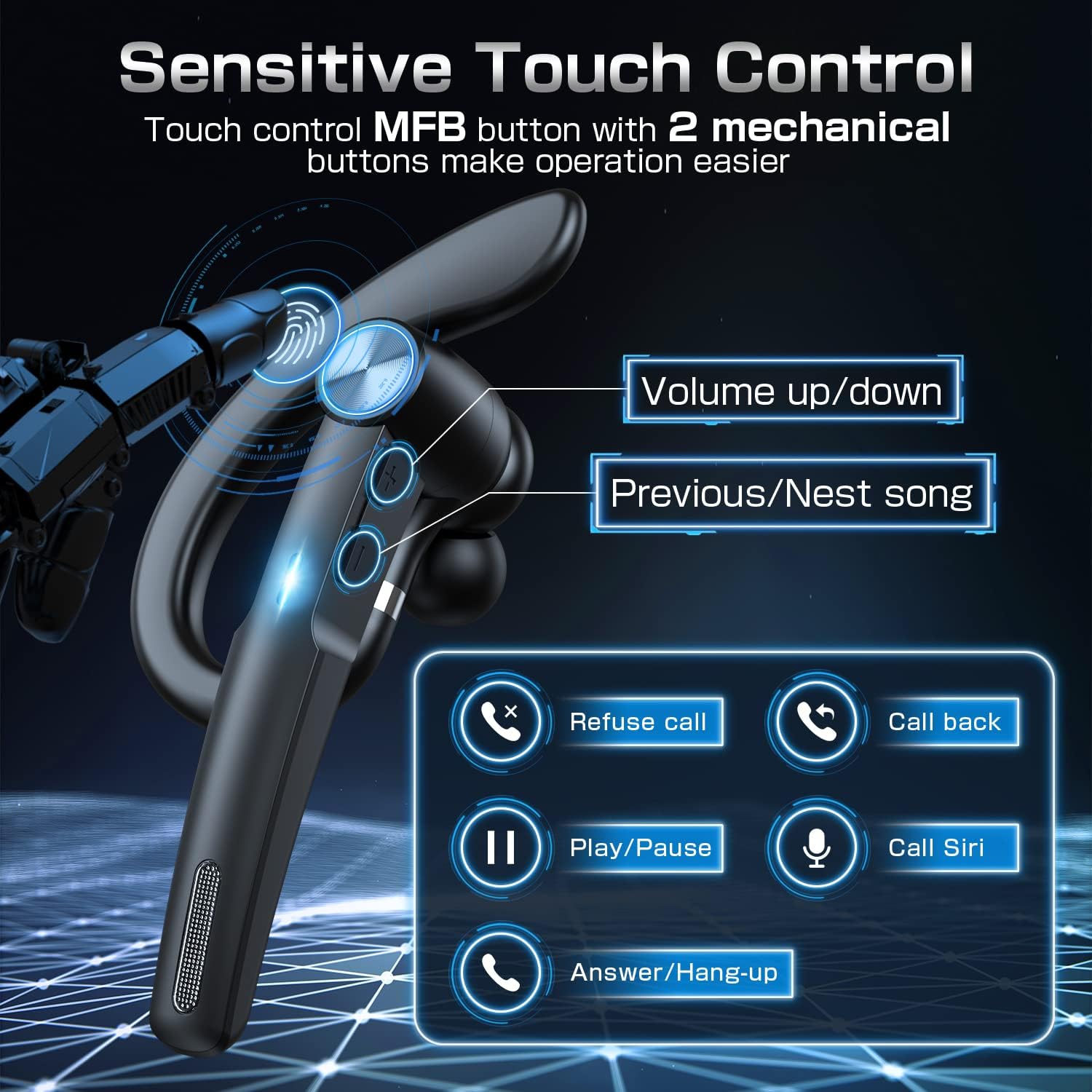
Image: A detailed diagram of the TEIMO Bluetooth Headset G1 highlighting its control buttons and their respective functions, including volume up/down, previous/next song, refuse call, call back, play/pause, call Siri, and answer/hang-up.
Call Management
- Answer/Hang-up Call: Short press the MFB (Multi-Function Button).
- Refuse Call: Long press the MFB.
- Call Back: Double press the MFB.
Music Playback
- Play/Pause: Short press the MFB.
- Next Song: Short press the "Next" button.
- Previous Song: Short press the "Previous" button.
Volume Control
- Volume Up: Short press the "Volume Up" button.
- Volume Down: Short press the "Volume Down" button.
Voice Assistant
- Activate Voice Assistant (Siri/Google Assistant): Long press the MFB.
Maintenance and Care
Proper maintenance ensures the longevity and optimal performance of your TEIMO G1 headset.
- Cleaning: Use a soft, dry cloth to clean the headset and charging case. Do not use abrasive cleaners or solvents.
- Storage: When not in use, store the headset in its charging case to protect it from dust and damage. Store in a cool, dry place.
- Avoid Water: The headset is not waterproof. Avoid exposure to water, rain, or excessive moisture.
- Temperature: Do not expose the device to extreme temperatures (hot or cold).
- Charging: Only use the provided Type-C cable for charging.
Troubleshooting
| Problem | Possible Cause | Solution |
|---|---|---|
| Headset does not turn on. | Low battery. | Charge the headset and charging case fully. |
| Cannot pair with device. | Bluetooth is off on device; headset not in pairing mode; too far from device. | Ensure Bluetooth is enabled. Take headset out of case to enter pairing mode. Move headset closer to device (within 33ft/10m). Try forgetting the device on your phone and re-pairing. |
| No sound or low volume. | Volume too low on headset or device; headset not connected properly. | Increase volume on both headset and connected device. Reconnect the headset. |
| Microphone not working. | Microphone muted; headset not selected as audio input. | Ensure microphone is not muted. Check audio input settings on your device to confirm TEIMO G1 is selected. |
| Intermittent connection. | Interference; too far from device; low battery. | Move away from sources of interference (Wi-Fi routers, other Bluetooth devices). Stay within 33ft/10m range. Charge the headset. |
Product Specifications
| Feature | Detail |
|---|---|
| Model Number | G1 |
| Brand | TEIMO |
| Wireless Technology | Bluetooth V5.1 |
| Charging Case Capacity | 400mAh |
| Total Playtime | Up to 55 hours (with charging case) |
| Talking Time | Up to 12 hours |
| Music Time | Up to 10 hours |
| Charging Time | Approx. 1.5 hours |
| Control Method | Touch & Mechanical Buttons |
| Charging Port | USB Type-C |
| Wireless Range | Up to 33 feet (10 meters) |
| Ear Placement | In Ear (with over-ear hook) |
| Item Weight | 5.9 ounces |
| Package Dimensions | 5.94 x 3.58 x 1.3 inches |
| Manufacturer | Anuodun |
Warranty and Support
For warranty information and technical support, please refer to the contact details provided with your product packaging or visit the official TEIMO website. Please retain your proof of purchase for warranty claims.
Note: Specific warranty terms may vary by region.
Ask a question about this manual
Ask about setup, troubleshooting, compatibility, parts, safety, or missing instructions. Manuals+ will review the question and use this page’s manual context to help answer it.