
1. Introduction
This manual provides detailed instructions for the installation, operation, and maintenance of your MOOKAKA Digital Cluster Virtual Cockpit Instrument. Please read this manual thoroughly before installation and use to ensure proper function and longevity of the product.
1.1. Compatibility
This digital dashboard is designed for BMW 5 Series F10, F11, F18 models manufactured between 2010 and 2017, equipped with either the CIC or NBT system. Please verify your vehicle's system before installation.
1.2. Important Notes
- Confirm if your factory unit includes a Head-Up Display (HUD) function.
- This digital dashboard is not compatible with gas-electric hybrid vehicles.
- Vehicles with an existing HUD function are not compatible with this digital dashboard.
2. Setup & Installation
The MOOKAKA Digital Cluster is designed for non-destructive, plug-and-play installation. Professional installation is recommended to ensure correct wiring and secure mounting.

Image: Comparison showing the original BMW dashboard before installation and the new 12.3-inch digital cluster after installation, highlighting the non-destructive, plug-and-play design.
2.1. Installation Steps (General Overview)
- Ensure the vehicle's ignition is off and the battery is disconnected.
- Carefully remove the original instrument cluster following your vehicle's service manual.
- Connect the provided wiring harness to the vehicle's existing connectors and to the new digital cluster.
- Mount the new digital cluster securely into the dashboard opening.
- Reconnect the battery and test the functionality of the new cluster.

Image: Real shots of the MOOKAKA Digital Cluster components, including the main unit and USB cable ports, illustrating the physical product.
3. Operating Instructions
3.1. Display Features
The digital cluster provides a comprehensive display of original car data, offering more information and better visualization than the mechanical instrumentation. This includes:
- Four-wheel drive display
- Fuel consumption display
- Real-time monitoring of vehicle status

Image: The MOOKAKA LCD Dashboard Player in operation, showing a digital speedometer, tachometer, fuel gauge, and other vehicle data on a clear display.

Image: A high-definition display screen of the digital cluster, providing real-time monitoring of vehicle status with clear graphics.
3.2. User Interface (UI) Themes
The digital cluster offers multiple UI themes to customize your driving experience. You can switch between different themes and colors to match your preference.

Image: The UI Interface of the digital cluster, showcasing three distinct theme styles: Lite mode for fuel consumption monitoring, Tech mode for a cool style, and Comfort mode for a classic look.
3.3. Steering Wheel Control
The speedmeter does not support touchscreen input. All settings, including changing themes and colors, are controlled using the BC button on your vehicle's steering wheel.
4. Maintenance
To ensure optimal performance and longevity of your digital cluster, follow these maintenance guidelines:
- Cleaning: Use a soft, dry microfiber cloth to gently wipe the screen. Avoid abrasive cleaners or solvents that could damage the display.
- Environmental Conditions: Avoid exposing the unit to extreme temperatures or direct sunlight for prolonged periods.
- Software Updates: Periodically check the manufacturer's website or contact customer support for any available software updates to improve functionality and fix potential issues.
5. Troubleshooting
If you encounter any issues with your MOOKAKA Digital Cluster, please refer to the following common troubleshooting steps:
- No Power/Display: Check all cable connections to ensure they are securely seated. Verify the vehicle's battery is properly connected and charged.
- Incorrect Data Display: Ensure the unit is correctly configured for your specific BMW model and year. If issues persist, a factory reset (if available) or software re-installation might be necessary.
- Steering Wheel Controls Not Responding: Confirm that the BC button on your steering wheel is functioning correctly with other vehicle systems. Recheck wiring connections to the cluster.
- Intermittent Functionality: This could indicate a loose connection or a software glitch. Try restarting the vehicle.
For persistent issues or problems not covered here, please contact MOOKAKA customer service.
6. Specifications
| Feature | Specification |
|---|---|
| Brand | MOOKAKA |
| Model Compatibility | BMW 5 Series F10, F11, F18 (2010-2017) CIC NBT System |
| Display Size | 12.3 Inches |
| Product Dimensions (L x W x H) | 14.96 x 9.65 x 7.28 inches |
| Material | Plastic |
| Control Method | Steering wheel BC button (Non-touchscreen) |
| Installation Type | Non-destructive, Plug and Play |
7. Warranty & Support
The MOOKAKA Digital Cluster comes with a 1-year warranty from the date of purchase. This warranty covers manufacturing defects and malfunctions under normal use.
For any installation or usage issues, or to claim warranty service, please contact MOOKAKA customer service via email. Our support team aims to reply within 24 hours.
Contact Information: support@mookaka.com (Example email, please replace with actual if available)
8. Product Overview (Visuals)
8.1. Compatibility Overview
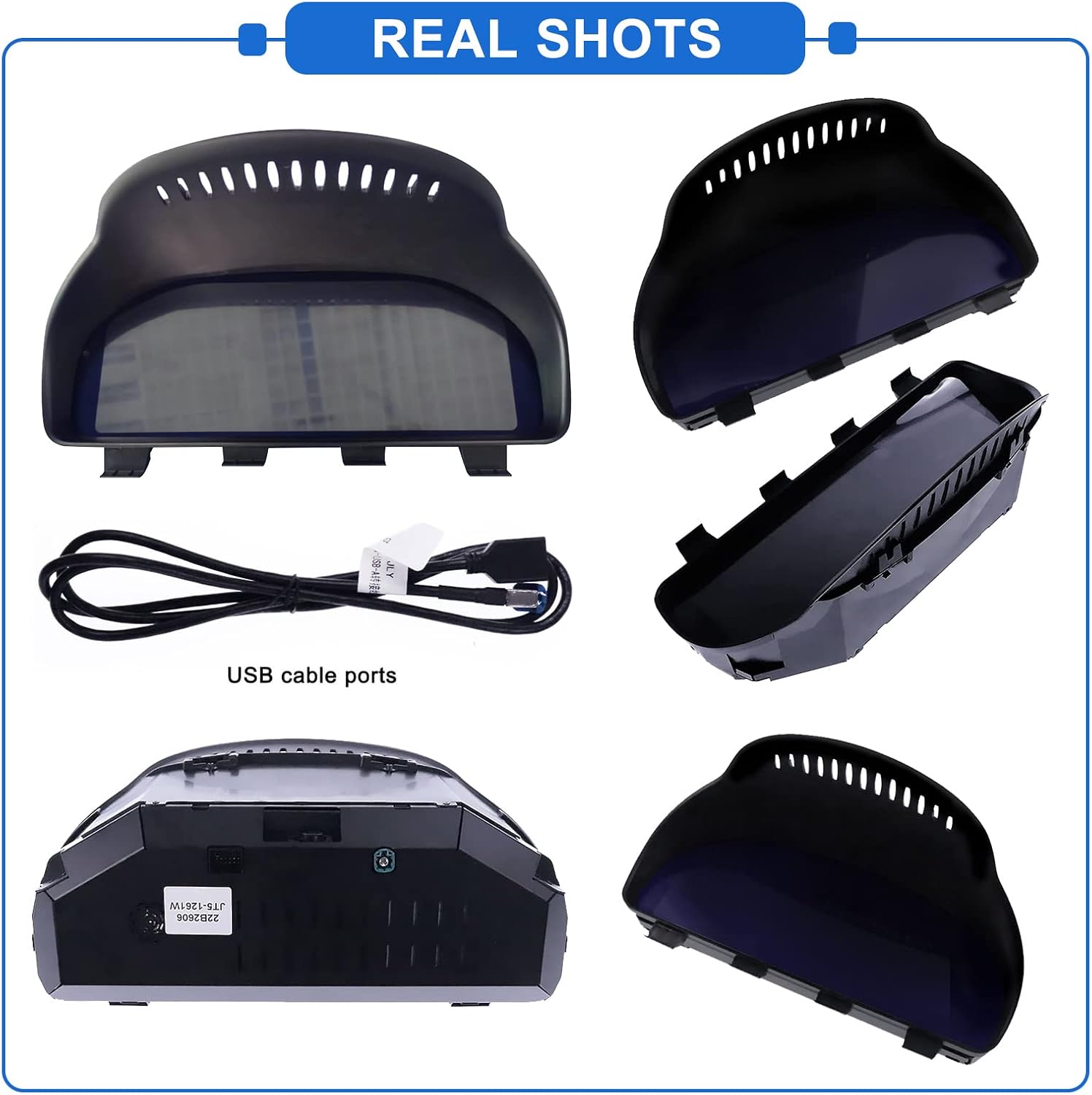
Image: An overview of the MOOKAKA Digital Cluster's compatibility, indicating it fits BMW 5 Series 2010-2017, BMW 5 Series GT 2009-2016, BMW 6 Series 2011-2017, and BMW 7 Series 2009-2015.
8.2. Digital vs. Mechanical Instruments

Image: A side-by-side comparison illustrating the difference between traditional mechanical instruments and the advanced LCD digital meter, highlighting the enhanced information display of the digital cluster.
8.3. Key Features

Quick Boot-up: Intelligent instrument starts in 3 seconds.

Full LCD Screen: 12.3-inch display with 1920x720 resolution.

Original Vehicle Protocol: No programming required for installation.
8.4. Product Video
Video: A demonstration of the MOOKAKA Digital Dashboard in a BMW GT 5, 6, 7 Series, showcasing its dynamic display and integration within the vehicle's interior.
