
Dowinx LS-6668B-03
Dowinx Gaming Chair LS-6668B-03 User Manual
Model: LS-6668B-03
1. Introduction
Thank you for purchasing the Dowinx Gaming Chair LS-6668B-03. This chair is an upgraded version of our popular 68 series, designed to provide superior comfort and ergonomic support for various activities such as gaming, studying, and teleworking. It features a casual design that blends seamlessly with most interiors, along with advanced functionalities like 4D adjustable armrests, a pocket coil seat, and a retractable ottoman.

The chair is constructed with highly breathable and durable fabric, ensuring comfort in all seasons. Its unique pocket coil cushion system, typically found in luxury sofas, provides balanced support, reducing pressure during long hours of use. The S-shaped backrest and lumbar support are designed to protect your lumbar spine, promoting a healthy posture.

2. Safety Information
Important Safety Precautions:
Please read and understand all safety information before assembly and use. Failure to follow these instructions may result in injury or damage to the product.
- Keep small parts out of reach of children to prevent choking hazards.
- Ensure all bolts and screws are securely tightened before use. Periodically check and re-tighten as necessary.
- Do not stand on the chair or use it as a step stool.
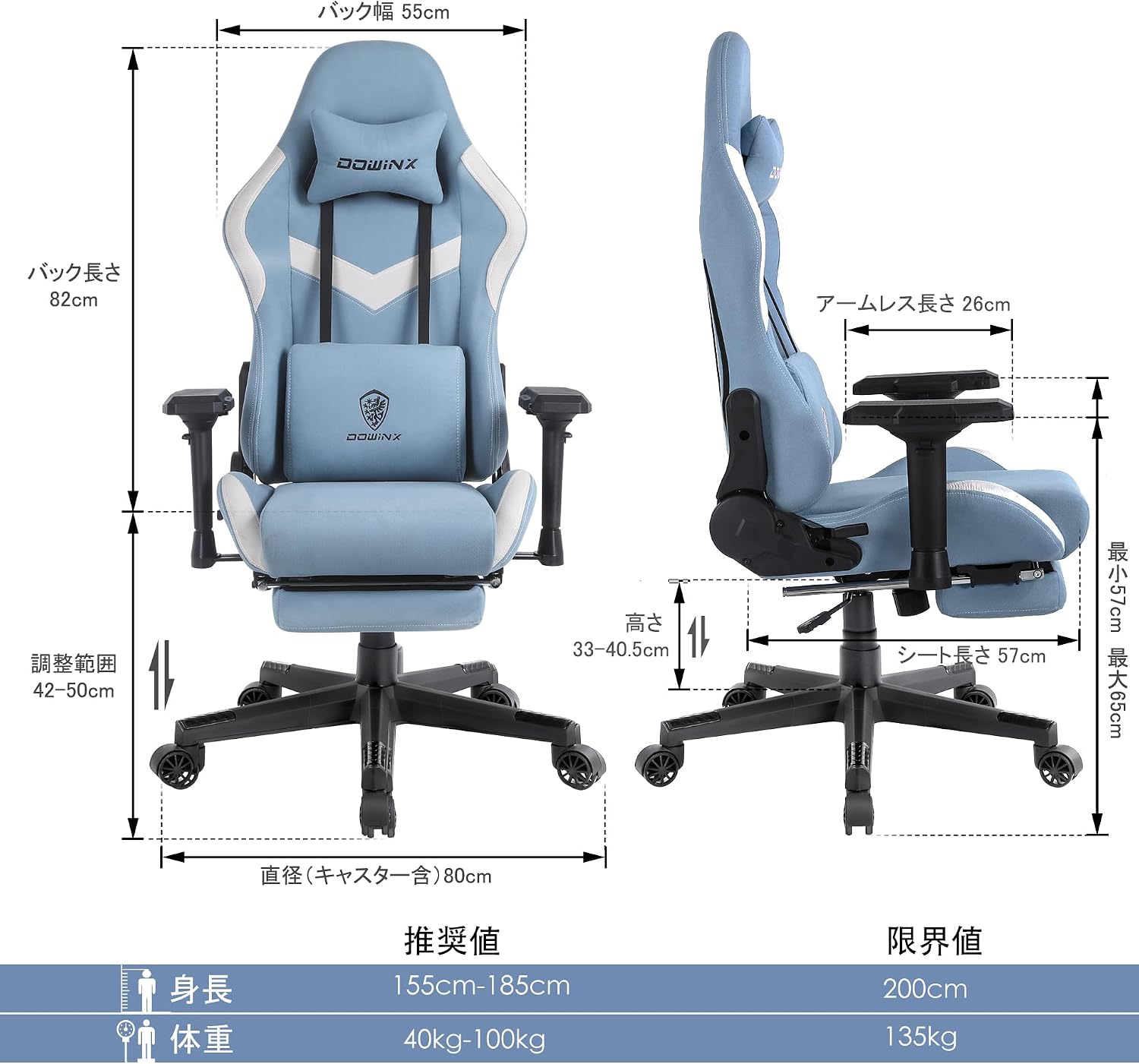
- Do not exceed the maximum weight capacity of 135 kg (297 lbs).
- Use the chair on a flat, stable surface.
- Avoid exposing the chair to direct sunlight or extreme temperatures.
3. Package Contents
Please verify that all components are present before beginning assembly. If any parts are missing or damaged, please contact customer service.
- Backrest
- Seat Cushion with Retractable Ottoman
- Armrests (x2)
- Star Base
- Casters (x5)
- Gas Lift Cylinder
- Mechanism Plate
- Lumbar Support Cushion (with vibration module)
- Headrest Pillow
- Assembly Hardware (bolts, washers, Allen wrenches)
- Assembly Instructions (Japanese & English)
4. Setup & Assembly
Assembly can be completed by one person using the provided tools and instructions. It is recommended to assemble the chair in a spacious area.
- Attach the casters to the star base by pushing them firmly into the holes until they click into place.
- Insert the gas lift cylinder into the center hole of the star base. Place the cylinder cover over the gas lift.
- Attach the mechanism plate to the underside of the seat cushion using the specified bolts. Ensure the front of the mechanism faces the front of the seat.
- Attach the armrests to the seat cushion using the designated bolts. The 4D armrests allow for various adjustments; ensure they are oriented correctly.
- Connect the backrest to the seat cushion and mechanism plate using the remaining bolts. Securely tighten all connections.
- Carefully place the assembled seat and backrest onto the gas lift cylinder.
- Attach the headrest pillow and lumbar support cushion to the backrest using their respective straps. The lumbar support cushion includes a USB-powered vibration module.

5. Operating Instructions
5.1. Height Adjustment
To adjust the chair height, pull the lever located on the right side of the seat upwards while applying or releasing body weight. Release the lever to lock the height.
5.2. Reclining Function
The backrest can recline up to approximately 165 degrees. Pull the lever on the right side of the chair (below the seat) upwards and lean back to adjust the angle. Release the lever to lock the backrest in place.
5.3. Rocking Function
To enable the rocking function, pull the lever on the left side of the seat outwards. Push it inwards to lock the chair in an upright position. The tension of the rocking can be adjusted by turning the knob located underneath the seat.
5.4. 4D Armrest Adjustment
The armrests offer 8-stage adjustments for optimal support:
- Height Adjustment: Press the button on the side of the armrest and move it up or down.
- Front/Back Adjustment: Slide the armrest pad forward or backward.
- Left/Right Adjustment: Slide the armrest pad left or right.
- Angle Adjustment: Pivot the armrest pad inwards or outwards.

5.5. Retractable Ottoman
For added comfort and relaxation, pull the ottoman out from underneath the seat. Push it back in when not in use to store it discreetly.
5.6. Lumbar Support Vibration
The lumbar support cushion features a built-in vibration module. Connect the USB cable from the cushion to a compatible USB power source (e.g., computer, power bank) to activate the massage function.

6. Maintenance
To ensure the longevity and appearance of your Dowinx Gaming Chair, follow these maintenance guidelines:
- Cleaning: For general cleaning, wipe the fabric with a soft, damp cloth. For stubborn stains, use a mild fabric cleaner and follow the product's instructions. Avoid harsh chemicals or abrasive cleaners.
- Fabric Care: The fabric is designed to be durable and scratch-resistant. While the specifications mention "Machine Wash," this typically refers to removable fabric covers if applicable. For the main chair body, spot cleaning is recommended.
- Moving the Chair: Utilize the silent casters for easy movement. Avoid dragging the chair, which can damage the casters or flooring.
- Bolt Tightness: Periodically check all bolts and screws for tightness and re-tighten them as needed to maintain stability and prevent squeaking.
7. Troubleshooting
| Problem | Possible Cause / Solution |
|---|---|
| Chair wobbles or feels unstable. | Check all assembly bolts and screws. Re-tighten any loose connections. Ensure the chair is on a flat surface. |
| Gas lift does not adjust height. | Ensure the height adjustment lever is fully engaged. If the issue persists, the gas lift cylinder may need replacement. Contact customer service. |
| Backrest does not recline or lock. | Check the reclining lever for proper engagement. Ensure no obstructions are preventing movement. |
| Casters do not roll smoothly. | Check for debris (hair, dust) wrapped around the caster wheels. Clean them if necessary. |
| Lumbar support vibration not working. | Ensure the USB cable is securely connected to a working power source. Try a different USB port or power adapter. |
8. Specifications
| Attribute | Value |
|---|---|
| Brand | Dowinx |
| Model Number | LS-6668B-03 |
| Color | Sky Blue |
| Material | Metal, Polyurethane, Alloy Steel |
| Product Dimensions (D x W x H) | 80 cm x 55 cm x 132 cm |
| Product Weight | 22 kg |
| Package Dimensions | 80.5 cm x 58.5 cm x 28.3 cm |
| Package Weight | 23.44 kg |
| Max Weight Capacity | 135 kg |
| Recline Angle | Up to 165° |
| Armrest Type | 4D Adjustable |
| Special Features | Breathable Fabric, Ergonomic Design, Swivel, Retractable Ottoman, Lumbar Massage |
9. Warranty and Support
Dowinx provides a one-year manufacturer's warranty from the date of delivery. This warranty covers defects in materials and workmanship under normal use.
If you encounter any issues with your product or have questions regarding assembly, operation, or maintenance, please do not hesitate to contact our customer service team. Our dedicated support staff is ready to assist you.
Contact Information:
Please refer to the contact details provided on your purchase receipt or visit the official Dowinx website for customer service contact information.
Related documentsLS-6668B-03


Ask a question about this manual
Ask about setup, troubleshooting, compatibility, parts, safety, or missing instructions. Manuals+ will review the question and use this page’s manual context to help answer it.