
1. Introduction
Welcome to your new Accutime Kids Lilo & Stitch Analog Quartz Wrist Watch, Model LAS8014AZ. This manual provides essential information for the proper setup, operation, and care of your watch. Please read this manual thoroughly before using your watch to ensure optimal performance and longevity.
2. Important Safety Information
- This watch contains small parts and is not suitable for children under 3 years of age. Adult supervision is recommended.
- The watch is not water resistant. Avoid exposure to water, including showering, swimming, or heavy rain, to prevent damage.
- Do not attempt to open the watch case or replace the battery yourself. Refer to qualified personnel for battery replacement to avoid damaging the watch or voiding the warranty.
- Dispose of used batteries responsibly according to local regulations.
3. Package Contents
Your Accutime Kids Lilo & Stitch Analog Quartz Wrist Watch package should contain the following items:
- Accutime Kids Lilo & Stitch Analog Quartz Wrist Watch (Model LAS8014AZ)
- Pre-installed watch battery
4. Product Overview
Familiarize yourself with the components of your watch:
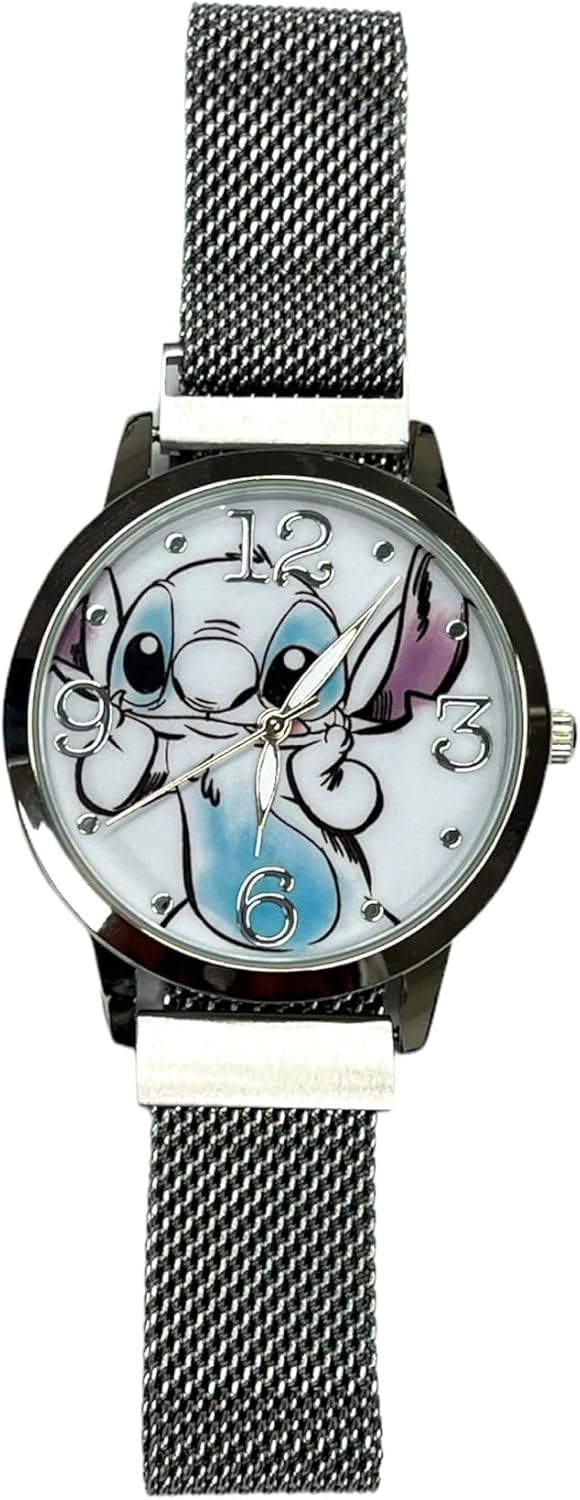
- Watch Face: The circular display showing the time with hour, minute, and second hands. It features a Lilo & Stitch character design.
- Crown: A small, ridged knob located on the right side of the watch case. This is used to set the time.
- Strap: An adjustable strap designed for comfortable wear on a child's wrist.
5. Setup
5.1. Setting the Time
To set the correct time on your analog watch:
- Gently pull the crown (the small knob on the side of the watch case) outwards until you feel a slight click. The second hand will stop moving.
- Rotate the crown clockwise or counter-clockwise to move the hour and minute hands until the correct time is displayed.
- Once the time is set, push the crown back into its original position. The second hand will resume movement, indicating the watch is now running.
6. Operating Instructions
Your Accutime Kids Lilo & Stitch Analog Quartz Wrist Watch is designed for simple and clear time-telling.
6.1. Reading the Time
- The short hand points to the hour.
- The long hand points to the minute.
- The thin, sweeping hand indicates the seconds.
7. Maintenance
7.1. Cleaning
To maintain the appearance of your watch, gently wipe the watch face and strap with a soft, dry cloth. Do not use harsh chemicals, solvents, or abrasive materials, as these can damage the watch's finish or design.
7.2. Battery Information
Your watch comes with a pre-installed battery. When the watch stops running, it indicates that the battery needs to be replaced. For battery replacement, it is recommended to take your watch to a qualified watch technician. Attempting to replace the battery yourself may damage the watch or void the warranty.
8. Troubleshooting
If you encounter any issues with your watch, please refer to the following common solutions:
8.1. Watch is not running:
- Ensure the crown is fully pushed in. If it is pulled out, the watch will not operate.
- The battery may need to be replaced. Refer to the "Battery Information" section for guidance.
8.2. Time is incorrect:
- Follow the "Setting the Time" instructions in Section 5.1 to adjust the time.
9. Specifications
| Feature | Detail |
|---|---|
| Model Number | LAS8014AZ |
| Movement Type | Analog Quartz |
| Manufacturer | Accutime Watch Corp. |
| Water Resistance | Not Water Resistant |
| Minimum Age | 3+ years |
| Package Dimensions | 4.02 x 3.07 x 3.03 inches |
| Item Weight | 6.38 ounces |
Note: Specifications are subject to change without notice.
10. Warranty and Support
10.1. Warranty Information
This Accutime Kids Lilo & Stitch Analog Quartz Wrist Watch (Model LAS8014AZ) comes with a One Year Warranty from Accutime Watch. Please retain your proof of purchase for any warranty claims. The warranty covers manufacturing defects but typically excludes damage from misuse, accidents, or water exposure (as this watch is not water resistant).
10.2. Customer Support
For further assistance, technical support, or inquiries regarding your watch, please contact Accutime Watch Corp. directly.
Manufacturer: Accutime Watch Corp.
Address: 1001 Ave of the Americas, New York, NY 10018
You can also visit the Accutime Store on Amazon for more information about the brand and its products.