
1. Introduction
This manual provides instructions for the Generic RC-799M infrared replacement remote control. This remote is designed to operate various Onkyo A/V receivers and components. It offers a straightforward, ready-to-use solution without complex programming.
Important Note: This is a replacement remote and may not offer all functions of your original Onkyo remote. Please review the compatibility section carefully.
2. Compatibility
The Generic RC-799M remote control is compatible with a range of Onkyo A/V receivers. Please ensure your specific model is listed below before use. If your model is not listed, this remote may not be compatible.
Compatible Onkyo Models include:
- RC-717M
- RC-763M
- TX-NR906
- TX-NR626
- HT-R520
- RC-687M
- RC-690M
- RC-649M
- RC-807M
- TX-NR1008
- TX-SR502
- TX-SR706
- HT-S5600
- TX-SR502S
- TX-SR706S
This remote is designed to control Onkyo and INTEGRA components only. It cannot be programmed to control other brands of televisions or devices.
3. Setup
The Generic RC-799M remote control requires two AA batteries (not included) for operation. No programming is required; simply insert the batteries, and the remote will be ready to use with compatible Onkyo A/V receivers.
3.1. Installing Batteries
- Locate the battery compartment cover on the back of the remote control.
- Slide the cover downwards or press the latch to open it.
- Insert two new AA batteries, ensuring the positive (+) and negative (-) terminals align correctly with the markings inside the compartment.
- Replace the battery compartment cover by sliding it back into place until it clicks securely.

Image 1: Back view of the remote control, illustrating the battery compartment.
Once batteries are installed, the remote is ready for immediate use with your compatible Onkyo A/V receiver.
4. Operating the Remote Control
This remote control operates using infrared (IR) technology. Point the remote directly at your Onkyo A/V receiver and ensure there are no obstructions between the remote and the receiver's IR sensor.
4.1. Basic Functions
The remote features standard buttons for common A/V receiver functions. While the exact layout may vary slightly from your original remote, the functions are generally intuitive.
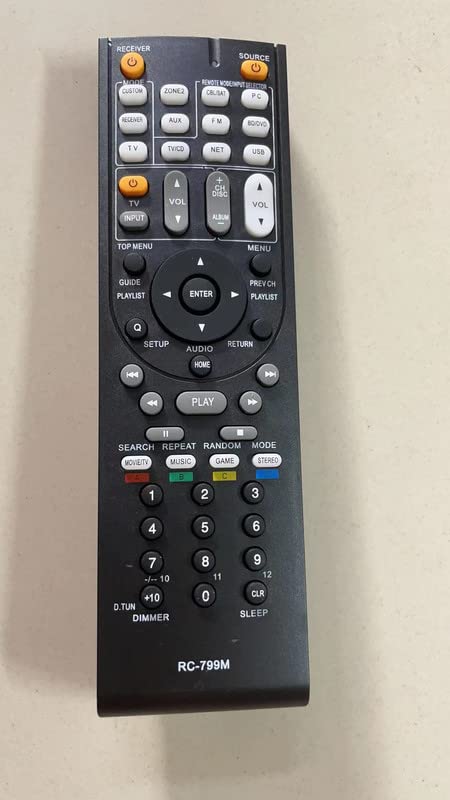
Image 2: Front view of the remote control, displaying its button layout.
- Power: Turns the receiver on or off.
- Volume Up/Down: Adjusts the audio volume.
- Input Selector: Cycles through available audio/video inputs.
- Navigation Buttons: For menu navigation (if supported by your receiver).
- Playback Controls: Play, Pause, Stop, Fast Forward, Rewind (for connected media devices, if supported).
Refer to your Onkyo A/V receiver's original manual for specific button functions and their corresponding operations.
5. Maintenance
To ensure optimal performance and longevity of your remote control, follow these simple maintenance guidelines:
- Cleaning: Wipe the remote control with a soft, dry cloth. Do not use liquid cleaners, solvents, or abrasive materials, as these can damage the surface or internal components.
- Battery Replacement: Replace batteries when the remote's response becomes sluggish or stops working. Always replace both batteries at the same time with new AA batteries. Do not mix old and new batteries, or different types of batteries.
- Storage: If the remote will not be used for an extended period, remove the batteries to prevent leakage, which can damage the remote. Store the remote in a cool, dry place away from direct sunlight and extreme temperatures.
- Avoid Drops: Protect the remote from drops and impacts, which can damage its internal circuitry.
6. Troubleshooting
If you experience issues with your remote control, try the following troubleshooting steps:
- Remote not responding:
- Ensure the remote has fresh AA batteries installed correctly.
- Check for any obstructions between the remote and the A/V receiver's IR sensor.
- Make sure you are pointing the remote directly at the receiver.
- Verify that your Onkyo A/V receiver model is listed in the compatibility section of this manual.
- Some functions do not work:
- As a replacement remote, it may not support all advanced or specific functions of your original Onkyo remote. This is normal.
- Confirm that the function you are trying to use is supported by your specific Onkyo A/V receiver model.
- Remote controls other devices unintentionally:
- This remote is designed for Onkyo and INTEGRA components only. It cannot be programmed for other brands. Ensure you are not attempting to control non-compatible devices.
7. Specifications
| Feature | Detail |
|---|---|
| Model Name | RC-799M |
| Brand | Generic |
| Connectivity Technology | Infrared (IR) |
| Compatible Devices | Various Onkyo A/V Receivers (see Compatibility section) |
| Power Source | 2 x AA Batteries (not included) |
| Number of Buttons | 10 |
| Special Features | Cannot be programmed; controls Onkyo & INTEGRA components only; no mute button. |
8. Warranty Information
This product comes with a 90-day warranty from the date of purchase. This warranty covers manufacturing defects. It does not cover damage caused by misuse, accidents, unauthorized modifications, or battery leakage. Please retain your proof of purchase for warranty claims.
9. Support
For further assistance or inquiries regarding this product, please contact the seller directly through the platform where the purchase was made. Provide your order number and a detailed description of the issue for prompt support.