
Introduction
The Alesis Harmony 61 Pro is a versatile 61-key keyboard piano designed for both beginners and experienced players. It features touch-sensitive keys with adjustable response, a vast sound library, and an intuitive control set for enhanced musical expression.
Key features include:
- 61 full-size keys with user-adjustable touch response.
- 580 premium built-in sounds with Layer and Split modes.
- Pitch-bend wheel and X/Y performance touchpad with DJ-style FX.
- 177 built-in demo songs with step-lesson mode.
- 180 built-in accompaniment rhythms.
- On-board effects: 10 Reverb, 8 Chorus, and 2 Slicer effects.
- Backlit LCD screen with notation and chord dictionary.
- Built-in recorder for .WAV file recording via SD card input.
- USB-MIDI connection for use with educational and recording software.
- Powerful 30W (15W x 2) stereo speaker system.
- Connectivity: 1/4” Stereo out, 1/8” AUX input.
- Optional battery power for portability.
What's in the Box
Please ensure all the following items are included in your package:
- Alesis Harmony 61 Pro Digital Keyboard
- Power Supply
- Music Rest
- User Guide (this manual)

Image: The Alesis Harmony 61 Pro keyboard shown with its included accessories: power adapter and music rest. It also highlights the option for battery power (6 AA Cell Batteries, not included).
Setup
- Power Connection: Connect the included power adapter to the DC 12V input on the rear panel of the Harmony 61 Pro and then to a power outlet. Alternatively, for portable use, insert 6 AA cell batteries (not included) into the battery compartment on the underside of the keyboard.
- Music Rest Installation: Slide the music rest into the slot located on the top panel of the keyboard. Ensure it is securely seated.
- Audio Output: For private practice, connect headphones to the 1/4" PHONES jack. To connect to external speakers or an amplifier, use the 1/4" STEREO OUT jack.
- Audio Input: To play along with an external audio device (e.g., smartphone, tablet), connect it to the 1/8" AUX IN jack using an appropriate audio cable.
- USB-MIDI Connection: For connecting to a computer for MIDI functionality with educational or recording software, use a standard USB cable to connect the USB-MIDI port on the keyboard to your computer's USB port.
- SD Card: Insert an SD card into the SD CARD input slot for recording your performances as .WAV files.

Image: A close-up view of the rear panel of the Alesis Harmony 61 Pro, highlighting its various connectivity options including the SD card input, USB-MIDI port, Sustain pedal input, Headphone jack, Aux In, and Power input.
Operating Instructions
Basic Operation
- Power On/Off: Press the Power button located on the control panel to turn the keyboard on or off.
- Volume Control: Use the Master Volume knob to adjust the overall output volume.
- Sound Selection: Use the "SOUND" buttons and the numeric keypad to select from the 580 built-in sounds. The LCD screen will display the selected sound.

Image: The Alesis Harmony 61 Pro keyboard, emphasizing its 61 full-size keys with adjustable touch response, the extensive library of 580 premium sounds, and the DJ-style Mix Mode featuring 30 different styles.
Performance Features
- Touch Response: Adjust the touch sensitivity of the keys to match your playing style. Refer to the user guide for detailed settings.
- Pitch-Bend Wheel: Use the pitch-bend wheel on the left side of the keyboard to smoothly bend the pitch of notes up or down for expressive playing.
- X/Y Performance Touchpad: Explore the X/Y touchpad for real-time control over various parameters and DJ-style effects.
- Layer Mode: Combine two different sounds to play simultaneously when a key is pressed.
- Split Mode: Divide the keyboard into two sections, allowing you to play different sounds with your left and right hands.

Image: A detailed view of the Alesis Harmony 61 Pro, showcasing the pitch-bend wheel for expressive control, the X/Y performance touchpad for dynamic effects, and the powerful 30W (15W x 2) stereo speaker system.
Learning and Practice Tools
- Built-in Songs: Access 177 built-in demo songs. Utilize the step-lesson mode to learn these songs note by note.
- Auto-Accompaniment: Choose from 180 built-in auto-accompaniment patterns to provide a full band backing for your playing.
- Metronome: The built-in metronome is adjustable from 5-280 BPM, providing a steady beat for practice.
- Chord Dictionary: The backlit LCD screen displays notation and includes a built-in chord dictionary to assist with learning chords.

Image: The Alesis Harmony 61 Pro keyboard's control panel, highlighting the backlit LCD screen that shows notation, the availability of 180 built-in auto-accompaniment patterns, and the adjustable built-in metronome (5-280 BPM).
Recording and Effects
- On-board FX: Apply 10 Reverb, 8 Chorus, and 2 Slicer effects to add depth and character to your sound.
- Recording: Record your performances directly to an SD card as high-quality lossless .WAV files (16-bit, 44.1kHz).
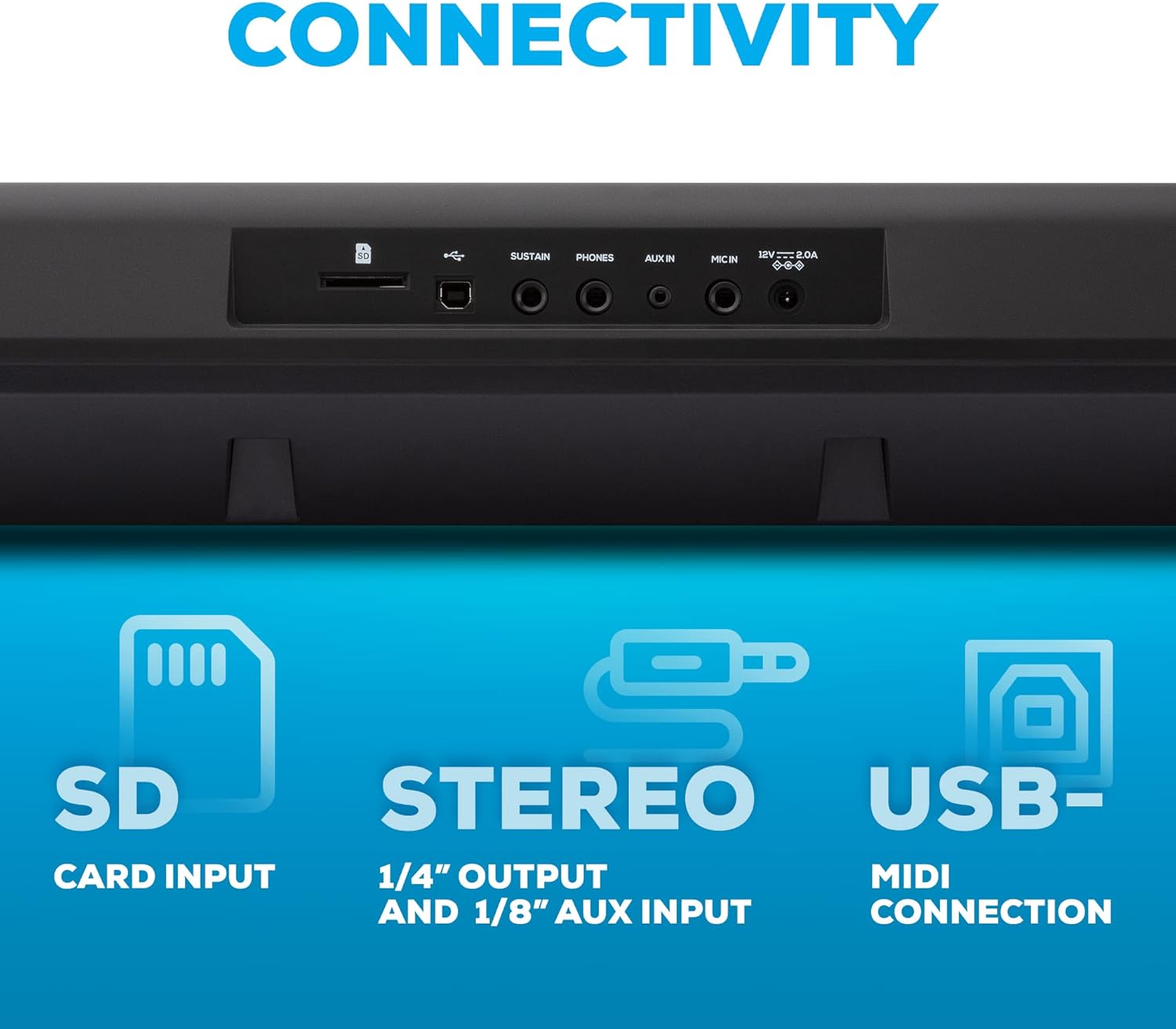
Image: The Alesis Harmony 61 Pro keyboard, showcasing its on-board effects (10 Reverb, 8 Chorus, 2 Slicer), 180 built-in auto-accompaniment patterns, and 177 built-in songs with step-lesson functionality.
Maintenance
- Cleaning: Use a soft, dry cloth to clean the surface of the keyboard. For stubborn dirt, a slightly damp cloth can be used, but ensure no moisture enters the unit. Avoid abrasive cleaners or solvents.
- Storage: When not in use, store the keyboard in a cool, dry place away from direct sunlight, extreme temperatures, and high humidity. If storing for an extended period, remove batteries to prevent leakage.
- Key Care: Keep the keys free from dust and debris. Avoid placing heavy objects on the keys.
- Power Adapter: Always use the original power adapter provided with the unit. Disconnect the power adapter from the wall outlet when not in use for long periods.
Troubleshooting
If you encounter issues with your Alesis Harmony 61 Pro, please refer to the following common problems and solutions:
| Problem | Possible Cause / Solution |
|---|---|
| No power |
|
| No sound from speakers/headphones |
|
| Keys not responding or inconsistent touch response |
|
| SD card not recognized or recording issues |
|
For more detailed troubleshooting or issues not listed here, please refer to the complete User Guide PDF available on the Alesis website or contact Alesis customer support.
Specifications
| Feature | Detail |
|---|---|
| Keys | 61 full-size, touch-sensitive |
| Sounds | 580 built-in premium sounds |
| Polyphony | 64-note max |
| Effects | 10 Reverb, 8 Chorus, 2 Slicer |
| Accompaniment Patterns | 180 built-in |
| Demo Songs | 177 built-in with lesson function |
| Display | Backlit LCD with notation and chord dictionary |
| Speakers | 30W (15W x 2) stereo |
| Connectivity | 1/4” Stereo Out, 1/8” AUX In, 1/4" PHONES, USB-MIDI, SD Card Input |
| Power | 12V DC power adapter (included) or 6 AA cell batteries (not included) |
| Dimensions (L x W x H) | 1.42"D x 3.72"W x 0.46"H |
| Item Weight | 7.53 Kilograms (16.57 pounds) |
| Model Name | Harmony 61 Pro |
| UPC | 694318025857 |
Warranty Information
Alesis products are manufactured to the highest quality standards. For specific warranty terms and conditions applicable to your Harmony 61 Pro keyboard, please refer to the warranty card included with your product or visit the official Alesis website. Warranty coverage typically includes defects in materials and workmanship under normal use.
Please retain your proof of purchase for any warranty claims.
Support
For further assistance, technical support, or to access additional resources such as updated drivers, software, and FAQs, please visit the official Alesis support website:
You can also find additional information and product registration details on the Alesis brand store page on Amazon: Alesis Amazon Store.


